

A Containerized Answer to Microservice Testing
For teams working in a distributed system, validating a change isn’t just about unit tests and a clean build. It’s about whether a service behaves correctly when it’s connected to the dozens of other services it depends on. GitHub’s Developer Experience (DX) team has addressed this by building a tool called “Hubber Codespace” (HCS). HCS lets engineers spin up the full GitHub ecosystem locally by querying an endpoint or adding configuration to a development container, so they can test against real dependencies instead of mocked ones.
The Monorepo Bottleneck
GitHub wasn’t always a sprawling network of hundreds of teams. In the early days, a monorepo served everyone well; coordinating across a few developers didn’t require elaborate infrastructure. But as the engineering organization expanded, the monorepo became unwieldy. Different services may require different versions of the same dependency—one might need Ruby 2.2 while another demands Ruby 2.4. In a small team, reconciling those conflicts manually is tedious but possible. At scale the task becomes a major drain on productivity.
Attempting to run a suite of unrelated services in a single shared environment often results in shortcuts. Equally common are “hacks” in the development loop, like deleting a .ruby-version file to switch contexts for a particular service. These workarounds deplete confidence and slow shipping, especially when teams need some visibility into how their code integrates with upstream and downstream services before deploying.
Instead of forcing developers to adapt to a monolithic environment, the DX team decided to do the reverse: bring a self-contained ecosystem to the developer’s own workspace.
Bringing the Ecosystem to the Developer
The foundation for HCS comes from previous work containerizing the services behind GitHub.com. The DX team’s goal was to take these existing containers, wire them together to mimic the full GitHub ecosystem, and make that stack available on demand so partners could observe how changes behave in a realistic integration environment.
Three orchestration options were weighed during design:
- Minikube provided a solid Kubernetes foundation but fell short on user experience—networking complexity and long cycle times could counteract the velocity gains.
- Codespace-Compose, an internal tool enabling SSH tunneling between codespaces, would neatly connect team environments. However, since it was not backed by any SLA or long-term commitment, it carried significant maintenance overhead for the adopting team.
- Docker-Compose emerged as the right tradeoff. It is publicly available and actively maintained, with no added codebase upkeep for the team. Also, running Docker Compose within a code-space with Docker in Docker is a well-trodden path with ample prior art.
Docker-Compose won for orchestration. To glue it together for actual users, the DX team created a dedicated Golang CLI, versioned in lockstep with HCS. That wrapping layer hides the underlying complexity: where static files live, which flags to set, what commands to run. Getting started comes down to downloading a release and pairing it with the matching CLI version.
A Wrapper for Real-World Workflows
Several standard Docker-Compose commands are long and full of predictable flags. The HCS CLI abstracts those away to improve ergonomics for daily use. The pattern holds across the entry points most developers touch:
# Start using Docker-Compose

docker compose --project-name hcs \
--file /workspaces/hubber-codespace-dist/docker-compose-hcs-actions.yml \
--file /workspaces/hubber-codespace-dist/docker-compose-hcs-base.yml \
--file /workspaces/hubber-codespace-dist/docker-compose-hcs-bg.yml \
--file /workspaces/hubber-codespace-dist/docker-compose-hcs-core.yml \
--file /workspaces/hubber-codespace-dist/docker-compose-hcs-volume.yml \
--file /workspaces/hubber-codespace-dist/docker-compose-hcs-test.yml \
--file /workspaces/hubber-codespace-dist/docker-compose-hcs-vendor.yml \
--profile full up -d --remove-orphans

# Start using CLI

hcs start
Running a shell inside the ecosystem’s containers is also simplified. This lets developers module-by-module make ephemeral changes and inspect behavior:
# Run command from inside a container in the system using Docker-Compose

docker compose --project-name hcs exec bash

# Run from inside a container using CLI

hcs shell
Health checks are likewise streamlined so an engineer can glance at the status of the entire system:
# Status using Docker-Compose

docker compose --project-name hcs ps --format json

# Status using CLI

hcs status
More critical than ergonomics is never falling behind the actual codebase. Since GitHub moves fast, HCS needed to track main closely. A release is a full artifact—a compiled binary for both HCS and its CLI, retrievable through the gh CLI—and automation cuts a new one on a frequent cadence. The process is described in the release pipeline below:
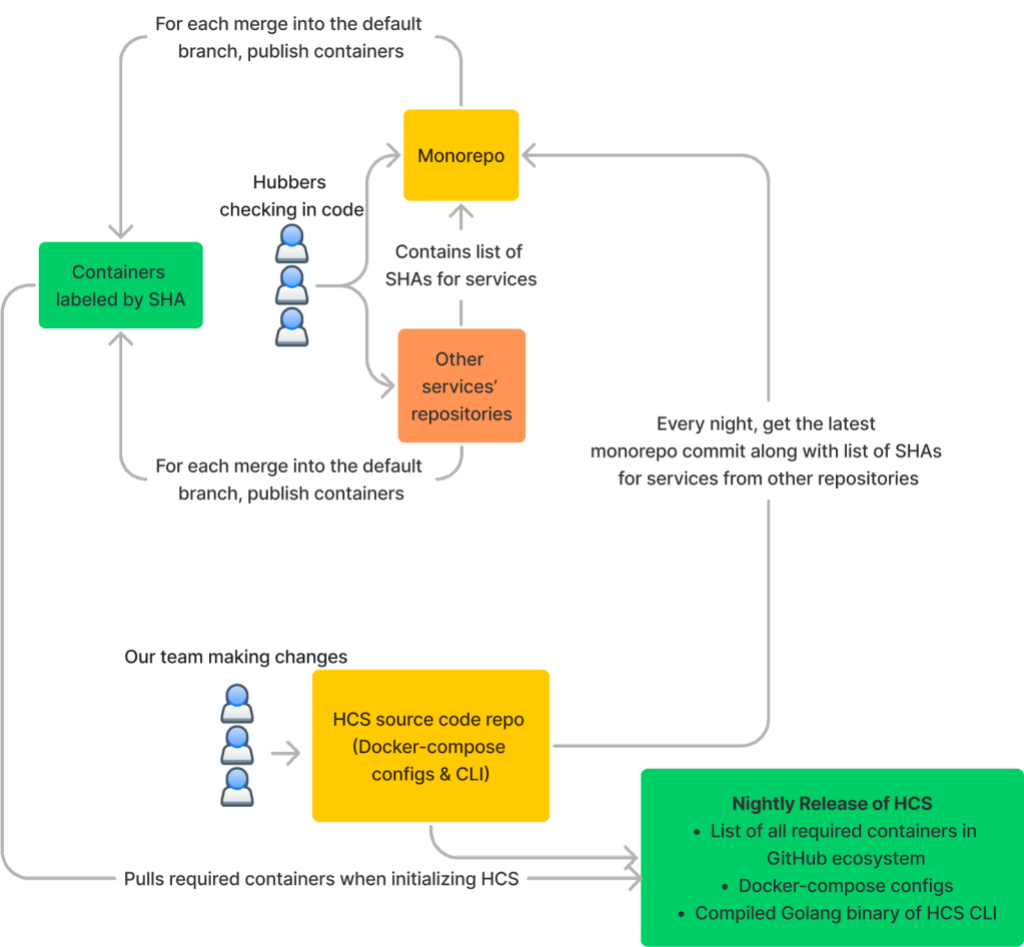
Consuming HCS
GitHub has been standardizing on Codespaces for day-to-day development. Since codespaces use devcontainers, they can leverage devcontainer features—a consistent mechanism for adding software to an environment. HCS exposes itself through this route too.
For partners already working in their own code-space, enabling the full ecosystem is minimal in configuration. Adding just a few lines to a devcontainer file brings all the wiring into the environment for integration testing alongside local development:
{
…
  "features": {
    …
    "ghcr.io/devcontainers/features/github-cli:1": {
      "version": "latest"
    },
    //docker-in-docker required for hcs
    "ghcr.io/devcontainers/features/docker-in-docker:2": {},
    // Include the hubber-codespace feature
    "ghcr.io/github/hubber-codespace/hcs:1": {},
    "ghcr.io/devcontainers/features/go:1": {}
    …
  }
}
Not every context requires a devcontainer, though. HCS is also consumable as a direct release binary pulled from GitHub’s API. A couple of commands hand the whole ecosystem over to any host:
gh release download --repo github/hubber-codespace  -p hcs -D /tmp/

chmod +x /tmp/hcs

sudo mv /tmp/hcs /usr/local/bin

hcs init

hcs pull

hcs start
Teams have already reported tangible improvements to their workflows.
“HCS has improved our dev loop for [our service] by making it simple to test [it] against [the rest of GitHub’s ecosystem]. It’s turned what used to be a number of manual steps to clone our repository into the [monorepo environment] into two simple commands in our own codespace. This has made it much easier to validate our changes without having to deploy to a staging environment.”
“Given that we are a service operating outside GitHub but with a heavy reliance on the services running within GitHub, we’ve had to go through a lot of bells and whistles to ensure we can have a smooth development environment. In my four years working on [our service], HCS has been the most seamless experience in going from a blank devbox to breakpointing live running code for our service.”
Solving distributed development is a matter of tradeoffs. GitHub’s investment in containerized services, repository automation, and CLI-based release publishing gave the DX team the tools needed to build something useful for the whole organization. Thanks to HCS, Hubbers can test integrated behavior before their code reaches production servers.


