
Agentic coding tools are now part of many developers' workflows, and that shift puts new weight on how design files are built. A well-organized file helps the developer—and the AI agent working alongside them—produce accurate code. Three practices cover most of the ground.
Ground the work in foundations
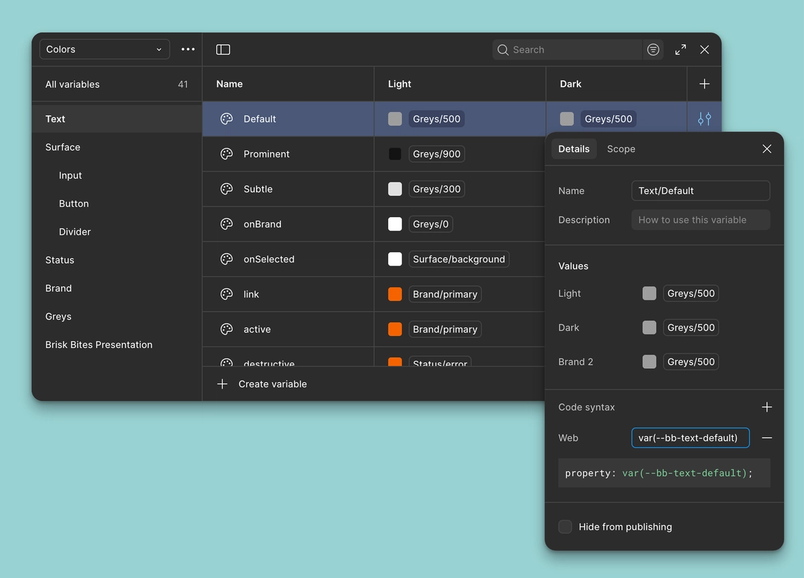
Design systems are not a new recommendation. Components and variables for color, sizing, spacing, and typography create repeatable patterns that hold up at scale. The added step is tying those foundations to code. Figma offers two documentation mechanisms for this: Code Connect links components to their coded counterparts and surfaces accurate snippets in Dev Mode, while code syntax defines how variables should be written across web and native codebases.
That codebase context flows back into Figma, where the Dev Mode MCP server can pass it to AI agents. A system card component that uses shared tokens for spacing, color, and typography, and that is connected to code, gives an agent everything it needs to generate the card as production-ready code. Agents no longer have to hunt through an entire repository for matching pieces. Because the context lives in your Figma libraries, the gain compounds: anyone building new UI inherits the right code context by default.
Shape files for machine and human readers
Page hierarchies and layer naming can feel like busywork, but they are read as context by both MCP and developers. A few habits matter most:
- Frames per breakpoint. Add frames where the layout changes in a major way—say, a navigation bar collapsing into a menu icon—so responsive behavior is stated rather than inferred.
- Auto layout. Apply it to vertical lists, horizontal rows, and grids to define how designs respond to viewport widths, breakpoints, and longer text. For elements that must escape the flow, set those layers to ignore auto layout and use resizing constraints instead.
- Clean layer structure. Skip unnecessary groups and frames so the hierarchy stays navigable.
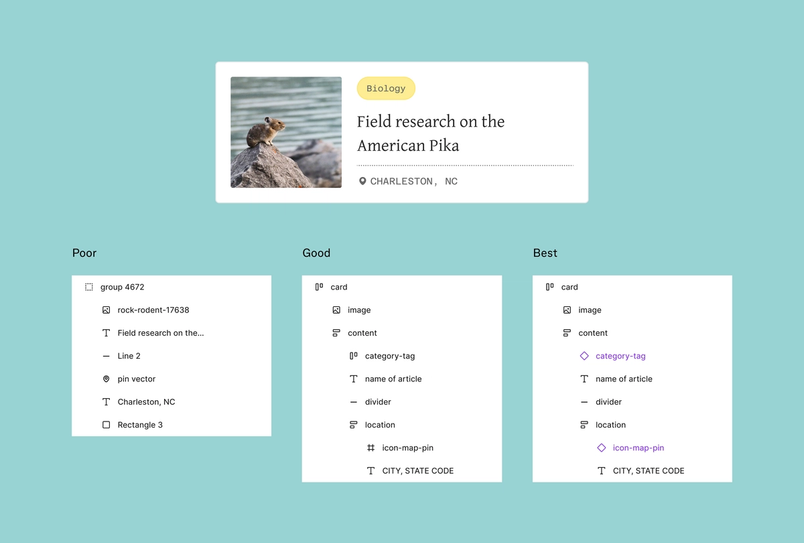
- Meaningful layer names. This is where AI is most easily misled. A layer called “Frame 1337” tells an agent little; “card,” “row,” or “avatar” tells it what to generate. Poorly named files lead to misinterpretation and downstream cleanup for developers. Figma's AI layer renaming can do a pass in seconds when time is short.
The difference shows up directly in output. Files without meaningful names or clear hierarchy invite AI agents to guess, and the code suffers. Adding good layer names and auto layout improves the result but can still leave structural variability. The strongest files combine clean naming, logical structure, and reusable patterns, which lets agents pull components and variables straight from the codebase and produce precise code.
Describe behavior, not just appearance
Static visuals are only half the story. Annotations capture intent, giving agents the information to understand not only what an element looks like but how it should behave. Notes on states, transitions, and dynamic content cut down on guesswork and move the first output closer to what was designed.
When functionality is documented as clearly as visuals, the MCP server can generate code that reflects the full design intent.
Annotations are worth writing when a design relies on:
- Interactive elements — how something responds to click or hover, or which cursor should appear.
- Conditional states — state changes triggered by a user action or a condition, such as a submit button that stays disabled until required fields validate.
- Dynamic content — placeholder content meant to be filled, with instructions on the data source.
Design system context, structure and naming, and written annotations all serve the same end: giving agentic tools what they need to produce accurate code. The tooling doesn't replace clear communication between designers and developers, which remains the baseline for alignment.



