
What Actually Counts as a Mobile Device?
Before designing for touch, it's worth questioning what we mean by "mobile" at all. The PC era assumed a desk-bound machine used in focused sessions. Mobile devices have always broken that pattern: they're always on, always with us, and aware of their surroundings through connectivity and sensors. Today, about half of all mobile devices are smartphones, and many of the remaining feature phones also have touchscreens. With most internet access now happening on mobiles, touch is set to become the world's primary interaction method within a decade.
Yet many designers treat touch as natural and self-explanatory. It is not. Touchscreens share little with the physical objects we learn to manipulate as children. Touch behaviors are learned conventions, as artificial as using a mouse or turning a doorknob. And there is no single type of touchscreen: changes in touch technology mean that standards from even a few decades ago are outdated, and sometimes actively misleading.
Smartphone
The default assumption is that mobile means a touchscreen smartphone. That's mostly true — but the platform breakdown matters more than most realize. An Android phone dominates nearly everywhere in the world, regardless of manufacturer. The OS is the same across devices, so apps run on virtually any handset of similar age. Android holds just over half the US market and closer to 75% of the worldwide installed base.
This duopoly took years to settle. Nokia's Symbian S60 held the lead for six years after the iPhone launched. BlackBerry and Windows devices lingered in some regions even longer. The reason is that smartphones didn't arrive fully formed. The first of them were called PDA phones, merging the mobile phone with the personal digital assistant. PDAs were stylus-driven touch devices with interfaces similar to today's smartphones, but they lacked connectivity and had to be docked to a computer to sync. Adding those capabilities to phones created what we now call smartphones.
Feature Phone
Half the world's mobile devices are still feature phones. These trace back to early cellular handsets, which only made calls before SMS was added as a network feature. By 2002, feature phones had browsers, cameras, and soon after gained GPS, Bluetooth, and Wi-Fi. What distinguishes them is their operating systems: proprietary, little-known systems from the manufacturers rather than Android or iOS. They can still install apps, though upgrades are limited. The ecosystem is also simpler — nearly every app works on nearly every phone.
Feature phone users are not disconnected from the digital world. Their devices tie communities together and have underpinned large-scale, profitable projects. Project teams and governments alike tend to dismiss this half of the market, but any product could likely benefit from working at least partially on feature phones.
Tablet
iPads are often treated as a separate category, but they clearly belong in the mobile world. People carry them, use them standing up, and interact with them as extensions of their phones. The received wisdom is that Apple won the tablet market outright. The data tells another story: Android runs on a huge number of tablets, and then there are Chromebooks. Industry trackers usually classify Chromebooks as computers, but most are tablet-form devices, possibly with a dockable keyboard.
Chrome OS is a minor offshoot of Android, not a distinct computer OS. Counted as computers, Chromebooks make up 10–20% of all PC sales and the share is rising rapidly. Counted as tablets, they are touch-first Android machines that would give Google over 70% of the tablet market.
Personal Computer
With Chromebooks included, the laptop category no longer fits its name. Even Windows has moved on: many laptops have touchscreens, and convertible or detachable form factors are now standard. Over 40% of laptops sold in 2020 were 2-in-1 designs. As early as 2013, one in ten laptops shipped with a touchscreen; today it appears to be more than half.
These machines are used in tablet-like ways. People hold them in hand and tap the screen, reserving the keyboard for long-form typing. At a desk, users mix input methods freely — tabbing through spreadsheets, mousing into a ribbon for formula work, then reaching out to tap a dialog away or switch apps. Desktop all-in-ones also increasingly have touchscreens and get used the same way.
Knowing what counts as a mobile device is essential for any project. Mobile methods have reached deep into traditional computing, and touch is now everywhere. Equally important is understanding what we mean by touch itself, which requires a grasp of the many pointing technologies and their history.
Building a Useful Device Test Set
A common question designers hear is which phone is “best.” Professionally, the more useful answer is that there is no single best device. Anyone designing for mobile benefits from regularly switching between a range of phones and tablets, not to chase the newest hardware, but to stay grounded in how the variations across devices and operating systems actually affect usage. The goal is to understand how real people interact with digital products day to day.
That means assembling or gaining access to a device lab: a small, purposeful collection of functioning phones and tablets that covers the range of devices most likely used by your audience. The composition of such a lab is not universal—it should be driven by your users’ context, not by general popularity or personal preference.
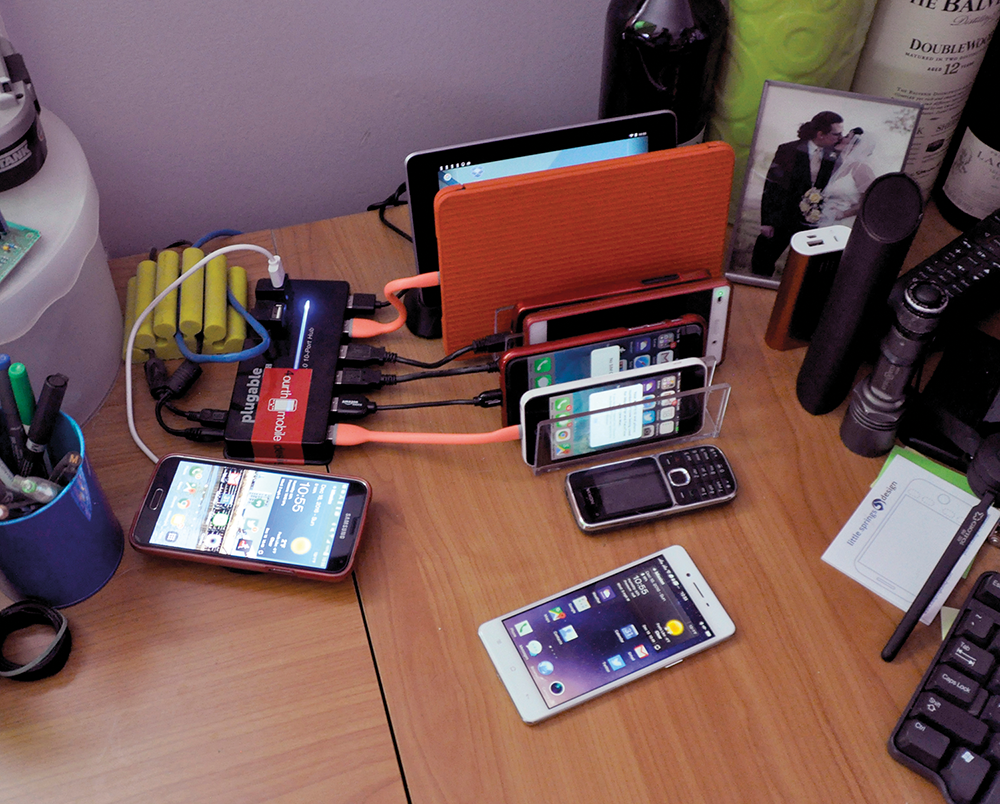
Historically, when there were four or five major mobile OSes, maintaining a large device library and switching personal handsets at least twice a year was a common practice. Currently, a typical setup might be an Android phone as a daily driver, with frequent use of an iPhone as well.
For products with a foreign or global reach, local phone-store popularity is not the right baseline. Research the most common devices in your specific target market and source one of those units if possible. Many foreign-market devices function perfectly well elsewhere and are available internationally.
One caveat: mobile networks differ from Wi-Fi. Keep a spare SIM on hand and swap it in periodically, particularly when testing whether an app or site performs correctly on cellular connections. Similarly, keep both a Mac and a PC in your workspace. If an employer doesn’t provide one of the platforms, purchasing it yourself is a reasonable investment. Even a budget Chromebook—even one largely used by a toddler for watching TV—serves as a legitimately useful testing tool, provided you actually use it in your daily life.
Building this collection costs money. With luck, an employer will fund the effort, or an open device lab may be available for free or a nominal fee. Informal sharing arrangements among designers also work: asking around the community can surface ad hoc pools of devices worth contributing to or borrowing from.
A Few Pointers on Mobile Testing
- Build a lab that covers your users’ likely device range—not the bestselling devices in your region.
- For global products, source devices that are common in the target market specifically.
- Test over real mobile networks, not just Wi-Fi, and carry a spare SIM to enable that.
- Consider cross-platform desktops too—even a low-cost Chromebook is a viable stand-in for understanding web behavior.
- Leverage employer-funded labs, community open labs, or ad hoc sharing pools before spending out of pocket.


