
When Design Systems Stop Needing Humans to Stay in Sync
The second installment of our series on the future of design systems shifts focus from strategy to execution. Industry practitioners weigh in on how plugins, widgets, and emerging tooling are reshaping the day-to-day work of keeping design systems coherent.

The consensus among the experts we spoke with: manual maintenance is on its way out. What's replacing it is a layer of automation that sits between design and code, catching drift before it becomes a problem.
Closing the Loop Between Design and Code
Several practitioners pointed to the same pain point as their primary motivator for automation: the gap between what designers ship in tools like Figma and what engineers actually implement. Handoff is no longer about static redlines or annotated mockups. The teams interviewed describe a workflow where the design system itself acts as the source of truth, and tooling continuously checks both sides against it.
One recurring theme is the shift from documentation-as-reference to documentation-as-executable. Instead of reading a spec and manually translating it, designers and developers are leaning on plugins that push tokens, components, and styles directly into their work environment. This reduces the "it worked in the mockup" class of bugs, because the production component is the same artifact the designer used.
Another repeated observation: versioning gets harder, not easier, as teams scale. Automated tooling doesn't eliminate the need for review, but it does change the review cadence. Rather than auditing the whole system at milestones, teams are moving toward continuous, incremental checks — flagging mismatched typography, spacing, or color values the moment they appear in a file.
Widgets and Plugins Carry the Load
The conversation makes a clear distinction between plugins — which typically run on command or on a schedule — and widgets, which live persistently in the design file and respond to context. Practitioners view the latter as the more interesting frontier because widgets can react in real time. They can show a token's status, surface a deprecation notice, or indicate that a component instance has drifted from its latest published version.
Tooling in this space is also being used to standardize workflows that used to be tribal knowledge. Onboarding a new designer to a large system used to mean reading lengthy guidelines. With the right widget layer, the same information appears inside the canvas, attached to the elements that need it. Experts noted that this kind of ambient guidance reduces the cost of entry and keeps teams from developing local conventions that don't align with the system.
At the same time, no one interviewed frames automation as a replacement for designers. The stated goal is to remove the tedious, repetitive checks so that humans can spend their energy on the nuanced decisions — interaction design, accessibility tradeoffs, and the judgment calls that few algorithms are ready to make reliably.
Automation Alone Isn't a Foundation
A skeptical through-line appears in multiple responses: tooling can only be as coherent as the system it's built on. Several experts warned against treating plugins as a fix for weak structure. If color roles, component APIs, or token names are poorly designed, automation will happily scale the inconsistency across the entire org.
The most forward-looking teams are treating their design system as an API surface. In that framing, plugins are just clients of that API. It means documentation has to describe contract and behavior, not just visual output. It also means change management becomes more rigorous — breaking a component contract is now as serious as breaking an API in production.
Plugins and widgets: functional shortcuts versus interactive surfaces
Plugins and widgets have been intertwined with design software since the earliest days of personal computing. Some of the first plugins appeared in the 1970s for text editors and publishing tools like HyperCard and QuarkXPress on Apple’s Macintosh. Designers quickly built a microeconomy around those add-ons, trading custom effects, brushes, and styles through community forums and marketplaces.
The plugin ecosystem for design systems splits into two broad camps. One covers automation: condensing repetitive sequences into a single command. The other extends a tool’s feature set, adding analytics, accessibility checking, testing, and similar capabilities.
Removing repetitive work
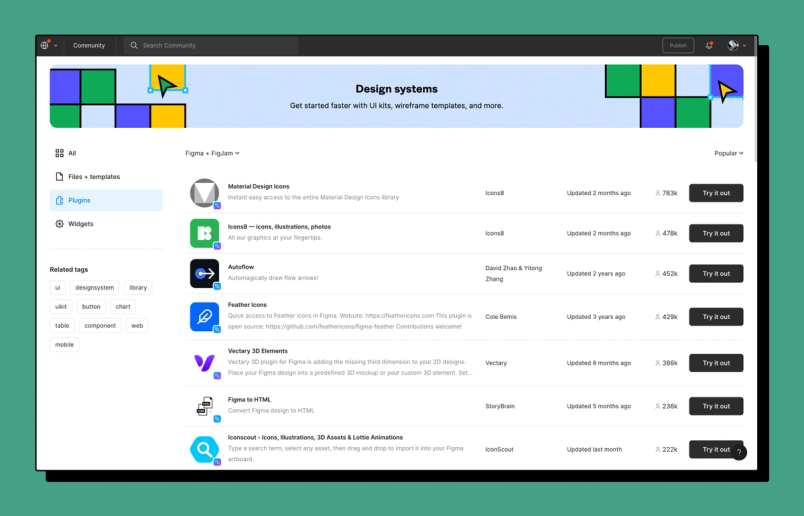
At Figma, the Community pages reflect that demand. Image and icon generators — along with tools for compressing assets — occupy half of the top ten most popular spots in the design systems category. Other frequently used plugins automate flows, convert designs to HTML, or turn interfaces into slide decks. The common denominator is reducing friction: keeping designers inside one tool rather than forcing them to jump between applications or repeat the same clicks endlessly.
That repetition carries real cost. Matthew Ström, a product design manager at Stripe, notes that complex design systems create many possible paths between a problem and its solution, and each path costs time and effort to explore. He argues that automation tools can save design systems teams "uncountably many hours of manual work." Writing on UXdesign.cc, Teisanu Tudor illustrates the point with a simple exercise: checking 20 combinations of typefaces and text sizes. Most people, he concludes, would never explore all 20 — and very few would systematically generate each variation without becoming attached to one along the way.
Andrew Pouliot, a machine learning engineer at Diagram, sees the same opportunity. "Spending less time mechanically doing things and being able to create a higher quality result — I think that's going to be a huge part of the future of design systems," he says. Diagram’s Automator plugin exemplifies the approach: teams assemble custom drag-and-drop automations to generate style guides, batch-resize icons, or pull in API data. Until recently, it also filled a notable gap in Figma itself — the long-awaited find and replace feature.
Extending the feature set
When native functionality falls short, plugins can bridge the gap. Stark, for example, helps teams detect and address accessibility issues across nine platforms, including desktop and browser environments. Stark’s Chief Design Officer Benedikt Lehnert describes it as a suite that hooks into the tools product teams already use and stitches them together into a single accessibility workflow — regardless of whether the user is a designer, developer, project manager, or QA expert.
Widgets for visualization and organization
Where plugins were built for doing, widgets are often about showing. Widgets tend to be interactive, inviting users to engage with and visualize content directly inside a file. Popular widgets for design systems include data charts, quick-link buttons, device frames that display styles in context, and tables for organizing component properties.
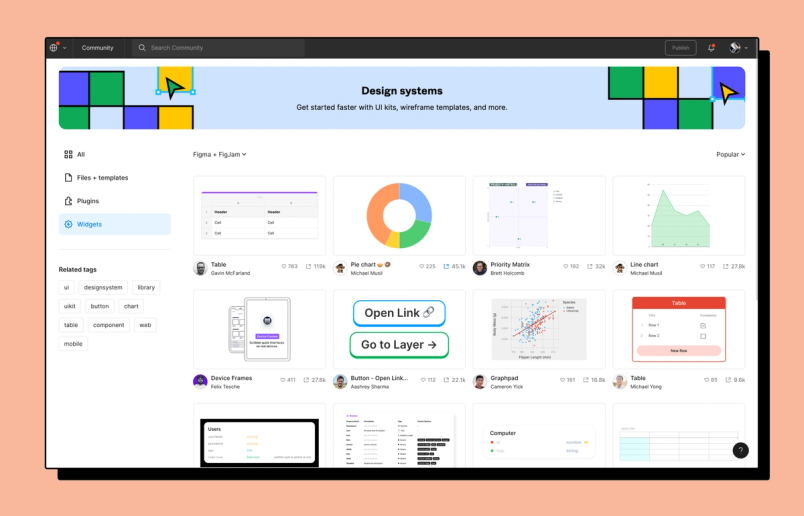
Device frame widgets, for instance, let a designer sketch an interface idea inside Figma without hunting for a clean phone wireframe elsewhere. Component prop table widgets generate documentation properties directly from Figma components, which speeds up spec-writing at handoff time.
The benefits for design systems teams are tangible: reduced friction can improve adoption, and added functionality can ease maintenance and distribution. Even as product design grows more complex — spanning more touchpoints, devices, and platforms — these integrations create new avenues for streamlining and scaling workflows.
AI gives those tools a new foundation
Plugins improve functionality, and widgets improve usability; artificial intelligence offers a third layer beneath both. Popular plugins and widgets hint at current pain points and where AI might fill the gaps.
Generating icons, imagery, and copy is one obvious candidate. Shopify has unveiled "Shopify Magic" for AI-generated product descriptions. Diagram’s Magician plugin uses deep generative models to insert icons, imagery, and text into Figma files based on text prompts. Pouliot points to GitHub Copilot as a shift in his thinking about human-computer interaction. Copilot lives inside the code editor, auto-completing lines or proposing solutions from text prompts while also reading the broader project context.
"It's sort of like this augmentation of your own brain," Pouliot says. "I'll just start writing the name of a function, and before I even get to what the parameters should be, it's already filled out the rest of the line." Copilot is not perfect — users still tweak output and fix errors — but it creates a back-and-forth between human and machine, and illustrates how AI is working its way into everyday design and development practice.
Design systems are going to go through a big shift over the next few years, and I think the best way to predict the future is to create it.“Design systems are going to go through a big shift over the next few years, and I think the best way to predict the future is to create it.”
Kaelig Deloumeau-Prigent, founder of the Design Tokens W3C Community Group, sees particular promise for AI in design system workflows. "GitHub’s AI Copilot can now help us write code. I want to see that same kind of collaboration with technology for design systems," he says. He anticipates better token management systems that lower the barrier to entry in the next few years. Today few turnkey solutions exist; the alternative requires deep coding knowledge plus working familiarity with GitHub, audits, and automations. "For some teams, that's a barrier they might not be able to overcome," he notes.
The futures catching up to past predictions
In 2017, Benjamin Wilkins shared Airbnb explorations into using design systems and machine learning to generate code from low-fidelity wireframes. The reaction was awe mixed with concern. "Really thought I had more time until I get replaced by a robot," one observer tweeted. The work was never fully realized — Jem Gold, a research scientist at Airbnb at the time, later clarified it served as prototypes — but the ideas previewed a future that is now arriving as AI tooling matures.
Design leaders expect those barometers to keep shifting. At a 2021 Figma-hosted panel, Soleio predicted: "We should expect to see substantial progress in how design exploration and feedback becomes increasingly automated. In much the way that we now inhabit collaborative environments with other people, I anticipate that we will find ourselves in a future where more knowledge work, feedback, and iterations will happen through virtual collaborators: non-human agents that are well-tuned to the types of tasks we manually do today."
Concrete futures on that horizon include extending design systems to quickly assemble new interfaces, flagging potential conflicts before they surface, and generating documentation that suggests — rather than merely enforces — correct usage.
The designer remains in the loop
Despite those advances, "automated" does not mean "autonomous." Sam Anderson, Director for Design Systems & Accessibility at Intuit, argues that human judgment stays essential. "It would be hard to create an AI that would figure out the customer problem, figure out the right thing from the catalog that might solve that customer problem and render it on-screen in the right way. We still need human designers to do that," he says. What he hopes automation will accelerate is the journey from concept to prototype, clearing more room for rapid experimentation, screen testing, and user feedback.
The appetite for human designers is not softening. Andrew Hogan, who leads insights at Figma, points out that as design systems become easier to use and more widely accepted, more people can produce passable interfaces. But that, he argues, raises the premium on memorable craft: "There will be more demand for great interactions and for new, interesting interactions." Companies still seek differentiation, and that desire keeps fueling demand for designers who can explore directions, weigh feedback, and bring fresh perspective to problems. What changes is the skill set — increasingly valued is fluency with the new automation itself, and the judgment needed to deploy it ethically and responsibly.
Automating the Handoff
The most immediate payoff comes at the developer handoff stage. Instead of sending static redlines or expecting engineers to manually interpret a spec, the system pushes a machine-readable package directly from the design file. That downstream workflow is where the repeatable labor lives, and it is also where design-system automation has the least friction to adoption.
Because the same token file drives both the design tool and the production codebase, there is no point-in-time translation to drift apart. A token renamed in the source file updates the spec automatically. A spacing scale modified against the accessibility rules updates the code annotations with the rationale attached, not just the new value.
Guardrails Over Governance
Rather than policing designers with review boards and freeze periods, the new model leans on constraints configured directly into the system. The relevant rules live beside the tokens they govern. For example, contrast checks run inside the component layer, and palette definitions are locked to the set of primitives the system has been validated against.
What that looks like internally:
- The system will only generate a role color from a full palette definition, never from an arbitrary hex value.
- Validation rules block a token update if it breaks a downstream contract, with the dependency trace shown in the message.
- Generated code references tokens by identifier, not by hardcoded value, so the UI layer changes when the token changes, not when the engineer remembers to update it.
This enforcement moves the job of the systems team away from writing documentation about what should happen and into writing the rules that make undesired states impossible. When the rules themselves express the design constraints, documentation becomes a description of the current truth of the running system rather than a set of intentions.
Measuring Drift and Compliance
With the rules machine-readable, drift is a measurable quantity rather than a matter of audit. The pipeline tracks two numbers:
- Coverage: the proportion of the live interface that maps back to a recognized token or component.
- Baseline health: how many times a token was directly overridden versus authored and published through the system.
These numbers are not decorative. They feed directly into release decisions and team capacity planning. If baseline health is draining because designers are repeatedly reaching for raw value overrides through a custom plugin route, that is a systemic signal to improve the primitives, not a notation to remind people to follow the rules.
The Shape of the Roadmap
Over the next year, the practical benchmark for automation will be whether it can eliminate the time spend reconciling design intent with production reality. Mature organizations will track where the residual edits land, and at what speed. The marker is not whether a system has an integration but whether the integration catches the mismatch before the consumer sees it.
Organizations still assembled on static component sets will feel the difference most on version bumps. Without autonomous propagation, a change doubles every time a team has to adopt it and re-check downstream consistency manually. Forging the pipeline to resolve that in one pass is the concrete ROI case for automation.


