

The accessibility gap in design systems
Design systems have been examined through the lenses of complexity and automation. This installment turns to accessibility, drawing on conversations with design system and accessibility experts about why inclusive systems deserve to be a top priority.

Why systems and accessibility reinforce each other
The scale of the gap is stark: as of 2022, only 3% of the internet was accessible to people with disabilities. Design systems look like the obvious lever, since shared parts and shared rules mean accessibility guidance can be woven in once rather than rebuilt per product.
Adoption data supports the idea that this is finally happening. Material Design's State of Design survey (2020) reported a 22% rise in in-house design system investment, and 47% of respondents said their system included accessibility guidelines—up from the prior year, when accessibility sat inside "Other" at 8.4%. Tooling, established standards such as the Web Content Accessibility Guidelines (WCAG), and legal consequences are all pushing in the same direction.
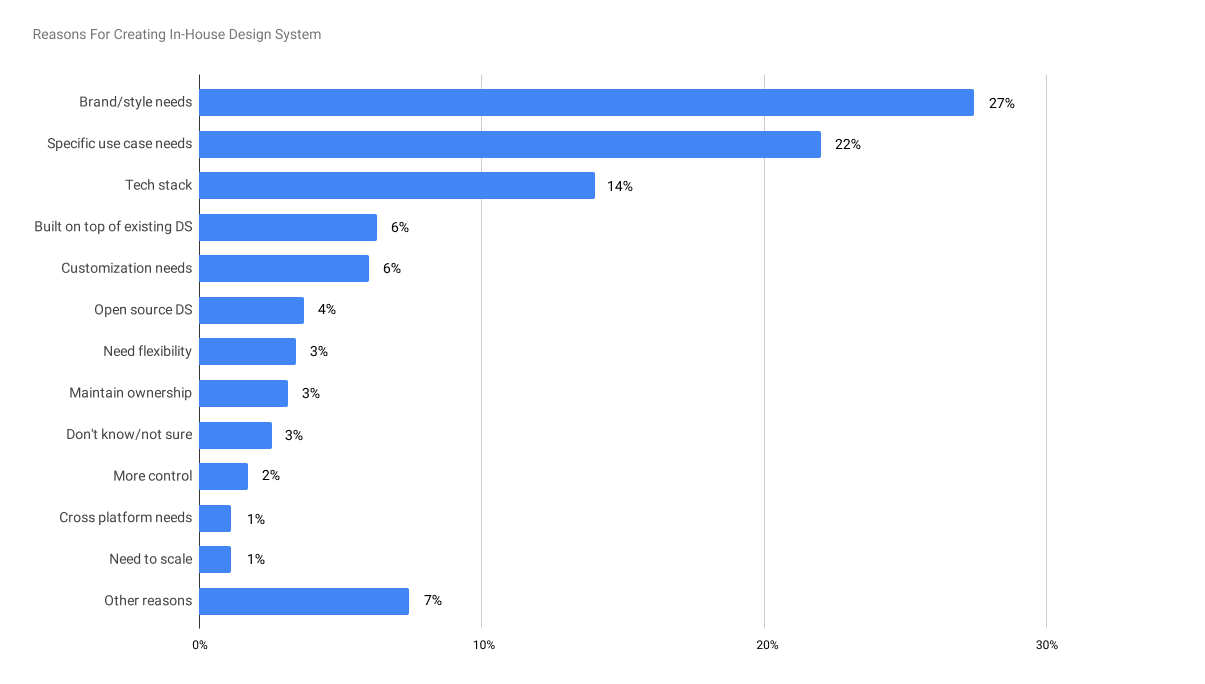
1. What drives in-house design systems creation?
Percentage of responses providing reasons for creating in-house design systems from Material Design's State of Design survey (2020).
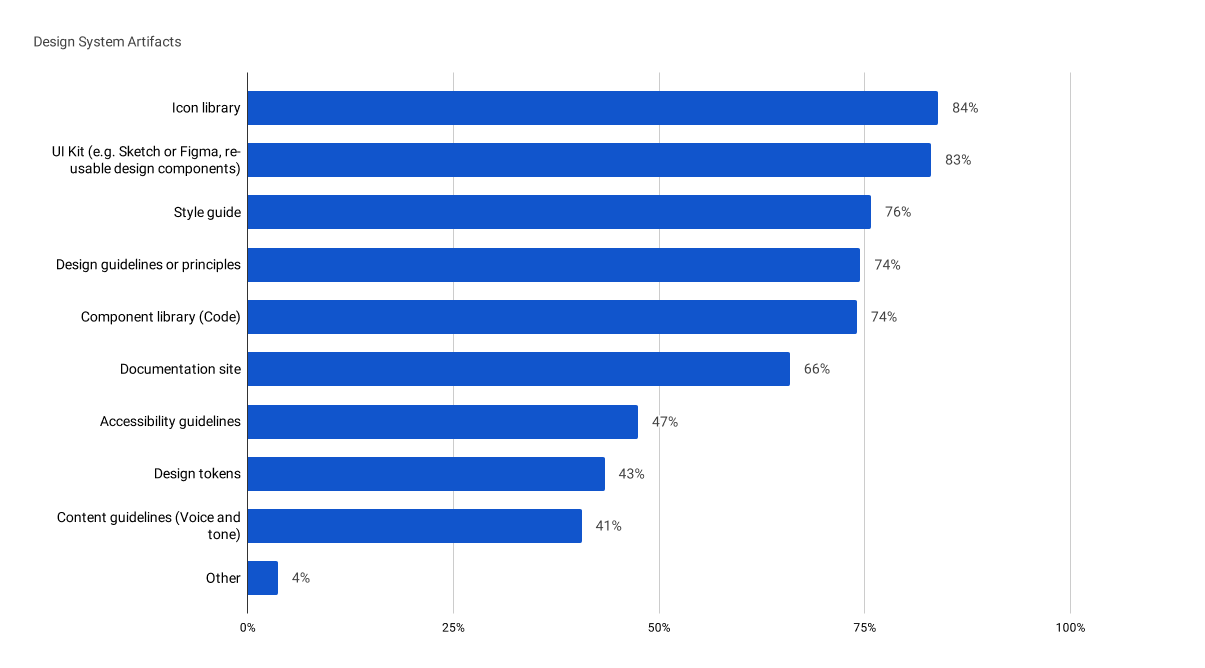
2. What's included in a design system?
Percentage of responses for a specific artifact included in their organization's design system also from Material Design's State of Design survey (2020).
One billion people worldwide live with disabilities and hold $1.2 trillion in annual disposable income—what Forrester calls the "digital accessibility opportunity." "Design systems are a perfect pair to accessibility," says Anna Zaremba, Senior Design Lead at eBay: accessibility can be baked into every layer, from tested foreground and background colors to individual components. Consistency, documentation and feedback loops give teams scaffolding for best practices, and system-level changes propagate everywhere at once.

Where AI helps—and where it doesn't
Design system teams increasingly reach for AI to improve accessibility, producing tools that promise to detect and fix issues with a single line of code: describing images, labeling unlabeled buttons, adding semantic heading structure. An accessibility overlay is JavaScript that runs after the browser renders a site or app, transforming it post hoc. Many plug-and-play widgets and overlays hurt accessibility rather than help, and more than 400 companies using them have faced lawsuits. In many cases a clear navigation structure and semantic code would have produced a more inclusive result than the overlay did.
Responsible implementations exist. Chancey Fleet, a blind library-based tech educator in New York, points to Apple's Screen Recognition, which works alongside VoiceOver to detect interface layout, including in apps never optimized for the tool. It sits under the user's control—they enable it and see whether it solves their problem—and, she says, "is not an attempt to siphon market dollars away from genuine accessibility efforts. It is a way to furnish the users with an extra tool."
Accessibility tools have the power to make life easier and reduce friction, but can also foster new dependencies and new limitations.“Accessibility tools have the power to make life easier and reduce friction, but can also foster new dependencies and new limitations.”
Fleet expects image recognition to keep improving at unlabeled images. "I don't think that AI is going to be able to deal with subjectivity or emotional valence anytime soon, but I do think it will be able to help interpret elements with a fairly controlled visual vocabulary, like infographics and bar charts," she says. She also warns that accessibility tools "can also foster new dependencies and new limitations," while hoping AI and machine learning absorb more work that currently needs human intervention.

Building it in from day one
Starting with an accessible-by-default design system means aligning every component and code element to accessibility standards up front. Lucy Greco, accessible technology evangelist for UC Berkeley and lead for the University of California's accessibility initiative, says teams must interrogate every interaction: "Can a person with a disability use your design system without a mouse? Are components drag and drop? If they're drag and drop, can they use a mouse emulation keyboard to complete that action?"
That thinking produced Include, a plugin Zaremba built with several eBay teammates to make accessibility annotations easier for designers to spec and developers to understand. "We found that accessibility can be overwhelming, especially for newer designers who are just joining eBay and may not be familiar with industry-wide best practices," she says.
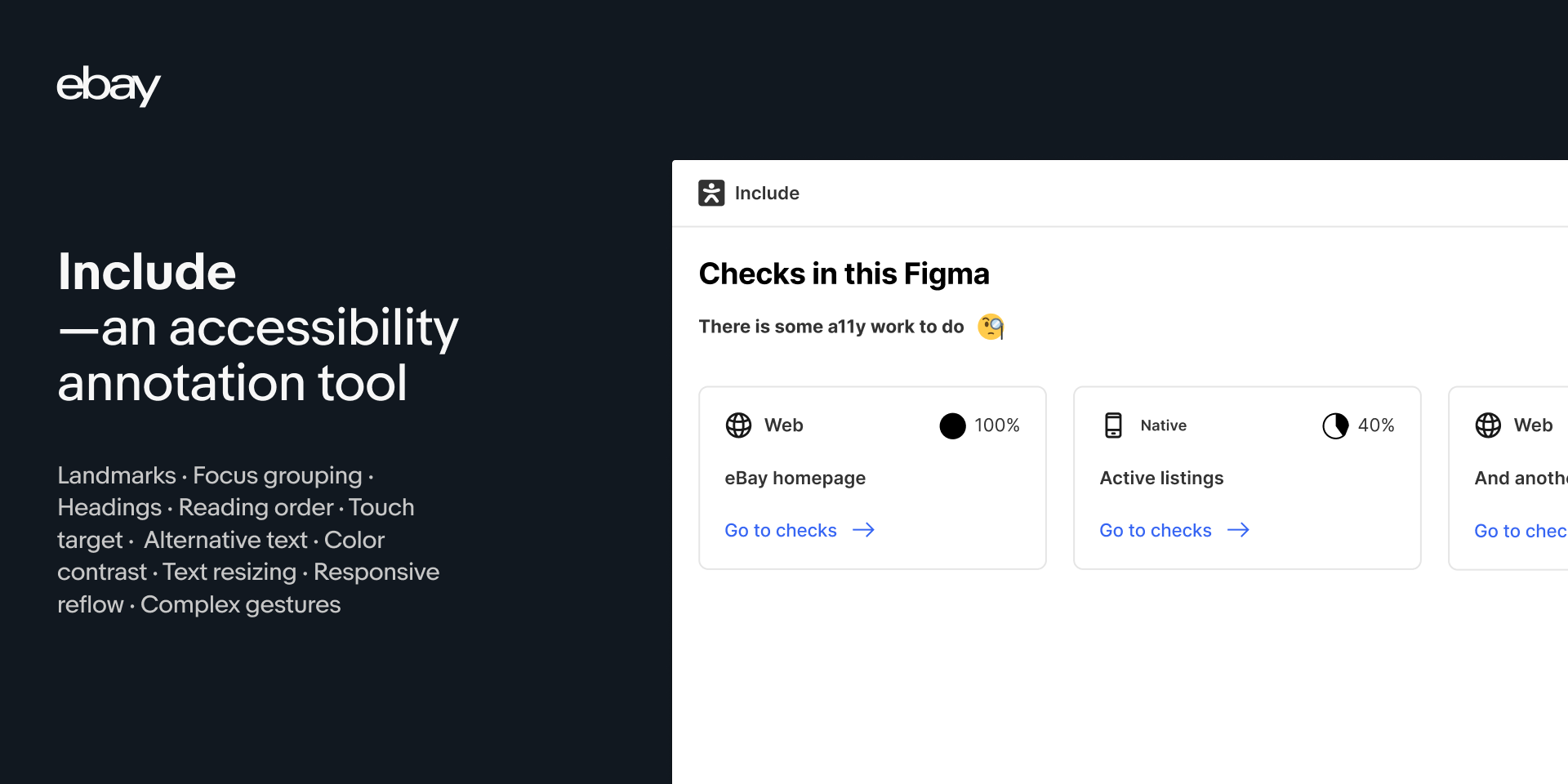
Users select a top-level frame in Figma and run the checker, which returns a list of action items with reasoning for each—for example, recommending alt text for an image marked as informative. The recommendations draw on commonly seen bugs and on accessibility priorities from disciplines across eBay. The team optimized for existing workflows rather than a new process. "Everyone has to start somewhere, and I hope the plugin helps with making it easier," Zaremba says.
The plugin is free in the Figma Community, with code released on GitHub. "eBay has a strong culture of sharing our tools as a way to give back to the community," Zaremba says, noting that open sourcing invites feedback, forks and contributions. "The more people who engage with it, the better it will get."
What prioritizing accessibility actually requires
Education is the starting point: organizations need a shared working understanding of accessibility. People with disabilities must also be in the pipeline as workers and as testers. "When you have a person with a disability on your team, you're less likely to have an inaccessible product," says Greco, who argues for involvement across the creation process rather than end testing alone—"Nothing for us without us." Fleet adds that alongside compensated user testing, internal teams need the authority to enforce accessible practices and to block releases that regress accessibility.

Greco's hope is that design systems make their component libraries accessible from day one "and that they're tested by people and not just machines."

Accessible design systems and where they intersect
Design systems tie together several threads running through modern product work: the adoption of AI in design workflows, accessibility linters, and code-forward asset management. Each of these extends the system's reach rather than sitting apart from it.

AI and asset management in the design system
Integrating AI helps teams build stronger design systems from the start and lets them maintain those systems as they grow. Automated asset management does the same for governance: teams can organize and store assets in one shared location, which makes them easier to add, update, and scale.
Both ideas appear together in the trend of feeding AI tools into design system maintenance, so that the documented rules and shipped assets stay aligned as the system expands.
Linting and unit testing for agentic experiences
Newer work on linting and unit tests for agentic experiences invites teams to look at what would have been hard to imagine—crafting a design system whose rules are enforced on both the design and the code side, applied at the scale of agentic and generative experiences.
Moving closer to the code
Another shift is the migration of design programs to the web, which aims to meet designers where they are and integrate directly into design workflows, connecting design systems to production code more closely.



