

Flutter's Cross-Platform Reality Check
Cross-platform frameworks like Flutter give you one codebase that targets many platforms, but that doesn't mean every platform behaves the same. Flutter runs natively on each operating system, so your app is subject to the same constraints as a platform-specific app written in Kotlin, Swift, or Java. Two areas where developers most often trip up are storage and UI differences.
Storage: Different Platforms, Different Rules
Storage is where platform divergence becomes most visible, especially when you're handling sensitive data like session tokens.
What the Web Offers
Web apps have three main storage mechanisms:
- File download/upload, which requires explicit user interaction and is only practical for user-facing files.
- Cookies, which may or may not be readable from JavaScript (depending on whether they're
httpOnly) and are automatically attached to requests for a given domain. localStorageandsessionStorage, which are accessible to any JavaScript running on your site's pages.
What Mobile Offers
Mobile apps have a wider range of options:
- App-private documents and cache storage.
- Local storage paths for user-created or user-readable files.
NSUserDefaultson iOS andSharedPreferenceson Android for key-value storage.Keychainon iOS andKeyStoreon Android for secure storage — the former handles generic credentials, while the latter stores and can generate cryptographic keys.
If you reach for shared_preferences in Flutter, you get localStorage on the web, SharedPreferences on Android, and NSUserDefaults on iOS. Those are convenient, but they are not secure. Neither SharedPreferences nor NSUserDefaults is encrypted, and localStorage is readable by any client-side script, which matters if you're exposed to XSS. These are meant for preferences, not secrets.
Secure Storage on Mobile (and Why the Web Lacks It)
The only genuine secure storage on mobile comes from the Keychain on iOS and the KeyStore on Android. The two are different in nature: Keychain is a general credential store, while KeyStore is for cryptographic keys. Storing a session token on iOS can be as simple as handing it to the Keychain. On Android, you typically generate a symmetric key, keep it in the KeyStore, encrypt the token with it, and store the ciphertext in SharedPreferences.
You don't have to write that platform-specific code yourself — the flutter_secure_storage plugin wraps this logic for mobile. But it doesn't work on the web, and that's not an oversight. There is no equivalent of secure storage on the web. The platform simply doesn't provide one.
That absence doesn't mean your tokens have to be exposed. You can use httpOnly cookies, which JavaScript can't read and which are only sent to your server. The downside is that they're always sent, so a request triggered from an external site can hit your server with the cookie attached — a cross-site request forgery vector. Mitigations exist; a common pattern is a dual-token approach: one token in an httpOnly cookie, and another returned in the response body, which you store in localStorage so it isn't automatically transmitted.
When You Have Both Mobile and Web
If your backend must serve both a web client and a mobile app, you have two reasonable paths:
- Reuse the same cookie-based endpoint for mobile, manually extracting and attaching the cookie from HTTP headers.
- Add a separate backend endpoint for mobile that issues a distinct token, and allow standard JWT authorization when that mobile-only token is presented.
Writing Platform-Specific Logic in Flutter
Handling these differences in Dart code requires knowing which platform you're on at runtime. After importing package:flutter/foundation.dart, you can compare Theme.of(context).platform against values like TargetPlatform.android, TargetPlatform.iOS, TargetPlatform.linux, TargetPlatform.windows, TargetPlatform.macOS, and TargetPlatform.fuchsia. That lets you branch your functions per platform. The flutter_platform_widgets package builds on this idea to make it easier to render platform-appropriate widgets.
Another option is a Flutter plugin. Plugins expose a single Dart interface but can dispatch to native Kotlin/Java or Swift/Objective-C code underneath, which is how packages like flutter_secure_storage and shared_preferences achieve their behavior. shared_preferences is notable because it has a dedicated web implementation, shared_preferences_web, which maps to localStorage.
Knowing your platform's storage model and its UI conventions isn't optional if you're building for more than one target. It's the difference between code that happens to compile everywhere and code that behaves correctly everywhere.
Platform Differences Are Part Of The Deal
Writing once and running everywhere does not mean your UI will be identical everywhere. Browsers, phones, desktops, and wearables have different conventions, and users have different expectations on each. Flutter keeps your app native, with the performance and UX benefits that come with it, while letting you share most of the codebase. But that only works if you understand the platforms you are targeting and how Flutter adapts to them.
React Native developers face an even greater challenge. Since React Native uses the operating system's native widgets, you must test extensively on both iOS and Android to ensure the app looks right. Flutter, in contrast, renders widgets with its own low-level engine, so you can preview both platform versions from a single device or workstation.
What Changes Automatically
Some UI elements change without any action on your part. Flutter can render Material widgets on iOS and Cupertino widgets on Android, but it does not show the exact same thing on both. Material theming adapts to platform conventions.
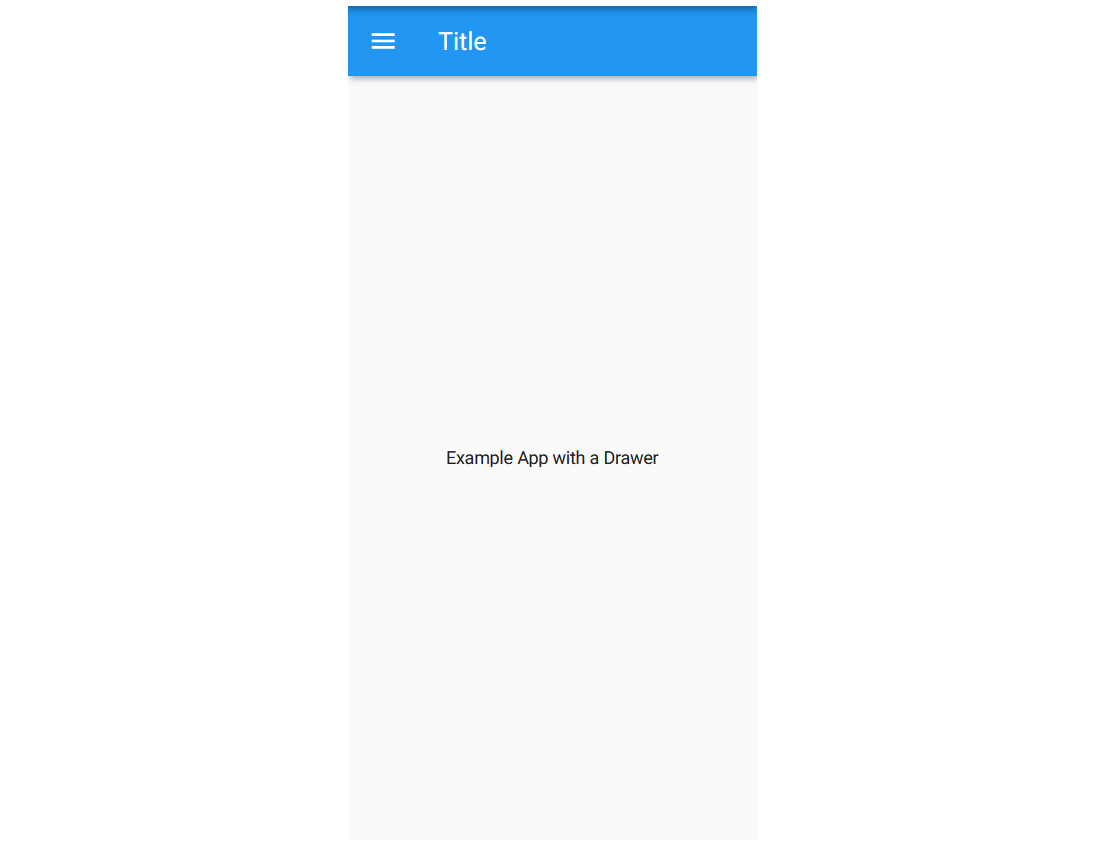
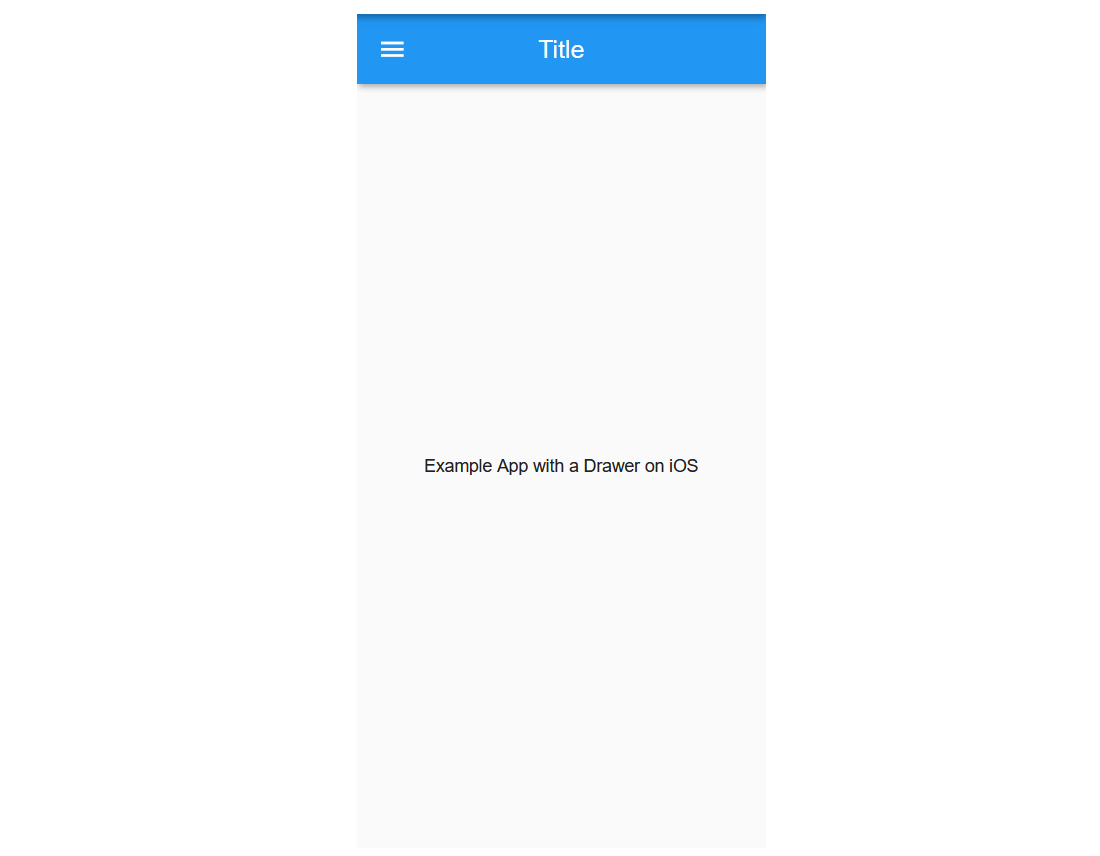
Navigation animations, transitions, and default fonts differ, though these rarely impact your app's design decisions. More notable are static elements that shift between platforms. Some icons change. App bar titles are centered on iOS but aligned left on Android, shifting left of the available space when a back button or Drawer hamburger menu is present.
Notches, Browser Edges, And SafeArea
Web and mobile introduce their own layout hazards. On the web, widgets can be placed outside the visible browser window. On mobile, some phones have notches or other hardware obstructions at the top of the screen. Both issues are solved by wrapping your widgets in a SafeArea widget. This acts as a special padding widget, ensuring your content renders in a visible, unobstructed region regardless of hardware or software constraints.
The React Native Difference
React Native requires deeper platform knowledge and at minimum running both the iOS Simulator and Android Emulator for testing. Because React Native converts its JavaScript UI elements to platform-specific widgets, your iOS app will always use Cupertino elements and your Android app will always use Material Design widgets. Flutter's rendering engine means the same code can be tested in both versions without requiring two physical devices.
Designing For Each Platform Intentionally
Your app should look different on different platforms — unless you are deliberately aiming for a specific unified aesthetic. Shipping Cupertino-styled widgets to Android users generally causes confusion, just as shipping a mobile layout to the web without adaptation does.
The ability to run an app with widgets meant for another platform is an advantage. You can test how the app appears and behaves in both versions without needing two devices. This also means you can do most Flutter development on a Linux or Windows machine without sacrificing the iOS user experience. After building for the other platform, you do not need to start from scratch on testing.
Thinking Beyond The Widgets
Cross-platform frameworks shift responsibility to the developer. Understanding how each platform works and how users expect to interact with your app becomes part of the job. Minor details matter: different platforms may have different conventions for labeling what is essentially the same action, so you may need platform-specific wording.
You are not writing a single app anymore; you are building multiple apps from one codebase. That requires thinking about each target platform's UX, not just the shared code.
Other resources worth consulting include the Flutter Gallery website and Android app, which showcase widget usage across platforms, the Flutter API documentation on TargetPlatform, and Flutter's official documentation on creating packages and plugins as well as platform adaptations.


