
Product managers are increasingly reaching for a working build instead of a written spec when they need to get clear on a problem. Inside Figma Make, they pressure-test assumptions early and give their teams something tangible to react to — a shift that has prototypes starting to displace the Product Requirements Document altogether.
The pattern follows a broader change in the PM role: as traditional product workflows collapse, PMs prompt and prototype alongside their teams rather than circulating static documents for review. Interactive, high-fidelity prototypes let teams explore several concepts at once and push ideas further, showing intent through working examples instead of prose that may not capture a product's nuances.
Exploring the problem space
Early concept work has usually depended on mocks, diagrams or slide decks. None of these can demonstrate real behavior, so teams have to imagine the experience — and alignment slows down. Prototypes give scope discussions something concrete to react to, and they are especially useful when the unknowns and constraints are still ill-defined.
Figma Product Manager Tara Nadella turns to Figma Make "when I don't feel like I understand a problem space very well." When her team started exploring potential features in Check designs — a design system linter that surfaces raw values and recommends the right variables — her engineering counterpart shared a feature prototype and tech spec, while the design team began suggesting visual approaches. Tara couldn't align on a solution because the shape of the problem was still unclear. "People were starting to run with it, and I realized I needed to form an opinion. But I didn't know where to start." Prompting rough flows and interactions in Figma Make helped her articulate the ideas and questions to bring back to the team, covering everything from whether to use wraparound plugins to design tweaks that would make the end-to-end experience more intuitive.
For initial concepts, Figma Make can generate several approaches in minutes. "Figma Make helps you solve the blank-canvas problem by giving you something to riff on," Tara says. Make kits keep those explorations anchored in real product components, so outputs look and behave closer to something shippable. "It lowers the barrier to entry for idea generation — there's no need to rely on hand sketches or text alone," says Figma Product Manager Summer Wang.
Refinement can continue outside the tool. The Copy design feature converts a Figma Make preview into editable layers in Figma Design, so teams can spin out variations, explore directions faster and add visual polish by hand; an updated design can be attached back to Figma Make to refresh the prototype.
Figma Product Manager Sean Lee used this route to test how AI in Figma Slides might apply a user's brand colors when a prompt indicates a branded deck is being created. He duplicated existing Figma Slides templates and prompted Figma Make to remix their color palettes based on prompt cues, simulating how an automated system might behave. "It helped us build confidence in the approach and demonstrate it in action, rather than just describing it," he says.
AI-powered image features in Figma Make speed up visual exploration further: backgrounds can be removed, objects isolated, or images reframed directly on the canvas.
- Anchor prototypes in the design system. Use Make kits to connect team libraries so generated output reflects the actual product rather than a generic mockup. "When prompting, always start from a base UI and attach libraries so you can simulate your real product," Summer advises.
- Step away and come back. "A lot of my Figma Make sessions tend to be multiple hours in one go, so revisiting it later is helpful because you're coming out of that rabbit hole and coming back to it fresh," Tara says. A fresh pass can surface small inconsistencies or details you would otherwise miss.
Make templates set a quality baseline for exploration. Once a prototype is polished, it can be published as a template with guidelines controlling what teammates may change, so everyone starts from the same foundation and brand consistency holds.
Validating with users and stakeholders
Moving from generative exploration to deciding what deserves resources is difficult. The work here is twofold: internal buy-in and user feedback, both of which prototypes make more reliable.
Testing with users
Figma Make puts working examples in front of users quickly. "Figma Make's output quality is good enough that you can have a real conversation with users about a feature or an idea," says Figma Product Manager Ezra Mechaber. "You're not shipping the code, but you're tightening the build-measure-learn loop dramatically." Connected to a design system, prototypes also stay on brand, so what users see mirrors the real product.
When preparing the launch of ChatGPT in Figma Slides, Sean had two days to gather user insights. He merged ChatGPT's interface with Figma's own design patterns in Figma Make to prototype a sample flow and had a functional prototype ready within a day for five user interviews. "The insights directly shaped our quality criteria for evals and gave us the confidence to make a clear go/no-go call," he says. When prototypes run on the Supabase integration for backend functionality, they can include working login screens, forms that save data and apps that remember information across sessions — testing that behaves like a real app rather than a clickable mockup.
Building alignment
A quick prototype is also an argument. "Figma Make is a very powerful tool for alignment," Tara says. "We often have theoretical conversations about theoretical features somewhere in the product. But if you're showing a visual, it's so much faster to get everyone on the same page. That way, we're all speaking the same language and can move forward." Seeing a concept in context helps teams prioritize with confidence — and can revive ideas that had gone dormant. "For ideas in the backlog, I can quickly show what I'm envisioning — helping us revisit ideas with more context," Summer says.
- Share unfinished work. "The biggest trap is thinking your Make project needs to be 'ready' before sharing. Use it early and often — even for messy, half-baked ideas," Sean says. Treat prototypes as conversation starters, not deliverables.
- Make interactions realistic. Mirror the current product as closely as possible. "Ask Make to create linked pages, buttons, and other interactions to make it feel real," Summer says, so users and stakeholders engage with it as they would the actual product.
Turning discussion into side-by-side evidence
Many product choices rest on details that stay abstract until someone can interact with them, and describing behavior across product, design, and engineering remains a persistent difficulty. Figma Product Manager Holly Li says Figma Make has reduced that problem substantially. Rather than asking teams to picture alternatives, teams can place working prototypes in front of them and compare. “PMs constantly live in that space between describing a product idea and showing it,” Ezra says. A prototype brought into a pillar workshop changes the discussion, making it immediately clear what works in practice versus what only sounds good in theory.
PMs constantly live in that space between describing an idea and showing it.“PMs constantly live in that space between describing an idea and showing it.”
Holly's team hit this directly while weighing different scrolling behaviors. The trade-offs resisted prose: speed, direction, and timing all affect the quality of the experience, but the combination is nearly impossible to explain. Prototyping each version with Figma Make and watching the options run side-by-side in context made the choice obvious for the use case.
Sharing a prototype is a narrative task
Once a prototype exists, it becomes a shared artifact for gathering input and refining ideas—but distribution method shapes the response. “It's not just about the artifact, but also about wrapping a narrative around it,” Tara says. A bare link dropped into chat can overwhelm reviewers. Many PMs record a Loom walkthrough of the demo or present the prototype live in meetings instead.
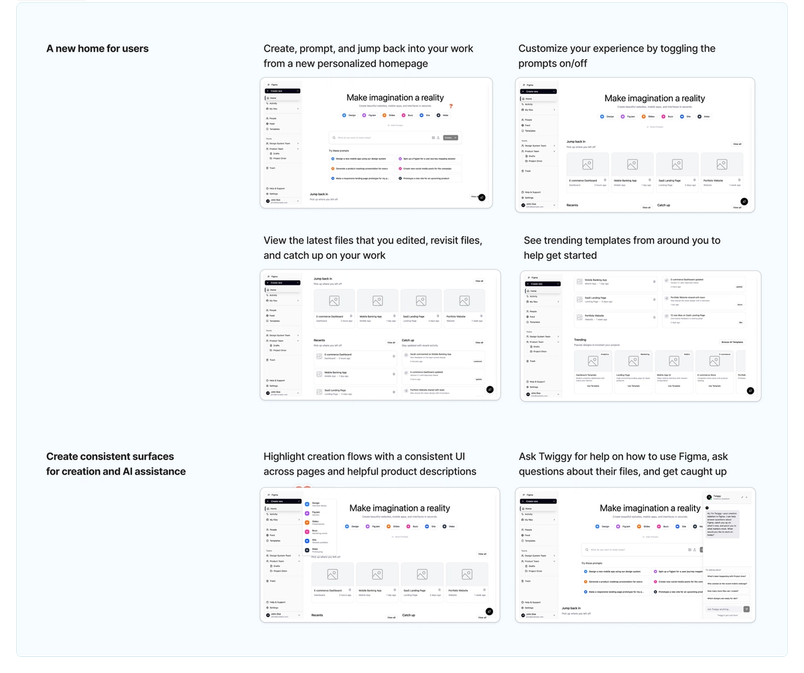
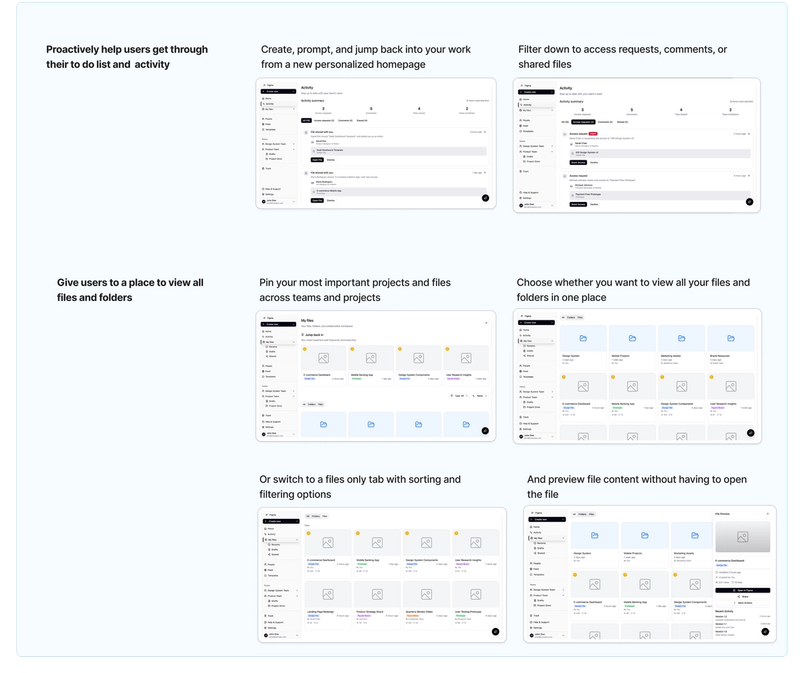
Summer followed that pattern when narrowing the direction for a new homepage and activity feed. She prototyped several variations of her leading concepts in Figma Make, then brought them into a FigJam. Laying out screenshots of each flow with annotations on how the interactions might work gave stakeholders a visual narrative for evaluating trade-offs and returning targeted feedback.
Make offers several sharing modes. A project can be published internally, limited to people logged into their Figma organization, or protected with a password for external reviews—keeping prototypes off the open web while collaborations and feedback continue.
Keeping prototypes in step with evolving decisions is a separate problem. Make Connectors sync context from tools such as Coda, Notion, or Linear directly into a prototype, tightening the feedback loop and maintaining a single source of truth inside existing workflows.
From playground to production
Used as a prototyping playground, Figma Make forces flows, logic, and edge cases to surface well before a feature reaches production. What follows is refinement, where attention shifts to craft. “Figma Make frees up time for the fun part of product management: making calls based on taste and making workflow decisions with much higher confidence,” Holly says.
Figma Make frees up time for the fun part of product management: making calls based on taste and making workflow decisions with much higher confidence.“Figma Make frees up time for the fun part of product management: making calls based on taste and making workflow decisions with much higher confidence.”
As work approaches production, React npm packages can be connected to keep prototypes consistent with the live codebase. Engineers start from real components, and product managers can see how a feature will behave once implemented, narrowing the distance between prototype and production.
Handoff changes accordingly. “The spec to our engineering teams today is often a Figma Make file plus designs,” Holly says. Engineers can treat the prototype as a reference for interaction behavior, push its code directly to GitHub as a development foundation, or use Figma's MCP server to pull design context—components, variables, and structure—into their coding environment. Because MCP connects to the same files PMs work from, generated code aligns with the prototype's intent.
Prompting advice from Figma PMs
- Workshop prompts with ChatGPT. Use it to shape rough ideas into clear prompts. “Sometimes I just want to brain dump and I’ll ask, ‘How would you break this up?’” Tara says.
- Be specific and thorough. Supply as much detail as possible, even across several smaller prompts. “You have to be specific and do a little explaining,” Holly says. “This way, you and the model are on the same page about your goals.”
As AI reshapes product development, prototypes serve as a faster, clearer route to exploring ideas and aligning a team. The PMs positioned to benefit are those who embrace real-time iteration and move fluidly across traditional role boundaries.

Emma Webster is a writer and editor on Figma’s Story Studio team. Previously, she’s worked as a writer at Faire and Audley Travel.
Create and collaborate with Figma — Get started for free


