

Why Accessibility Needs A Business Case
Too often, accessibility is treated as a finishing touch — something bolted on at the end of a project if budget and schedule allow. But in practice, it is a fundamental requirement that should shape a product from the very first design conversation through launch and beyond. Failing to treat it that way has real consequences for real users.
“The design of mainstream products and/or services that are accessible to, and usable by, as many people as reasonably possible ... without the need for special adaptation or specialized design.” — The British Standards Institution (2005)
Consider a user with cataracts or total blindness navigating a site with low-contrast text and no alternative text for images. Or a user with arthritis or multiple sclerosis who cannot operate a mouse and relies on keyboard or voice navigation. These are not edge cases; they are everyday experiences for a significant portion of the population, and inaccessible design excludes them from essential information and services.
Data from the WebAIM Million report illustrates the scale of the problem. Among one million home pages tested, more than 51 million accessibility errors were found — roughly 51.4 errors per page on average. While overall error counts have decreased slightly in recent years, page complexity has risen, meaning the number of detectable errors per element has not improved meaningfully.
What Practical Accessibility Looks Like
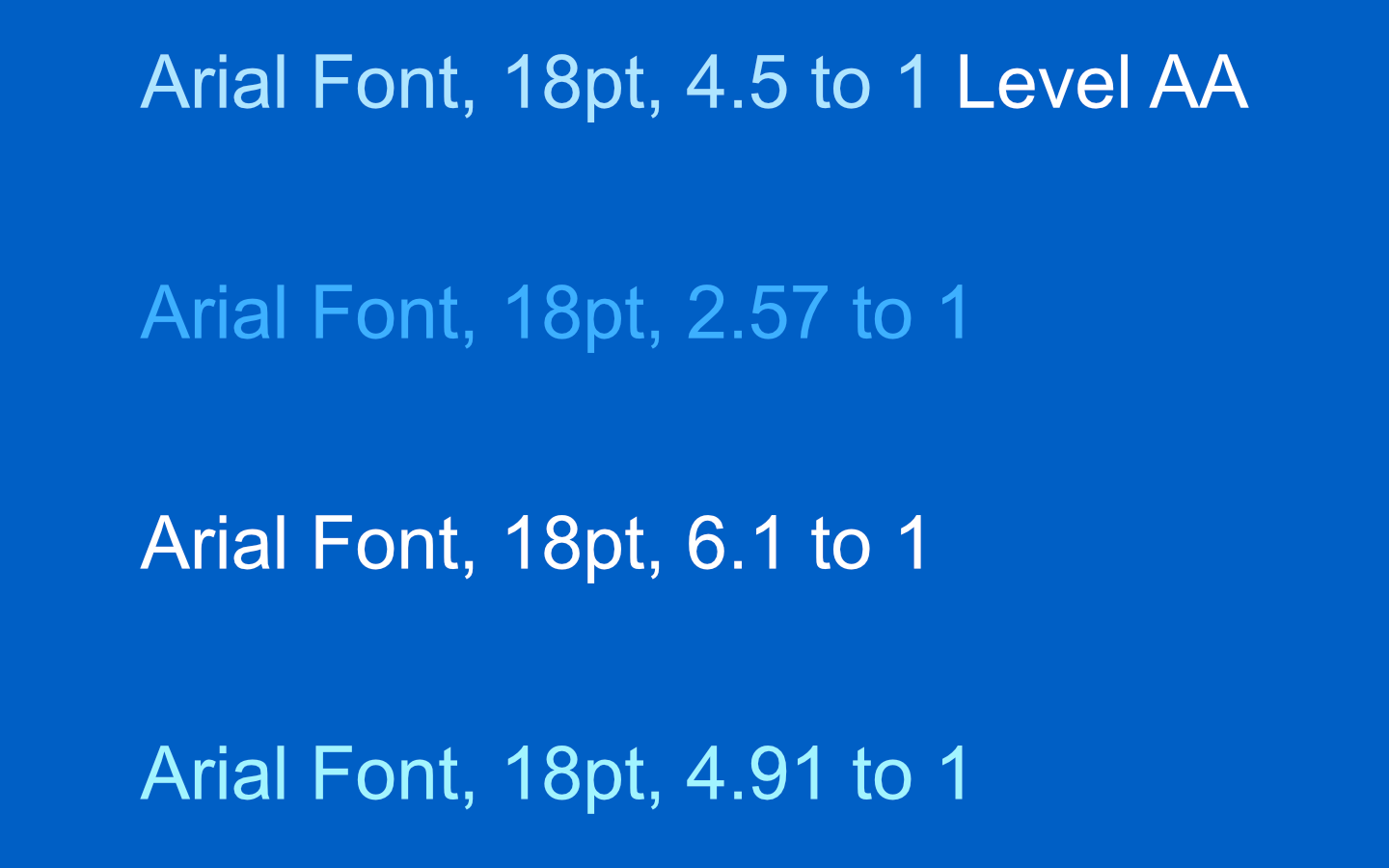
Accessibility failures often appear in small but significant details. A brand color palette may look fine to a designer with normal vision, but fail for users with glaucoma, cataracts, or tritanopia (a deficiency in blue perception). If a light blue font sits on a darker blue background and does not meet the 4.5-to-1 contrast ratio outlined in WCAG Success Criterion 1.4.3, that content is effectively invisible to some users.
Keyboard navigation is another common failure point. Users who cannot use a mouse — due to motor skill disorders, dexterity issues, or injury — depend on assistive technologies to move through a site. Content such as accordions that cannot be expanded or collapsed via keyboard is simply inaccessible. The same principle applies to alternative text for images: without descriptive alt text, screen reader users cannot know what a picture conveys.
- Someone in a rural area with poor connectivity or an older device has more barriers than a user in a metropolitan area with the latest technology.
- A user on a sunny beach squinting at a screen while trying to find a nearby restaurant experiences a situational impairment.
- Someone reading an email with a fussy child on their lap — or typing with an injured arm — faces a temporary limitation that still hinders access.
These situational impairments demonstrate that accessibility is not only about permanent disability. It is about designing for the widest possible range of human circumstances.
Securing Buy-In From Executives And Stakeholders
Advocacy for accessibility must start at the top. Without executive support, accessibility initiatives rarely gain traction across departments. But when decisions are made at the stakeholder level, support flows downward to managers, teams, and individual contributors.
When an ethical appeal is not enough, a financial argument often works. Building accessibility into the initial development process reduces maintenance costs over time because code remains cleaner and more predictable. If that fails, there is the legal case: lawsuits against companies like Target, Bank of America, and Domino’s Pizza serve as cautionary tales. The prospect of litigation tends to change minds quickly.
Regular meetings with executives keep accessibility initiatives visible and supported. That ongoing engagement also provides cover when new accessibility requirements arise or when teams disagree about prioritization. Accessibility can also be a differentiator — teams that ship high-quality, accessible products often find that company-wide buy-in follows naturally.
Live demonstrations with disabled users can be persuasive in ways that written arguments are not. Watching a user struggle with an inaccessible interface humanizes the problem. In some cases, the most effective approach is simply to build accessible products without asking permission, and let the results speak for themselves.
Assigning Advocates And Assessing Current State
Once stakeholders are on board, designate accessibility advocates within each department. These individuals serve as liaisons — answering questions, maintaining documentation and tooling, and coordinating efforts between teams. A dedicated accessibility team or champion reduces friction and prevents initiatives from stalling.
Before making changes, assess where the product and the organization currently stand. What is the state of the website or application? How proficient are teams in WCAG and accessibility best practices? What training has been completed, and what is still needed?
Maintaining a written record of all accessibility training is essential for tracking progress and meeting compliance requirements. If internal training is not available, external organizations such as WebAIM, the ADA, and Knowbility offer structured programs.
Establishing Guidelines And Documentation
Consistency benefits everyone. Design systems should enforce not only brand alignment but accessibility and code clarity. Reusing accessible components saves development time and reduces the risk of introducing new barriers. Testing procedures, particularly for QA and development teams, should be built into the workflow from the start.
Documenting accessibility guidelines internally is a simple but effective step. Collaborative tools like Notion, Google Docs, or Dropbox Paper allow teams to build and refine a shared reference over time.
Winning Over Colleagues And Navigating Regulation
In an industry that often prizes speed over inclusiveness, education at the team level is critical. Workshops and training sessions help colleagues understand what accessibility means for their work. Developers, in particular, are often won over by the argument that accessible code is cleaner code — which means less time debugging and fewer headaches down the line.
Legal compliance is another lever. Different regions have their own frameworks: the ADA and Section 508 in the United States, the Accessible Canada Act, and EN 301 549 in the EU. Familiarity with these standards ensures compliance and provides a shared vocabulary for advocating internally.
“You’ll be saving the company a lot of money when you do this from the start. When maintenance is needed, it won’t take the team as long to maintain the code because of accessibility and clean code.”
Real-World Evidence Builds the Argument
Recorded test sessions where a disabled user attempts to use your product carry more weight in a boardroom than abstract arguments. Demonstrating these real cases to colleagues and executives makes the need tangible. If your internal team lacks the expertise, bring in an outside firm that specializes in accessibility testing with disabled users, such as Applause. Their independent findings often convince skeptics faster than internal reports, and the exposure can lead to accessibility becoming a standard part of the workflow.
Bring Lived Experience Into the Team
Hiring people with disabilities—whether as permanent employees or through a contract with a specialist firm—adds a dimension that checklists and automated tools cannot replicate. These team members understand the barriers firsthand and can advocate effectively for inclusive design. Getting executives and hiring managers to support this approach creates an internal champion for accessibility who can teach and guide the organization, not just audit the output.
Accessibility Is an Ongoing Process
The launch of a product is not the end of the accessibility work. The web evolves, and so do the barriers users encounter—each new feature or content change can introduce problems that did not exist before. Maintaining a standard takes continuous vigilance, not just a one-time pass.
Integrate automated testing into your release strategy wherever possible, but do not rely on it alone. Perform a screen reader analysis before every release to confirm that assistive technologies can navigate the updated interface. When barriers are discovered—and they will be—address them promptly so the fix cycle is efficient and the impact on users is minimized.
Schedule Regular Audits
An annual accessibility audit, whether run internally or by a third-party specialist, keeps a product honest. Including disabled users in that testing makes the audit far more realistic and valuable. A thorough audit should contain two deliverables:
- An executive summary for stakeholders that covers the current state of the product and the steps needed to reach compliance.
- A developer report mapping every user path through the website, mobile app, or product, flagging concerns and requirements at each step.
Inclusion in design is not a feature toggle; it is a baseline expectation. When accessibility is an afterthought, people are shut out from daily digital interactions—often without any intentional exclusion. Accessible sites and apps remove these barriers for people with disabilities, and they also create a better experience for anyone using older or less powerful devices.
Treating accessibility as a fundamental part of the process—not a checklist to be completed after the build—is a choice that improves the outcome for everyone. Accessibility is a right, not a privilege, and making it a priority means remembering the people on the other side of the screen.


