
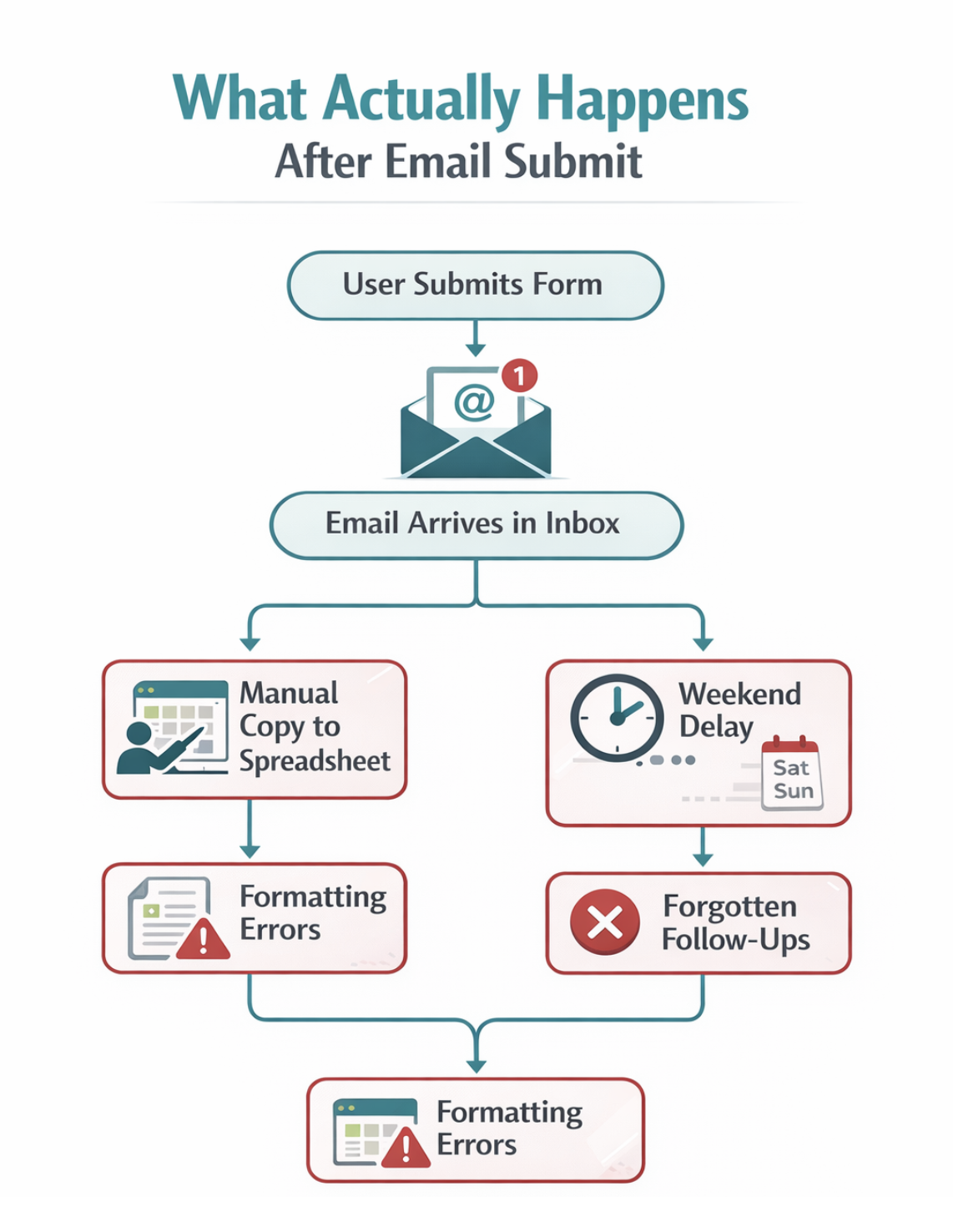
A contact form can be semantically correct, validated smoothly, and fully keyboard accessible and still fail the business it was built for. That was the lesson after a client reported losing a referral because the submission sat in a developer's inbox over a weekend. The form worked; the workflow around it did not.
The gap between a working form and a working pipeline
Front-end work tends to concentrate on user experience, validation techniques, and accessibility, while what happens to the data after it leaves the page gets far less attention. That is where real-world failures surface. The usual pattern is a handler that sends an email on submit:
fetch('/api/contact', {
  method: 'POST',
  body: JSON.stringify(formData)
})

// Email gets sent and we call it done
In practice that approach produces duplicate submissions that confuse CRMs like Salesforce, inconsistent formatting that breaks automated imports, weekend queries nobody sees until Monday, copied-and-pasted values that lose decimal places in quotes, and "required" labels on fields that were never actually required.
A functioning form is the starting line, not the finish line. An email is a handoff, not a notification — treating it as the latter turns your own code into a bottleneck. Litmus's 2025 State of Email Marketing Report (sign-up required) found that inbox-based workflows lead to lagging follow-ups, particularly for sales teams doing lead generation.
Front-end decisions drive back-end automation
Research from HubSpot indicates that what happens at the front-end interaction stage determines what is possible downstream. These are the design choices worth making deliberately:
Decide which fields are required, and why
Start from what the business needs the data for. If phone calls are the primary follow-up channel for a new lead, make phone required; if a job title is merely nice context, make it optional. This is a conversation to have before writing any markup. One developer assumed a phone field could be optional only to find the CRM mandated it — every submission was invalidated and rejected. Coding decisions should follow the business process, not assumptions about ideal UX.
Normalize data before it leaves the browser
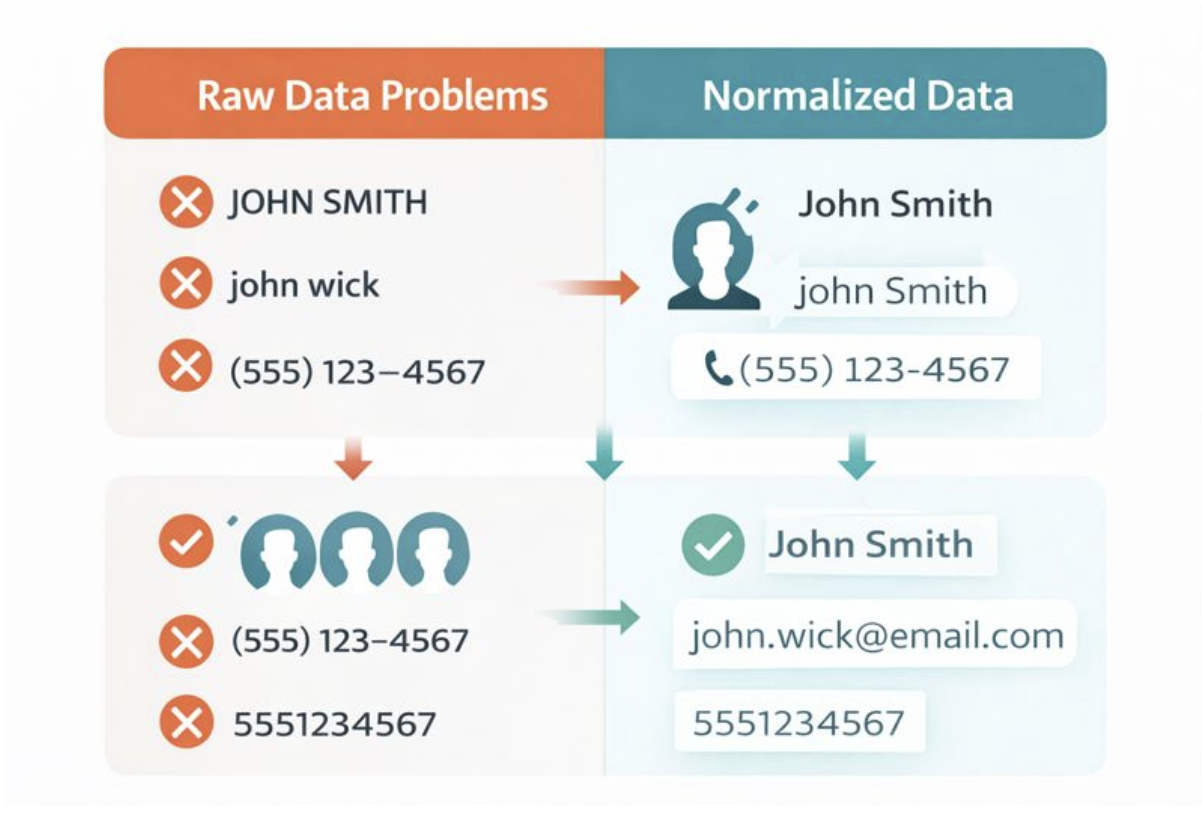
Receiving tools cannot infer that "John Wick" and "john wick" are the same person. Consistent phone formatting, whitespace trimming, and title casing make life easier for whoever reads the data. One client manually cleaned 200 CRM records because inconsistent casing had created duplicates — the kind of cleanup a few minutes of front-end code prevents.
Block duplicate submissions
Disabling the submit button on click, pairing it with a visible loading indicator, and storing an in-progress flag prevents the double-clicks that impatient users on slow connections will inevitably make. Duplicate CRM entries cost real money to fix.
Write success and error states that carry information
A bare "Thanks!" leaves the lead wondering where the submission went, when follow-up happens, and whether there is anything to read in the meantime. Those details manage expectations and give the sales team a head start. Error messages should serve the business too: telling a duplicate submitter "This email is already in our system" beats a generic failure notice.
Building an automation-ready form
Several concrete implementation changes address the failures above.
Validate usability, not just presence
Instead of only checking that a field exists:
const isValid = email && name && message;check that its contents are actually usable:
function validateForAutomation(data) {
  return {
    email: /^[^\s@]+@[^\s@]+\.[^\s@]+$/.test(data.email),
    name: data.name.trim().length >= 2,
    phone: !data.phone || /^\d{10,}$/.test(data.phone.replace(/\D/g, ''))
  };
}
CRMs reject malformed email addresses, so error handling should catch problems before the user waits on a server round trip. The phone check here covers common cases but not international formats; for production, a library such as libphonenumber provides comprehensive validation.
Format consistently before sending
Handle formatting on the client rather than assuming the back end will cope:
function normalizeFormData(data) {
  return {
    name: data.name.trim()
      .split(' ')
      .map(word => word.charAt(0).toUpperCase() + word.slice(1).toLowerCase())
      .join(' '),
    email: data.email.trim().toLowerCase(),
    phone: data.phone.replace(/\D/g, ''), // Strip to digits
    message: data.message.trim()
  };
}
This prevents the casing-driven duplicates described earlier at the cost of a few minutes of code. Note that name-splitting logic breaks on single names, hyphenated surnames, "McDonald"-style edge cases, and names containing multiple spaces — if robust name handling matters, ask for separate first and last name fields instead.
Guard against double submits
Disabling the button on click is the mechanism:
let submitting = false;
  async function handleSubmit(e) {
    e.preventDefault();
    if (submitting) return;
    submitting = true;

const button = e.target.querySelector('button[type="submit"]');
button.disabled = true;
button.textContent = 'Sending...';

try {
  await sendFormData();
    // Success handling
  } catch (error) {
    submitting = false; // Allow retry on error
    button.disabled = false;
    button.textContent = 'Send Message';
  }
}
Impatient users double-click; slow networks invite a second click. Without the guard, those become duplicate leads with real cleanup costs.
Structure the payload
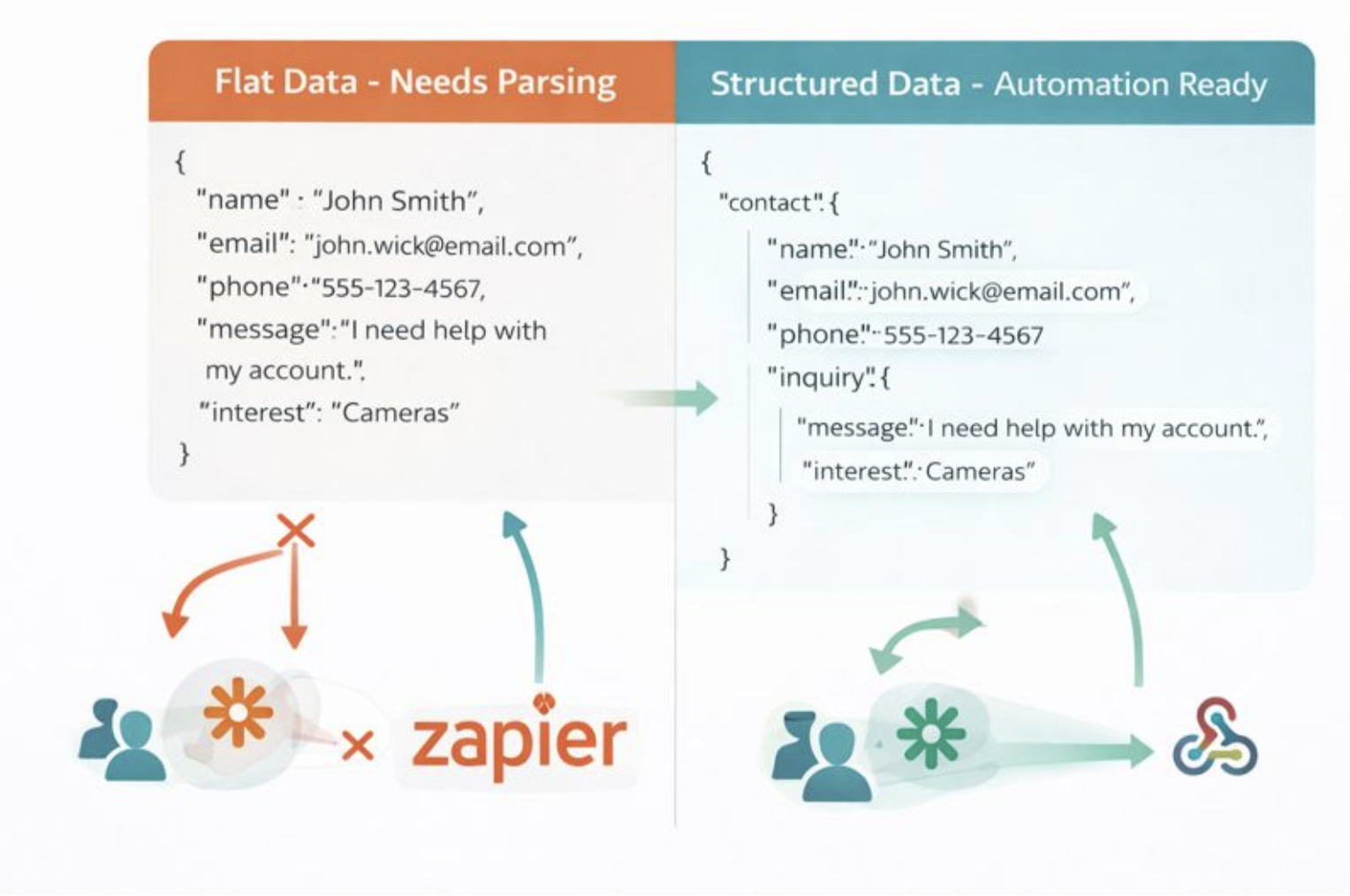
Avoid sending a flat object, and instead emit structured data:
const formData = new FormData(form);const structuredData = {
contact: {
firstName: formData.get('name').split(' ')[0],
lastName: formData.get('name').split(' ').slice(1).join(' '),
email: formData.get('email'),
phone: formData.get('phone')
},
inquiry: {
message: formData.get('message'),
source: 'website_contact_form',
timestamp: new Date().toISOString(),
urgency: formData.get('urgent') ? 'high' : 'normal'
}
};Automation tools like Zapier, Make, and custom webhooks all expect structure. A flat object forces someone to write parsing logic; pre-structured data lets automation work as intended, consistent with Zapier's own guidance on building maintainable workflows rather than fragile single-step "simple zaps."
The end-to-end flow
A desirable pipeline runs, in order: the user submits; data reaches your endpoint or form service; a CRM contact is created automatically; a Slack or Discord message alerts the sales team; a follow-up sequence triggers; and the record is logged to a spreadsheet for reporting. Front-end choices are what make each step possible:
- Consistent formatting leads to successful CRM imports
- Structured payloads can be populated automatically by automation tools
- De-duplication removes cleanup work
- Validation reduces invalid-entry errors
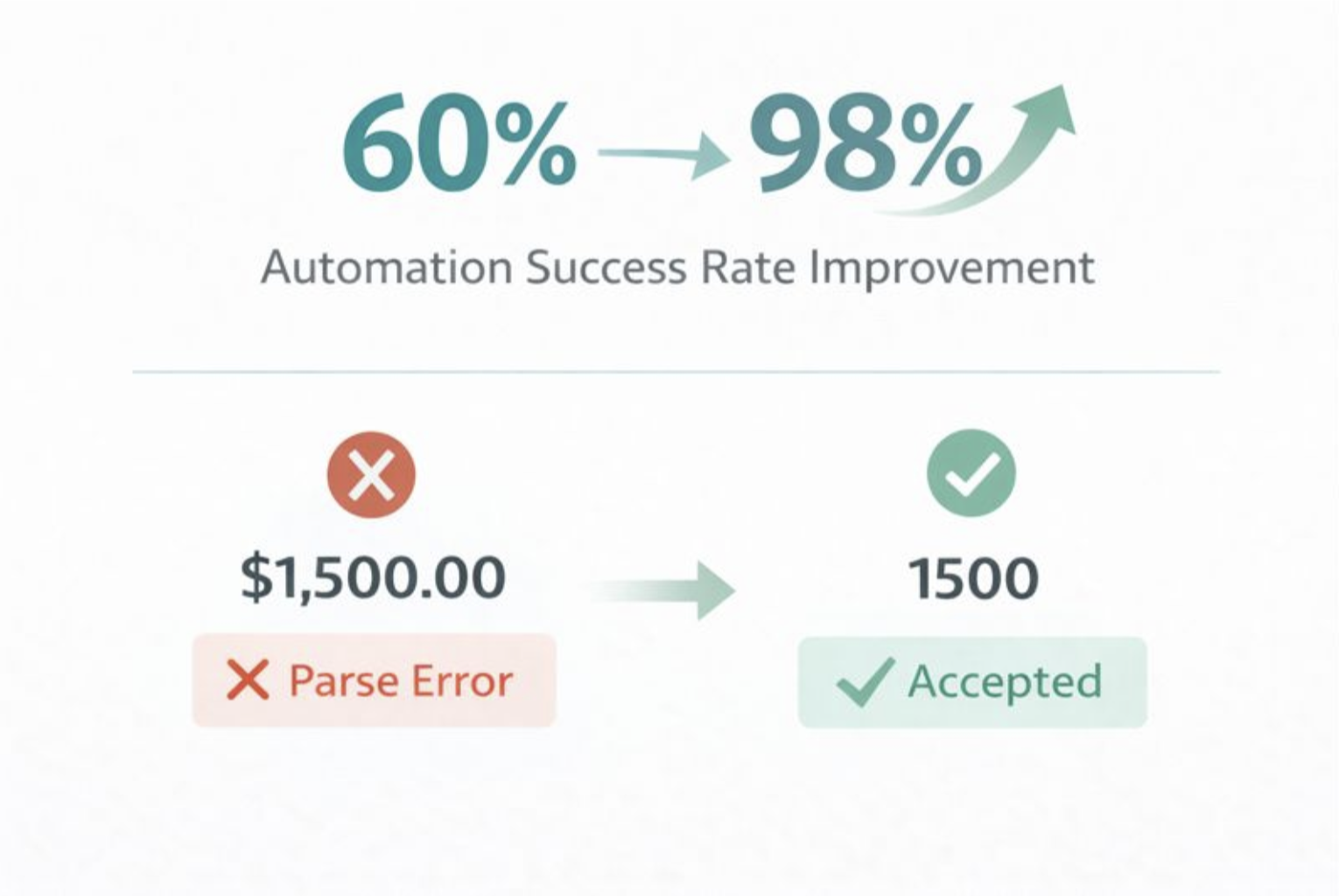
One concrete result: after restructuring a lead quote form, an automated quote success rate went from 60% to 98%. The fix was sending { "amount": 1500} instead of { "amount": "$1,500.00"} — the Zapier integration could not parse the currency symbol.
Practices worth adopting
- Ask about the workflow first. "What happens after someone fills this out?" is the opening question. It reveals what data must go where, in what format, and which integrations are in play.
- Test with real-world input. Fill forms with extra spaces, odd character strings, mobile number formats, and inconsistent casing. Try "JOHN SMITH " instead of "John Smith" and count the edge cases that appear.
- Record timestamp and source. Neither seems essential now, but six months later knowing when and where a submission originated will matter.
- Build in redundancy. Trigger both an email and a webhook. Email can fail silently and nobody notices until someone asks, "Did you get that message we sent you?"
- Over-communicate success. "Your message has been sent. Sarah from sales will answer within 24 hours" sets expectations far better than "Success!"
Where the job actually ends
The standard to hold yourself to is this: the job does not stop when a form posts without errors; it stops when you are confident the business can act on the submission. That means no copy-paste steps, no "I'll check my email later," no duplicate entries to reconcile, and no formatting fixes required.
The code involved is not especially difficult. The shift is in treating a form as part of a larger system rather than a standalone object, which changes how you approach planning, validation, and data. Before building the next one, ask what happens once the data leaves your hands.
The CodePen demo accompanying this piece places a standard form alongside an automation-ready one; they look identical to users, but the console output shows how much data quality differs. Further reading:
- "2025 State of Email Marketing Report" (Litmus)
- "Form Design Best Practices for Lead Capture" (HubSpot)
- "How to set custom error messages for your HTML forms" (Kevin Powell, YouTube)



