
A First Look at CSS Color Contrast Selection
Deep in the release notes for Safari Technology Preview 122 is a small but significant entry: support for a color-contrast() function in CSS. Safari is the first browser to ship this, even in preview form. No other browser has announced support, and there’s no word on when it might land in stable Safari. Still, it’s a welcome addition — anything that makes it easier to build accessible interfaces natively is worth paying attention to.
Getting it running takes a couple of steps. The feature isn’t enabled by default in the preview build, just like experimental features in Chrome Canary require a manual flag. You’ll need to download Safari Technology Preview and flip the appropriate setting before the function will work.

How the Function Works
The release notes don’t document the syntax, but the specification lives in the CSS Color Module Level 5 draft, and MDN has a basic reference page. The core idea is straightforward: you give the function a base color and a list of candidate colors, and it returns whichever candidate has the highest contrast against the base.
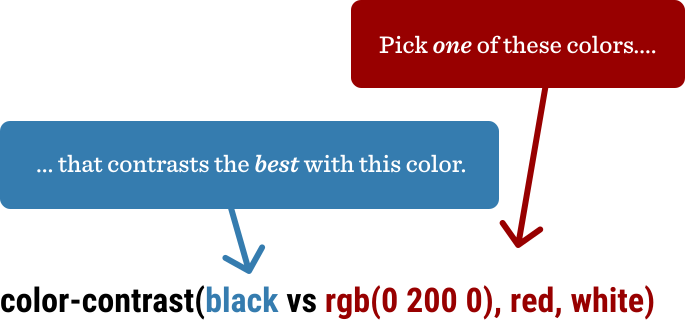
That example is deliberately trivial — white will always win against black. The function becomes genuinely useful when the colors involved are dynamic, which in practice means CSS custom properties. Since the function returns a color value, the most obvious application is setting text color based on a background color that might change.
section {
  background: var(--bg);
  color: color-contrast(var(--bg) vs white, black);
}
With that pattern, you can throw any value at --bg and the browser will pick either white or black text based on which has stronger contrast:

That basic case alone is compelling — it automates a decision developers make manually all the time, often incorrectly.
Beyond Simple Text
The function scales to more complex scenarios. One demonstration shows a parent element setting text color while links within it evaluate against a separate palette of candidate colors. Adjusting HSL sliders (in Safari Technology Preview, of course) updates the colors in real time across those different spots.
Picking two colors with adequate contrast is easy in isolation — though even that gets fumbled more often than it should. But contrast requirements multiply when you’re dealing with variations, nested elements, or user-generated color combinations. A function that handles those arbitrary pairings automatically is a meaningful step toward more robust accessible design.


