
AWS Amplify has long offered a CLI for wiring up a project's auth, storage and APIs. The new Admin UI moves much of that work into a local interface, extending beyond the usual setup tasks to data modeling itself.
Where this fits in a Jamstack setup
Amplify combines static hosting with services. You connect a project to a Git repo (zip upload is possible, but beside the point), and pushing to the designated branch, typically main or master, triggers a deployment.
For many sites, static hosting alone is sufficient. Sites that need more often run client-side code that calls an API for data. On AWS, that API layer is commonly AWS AppSync, which provides real-time GraphQL. It can be configured through the CLI, but the Admin UI makes the job simpler.
Modeling data before writing code
The Admin UI includes a visual data modeler. For a blog, you'd define Posts, each with Comments:

The experience is comparable to using Advanced Custom Fields in WordPress to model data for a Custom Post Type. Once the model exists in the Admin UI, it can be pulled down into the project with the full schema mocked out:

GraphQL setup is often a barrier for developers who are comfortable consuming an existing API or making small tweaks to one. A visual builder plus generated schema scaffolding lowers that barrier considerably.
From schema to working application
After deployment, a real data store exists in the cloud and is ready for data. The CRUD operations are plain JavaScript. Creating a blog and then a post inside it looks like this:
import { DataStore } from '@aws-amplify/datastore';
import { Blog } from './models';

const newBlog = await DataStore.save(
 new Blog({
   "name": "Name of Blog"
 })
);

await DataStore.save(
 new Post({
   "title": "Blog Post Title",
   "blogID": newBlog.id
 })
);
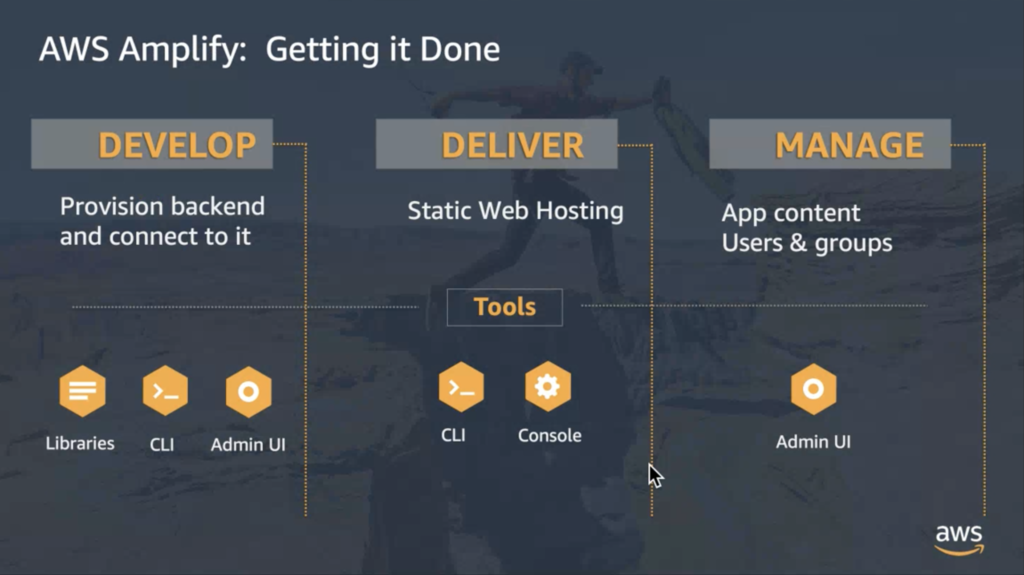
That code works because the database exists and the app knows the data model. This is where Amplify's libraries for DataStore come in: they provide helpers so you don't hand-write fetch calls and error handling. The following slide from the developer preview shows the picture once all the pieces are in place:
Hosting, services and local workflow
The static hosting side is framework-agnostic. Vanilla HTML/CSS/JavaScript, React, Vue or Angular apps, and native apps all deploy the same way. Amplify handles deployment and services and leaves the rest to you.
The Admin UI is where those services are configured: navigating them, deployment activity, and modeling or editing data.

The services available there cover the common needs alongside data and APIs. Authentication is included, as are functions for server-side code (Lambdas) and analytics.
One notable detail about the development story: the Admin UI is hosted locally on your own site rather than in the AWS console. Data modeling, storage and editing all happen locally, and from there you can push to live environments such as production or any staging setups you need. Pulling production data down for local work is a single command, provided in the Admin UI itself.
A full view of the workflow is what makes the Admin UI useful for developers who identify primarily as front-end: it gives a clearer picture of what's happening with the backend and services, while leaving the front end completely open and taking care of the parts most would rather not handle themselves, deployment and SSL among them.



