

A Scripting Language That Skips the Boilerplate
CSCS (Customized Scripting in C#) is an open-source, C#-based scripting language designed to minimize the amount of code a developer has to write. Its syntax closely resembles JavaScript, but it shares a few traits with Python—notably the if…elif…else keyword structure and Python-like variable scoping, where a variable defined inside a block or loop remains visible outside of it.
Unlike JavaScript and Python, CSCS is case-insensitive when it comes to variable and function names (though core control flow statements such as if, for, function, and return remain case-sensitive). The same CSCS codebase can target iOS, Android, Windows, Mac, and Unity, and since the full C# source is embedded into your project, you have complete ownership and can extend the language to fit your needs.
To start building an app with CSCS, the simplest approach is to download a sample project from the official repository and start editing the start.cscs file. The first example below demonstrates how to create a basic user interface with a few widgets and event handlers.
Building a Basic GUI with Widgets
AutoScale();
SetBackgroundColor("light_green");

locLabelText = GetLocation("ROOT", "CENTER", "ROOT", "TOP");
AddLabel(locLabelText, "labelText", "Welcome " +
    _DEVICE_INFO_ + " " + _VERSION_INFO_ + " User!", 600, 100);

locTextEdit = GetLocation("ROOT", "LEFT", labelText,
  "BOTTOM");
AddTextEdit(locTextEdit, "textEdit", "Your name", 320, 80);

locButton = GetLocation(textEdit,"RIGHT",textEdit, "CENTER");
AddButton(locButton, "buttonHi", "Hello", 160, 80);

function buttonHi_click(sender, arg) {
  name = getText(textEdit);
  msg = name != "" ? "Hello, "+ name + "!" : "Hello, World!";
  AlertDialog("My Great App", msg);
}
The code begins with an AutoScale() call, which instructs the parser to size all widgets relative to the screen dimensions. This scaling can be overridden for individual widgets if needed. Notably, there is no need for an explicit event hookup: defining a function named widgetName_click() automatically registers it as the click handler for the widget widgetName—this applies to any widget, not just buttons.
All GUI elements are created entirely in code, using a relative location command to position each widget. The general format for defining a position relative to another widget is:
location = GetLocation(WidgetX, HorizontalPlacement, WidgetY, VerticalPlacement,
                       deltaX=0, deltaY=0, autoResize=true);
A special "ROOT" widget represents the main screen itself. After creating a location, you pass it to one of the widget creation functions, all of which share the same signature:
AddLabelAddButtonAddComboboxAddStepperAddListViewAddTextViewAddImageViewAddSliderAddPickerView
AddButton(location, newWidgetname, initialValue, width, height);
With AutoScale() enabled, widget width and height are expressed relative to the screen size. For buttons, the initial value is the displayed text, which can be updated later with SetText(widgetName, newText).
Debugging and Live Editing with Visual Studio Code
CSCS scripts can be debugged directly in Visual Studio Code. To do so on a Mac—required for cross-platform iOS and Android development—install the CSCS Debugger and REPL extension from the marketplace, then add a single line of code anywhere in your start.cscs file:
StartDebugger();
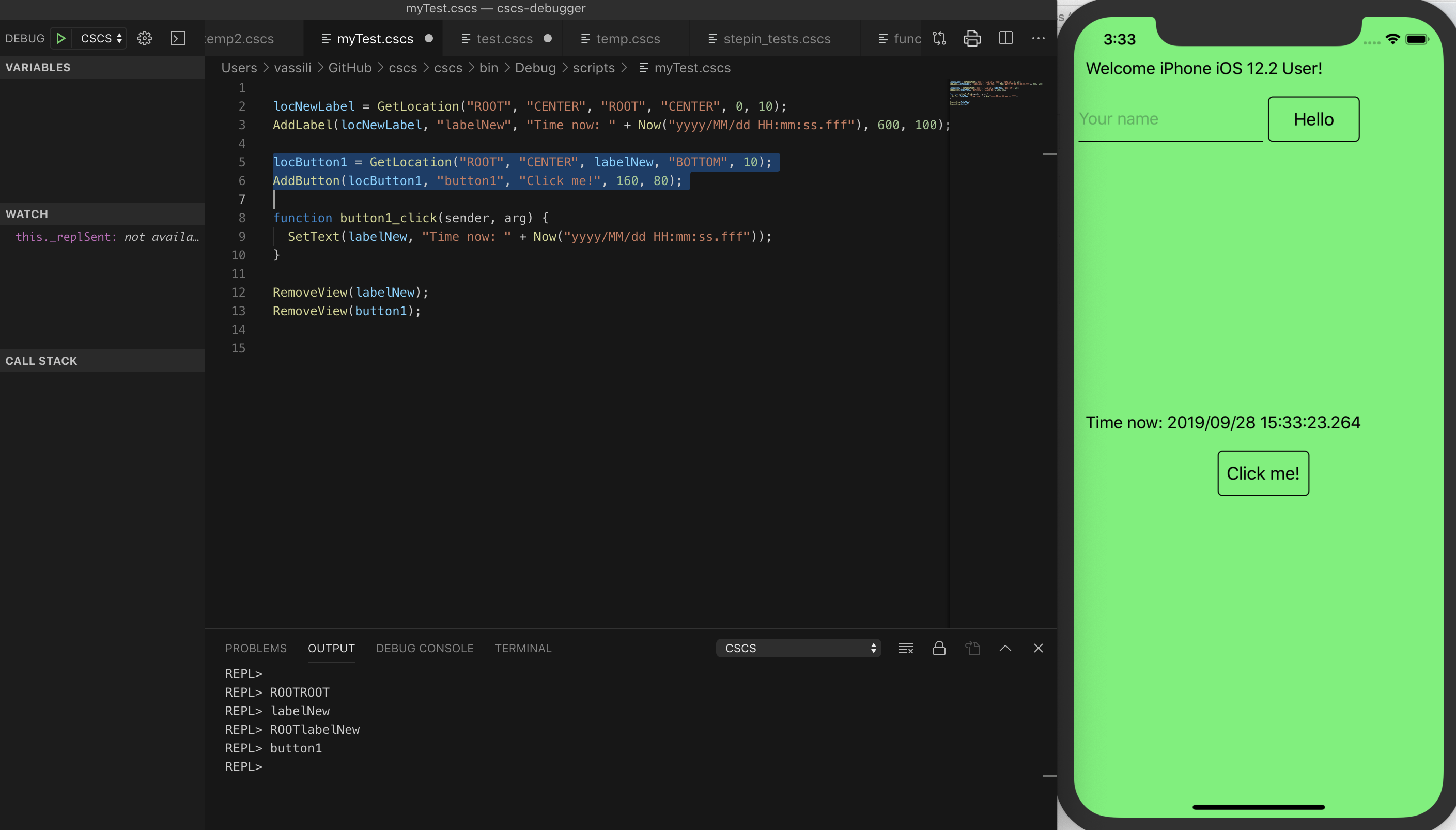
This enables you to execute selected portions of your code interactively. For instance, you can select a snippet that adds a new label and button at the center of the screen, complete with a button click handler that updates the label with the current time each time it is pressed:
Handling Persistent Data with SQLite
SQLite is an embedded, ACID-compliant relational database first released in 2000 by Richard Hipp. Unlike server-based databases such as Microsoft SQL Server or Oracle, SQLite is bundled directly into your application as a compact library under 500 KB. It requires no separate installation on iOS or Android, although two separate apps can only share the same database if they both know the file path.
SQLite is weakly typed—inserting a string where an integer is expected will silently convert to an integer or to 0 on failure. This can be seen as a limitation regarding data capacity and type safety, but also as a flexibility advantage.
CSCS provides direct access to SQLite functions without any extra import statements. The following functions are available:
| Command | Description |
|---|---|
SQLInit(DBName) | Initializes a database or sets a database to be used with consequent DB statements. |
SQLDBExists(DBName) | Checks whether the DB has been initialized. Also sets the database to be used with consequent DB statements. |
SQLQuery(query) | Executes an SQL query (a select statement). Returns a table with records. |
SQLNonQuery(nonQuery) | Executes an SQL non-query, e.g. an update, create or delete statement. Returns number of records affected. |
SQLInsert(tableName, columnList, data) | Inserts passed table of data of records to the specified DB table. The columnList argument has the following structure: colName1,colName2,…,colNameN |
A typical initialization sequence using SQLInit() and SQLDBExists() looks like this:
DBName = "myDB.db1";

if (!SQLDBExists(DBName)) {
  create = "CREATE TABLE [Data] (Symbol ntext, Low real,
    High real, Close real, Volume real,
    Stamp text DEFAULT CURRENT_TIMESTAMP)";
  SQLNonQuery(create);
}

SQLInit(DBName);
Extending CSCS with Custom Functions
To add your own functionality to CSCS, you create a new class that derives from the abstract ParserFunction class and overrides its Evaluate() method. The following example implements a Sleep function (simplified without error checking):
class SleepFunction : ParserFunction
{
  protected override Variable Evaluate(ParsingScript script)
  {
    List  args = script.GetFunctionArgs();
    int sleepms = Utils.GetSafeInt(args, 0);
    Thread.Sleep(sleepms);

    return Variable.EmptyInstance;
  }
}
The new class is then registered with the parser anywhere during initialization:
ParserFunction.RegisterFunction("Sleep", new SleepFunction());Once registered, any token matching "Sleep" (or "sleep," since the language is case-insensitive except for control flow keywords) triggers the Evaluate() method. Both Sleep(100) and sleep(100) suspend the executing thread for 100 milliseconds.
Parsing JSON Data
CSCS offers a straightforward function, GetVariableFromJSON(jsonText), to parse a JSON string into a hash table, where keys correspond to JSON attributes. For example, given this JSON input:
jsonString = '{ "eins" : 1, "zwei" : "zweiString", "mehr" : { "uno": "dos" },
               "arrayValue" : [ "une", "deux" ] }';
Calling the parser function:
a = GetVariableFromJSON();Results in the variable a being a hash table containing:
a["eins"] = 1
a["zwei"] = "zweiString"
a["mehr"]["uno"] = "dos"
a["arrayValue"][0] = "une"
a["arrayValue"][1] = "deux"
Real-World App: Stocks with Web Requests and SQLite
To illustrate integrating all these features, consider a stock data app that fetches data from the Alpha Vantage Web Service, stores it locally in SQLite, and displays it in a list. Alpha Vantage provides free API keys, though the free tier is limited to five requests per minute.
The app's main GUI is built with a few widgets:
locLabel = GetLocation("ROOT","CENTER", "ROOT","TOP", 0,30);
AddLabel(locLabel, "labelRefresh", "", 480, 60);

locSFWidget = GetLocation("ROOT","CENTER",
                          labelRefresh,"BOTTOM");
AddSfDataGrid(locSFWidget,  "DataGrid", "",
              graphWidth, graphHeight);

listCols = {"Symbol","string",  "Low","number", "High",
            "number", "Close","number",  "Volume","number"};
AddWidgetData(DataGrid, listCols, "columns");
colWidth = {17, 19, 19, 19, 26};
AddWidgetData(DataGrid, colWidth, "columnWidth");

locButton = GetLocation("ROOT","CENTER",DataGrid,"BOTTOM");
AddButton(locButton, "buttonRefresh", "Refresh", 160, 80);

locLabelError = GetLocation("ROOT","CENTER","ROOT","BOTTOM");
AddLabel(locLabelError, "labelError", "", 600, 160);
SetFontColor(labelError, "red");
AlignText(labelError, "center");

getDataFromDB();
The getDataFromDB() function retrieves all records from the SQLite database using a query defined as:
query = "SELECT Symbol, Low, High, Close, Volume, DATETIME(Stamp,
               'localtime') as Stamp FROM Data ORDER BY Stamp DESC LIMIT 5;";
The SQL implementation loops through each returned row to populate the app's list view:
function getDataFromDB() {
  results = SQLQuery(query);
  for (i = 1; i < results.Size; i++) {
    vals       = results[i];
    stock      = vals[0];
    low        = Round(vals[1], 2);
    high       = Round(vals[2], 2);
    close      = Round(vals[3], 2);
    volume     = Round(vals[4], 2);
    refresh    = vals[5];

    stockData  = {stock, low, high, close, volume};
    AddWidgetData(DataGrid, stockData, "item");
  }
  SetText(labelRefresh, "DB Last Refresh: " + refresh);
  lockGui(false);
}
Before fetching new data, the app initializes its state:
baseURL     = "https://www.alphavantage.co/query? " +
              "function=TIME_SERIES_DAILY&symbol=";
apikey      = "Y12T0TY5EUS6BC5F";
stocks      = {"MSFT", "AAPL", "GOOG", "FB", "AMZN"};
totalStocks = stocks.Size;
When the user taps the "Refresh" button, the app loads each stock symbol sequentially via web requests:
function buttonRefresh_click(object, arg) {
  lockGui();

  SetText(labelRefresh, "Loading ...");
  SetText(labelError, "");
  ClearWidget(DataGrid);
  loadedStocks = 0;
  getData(stocks[loadedStocks]);
}

function getData(symbol) {
  stockUrl  = baseURL + symbol + "&apikey=" + apikey;
  WebRequest("GET", stockUrl, "", symbol, "OnSuccess", "OnFailure");
}
The main network function that contacts the Alpha Vantage API:
WebRequest("GET", stockUrl, "", symbol, "OnSuccess", "OnFailure");This function takes callback handlers for success and failure as its last two parameters. On network failure, an error handler displays a message to the user:
function OnFailure(object, errorCode, text)
{
  SetText(labelError, text);
  lockGui(false);
}
When the request succeeds, the JSON response is parsed to insert data into the SQLite database:
function OnSuccess(object, errorCode, text)
{
  jsonFromText  = GetVariableFromJSON(text);
  metaData      = jsonFromText[0];
  result        = jsonFromText[1];

  symbol        = metaData["2. Symbol"];
  lastRefreshed = metaData["3. Last Refreshed"];
  allDates      = result.keys;

  dateData   = result[allDates[0]];
  high       = Round(dateData["2. high"],  2);
  low        = Round(dateData["3. low"],   2);
  close      = Round(dateData["4. close"], 2);
  volume     = dateData["5. volume"];
  stockData  = {symbol, low, high, close, volume};
  SQLInsert("Data","Symbol,Low,High,Close,Volume",stockData);

  if (++loadedStocks >= totalStocks) {
    getDataFromDB();
  } else {
    getData(stocks[loadedStocks]);
  }
}
To clarify how the parsing works, here is an excerpt of the actual JSON structure received from Alpha Vantage:
{   "Meta Data": {
        "1. Information": "Daily Prices (open, high, low, close) and Volumes",
        "2. Symbol": "MSFT",
        "3. Last Refreshed": "2019-10-02 14:23:20",
        "4. Output Size": "Compact",
        "5. Time Zone": "US/Eastern"
    },
    "Time Series (Daily)": {
        "2019-10-02": {
            "1. open": "136.3400",
            "2. high": "136.3700",
            "3. low": "133.5799",
            "4. close": "134.4100",
            "5. volume": "11213086"
        },
   …
    }
}
As shown, the most recent trading date is conveniently available as the first element of the allDates array, which contains all available dates from the response.
Embedding CSCS Into a Real Project
The cleanest way to adopt CSCS is to embed its C# source directly into your application as a module, avoiding external dependencies or process boundaries. A working example of this approach is available in the sample Xamarin project, which illustrates how the interpreter integrates with a native mobile UI while maintaining shared logic across platforms.
Deployment and Extension Notes
Because CSCS is open and source-level, you are free to edit or extend its behavior to meet domain-specific needs. The interpreter's modular design means you can add custom functions or alter parsing rules without touching the host application's core architecture.

Author Resources and Further Reading
For deeper exploration of the language and its use cases, the author has published several technical articles covering the parser design, customization techniques, and cross-platform development patterns:
- “A Split-and-Merge Expression Parser in C#,” MSDN Magazine (Oct. 2015)
- “Customizable Scripting in C#,” MSDN Magazine (Feb. 2016)
- “Writing Native Mobile Apps Using a Customizable Scripting Language,” MSDN Magazine (Feb. 2018)
- “CSCS: Customized Scripting in C#,” GitHub
- “Developing Cross-Platform Native Apps with a Functional Scripting Language,” CODE Magazine
- “Implementing A Custom Language Succinctly” (eBook)
- “Writing Native Mobile Apps in a Functional Language Succinctly” (eBook)
For performance improvements, the author also recommends reading about precompiling CSCS functions to reduce runtime overhead in hot paths.


