

Git as a distributed database
At its core, Git is a distributed version control system, but it operates on principles familiar to anyone who works with application databases. Your repository is a data store that persists information to disk. Commands like git log and git show are essentially queries, optimized through specialized data structures and algorithms. And when multiple developers work together, distributed nodes must synchronize and agree on a shared state. Git's data model is purpose-built for plain-text source code, favoring efficiency when storing snapshots of files across thousands of commits. Unlike many databases that run as long-lived services with heavy in-memory caching, Git runs short-lived processes, using the filesystem to persist state between executions. This specialization leads to highly tuned storage and access patterns.
Understanding the object store
Every piece of data in a Git repository lives as a Git object inside the .git/objects directory. This directory is the object store, a content-addressable store where you retrieve an object by providing a hash of its contents. Think of it as a two-column table: one column for the object ID (the hash acting as a primary key) and one for the object content.
$ ls .git/objects/
01  34  9a  df  info    pack

$ ls .git/objects/01/
12010547a8990673acf08117134bdc181bd735

$ ls .git/objects/pack/
multi-pack-index
pack-7017e6ce443801478cf19006fc5499ba1c4d2960.idx
pack-7017e6ce443801478cf19006fc5499ba1c4d2960.pack
pack-9f9258a8ffe4187f08a93bcba47784e07985d999.idx
pack-9f9258a8ffe4187f08a93bcba47784e07985d999.pack
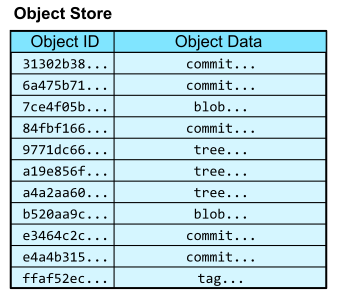
Because the store is content-addressable, you cannot look up an object without already knowing its hash. To navigate into the store, Git provides references as named pointers to object IDs. These live in the .git/refs/ directory and can be thought of as a table mapping reference names to object IDs, where the name is the primary key.
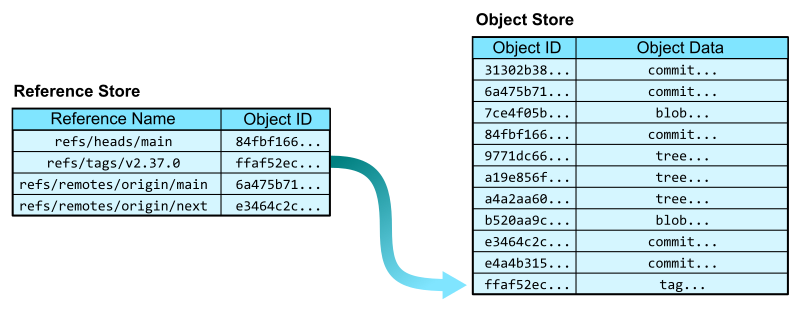
A typical navigation from a reference name, like refs/tags/v2.37.0, to file contents traverses several object types. An annotated tag points to a commit, which is a snapshot of the worktree containing links to parent commits and a root tree. That root tree points to a tree object, which behaves like a directory, mapping path names to object IDs. Following the entry for README.md leads to a blob object that stores the actual file contents.

This simple request to "give me the README at this tag" requires several hops, linking one object ID to another. Understanding these paths is critical because Git's algorithms rely heavily on this graph structure, as we'll explore in later sections.
Querying the object store
Git's command-line interface acts as its query language. For direct object lookups by ID, use git cat-file. The -p flag outputs a "pretty" version of the object data, while -t reports the object's type, determined from its leading bytes. To insert data directly, git hash-object writes file content into a new blob and outputs the resulting object ID.
$ git hash-object -w --stdin
Hello, world!
af5626b4a114abcb82d63db7c8082c3c4756e51b

$ git cat-file -t af5626b4a114abcb82d63db7c8082c3c4756e51b
blob

$ git cat-file -p af5626b4a114abcb82d63db7c8082c3c4756e51b
Hello, world!
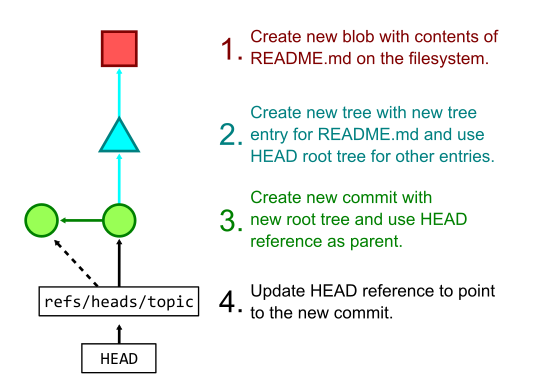
More commonly, you don't just add file contents but also update the commit history. Running git add hashes changes and writes blobs to the object store while updating the staging index. The git commit command then creates tree objects referencing those new blobs, generates a new commit object, and finally updates the current branch reference to point to the new commit.
For more complex queries, git log --pretty=format:<format-string> lets you extract specific "columns" from commits, such as object IDs, messages, author names, and dates. A simpler alternative is git log --pretty=reference -1 <ref>, which returns an abbreviated object ID, the first sentence of the commit message, and the short-form commit date.
$ git log --pretty=reference -1 378b51993aa022c432b23b7f1bafd921b7c43835
378b51993aa0 (gc: simplify --cruft description, 2022-06-19)
These examples only scratch the surface of Git's querying capabilities. To truly understand the performance and limitations of Git at scale, we must examine how this data is physically stored and compressed, starting with packfiles.
Packfiles: Git’s compressed object store
As a repository grows, storing every object as a loose file in .git/objects/ becomes impractical. The filesystem struggles with thousands of small files, and storing many versions of the same text file wastes space. Git’s packed object store, located in .git/objects/pack/, solves this with a more efficient format.
How packfiles and indexes work together
A packfile (*.pack) stores multiple objects in a compressed stream. Each object is individually compressed, but objects can also be compressed against each other to exploit shared content. The packfile itself contains only object data—not object IDs—so finding an object by ID would require decompressing and hashing every entry.
To avoid that, each packfile is paired with a pack-index (.idx). The pack-index lists object IDs in lexicographical order, enabling a binary search to confirm whether an ID exists in the packfile and to find the offset where the object’s data begins. A fanout table of 256 entries narrows the search by the object’s first byte, reducing the number of memory pages touched during the search. This works well because object IDs are uniformly distributed, keeping the fanout ranges balanced.
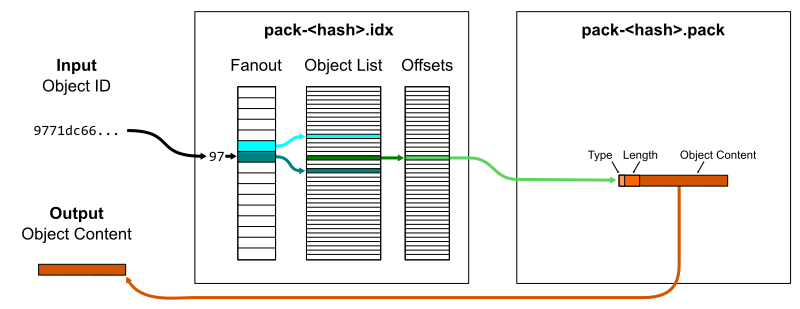
For repositories with multiple packfiles, a multi-pack-index consolidates several pack-indexes into one file. It stores the same offset information plus a reference to the specific packfile containing each object. This removes the need to query each pack-index sequentially.
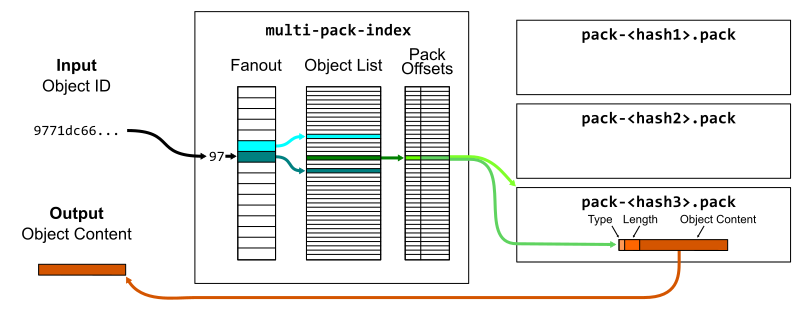
Object lookups and prefix queries behave the same as with a pack-index, but with better scalability across many packs—a key factor for large monorepo maintenance.
Why Git objects are diffable
Git’s design assumes source code: plain-text files that change incrementally between commits. Each iteration typically alters only small portions of a file while the majority stays fixed. This makes the data highly compressible through deltification, a specialized form of compression that stores differences between objects. It’s also why storing large binary files in Git is discouraged—they don’t diff well.
Tree objects are particularly well-suited for structural diffing. A tree entry includes a mode, type, name, and object ID. Most edits change only the object ID of a single entry while the other fields stay the same. For example, the root tree at the tip of a major Git release often differs from its parent in only one entry, such as the GIT-VERSION-GEN file:
$ git diff v2.37.0~1 v2.37.0
diff --git a/GIT-VERSION-GEN b/GIT-VERSION-GEN
index 120af376c1..b210b306b7 100755
--- a/GIT-VERSION-GEN
+++ b/GIT-VERSION-GEN
@@ -1,7 +1,7 @@
 #!/bin/sh

 GVF=GIT-VERSION-FILE
-DEF_VER=v2.37.0-rc2
+DEF_VER=v2.37.0

 LF='
 '

$ git cat-file -p v2.37.0~1^{tree} >old
$ git cat-file -p v2.37.0^{tree} >new

$ diff old new
13c13
< 100755 blob 120af376c147799e6c0069bac1f61709a0286cd6  GIT-VERSION-GEN
---
> 100755 blob b210b306b7554f28dc687d1c503517d2a5f87082  GIT-VERSION-GEN
Once a diff algorithm can process Git object structures, the packfile format can apply that logic.
Delta chains and their trade-offs
The packfile format starts with header metadata followed by concatenated object data. Each object entry begins with a type and length. If the type is a standard object type, the content is the full object data, compressed with DEFLATE.
Alternatively, the type can be an offset delta. In that case, the entry contains an integer offset pointing to a previous object in the packfile, followed by a list of instructions. These instructions either copy bytes from the base object or write new data chunks. For the tree example above, representing the v2.37.0 root tree as a delta means copying the previous tree up to the object ID 120af37..., inserting the new ID b210b30..., and then copying the remainder—a result that takes only 50 bytes instead of several kilobytes.
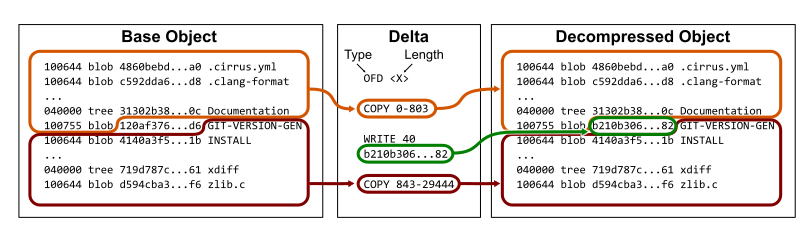
Delta instructions are also DEFLATE-compressed, so new data chunks benefit from the same compression as base object content. For instance, the root tree for v2.37.0 is roughly 19KB uncompressed and 14KB compressed on its own, but around 50 bytes as an offset delta.
$ git rev-parse v2.37.0^{tree}
a4a2aa60ab45e767b52a26fc80a0a576aef2a010

$ git cat-file -s v2.37.0^{tree}
19388

$ ls -al .git/objects/a4/a2aa60ab45e767b52a26fc80a0a576aef2a010
-r--r--r--   1 ... ... 13966 Aug  1 13:24 a2aa60ab45e767b52a26fc80a0a576aef2a010

$ git rev-parse v2.37.0^{tree} | git cat-file --batch-check="%(objectsize:disk)"
50
Offset deltas can reference other deltas, forming a delta chain. To materialize the raw object content, Git must resolve each link in the chain—and may need to traverse the entire chain just to determine the object type. This adds CPU work at read time.
Git manages this overhead in a few ways. The pack.depth config value caps delta chain length during pack creation; the default is 50. When constructing a packfile, Git also orders delta chains in reverse-chronological order, using a recent object as the base. This keeps overhead low for queries that touch recent objects, while older objects—queried less frequently—carry more of the cost.
The performance trade-off is nuanced. When reading multiple objects from the same delta chain, the disk I/O cost is nearly identical to reading just the base object. Since delta chains are stored adjacently in the packfile, the added CPU work to resolve deltas is minor compared with the savings from a smaller disk footprint. Removing objects from the same chain can therefore be faster than reading them from separate chains.

Some Git commands naturally trigger parsing of multiple objects within the same delta chain—this behavior becomes especially relevant for file history queries. And beyond on-disk efficiency, the packfile format is fundamental to how Git transmits object data between distributed copies during git fetch and git push, a topic covered in the next part on distributed synchronization.
Keeping the object store tidy
Because creating a packfile for every object write would be prohibitively expensive, Git batches packfile creation into explicit maintenance commands. You can assemble a packfile manually with git pack-objects and index it with git index-pack, but the typical approach is to let git repack -a or git gc handle it.
Rewriting the entire object store as one new packfile grows costly as the repository ages. You need disk space for two copies of all object data, and finding good delta compression is computationally demanding — an optimal delta search takes quadratic time in the object count. Git applies heuristics to make this tractable, but a full repack is still a significant expense, especially for client repositories that don't serve data to others.
Two maintenance strategies avoid full rewrites while keeping reads efficient:
- Geometric repacking:
git repack --geometricrepacks only a subset of packfiles until their sizes form a geometric sequence (each packfile a fixed multiple smaller than the next largest). Themulti-pack-indexkeeps object lookups logarithmic. The rare event of doubling repository size triggers a full repack, which is infrequent enough to be acceptable. - Incremental repack: The
git maintenancecommand's incremental repack task collects packfiles below a size threshold — two gigabytes by default — and combines them until their total exceeds that threshold. Packfiles above the threshold stay untouched. This approach is the default when background maintenance is enabled viagit maintenance start. Storage efficiency is slightly reduced because new objects can't use deltas against objects in the fixed, larger packs, but the simplicity of avoiding full rewrites is worth the overhead.
If you're willing to pay the upfront cost, git repack -adf will recompute all delta chains across the entire store at any time.
What Git could borrow from database design
Notably absent from Git's packed object store is the B-tree — the index structure that anchors nearly every database primer. Its absence isn't an oversight. Git packfiles and pack-indexes are immutable: a packfile isn't touched by active processes until its index is fully written, and neither is modified in place. Objects enter the store only as new loose objects (git add, git commit) or as complete new packfiles (git fetch).
With static content, the most efficient index is binary search over sorted object IDs, refined by a fan-out table on the first ID byte — a binary tree whose root has 256 children rather than two. B-trees shine when data is inserted or removed continuously, because they minimize structural changes under load. Git has no mechanism to update a packfile while concurrent readers hold it open; such a capability would require a substantial storage redesign. That makes this an area where database engineering expertise could genuinely advance the Git project.
A second difference is process lifecycle. A database is a long-running process with an in-memory cache; clients query that process and it responds without exiting. Git instead launches a fresh process per command and depends on the filesystem for persistence, while relying on the operating system's page cache to keep disk data warm between runs. Databases often bypass the kernel's generic page management because they can predict their own access patterns. A long-running Git daemon with a maintained in-memory representation of object data would avoid repeated parsing from disk, but the current architecture isn't designed for that. It's an idea worth considering for Git's future.


