
The shape of a file’s history
When you need to understand why a piece of code looks the way it does, commit messages alone rarely tell the full story. What you actually need is to find the commits that changed a specific file or specific lines within it. Git’s file history commands are a set of queries designed to find those pivotal moments.
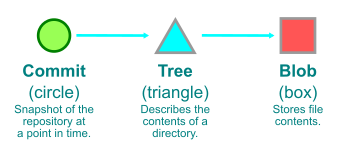
Before looking at the commands, it helps to recall that commits are snapshots, not diffs. Git must compute differences dynamically to answer “which commits changed this path?”
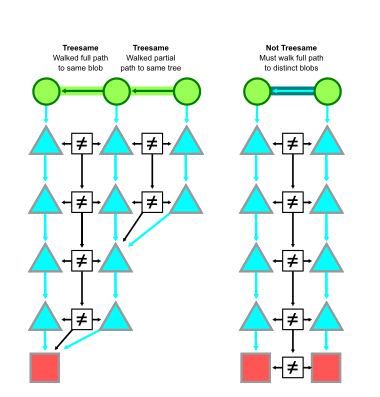
For each candidate commit, Git walks the root trees of the commit and its parent, comparing tree entries along the path. If it finds identical object IDs at any level, those commits are considered treesame on that path.
The default: simplified history
The default git log -- <path> query runs in simplified history mode. A commit with a single parent is interesting if it differs from that parent on the path. A merge commit is interesting if it differs from all of its parents on the path.
When the simplified walk hits a merge, it compares the merge against its parents in order. If it finds a treesame parent, it marks the merge uninteresting and continues the walk along that parent — skipping everything else reachable through the other parents. If no parent is treesame, the merge is interesting and every parent is walked.

This asymmetry is deliberate. For a path that changes rarely, most merges are treesame to their first parent, letting Git skip whole branches whose changes never touched the path. When a topic branch is merged cleanly into the trunk, the merge is typically treesame to its second parent for files that changed in that topic. Once merged to the trunk, those changes appear in the first-parent history, so the merge is still different from the first parent.

This optimized walk can skip merges even when they introduce a change to the trunk:
$ git log --graph --oneline -- src/
*   80423fa Merge pull request #800 from ...
|\
| * 9313670 build(deps): bump Newtonsoft.Json in /src/shared/Core
* | 47ba58f diagnose: don't await Git exit on config list
|/
* 5637aa9 macos build: use runtime instead of osx-x64
* 7a99cc0 Fixes typo in Mac dist script
If you want those merge commits to appear in the history, the --show-pulls option will surface merges that differ from their first parent:
$ git log --graph --oneline --show-pulls -- src/
*   80423fa Merge pull request #800 from ...
|\
| * 9313670 build(deps): bump Newtonsoft.Json in /src/shared/Core
* | 77f7922 Merge pull request #804 from ...
* | 47ba58f diagnose: don't await Git exit on config list
|/
* b83bf02 Merge pull request #788 from ...
* 5637aa9 macos build: use runtime instead of osx-x64
* cf5a693 Merge pull request #778 from ...
* 7a99cc0 Fixes typo in Mac dist script
Simplified history works extremely well most of the time, but its optimization can hide commits in a few scenarios. The most common are:
- Reverted changes. If a branch edits a file, then later reverts those edits before being merged, the branch has commits touching the path but ends treesame to its merge base. The simplified walk considers the merge uninteresting and skips the branch.
- Cherry-picks. When a fix is applied to several maintenance branches, those branches often merge without conflict because the tips agree on file content. Simplified history chooses one branch to walk and misses the cherry-picks in the others.
- Bad merge conflict resolutions. A merge that erroneously takes one parent’s version of a file and discards changes from the other side creates a scenario where simplified history sees a treesame parent and ignores the dropped changes. This is the most confusing case for developers investigating “where did my change go?”
Full history vs. simplified merges
When you suspect simplification hid something, the --full-history option changes the walk to examine every commit in the graph. A merge is interesting if any parent differs from it on the path. With --graph, Git performs parent rewriting so each merge connects to the next interesting commit found through each parent.
$ git log --graph --oneline --full-history -- src/
*   5d869d9 Merge pull request #806 from ...
|\
* \   80423fa Merge pull request #800 from ...
|\ \
| |/
|/|
| * 9313670 build(deps): bump Newtonsoft.Json in /src/shared/Core
* |   77f7922 Merge pull request #804 from ...
|\ \
| * | 47ba58f diagnose: don't await Git exit on config list
* | | 162d657 Merge pull request #803 from ...
|/ /
* / 10935fb Merge pull request #700 from ...
|/
*   2d79a03 Merge pull request #797 from ...
|\
* | e209b3d Merge pull request #790 from ...
|/
*   b83bf02 Merge pull request #788 from ...
|\
| * 5637aa9 macos build: use runtime instead of osx-x64
The price of completeness is noise. --full-history will display merges of branches whose changes never touched the path but whose bases happened to sit around other meaningful changes on the trunk. In a large repository that noise can obscure exactly what you came looking for.
Adding --simplify-merges solves that by smoothing the full-history output. The algorithm first removes parent connections that wrap back into the main first-parent line, treating affected merges as if they had a single parent. Then it removes any commit that is treesame to its single remaining parent, rewriting downstream connections to point to its ancestor. An interesting merge — one actually changing the path in a meaningful way — is preserved.
$ git log --graph --oneline --full-history --simplify-merges -- src/
*   80423fa Merge pull request #800 from ...
|\
| * 9313670 build(deps): bump Newtonsoft.Json in /src/shared/Core
* | 47ba58f diagnose: don't await Git exit on config list
|/
* 5637aa9 macos build: use runtime instead of osx-x64
* 7a99cc0 Fixes typo in Mac dist script
For well-formed histories the output matches the default simplified history. The two modes differ precisely when a bad merge would otherwise be skipped by the default walk, as in this case with two improperly constructed merges:
$ git log --graph --oneline -- src
* 5637aa9 macos build: use runtime instead of osx-x64
* 7a99cc0 Fixes typo in Mac dist script

$ git log --graph --oneline --full-history --simplify-merges -- src
*   7da271b Update with latest trunk
|\
| *   80423fa Merge pull request #800 from ...
| |\
| | * 9313670 build(deps): bump Newtonsoft.Json in /src/shared/Core
* | | 0b408b0 Resolve merge conflicts
|\| |
| |/
|/|
| * 47ba58f diagnose: don't await Git exit on config list
|/
* 5637aa9 macos build: use runtime instead of osx-x64
* 7a99cc0 Fixes typo in Mac dist script
These commits (7da271b and 0b408b0) both resolved merges by copying only their first parent’s version of src/, silently discarding changes from the other side. Simplified history would have classified those merges as uninteresting and omitted the commits that were overridden. The full-history with simplified merges mode is the remedy when you suspect such a merge exists.
Paying for correctness
If --full-history with --simplify-merges finds all the meaningful changes, why isn’t it the default? Performance. The simplified walk can stream results as it goes because it prunes large swaths of the graph early. The --simplify-merges algorithm, by contrast, is defined recursively: it must reach the roots of the commit graph before it can emit even its first output. That requires walking every reachable commit and computing diffs along the queried path — prohibitively slow in very large repositories.
Generation numbers from commit-graph files do not rescue this case: merge simplification cannot be short-circuited without exploring the full graph. It remains an open problem in Git, so the practical guidance is to reserve --full-history with --simplify-merges for investigations where you already suspect the default history is hiding something.
Line-level and blame-based history
The git log -- <path> modes covered in the previous section operate on whole files. Two other query styles narrow the focus further: git log -L targets a range of lines or a code identifier, while git blame/git annotate report the last commit that touched each individual line.
With git log -L, you can specify either a line range (-L<from>,<to>:<path>) or an identifier such as a function or struct name (-L:<identifier>:<path>). The command alters the definition of “treesame” for the walk: two versions of a file count as identical if their content matches within the specified range, even if edits elsewhere in the file shift line numbers. Once that adjusted treesame test is in place, the traversal proceeds as in simplified history mode. The trade-off is cost — -L requires computing diffs between blob contents rather than merely comparing object IDs.
git blame and git annotate answer a different question: for each line, which commit most recently changed it? The two commands are functionally identical, differing only in output formatting. Internally, Git tracks lines much as it does for -L, but once a commit is found that modified a line, that line is removed from further consideration.
Making file history queries faster
Like the commit history queries from part II, file history walks benefit from efficient traversal through the commit graph. But these queries spend a large share of their time on treesame checks. Finding the object at a given path in a commit requires a sequence of lookups: the commit’s root tree ID (accelerated slightly when the commit-graph file stores the root tree), then one tree parse per directory component, and finally the tree entry for the terminal path component. The -L and blame variants add a content diff step, though that only runs once the two blobs are known to differ.
Repository structure can drive most of that tree-parsing cost in two ways:
- Tree depth. Deeply nested paths require parsing more trees on every comparison. Java codebases, where namespaces mirror directories, tend to be deep.
- Adjacent changes. When Git walks two commits in parallel looking for a path, it can stop early if some intermediate tree entry on both sides points to the same object ID. If a file sits beside frequently edited files in the same directory, that shared ancestor is less likely to appear.
These two dimensions pull against each other: wide, shallow layouts increase the chance of adjacent changes, while deep layouts require more tree parses. A middle ground usually works best.
History shape matters too. Repositories that enforce linear history through rebases or squash-merges get no benefit from commit-skipping in simplified history mode — but they also don’t need the advanced modes, since all history modes return the same result.
Changed-path Bloom filters
For repositories of any shape, Git offers an optional index that avoids the vast majority of tree parses in file history queries. The changed-path Bloom filters live in the commit-graph file and are generated with:
git commit-graph write --reachable --changed-pathsOnce enabled, updates are automatic, including those triggered by background maintenance via git maintenance start.
Each commit’s Bloom filter is a probabilistic set encoding the paths changed between the commit and its first parent. Testing a path against the filter yields one of two answers:
- Probably different — the filter can be wrong, so Git falls back to parsing trees to confirm.
- Definitely treesame — the filter is authoritative, and Git can skip the tree parse entirely.
The filter parameters are tuned so that an unchanged path is reported as definitely treesame with 98% probability.
In simplified history mode, Git checks the first parent of each commit for treesame. When the Bloom filter reports treesame, Git skips the other parents and moves on — without touching a single tree object. For an infrequently changed path, nearly every commit will be treesame, so over 98% of potential tree-parsing work can be eliminated.
The runtime cost of the index is deliberately low. The query path is hashed once into a short set of integers; then for each commit Git loads the filter, applies the integer modulos corresponding to the filter size, and tests the relevant bits. This usage is slightly unusual in that a single key is checked against many filters rather than the reverse.
Git also exploits the path’s directory structure. For a query on A/B/C/d.txt, the filter stores every prefix — A, A/B, and A/B/C — since a change to d.txt implies changes in all of them. By testing every prefix against each filter, false positives are reduced further.
The following benchmark from the Linux kernel repository uses a file in i915 that changes rarely but sits among frequently edited files, drivers/gpu/drm/i915/TODO.txt:
Command
No
commit-graph
No Bloom filters
Bloom filters
git log -- <path>
1.03s
0.67s
0.18s
git log --full-history -- <path>
17.8s
11.0s
3.81s
git log --full-history --simplify-merges -- <path>
19.7s
13.3s
5.39s
The gain is smaller for queries that still depend on content diffs. For git log -L and git blame, the Bloom filter only short-circuits the initial treesame check; actual differences still run the full diff. Using the slightly more frequently changed drivers/gpu/drm/i915/Makefile as the test path:
Command
No
commit-graph
No Bloom filters
Bloom filters
git blame <path>
1.04s
0.82s
0.21s
git log -L100,110:<path>
9.67s
2.64s
1.38s
These savings matter to a developer typing commands interactively, but the real payoff is for centralized hosts. Because GitHub and similar services answer history queries for every repository visit, precomputing the Bloom filters sidesteps thousands of CPU hours that would otherwise be spent parsing trees on demand.
The commit-graph file has now served as a query index for two very different workloads: accelerating the commit history traversal itself, and letting file history queries skip directly to the commits that matter. The next part of this series turns to Git as a distributed database, where git fetch and git push synchronize remote copies of a repository. The shape of the commit graph serves again as the primary map, and reachability bitmaps appear as the query index that can cut local object traversal — with caveats about when they cannot be used.


