
Why Scalar exists
Git v2.38 ships with a new executable, scalar, that configures Git’s best features for large repositories automatically. Running scalar clone instead of git clone enables partial clone, sparse-checkout, background maintenance, and advanced configuration options without any manual setup. Existing repositories can opt in with scalar register.
That formal debut caps a multi-year engineering effort that began as an experiment carved from the VFS for Git codebase. The motivation came from a shift in how Microsoft’s largest monorepos would be developed, and the approach was shaped by clear principles about prototyping, incremental change, testing, and transparency.
Guiding development principles
Four values steered Scalar’s design at every stage.
Prototype first
Architecture on paper was not enough. The team built quick prototypes to measure real performance before committing to any design. Those prototypes took shortcuts to reach a measurable point, then got stress-tested for correctness and speed. Only then did the careful engineering—test strategy, architecture, and delivery plan—begin.
Small steps over big rewrites
Although the final code crossed from .NET to C and from a fork to upstream Git, each transition happened in small increments. The code moved to solve an immediate need while reducing technical debt, and each movement was modest relative to the whole system.
Tests are an asset
Software changes carry risk, mitigated by a robust, proven test suite. Scalar’s tests gave the team confidence to make significant architectural changes without fear of regressions.
Open development
From the first public reviews, all changes landed in the microsoft/scalar or microsoft/git repositories. That contrasts with VFS for Git, which was built for internal use before being open sourced. Scalar’s transparent history also made it possible to document this journey.
A pivot away from virtual filesystems
VFS for Git was created to move the massive Microsoft Windows OS repository to Git. It used a virtual filesystem to lazily load files on read, but that required the microsoft/git fork, the .NET-based VFS software, and Azure Repos as the host.
When the Microsoft Office monorepo planned to adopt Git, it needed macOS support. A macOS port progressed until Apple deprecated the kernel features that provided the necessary filesystem virtualization.
Fortunately, the Office repository had a defining trait: a rigorous dependency system that clearly identified which files were needed for a local build. That meant developers could declare their needs with Git’s sparse-checkout instead of relying on a virtual filesystem to populate the worktree dynamically. Sparse-checkout had been tried and abandoned for VFS for Git because of performance—matching patterns against every path could take quadratic time. For one large definition, Git needed 40 minutes to evaluate the patterns.
The team only needed directory-level matches, so they introduced a new “cone mode” for sparse-checkout that avoided generic pattern matching. A prototype paired cone mode with the filesystem monitor hook, and git status ran in three or four seconds—close to VFS for Git’s typical performance. That promise justified a full prototype as a separate project: Scalar.
A rough first cut
With Git command performance solved, the next problem was fast clones and fetches. Generic Git hosting services use the partial clone feature, but Azure Repos had its own earlier protocol built for VFS for Git: the GVFS protocol. Client-side code for speaking that protocol already existed in VFS for Git, along with a valuable set of end-to-end tests that compared against normal Git clones. That test suite tipped the decision toward refactoring rather than rewriting.
The initial prototype was rough. It disabled the virtual filesystem but kept the protocol hooks, set up sparse-checkout at clone time before initializing HEAD, and still called itself gvfs.
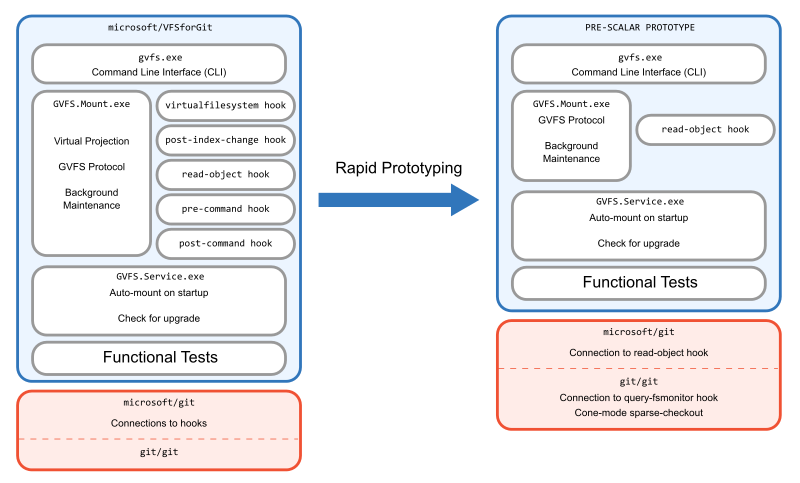
It was never meant to ship—compatibility with VFS for Git would have broken. The tests were cobbled together and sparse-checkout was disabled in them because they assumed a dynamic virtual filesystem. But once the clone was repeatable, the performance matched VFS for Git exactly. The proof of concept worked, so the real work began.
From Prototype to Product
With the prototype validated, the team set out to build a demoable MVP. That meant establishing the Scalar name and the microsoft/scalar repository, and instituting thorough reviews of all changes. The team deliberately chose a fresh repository rather than building on the VFS for Git codebase, avoiding lock-in to its architecture while preserving a clean commit history. The first task was renaming all references to the old project.
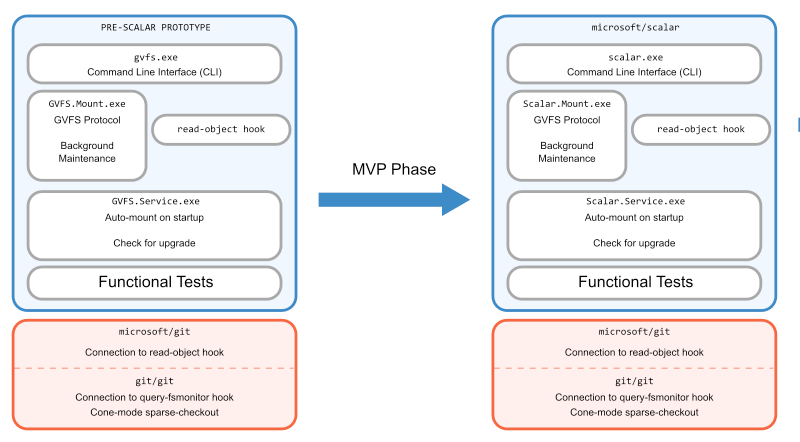
With the project scaffolded, the next challenge was testing. The prototype had relied on a full worktree to pass tests, but the MVP needed to prove the sparse-checkout environment itself. The team found a minimal set of patterns that covered all concrete paths used by the test suite, then ensured there were meaningful changes outside those patterns to exercise Git features like git merge and git cherry-pick. They also added tests that modified the sparse-checkout definition to verify Git would correctly populate missing files. This approach preserved all existing tests while adding new coverage for the sparse scenario.
Validating with Real Users
After finishing the code and test changes, the team ran performance numbers to match the prototype's results and created local clones to shake out lingering bugs. The real test, however, came from internal users. Demoing Scalar directly to the Office engineering system team, the developers asked pointed questions about fitness for purpose.
A chief concern was git checkout performance. In VFS for Git, git checkout is fast because it swaps concrete files for virtualized ones, deferring the cost of populating the filesystem until files are read. With Scalar, that population happens during git checkout itself, making the work upfront and visible. The engineering system team quickly dismissed this as a problem: because git checkout invalidates the local build, and builds in this monorepo can run for hours, developers typically run git checkout only at day's end to trigger an overnight build. It was never on the critical path. In fact, they valued the ability to disconnect from the network and browse the code without hitting a virtual file.
The plan was solid, but the monorepo team needed to build a bridge between their build system and sparse-checkout. While they did that, the Scalar team used the time to polish the product and improve installation and usability.
Simplifying the Architecture
With a stable test suite and several months of runway, the team revisited the architecture inherited from VFS for Git. That system required a background process to field filesystem requests for virtualized content — a process that created the notion of a "mounted" repository with gvfs mount and gvfs unmount commands. Many features had been bundled into that process simply because it existed. Scalar could do without it.
With the virtual filesystem already removed, two responsibilities remained in the mount process: background maintenance and object downloads over the GVFS protocol. The team moved maintenance duties into Scalar.Service, an existing global singleton process with Windows and macOS versions, making that shift quickly. Object downloads were more involved. The old design used a custom read-object hook installed by scalar clone, which communicated with the mount process to request objects from the server one at a time.
The replacement was a tool built directly into microsoft/git that performs missing-object queries via the GVFS protocol, sitting beneath the code that handles Git's partial clone feature. This positioning allowed batched requests — a clear improvement over the hook's single-object limit — and let improvements to the tool benefit partial clone users generally. Once those pieces moved out, there was nothing left in the mount process, so the team deleted it along with the old Git hook.
The result was a leaner architecture with fewer moving parts, ready for internal shipping.

Finding a Wider Audience
After the public announcement of Scalar, the team saw an opportunity beyond the monorepo use case. By extending scalar clone to fall back to Git's partial clone when a remote didn't speak the GVFS protocol, the command became useful against any Git remote. This marked a turning point: the original goal was met, but the broader potential shifted focus from the .NET project to contributing features upstream to Git itself.
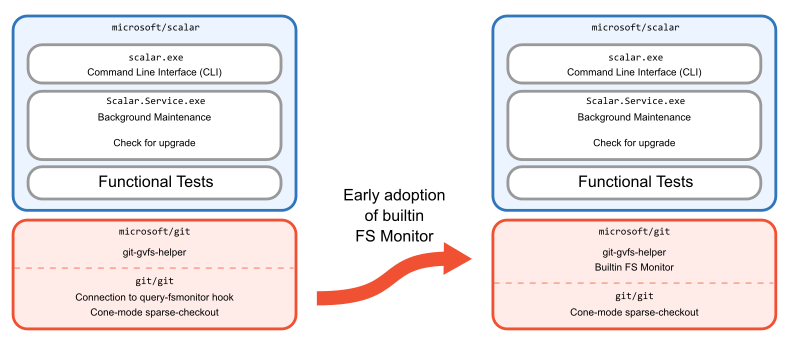
One early realization concerned the filesystem monitor. The current approach required a third-party monitor and a hook installed by scalar clone. Moving the monitor into Git would simplify installation, reduce the complexity of scalar clone, and improve performance. The team began building Git's builtin filesystem monitor, testing early versions in microsoft/git while the Git community reviewed them.
Maintenance Moves to Git
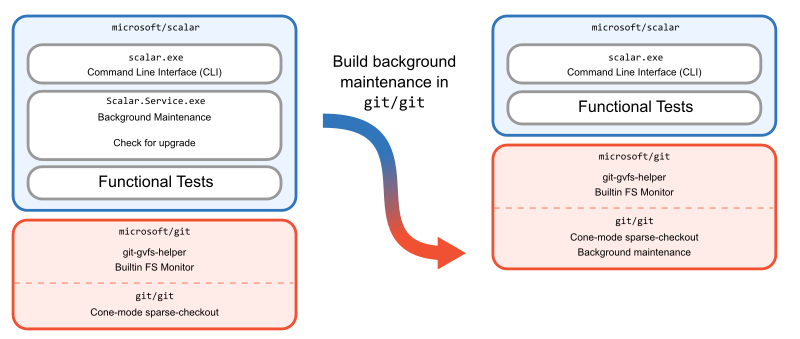
Background maintenance had always been handled by a service running scheduled Git commands. That service dated back to VFS for Git and worked on Windows and macOS, but the Office team's need for Linux clients exposed a problem: porting the .NET service to Linux would be difficult. Instead of building a new service, the team implemented background maintenance in Git itself, introducing git maintenance in Git 2.31. Once that was available, Scalar dropped its custom logic in favor of git maintenance run, and the service was removed entirely.
Rewriting in C
Removing the service prompted a fundamental question: Scalar was now merely a command-line interface on top of Git — why keep it as a separate C# project? The .NET tool carried release and shipping overhead, and requiring Office developers to install both the microsoft/git fork and another tool complicated every release. Moreover, most features had already been replaced by Git functionality, so a clean-slate rewrite offered a chance for a leaner architecture. Placing the Scalar CLI inside the Git codebase also allowed direct use of internal APIs — for instance, setting recommended config values without spawning git config processes.
The team ported the Scalar CLI to C in microsoft/git in fewer than 3,000 lines. The scale of the change is visible in the code counts: when the product code was removed from microsoft/scalar, the deletion was more than ten times the size of the addition to microsoft/git. The old repository was kept as a test suite to validate the new implementation.
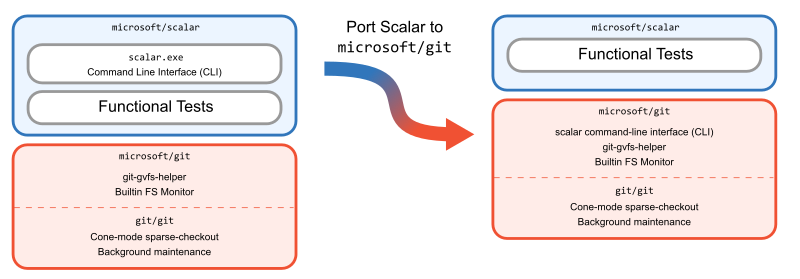
This was the largest rewrite in the journey, made possible by well-defined requirements that had been greatly simplified over time. The immediate benefit was tangible: internal customers could now receive updates by shipping only the microsoft/git fork. The trade-off was that users no longer could layer the .NET Scalar tool over any Git version; they had to adopt the fork to get the latest Scalar. Making Scalar useful to everyone, not just those willing to install a custom Git client, remained an open goal.
From contrib/ to core
Once Scalar was ported to C, it could live in microsoft/git alongside the rest of the project. The next question was whether it belonged in upstream Git at all. There was no precedent for a standalone executable in the Git project whose name did not start with git. That naming choice was more than cosmetic—it signaled a philosophical departure from the rest of the tooling.
Scalar wrapped a set of features—filesystem monitor, background maintenance, cone-mode sparse-checkout, blobless partial clones—that were individually useful to developers working in large repositories, but which many users didn't know how to enable or combine. The question was whether exposing those features as a dedicated executable was the right way to present them.
First stop: contrib/
To ease Scalar into the Git ecosystem, it first landed in Git's contrib/ directory. From the contrib/ README:
Although these pieces are available as part of the official git
source tree, they are in somewhat different status.  The
intention is to keep interesting tools around git here, maybe
even experimental ones, to give users an easier access to them,
and to give tools wider exposure, so that they can be improved
faster.
The contrib/ version required some adjustments relative to what shipped in microsoft/git. Clones using the GVFS protocol were removed; blobless partial clones, which had been introduced as a fallback for those clones, became the default. References to Scalar in the GitHub Actions workflow—including execution of the microsoft/scalar test suite—were stripped out to keep contrib/ separate from the main Git repository.
Living in contrib/ had its costs. Building and installing Scalar meant building Git from source, then separately navigating into contrib/scalar/ and building that tree as well. The separate build and test process also left Scalar vulnerable to breakage from changes elsewhere in Git. Still, that arrangement gave the project room to finish its feature set and settle on a long-term plan.
Defining what Scalar is for
As the possibility of upstreaming Scalar became real, proposals for its final form varied widely. One idea, floated in the original RFC, was to dissolve Scalar into new git commands and options to existing ones. Another suggestion was to place scalar in a dedicated subdirectory of the Git tree, similar to gitk. A third option was to turn it into a built-in command like git scalar—not to mention deeper questions of maintenance and how the tool fit Git's overall direction.
Near feature completion, with the drawbacks of contrib/ weighing on the project, the maintainers stepped back. A proposal outlined a three-part approach:
- Finish adding large-repository performance features to Scalar.
- Move the parts of Scalar that benefit all Git users into built-in commands and/or options.
- Relocate Scalar into the root Git tree, built and installed as a standalone executable next to
git.
This roadmap reflected a shift in how Scalar was framed within Git. Originally, like VFS for Git before it, Scalar carried its own opinions about repository configuration and workflow. As those features were folded into Git or adjusted to align with upstream conventions, only the parts specific to configuring large repositories remained. Git had a gap on the user-experience side of its performance features—a way to tie those features together for the repositories that need them most—and Scalar filled it.
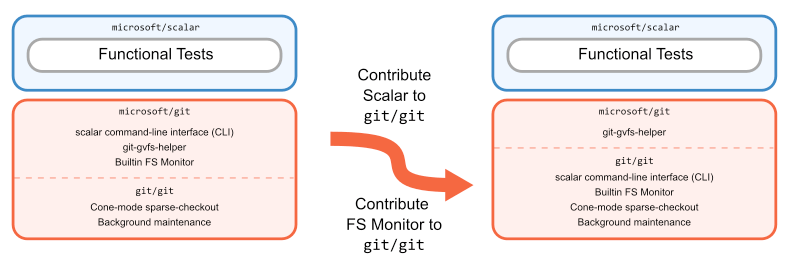
The plan proceeded mostly as written. Scalar gained a few more impactful features, notably built-in FSMonitor. Features with broad appeal, like the repository diagnostics in scalar diagnose, were extracted into new or existing Git commands. Finally, Scalar moved out of contrib/ and into the main build of the repository. Three upstream patch series later, Scalar became part of core Git in time for the v2.38.0 release.
The path forward
Scalar's history is one of repeated planning and redesign, first as a feature of microsoft/git, then as a contrib/ tool, and finally as a first-class part of Git. That process is one example of the path an open source project can take to reach users.
Today Scalar is fully integrated into Git, but its work is not finished. Large-repository performance remains an active area of development, and Scalar will continue to evolve alongside it. For now, it stands as the most direct route to unlocking Git's performance features on the largest codebases.



