
The Shape Of A Local-First App
Here’s the mental model that changed everything for me: local-first is Git for application data. Every client keeps a complete replica of the data it needs. Writes touch that replica immediately. Sync happens later, in the background. The server still matters, but it’s a sync peer, not a gatekeeper.
In practice, one function call illustrates the shift. On a classic stack, adding a task means a full request/response dance: POST to the API, wait, update local UI state, and hope nothing failed. In a local-first world, you write to a local database. The UI reflects that state instantly because it reads from the same store. The sync engine sorts out propagation later. There’s no loading spinner, no optimistic-update rollback, because there’s no round-trip to be pessimistic about.
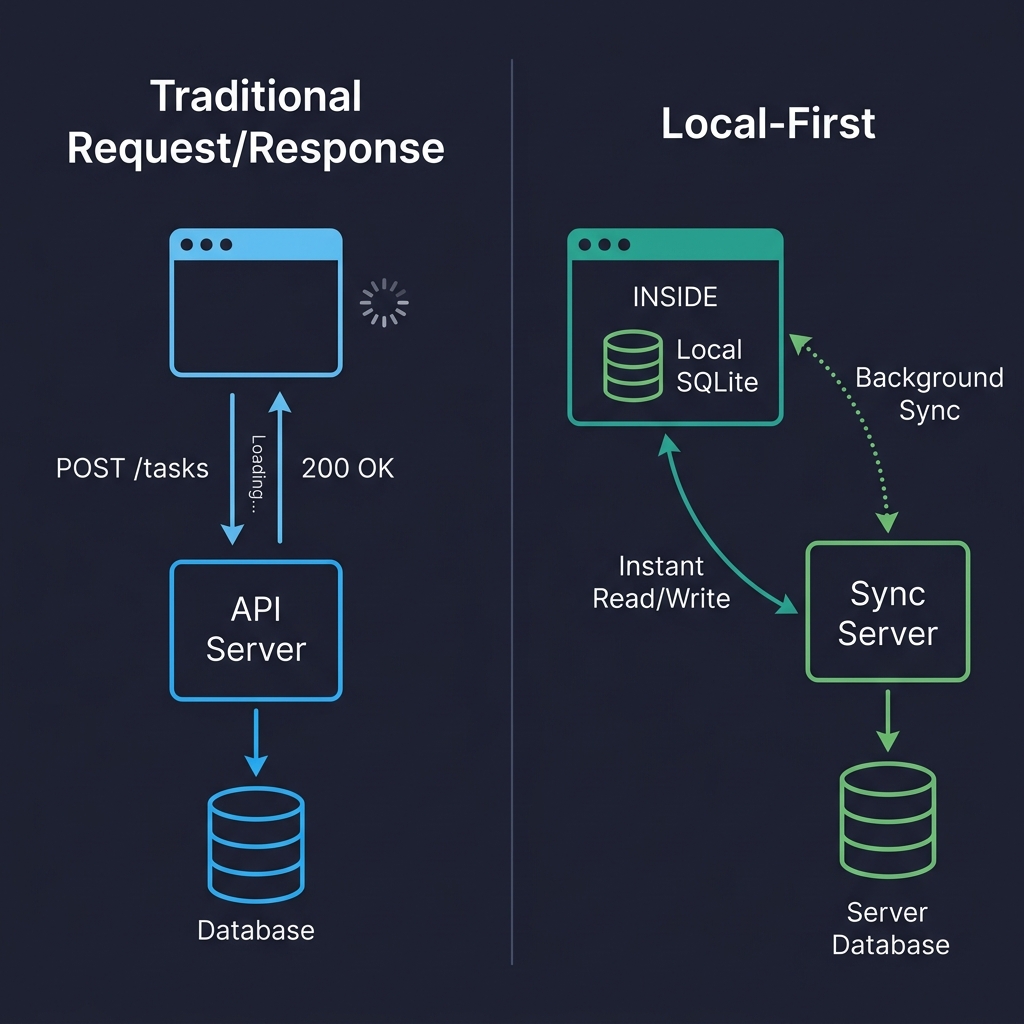
This changes more than the networking layer. When the local database is the source of truth for the UI, you don’t need fetching libraries or client-side state stores for server data. Routing no longer triggers API calls. Authentication gets reworked because the server doesn’t vet every read.
Before You Commit: Where Not To Use This
I’ll be direct: local-first is not a universal upgrade. I burned six weeks on an internal analytics dashboard before a colleague pointed out the obvious flaw — the data was generated server-side, and there was nothing for the client to own.
The pattern fails when data originates on the server. Analytics, social feeds, and search results are server products; an API client is the correct architecture. It also breaks for systems that need strong transactional guarantees. Stocking, payments, and inventory require a single authoritative database with ACID semantics; you don’t want eventual consistency deciding who gets the last item.
There are softer no-go zones too. A simple CRUD admin panel used by five people on a good network doesn’t need a sync engine, and a server-generated dataset that can’t fit on a device is physically impractical. The sweet spot is user-generated data that benefits from instant response, survives connectivity loss, and respects privacy — note-taking, collaborative editing, project management, and field apps. And you don’t need to commit wholesale: local-first works beautifully as a single feature (offline drafts, collaborative notes) inside an otherwise traditional application.
Client-Side Storage In 2026
The real story this year is SQLite running in a browser tab. Forget localStorage: it’s synchronous, capped around 5–10 MB, and stores only strings. IndexedDB works everywhere but has an API I’d rather not touch. The practical path is SQLite compiled to WebAssembly, persisted to the Origin Private File System (OPFS). That combination yields genuine transactional SQL, full indexes, and real queries living on the device. A sandboxed file system gives you fast synchronous access inside Web Workers — exactly what SQLite needs. Without OPFS, SQLite ran in-memory and manually saved to IndexedDB; it worked only if you squinted.
Initialization with a library like wa-sqlite looks like a normal database setup, but you’ll learn to treat access carefully. In production, I serialize every write through a queue and log failed statements (scrubbed of PII) to Sentry — debugging a browser-resident database blind is unbearable.
import { SQLiteAPI } from 'wa-sqlite';
import { OPFSCoopSyncVFS } from 'wa-sqlite/src/examples/OPFSCoopSyncVFS.js';

async function initDatabase() {
  const module = await SQLiteAPI.initialize();
  const vfs = new OPFSCoopSyncVFS('pm-tool-db');
  await vfs.initialize(module);

  const db = await module.open_v2('workspace.db');

  // HACK: wa-sqlite doesn't handle concurrent writes well on Safari,
  // so we serialize through a queue. See vlcn-io/wa-sqlite#247
  await module.exec(db, `PRAGMA journal_mode=WAL`);

  await module.exec(db, `
    CREATE TABLE IF NOT EXISTS tasks (
      id TEXT PRIMARY KEY,
      title TEXT NOT NULL,
      status TEXT DEFAULT 'backlog',
      assignee_id TEXT,
      project_id TEXT NOT NULL,
      position REAL DEFAULT 0,
      created_at TEXT DEFAULT (datetime('now')),
      updated_at TEXT DEFAULT (datetime('now'))
    )
  `);

  return db;
}
The browser quirks will bite you. I lost two days to a Safari 18 issue where createSyncAccessHandle() failed silently in some iframe contexts on Safari. There was no error, no warning — it just never worked. The fix was falling back to IndexedDB-backed persistence on that browser, slower but functional. Reports suggest Safari 26 resolves it, but I’m still verifying.
| Storage | Good For | Watch Out For |
|---|---|---|
| IndexedDB | Broad compatibility, moderate data | Terrible DX, no SQL, verbose |
| OPFS + SQLite WASM | Relational data, complex queries, serious apps | Safari quirks, ~400KB bundle addition |
| PGlite (Postgres in WASM) | Full Postgres compatibility on client | Newer, larger bundle, still maturing |
I also evaluated cr-sqlite, which adds CRDT columns inside SQLite. The idea is compelling, but in late 2025 it felt too fragile for production: surprising merge results made debugging painful. That’s a library I’m watching rather than shipping.
Two Approaches: CRDTs And Merging
You need a strategy for reconciling concurrent edits by definition of storing data in many places, and this is where the real thinking starts. The most prominent option is CRDTs (conflict-free replicated data types). They let arbitrary clients edit documents without coordination, then blend those edits deterministically.
A CRDT keeps a strict internal rule for merging: each value carries metadata that disambiguates conflicting writes. Collaboration never blocks because writes need no central permission — both sides edit, sync in the background, and converge automatically.
Replicating a conventional document database, like CouchDB/PouchDB does, is the alternative. The pattern there is “last-writer-wins” on conflicts unless you add logic for merging richer data structures. The sync model is more relaxed and tolerates slower networks better, since arrays and revisions are stored for later transfer rather than streamed live.
The Server Stack
Local-first does not remove backend work; it repositions it. You hire your own PouchDB-compatible sync endpoint or a turnkey system that talks CRDTs and Multiplayer over the wire. The server’s authority is limited to authentication, ACLs, and durability. It becomes a parking lot for replicas rather than the only origin of truth.
Choosing the client memory layer is only one of several early forks. If you want PouchDB’s offline to cloud sync out-of-the-box, the browser world has you covered. For stronger data richness, SQLite plus your wa-sqlite or cr-sqlite stack becomes practical once the Cloudflare D1 SQLite protocol and similar services stabilize for distributed SQL sync.
The tradeoff is immediate. With a conventional backing server that bridges a cloud database and replicas, the client only writes to its local database — replication runs transparently to the remote stack. Need direct browser-to-browser sessions or offline sharing? Then CRDTs shine, because merging and conflict resolution run in the client itself. Just weigh the increased client complexity and transport costs. Check your table stakes before you pick a camp, and know that your app’s “untethered” moment will come from backing-stack choices, not from cutting the server loose entirely.
Sync Is Where Local-First Gets Real
Keeping data on the device is straightforward. Keeping multiple copies of that data consistent across devices and users is the actual engineering problem. When several replicas can change the same data independently, you need a strategy for reconciling those changes. Four approaches dominate, and three of them are worth serious consideration.
CRDTs (Conflict-Free Replicated Data Types) are structures designed so concurrent edits always merge without conflicts, as a mathematical guarantee. Yjs is the leading JavaScript implementation, and it excels at real-time collaborative text editing. Setting up a shared Yjs document is direct:
import * as Y from 'yjs';
import { WebsocketProvider } from 'y-websocket';

const ydoc = new Y.Doc();

const provider = new WebsocketProvider(
  'wss://sync.our-app.dev',
  'workspace-a1b2c3d4',
  ydoc
);

const tasks = ydoc.getMap('tasks');

// Add a task
const task = new Y.Map();
task.set('title', 'Review Q3 roadmap draft');
task.set('completed', false);
task.set('assignee', 'maria');
// TODO: type this properly once; yjs exports better TS types
// for nested maps. For now, this works fine.
tasks.set('f47ac10b-58cc-4372-a567-0e02b2c3d479', task as any);

tasks.observeDeep(() => {
  // Re-render UI. In practice, I debounce this to ~16ms
  // because observeDeep fires a LOT during active collaboration
  renderTaskList(tasks.toJSON());
});
Automerge is the other major CRDT library, built on Rust with a document-oriented model. Teams that use it tend to stay loyal. Loro, a newer Rust-based option, claims better performance, but hasn't seen production use in my work. For most applications that don't need collaborative document editing, database replication is usually the better fit: replicate rows between a server database like Postgres and a client database like SQLite, with a sync engine managing the details.
PowerSync implements this model well, offering one-way replication from Postgres to client SQLite plus a defined path for writing mutations back. ElectricSQL aims higher with full active-active sync between Postgres and SQLite. In my evaluations during early 2026, PowerSync felt more stable, though ElectricSQL's reach is more compelling if they deliver on it. Triplit takes a different approach entirely: a full-stack database with sync built in, so you stop thinking about separate client and server databases. A weekend prototype impressed me, but I haven't pushed it further.
Event sourcing — syncing a log of mutations rather than current state — is what LiveStore adopts. I find it intellectually appealing but rarely practical. Reconstructing state from an event log adds complexity most apps don't need. For a task board, syncing rows is the right call. I've been told I'm wrong about this at conferences more than once, and event sourcing has passionate defenders. Perhaps I haven't built the right app for it.
Conflict Resolution Isn't the Bogeyman
Conflict resolution sounds terrifying until you've built a few systems that handle it. Then it becomes a manageable problem, provided you think carefully about your data model. Most developers overthink it.
Conflicts arise when two replicas change the same data without seeing each other's work. User A edits a task title offline on their phone while User B edits the same title on a laptop. When both come online, which edit survives? My earliest attempt was naive:
// My first try. Don't do this.
function resolveConflict(local: any, remote: any) {
  // just... take the remote one? sure?
  return remote;
}
The flaw is obvious: local changes vanish silently. User A's edit disappears after sync without any indication. That's unacceptable.
What actually works for most cases is last-write-wins (LWW) at the field level, not the record level. If User A changes the title and User B changes the due date, both survive because they touched different fields. A genuine conflict only occurs when both modify the same field, and then the later timestamp wins.
interface FieldValue {
  value: string | number | boolean;
  // ISO timestamp with enough precision to break most ties
  updatedAt: string;
  // Client ID as tiebreaker when timestamps match.
  // This happens more often than you'd think.
  clientId: string;
}

function pickWinner(a: FieldValue, b: FieldValue): FieldValue {
  const timeA = new Date(a.updatedAt).getTime();
  const timeB = new Date(b.updatedAt).getTime();
  if (timeA !== timeB) return timeA > timeB ? a : b;
  // Deterministic tiebreaker when timestamps match
  return a.clientId > b.clientId ? a : b;
}

// In practice, I apply this per-field across the whole record.
function mergeTask(local: Record<string, FieldValue>, remote: Record<string, FieldValue>) {
  const merged: Record<string, FieldValue> = {};
  const allKeys = new Set([...Object.keys(local), ...Object.keys(remote)]);
  for (const key of allKeys) {
    if (!local[key]) { merged[key] = remote[key]; continue; }
    if (!remote[key]) { merged[key] = local[key]; continue; }
    merged[key] = pickWinner(local[key], remote[key]);
  }
  return merged;
}
In production, this handles roughly 95% of conflicts with no user-visible problems. For remaining cases, like two people editing the same text field, LWW means one edit silently wins. For a task title, that's usually fine. For a document body, it isn't — that's where CRDTs belong.
A subtler issue appears after you've handled structural conflicts: semantic conflicts. Data merges cleanly, but the merged result is nonsense. Two offline users book the same 2 PM meeting slot with different meetings. Field-level merging accepts both writes because they target different records. No structural conflict exists, yet you have a double-booking your merge logic can't detect.
Semantic conflicts demand application-level validation on the server during sync. Your sync engine merges data structurally, but your server must enforce domain invariants before accepting the result. The pattern I've settled on, after getting it wrong twice: validate on the server during write-back, but flag violations rather than rejecting them.
interface SyncViolation {
  type: 'scheduling_conflict' | 'capacity_exceeded' | 'stale_assignment';
  recordId: string;
  description: string;
  // The conflicting records so the client can show context
  conflictingRecords: string[];
  // When was this violation detected
  detectedAt: string;
}

async function validateSyncBatch(
  mutations: SyncMutation[],
  serverDb: Database
): Promise<{ accepted: SyncMutation[]; violations: SyncViolation[] }> {
  const accepted: SyncMutation[] = [];
  const violations: SyncViolation[] = [];

  for (const mutation of mutations) {
    if (mutation.table === 'calendar_events') {
      // Check for double-booking
      const overlapping = await serverDb.query(
        `SELECT id, title FROM calendar_events
         WHERE room_id = ? AND id != ?
         AND start_time < ? AND end_time > ?`,
        [mutation.data.room_id, mutation.data.id,
         mutation.data.end_time, mutation.data.start_time]
      );

      if (overlapping.length > 0) {
        violations.push({
          type: 'scheduling_conflict',
          recordId: mutation.data.id,
          description: `Conflicts with "${overlapping[0].title}"`,
          conflictingRecords: overlapping.map(r => r.id),
          detectedAt: new Date().toISOString()
        });
        // Still accept the write, but flag it
        // The alternative is rejecting it, but then the user's
        // local state and server state diverge, and that's worse
        accepted.push(mutation);
        continue;
      }
    }
    accepted.push(mutation);
  }

  return { accepted, violations };
}
The key decision — one I debated extensively — is accepting the conflicting write and flagging it instead of rejecting it. Rejection creates a state divergence: the client holds a record the server refuses, leading to ghost records users can't delete because they don't exist server-side. That was a nightmare to recover from.
The alternative works: the server accepts the write, stores the violation, and syncs it back to the client. The client then shows a non-blocking notification: “Your meeting ‘Q3 Planning’ conflicts with ‘Design Review’ in Room B at 2 PM. Tap to resolve.” Tapping reveals both meetings, and the user's resolution is a normal write that syncs back.
This isn't perfect. A window exists between violation creation and resolution where both conflicting records exist. For meeting rooms, that's tolerable. For inventory management where two people "buy" the last item, that window is unacceptable — which is why local-first is wrong for systems requiring strong transactional consistency.
This pattern is still evolving. The violation table grows if notifications go ignored (I expire them after 72 hours, which feels arbitrary). Deciding which invariants require server validation means maintaining a parallel set of business rules outside client-side logic. It's not elegant, but it works. I'd welcome a cleaner approach.
For CRDTs like Yjs, character-level conflict resolution for text works remarkably well: two people typing in the same paragraph see both sets of characters in sensible order. But CRDT merging of structured data — maps, arrays, nested objects — can surprise you. I've watched a Yjs-backed task list duplicate items after a merge because two users reordered the same list offline, and the CRDT's list merge semantics interleaved their orderings. Technically correct, practically confusing. We added a post-merge de-duplication step, which felt hacky but solved it.
Should you surface conflicts to users, Git-style? Almost never for typical app data. Users want the app to handle it. The exception is high-stakes content: legal documents, medical records, anything where a silently dropped edit causes real harm.
The Tool Landscape, Mid-2026
This space moves quickly, so take these assessments as a snapshot that may age poorly.
Yjs is the most mature CRDT library: production-ready, a large community, and integrations with major collaborative editors including TipTap, BlockNote, and Lexical. For real-time collaborative editing, start here.
Automerge is solid and Rust-backed, favoring a document-oriented model over Yjs's approach. Fewer integrations, but the core is well-engineered and fits document-shaped data well.
PowerSync suits teams with an existing Postgres backend adding offline support. It's production-ready with good documentation and an easy mental model: Postgres syncs to client SQLite, client writes flow through a defined upload path. In my app, initial sync for a workspace with roughly 5,000 tasks took about 1.2 seconds on a decent connection and about 3.5 seconds on throttled 3G. Acceptable for us.
ElectricSQL pursues active-active Postgres-to-SQLite replication with "shapes" governing what data syncs to which client. The developer experience in prototypes is excellent, but my February 2026 production evaluation revealed rough edges around shape management and reconnection behavior. I chose PowerSync instead and plan to revisit ElectricSQL.
Triplit left a strong impression from a weekend prototype: full-stack database with sync built in and a pleasant TypeScript API. I'd want production load testing before committing.
Zero from Rocicorp (the Replicache team) takes a query-based approach to sync, diverging from row replication. Replicache was sunset in favor of Zero, which signals how fast approaches evolve here. Worth watching, but I wouldn't build production on it yet.
TinyBase offers a lightweight reactive store, ideal for smaller apps or prototypes. I used it for a personal reading tracker and liked it, but wouldn't scale it to a team product.
PGlite, Postgres compiled to WASM, is remarkable: identical SQL on client and server. Combined with ElectricSQL, identical queries could run everywhere. I suspect that's the long-term direction, though bundle size and memory footprint still trouble mobile browsers.
The Replicache sunset taught me a lesson: don't bet your architecture on a single tool from a small company without a fallback. I keep my sync layer abstracted enough to swap engines in weeks, not months. That sounds like premature abstraction, but in a space this young, it's prudence.
What a Local-First Stack Looks Like in Practice
The layer diagrams in most blog posts don’t reflect what real code looks like. In my current collaborative project management tool, the stack breaks down like this:
- UI: React components that never call
fetch()for data reads. - Query layer:
useLiveQueryhooks that subscribe to local SQLite and re-render automatically. - Local database: SQLite via wa-sqlite, persisted to OPFS.
- Mutation layer: Plain
INSERT/UPDATE/DELETEstatements against local SQLite. - Sync: PowerSync replicating between local SQLite and Postgres.
- Server: Postgres, a Node.js auth service, and a sync validation layer.
The component code becomes almost absurdly simple:
import { useLiveQuery } from '@powersync/react';
import { db } from '../lib/database';

function TaskBoard({ projectId }: { projectId: string }) {
  const tasks = useLiveQuery(
    `SELECT * FROM tasks WHERE project_id = ? AND archived = 0 ORDER BY position`,
    [projectId]
  );

  async function addTask(title: string) {
    await db.execute(
      `INSERT INTO tasks (id, title, project_id, position, created_at)
       VALUES (?, ?, ?, ?, datetime('now'))`,
      [crypto.randomUUID(), title, projectId, tasks.length]
    );
    // That's it. useLiveQuery picks up the change automatically.
    // No invalidation, no refetch, no loading state.
  }

  // No isLoading check. Data is local. It's always there after the first sync.
  return (
    <div>
      {tasks.map(task => <TaskCard key={task.id} task={task} />)}
      <NewTaskInput onSubmit={addTask} />
    </div>
  );
}
The equivalent React Query + REST version would be at least double the code, with loading states, error states, optimistic updates with rollback, and cache invalidation. That complexity is gone.
Authentication and the Sync Boundary
Auth in a local-first app works like traditional auth — JWTs, OAuth, session management — but the token authenticates the sync connection, not each request. Offline access works because the data is already local and was authenticated when it originally synced.
Authorization is where things get harder. You cannot sync the whole database to every client and rely on client-side checks to hide unauthorized rows. Anyone can open DevTools and inspect the local SQLite file. The client is not a trust boundary.
Authorization must be enforced at the sync layer. PowerSync uses “sync rules” to determine which rows go to which clients; ElectricSQL calls them “shapes.” Either way, the server only sends authorized data, and write operations are validated before they reach Postgres. Unauthorized mutations are rejected during sync.
End-to-end encryption pairs naturally with local-first. Because data sits on the client, it can be encrypted before syncing, leaving the server to store and relay unreadable blobs. Apps like Anytype do this. We haven’t implemented E2EE in our current app yet, but it’s on the roadmap.
Schema Migrations Across Thousands of Clients
Server-side migrations run against one database you control. On the client, every user has their own database that could be running any version of the schema, depending on when they last opened the app.
I use a simple migration runner that checks a version number at app startup:
const MIGRATIONS = [
  {
    version: 1,
    sql: `
      CREATE TABLE IF NOT EXISTS tasks (
        id TEXT PRIMARY KEY,
        title TEXT NOT NULL,
        status TEXT DEFAULT 'backlog',
        project_id TEXT NOT NULL,
        created_at TEXT DEFAULT (datetime('now'))
      );
    `
  },
  {
    version: 2,
    // Added priority and due_date in sprint 4
    sql: `
      ALTER TABLE tasks ADD COLUMN priority INTEGER DEFAULT 0;
      ALTER TABLE tasks ADD COLUMN due_date TEXT;
    `
  },
  {
    version: 3,
    // Denormalized assignee name for offline display.
    // Yes, I know this is a trade-off. The JOIN was killing
    // performance on low-end Android devices.
    sql: `
      ALTER TABLE tasks ADD COLUMN assignee_name TEXT DEFAULT '';
    `
  }
];

async function runMigrations(db: Database) {
  await db.execute(`
    CREATE TABLE IF NOT EXISTS _schema_version (version INTEGER)
  `);

  const rows = await db.execute('SELECT version FROM _schema_version');
  const currentVersion = rows.length > 0 ? rows[0].version : 0;

  for (const migration of MIGRATIONS) {
    if (migration.version > currentVersion) {
      console.log(`Migrating local DB to v${migration.version}`);
      await db.execute('BEGIN');
      try {
        await db.execute(migration.sql);
        await db.execute(
          'INSERT OR REPLACE INTO _schema_version (rowid, version) VALUES (1, ?)',
          [migration.version]
        );
        await db.execute('COMMIT');
      } catch (err) {
        await db.execute('ROLLBACK');
        // In production, this fires a Sentry alert with the
        // migration version and error details
        throw err;
      }
    }
  }
}
The design principle is to keep migrations additive. New columns with defaults, new tables — no renames or drops unless absolutely necessary. Old clients will still sync data, and the server needs to handle the mismatch. I once dropped a column that an older client was still writing to; about 200 users hit silent sync failures over a weekend. I won’t make that mistake again.
Current Recommendations for a New Project
For a collaborative app with real-time features and offline support, I’d start with React, PowerSync, SQLite via wa-sqlite persisted to OPFS (IndexedDB as a Safari fallback), and Supabase for Postgres, auth, and row-level security. I’d only reach for Yjs if I needed rich text collaboration — CRDTs add real complexity to a data model.
For simpler offline-first needs where collaboration is secondary, I might skip the sync engine entirely and write a custom layer that pushes and pulls from a REST API. For basic cases, a hand-rolled sync you fully understand beats a general-purpose engine that adds concepts you don’t need.
I wouldn’t use ElectricSQL or Zero in production today. They aren’t bad projects — they just need another 6-12 months of maturity before I’d stake an on-call rotation on them. Early Meteor adoption taught me to be cautious about novelty risk in infrastructure.
Performance Realities: Fast Reads, Costly First Sync
Reads are effectively instant. Querying SQLite locally for 500 tasks takes under two milliseconds on an M2 MacBook and about eight milliseconds on a mid-range Android phone. No network, no spinner, no loading state.
Writes are instant too. The INSERT runs locally, the UI reacts, and sync happens in the background. Users perceive writes as immediate because they are.
The real cost is initial sync. A workspace with 5,000 tasks, 200 projects, and 50 users takes about 1.2 seconds to bootstrap on broadband and four to five seconds on slow mobile. I mitigate this with partial sync — only syncing the user’s active projects — and a one-time “Setting up your workspace” screen. Incremental updates after that are small.
Bundle size is the other issue. SQLite compiled to WASM adds roughly 400KB gzipped to the JavaScript bundle, which hurts time-to-interactive on mobile. I lazy-load the database module with dynamic import() to keep it off the critical render path.
Memory constraints on mobile browsers are still unsolved. SQLite WASM runs in memory, and aggressive Android browser limits can crash tabs with large databases. The best mitigation is keeping the synced dataset small and pruning aggressively.
Testing Local-First Applications
Testing local-first apps is harder than traditional ones, and the tooling isn’t mature yet. What works for me:
- Unit tests for merge logic — these are pure functions and easy to test.
- Integration tests with two in-memory clients that verify convergence after concurrent edits.
- Playwright E2E tests using
context.setOffline(true)to simulate offline/online transitions.
The hard cases are bugs that only surface with specific conflict timing. When a user reports “lost its description,” it’s nearly impossible to reproduce without knowing the exact offline edit and sync sequence. I now log sync events in detail — exactly what was sent, received, and how conflicts resolved — and ship that to observability. It helps, but it’s not clean.
Property-based testing with fast-check genuinely works for CRDT logic: generate random operation sequences, apply them in random orders, and assert convergence. I wish I’d adopted it earlier.
What I’m Watching and What Worries Me
PGlite — full Postgres in the browser — suggests a future where the client/server data distinction dissolves. You’d write SQL that runs anywhere, with sync as a runtime concern rather than an architectural decision. We’re not there yet, but the direction is clear.
The convergence of local-first and AI is also interesting. On-device models, local data, cloud AI only with consent, and encryption — the privacy pitch of “your data never leaves your device” becomes a real market differentiator as AI integrates deeper into software.
What worries me is fragmentation. Every sync engine has its own protocol; there is no standard. If ElectricSQL shut down, migrating to PowerSync wouldn’t be trivial. I abstract my sync layer partly for that reason, but it still makes me nervous.
The web has standards for nearly everything. We don’t have one for sync, and I don’t see one emerging soon.
I also worry about the complexity budget. Local-first adds real architectural weight: sync engines, conflict resolution, client migrations, partial replication, and sync-boundary auth. For an experienced team building the right kind of app, that investment pays off. For a simple CRUD app, it’s a trap.
A developer named Kevin at a local-first meetup in Berlin put it best:
“The best architecture is the one your team can debug at 2 AM.”
If local-first makes your app faster and your team understands the sync layer, build with it. If you’re adopting it because it sounds cool but don’t yet understand the failure modes, build a prototype first and learn where it breaks.
I’m on my fourth local-first app — a collaborative planning tool for small teams with offline support and optional E2EE — and it’s the most ambitious yet. For anyone starting out, pick one feature that benefits from instant reads and offline writes, add local SQLite and reactive queries, and see how it feels. The reaction is usually: this is how it should have always worked.
Further Reading
- “Local-First Software” (Ink & Switch) — still the best starting point.
- “CRDTs: The hard parts” — Martin Kleppmann’s talks on CRDTs are excellent.
- localfirstweb.dev — a good tool directory.
- PowerSync Documentation
- ElectricSQL Documentation
- Yjs Documentation
- Automerge Documentation