
Identity management for machines and agents
Agentic AI and automated tooling accelerate development, but they also multiply the number of non-human identities that can authenticate to your infrastructure. OWASP's agentic AI threat list includes credential leaks, user impersonation, and privilege elevation—failures that can surface as data loss, denial of service, or compromise of sensitive systems.
These risks are fundamentally identity problems. Every API call, whether from a person, a script, or an autonomous agent, rests on three components:
- The principal — the entity making the request, such as a user via OAuth or an agent with an API token.
- The credential — the proof of identity, like an API token. A leaked credential lets anyone assume that identity.
- The policy — what the verified identity is permitted to do. A valid credential alone should not unlock every resource.
When these three pillars are managed separately, security gaps appear: a valid principal may hold a stolen credential, or a legitimate identity may carry overly broad permissions. The updates described below address each pillar in turn—detecting leaked credentials, giving visibility into OAuth-connected applications, and narrowing policy scope to specific resources.
Scannable API tokens and automated revocation
API tokens are a common leak vector, often ending up in public GitHub repositories. GitGuardian reported over 28 million secrets published to public repositories last year, with AI accelerating the rate of leaks fivefold. Once a token is exposed, anyone can use it until it is revoked.
To close that window, Cloudflare is introducing new token formats and partnering with credential scanning tools. New API tokens will carry a recognizable prefix and a checksum, making them easy for scanners to detect and statically validate. Existing tokens continue to work; generating a new token rolls it into the scannable format.

GitHub secret scanning
Cloudflare is participating in GitHub's Secret Scanning program. GitHub scans every commit in public and private repositories for the new Cloudflare token format. When a token is found in a public repository, GitHub verifies it via checksum, sends a webhook to Cloudflare, and the token is automatically revoked. The account holder is then notified by email so they can generate a replacement. For tokens found in private repositories, GitHub notifies the owner directly for manual cleanup.
DLP for Cloudflare One customers
Cloudflare One customers can extend the same credential protection beyond code repositories using the Credentials and Secrets DLP profile, which now recognizes Cloudflare API tokens:
- Network traffic — Cloudflare Gateway policies can detect and block Cloudflare API tokens in file uploads, outbound requests, or downloads.
- Outbound email — Microsoft 365 users can deploy the DLP Assist add-in to scan Outlook messages before delivery.
- Data at rest — Cloudflare CASB applies the same profile to scan files in connected SaaS apps like Google Drive, OneDrive, and Dropbox.
- AI traffic — Cloudflare AI Gateway scans both incoming prompts and outgoing model responses in real time against the same DLP profile.
Cloudflare is also working with additional open source and commercial credential scanners so that organizations are covered regardless of which scanning tool they use.
OAuth consent and revocation controls
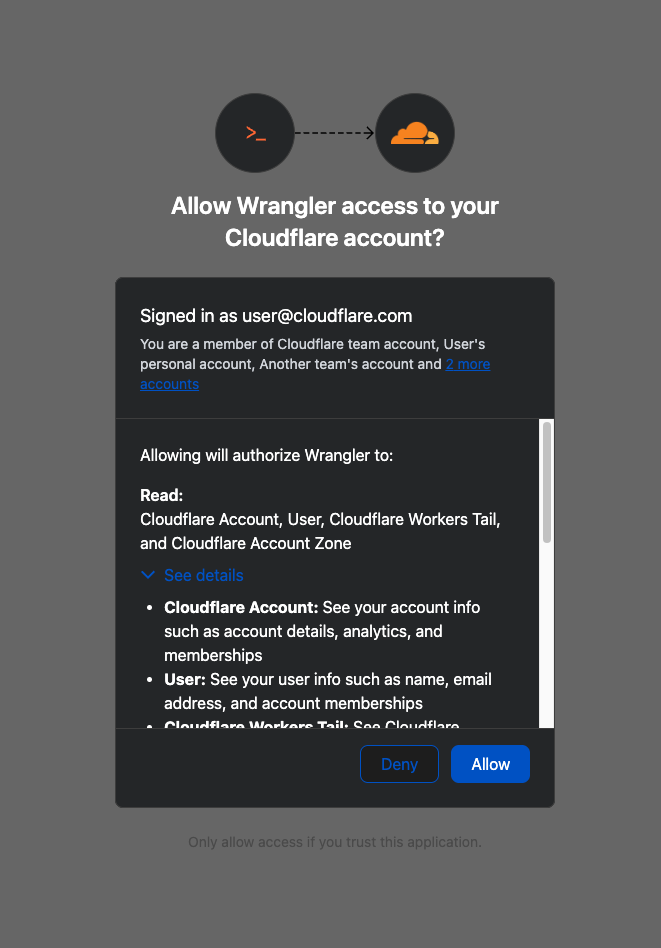
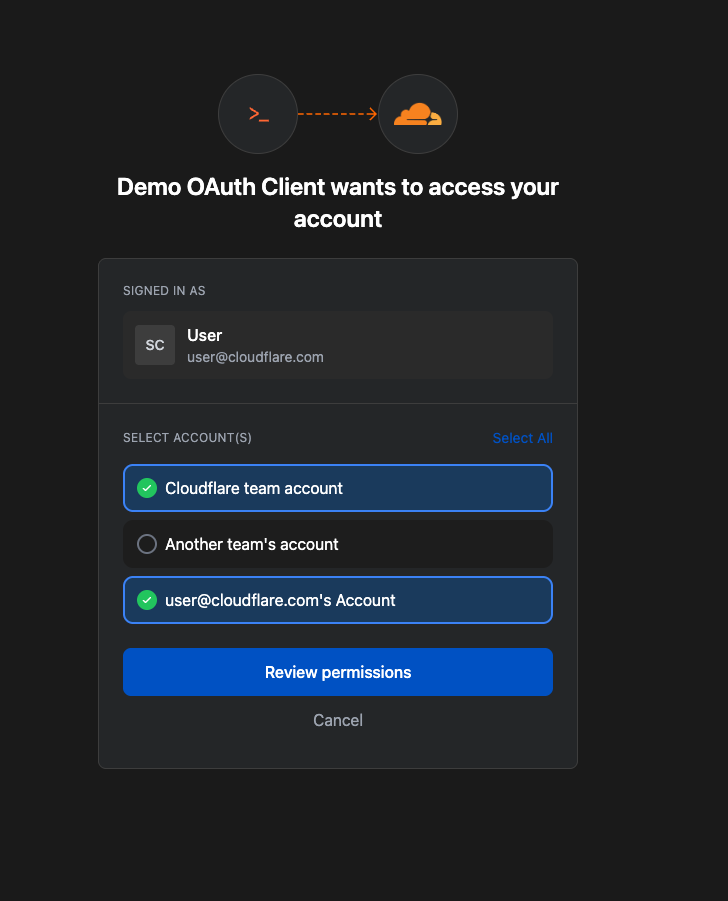
OAuth governs access for third-party platforms such as Wrangler. Previously, there was no central place to review which applications held OAuth access to an account, or what permissions they had been granted.
The OAuth consent screen now shows which third-party application is requesting access (including name, logo, and publisher), which scopes it is requesting, and which accounts it will be granted access to. This allows users to evaluate whether an application truly needs the permissions it asks for before approving the grant.
| Before | After |
|---|---|
 |
 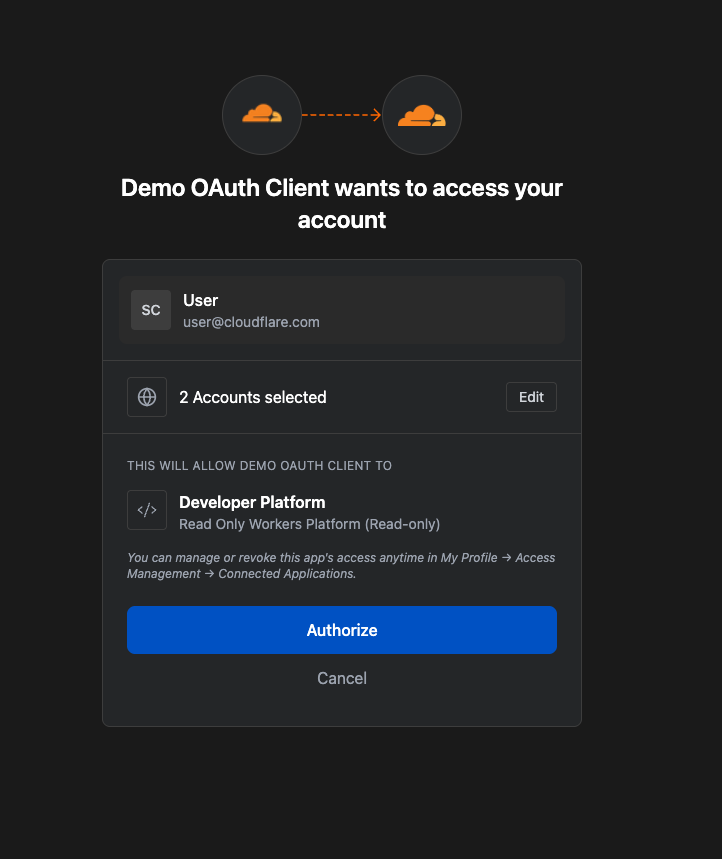 |
A new Connected Applications page in the dashboard provides an overview of all applications with OAuth access, the accounts and scopes associated with each, and the ability to revoke access at any time. This experience is available now under My Profile > Access Management > Connected Applications. Developers building OAuth integrations should monitor the Cloudflare Changelog for updates on registering their own OAuth apps.
Resource-scoped permissions
Scoping permissions to the resource level—rather than the entire account—is the third pillar. Cloudflare's RBAC system now supports resource-scoped permissions for:
- Access Applications
- Access Identity Providers
- Access Policies
- Access Service Tokens
- Access Targets
Permission policies consist of three components. The principal is the identity being granted access (user, API token, or agent). The role defines the permitted actions. The scope determines where those permissions apply—historically the entire account or individual zones, now extended to specific resources like a single Access Application or policy.

Additionally, new roles have been introduced at both the account and zone level. Account-scope roles include CDN Management, MCP Portals, Radar, Request Tracer, and SSL/TLS Management. Zone-scope roles include Analytics, Logpush, Page Rules, Security Center, Snippets, and Zone Settings. All resource scopes and new roles are available today through the Cloudflare Dashboard, API, or Terraform.
Least privilege, applied consistently
These changes give developers the granular controls required for a true least-privilege architecture. The principle is straightforward: whether a human administrator manages a zone or an automated agent deploys a Worker, it should be authorized to perform only its assigned job—nothing more. For enterprises, that expectation has never been negotiable, and these updates make it easier to meet across the full spectrum of users, apps, agents, and scripts accessing Cloudflare.
Three steps to tighten your security posture
Following this announcement, we recommend taking the following actions:
- Review your API tokens and reissue them with the new scannable token format as soon as possible.
- Review your authorized OAuth apps and revoke any that are no longer in use.
- Review member and API token permissions across your accounts, adopting the new account, zone, or resource-scoped permissions where appropriate to reduce your risk exposure.