Why Dropbox Runs Full Attack Simulations
Dropbox maintains a dedicated Offensive Security team that tests the company’s defenses using real-world adversarial techniques. The team’s work goes beyond traditional penetration testing, which typically stops once a vulnerability is found and exploited. The more difficult question is what happens afterward: can an attacker move laterally through internal environments, break additional security barriers, and exfiltrate data without triggering alarms—or at least without being stopped before reaching their objective?
Dropbox has invested heavily in hardening, detection, alerting, and response capabilities. Extensive instrumentation traces post-exploitation activity across the infrastructure. To measure how well those systems actually perform, the company recently ran a red team exercise with a third-party vendor, Syndis. The goals were to measure the steady-state of detection and alerting, and to gauge the company’s incident response once a breach was identified. Finding new ways into Dropbox systems was in scope, but even if none were found, the plan was to plant malware discretely to simulate the effects of a compromise without tipping off the internal Detection and Response Team.
A Zero-Day Discovery in Apple Software
The simulation took an unexpected turn. Syndis found vulnerabilities in Apple software used across Dropbox’s macOS fleet—and the issues affected more than just Dropbox. All Safari users running the latest version at the time were exposed. Chained together, the vulnerabilities allowed an attacker to execute arbitrary code on a victim’s machine simply by getting that person to visit a maliciously crafted web page. That is a zero-day exploit chain.
The issues were reported to Apple, which acknowledged them quickly and released fixes in about a month. That is notably faster than the industry standard of “within 90 days.” The vulnerabilities were assigned CVEs, and both Syndis and Dropbox validated the fixes.
Testing Defenses Against Real Exploits
The engagement served multiple purposes. Dropbox got to test its defensive posture against an adversary armed with a genuine zero-day chain, not a simulated one. The exercise also demonstrated how the security community benefits when researchers do the right thing: the same bugs that could have been used against Dropbox’s users were reported upstream and patched for everyone.
Dropbox protects the data of more than 500 million registered users and is aware that adversaries may develop zero-day exploits specifically to target the company. A powerful zero-day will likely gain an initial foothold regardless of hardening, which makes post-exploitation detection the critical control. Syndis noted that Dropbox “demonstrated admirable monitoring, detection, and incident response” during the engagement. Still, the company sees independent validation as an ongoing strategy rather than a one-time check, and expects to keep learning from each new exercise. Technical details on the Apple vulnerabilities and the validation of the fixes are covered in the Appendix.
Anatomy of the vulnerabilities
Syndis identified three distinct flaws in macOS that could be chained into a full exploit chain. Each was assigned its own CVE and patched by Apple on March 29, 2018.
Automatic mounting of disk images via Safari
CoreTypes maintains a list of "safe" Uniform Type Identifiers (UTIs) that Safari will automatically open, stored in LSRiskCategorySafe. The security researchers focused on one entry in particular: com.real.smil.
Querying the Launch Services database with lsregister shows this UTI is associated with the Real Player media application. Several file extensions map to it, including .smi. On macOS 10.12.6, the Disk Image Mounter application also claims an association with this extension. Although Disk Image Mounter declares com.apple.disk-image-smi for .smi files, the com.real.smil entry from CoreTypes takes precedence. The result: a web page can trigger the automatic mounting of a disk image without any user interaction beyond visiting the page.
$ touch a.smi
$ mdls a.smi | grep -e "kMDItemContentType\s\|kMDItemKind"
kMDItemContentType                 = "com.real.smil"
kMDItemKind                        = "Self Mounting Image"
CoreTypes Available for: OS X El Capitan 10.11.6, macOS Sierra 10.12.6
Impact: Processing a maliciously crafted webpage may result in the mounting of a disk image
Description: A logic issue was addressed with improved restrictions. CVE-2017-13890: Apple, Theodor Ragnar Gislason of Syndis
This issue was assigned CVE-2017-13890.
From mounted image to application launch
The bless utility sets volume bootability and startup options. One of its flags, --openfolder, is documented to "Specify a folder to be opened in Finder when the volume is mounted by the system." Syndis discovered that the behavior deviates from the documentation when the argument points to a loadable bundle—an application packaged as a directory ending in .bundle. Instead of opening the folder in Finder, the system launches the bundle as an application.
This converts the disk-image mount into an automatic application launch from a single web page visit. However, arbitrary code execution is still blocked by Gatekeeper, which restricts execution to apps from the App Store or signed by known developers. Launch Services enforces this check at launch time with an error dialog.
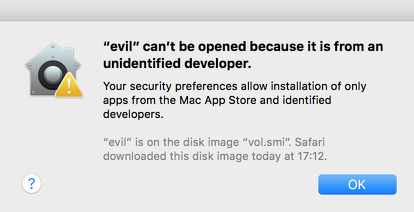
A Gatekeeper bypass became the missing piece needed to complete the chain. This issue was assigned CVE-2018-4176.
Disk Images Available for: OS X El Capitan 10.11.6, macOS Sierra 10.12.6, macOS High Sierra 10.13.3
Impact: Mounting a malicious disk image may result in the launching of an application
Description: A logic issue was addressed with improved validation. CVE-2018-4176: Theodor Ragnar Gislason of Syndis
Bypassing Gatekeeper
The error message from Gatekeeper indicated the blocked item was on a disk image downloaded by Safari. Syndis observed two anomalies that pointed the way around the restriction:
- Copies of signed application bundles—such as Terminal.app—placed on the disk image could be launched.
- Modifying the
Info.plistof a signed bundle does not invalidate its signature.
The Info.plist controls which file extensions an application handles. By editing it, an attacker can register new extensions and establish the app as the default handler for them. When the application launches, Launch Services registers the app into its database along with the associated extensions, verifiable via lsregister.
...
--------------------------------------------------------------------------------
Container mount state: mounted
bundle  id:            2740
        Mach-O UUIDs:  67FFA762-AB52-31F0-AC80-E72008760B13
        sequenceNum:   2740
        FamilyID:      0
        PurchaserID:   0
        DownloaderID:  0
        installType:   0
        appContainer:  #
        dataContainer: #
        path:          /Volumes/bundle/Terminal.app
        name:          Terminal
        displayName:   Terminal
...
        bundle flags:  apple-internal  has-display-name  launch-disabled  (0000000000000103)
...
                {
            CFBundleTypeExtensions =             (
                workingpoc
            );
            CFBundleTypeRole = invalid;
            LSIsAppleDefaultForType = 1;
        },
...
}
        library:       (null)
        schemesList:   ssh, telnet, x-man-page
...
        --------------------------------------------------------
        claim   id:            15108
                name:          (null)
                rank:          Default
                roles:         Viewer
                flags:         apple-default  apple-internal  doc-type
                icon:
                bindings:      .workingpoc
...
This grants the ability to register new file extensions and launch signed applications, but not yet to run attacker-controlled payloads. Terminal.app was the natural pivot, given its purpose of executing commands. Directly launching shell scripts still trips Gatekeeper due to the quarantine bit set on files downloaded by Safari.
The key insight: opening a file with a newly registered extension associated with the attacker's copy of Terminal bypasses the quarantine check. The file executes in the system's Terminal without any prompt. This issue was assigned CVE-2018-4175.
LaunchServices Available for: OS X El Capitan 10.11.6, macOS Sierra 10.12.6, macOS High Sierra 10.13.3
Impact: A maliciously crafted application may be able to bypass code signing enforcement
Description: A logic issue was addressed with improved validation. CVE-2018-4175: Theodor Ragnar Gislason of Syndis
The complete exploit chain
Syndis combined all three vulnerabilities into a two-stage exploit delivering arbitrary code execution to any user who visits a crafted web page in Safari:
- The first stage delivers a modified copy of Terminal.app, registered as the handler for a new file extension (
.workingpoc). A blank folder namedtest.bundlesits alongside it, set as the--openfoldertarget so the bundle opens automatically upon disk image mount—launching the modified Terminal without prompting. - The second stage is an unsigned shell script with the
.workingpocextension. Because the extension is now associated with the attacker's Terminal copy, opening it runs the script in Terminal without any Gatekeeper prompt.
Validating Apple's fixes
Apple addressed all three CVEs in the March 29, 2018 security update. Syndis verified the fixes across several macOS versions.
CVE-2017-13890
The com.real.smil UTI no longer appears in CoreTypes. A quick check confirms .smi files now resolve to the appropriate content type, and a comparison of the Launch Services database between 10.12.6 and 10.13.4 shows the change. Safari no longer auto-opens .smi files with Disk Image Mounter.
$ mdls a.smi | grep -e "kMDItemContentType\s\|kMDItemKind"
kMDItemContentType                 = "com.apple.disk-image-smi"
kMDItemKind                        = "Self Mounting Image"
Database comparison:
10.12.6
claim   id:            3804
                name:          Self Mounting Image
                rank:          Default
                roles:         Viewer
                flags:         apple-default  apple-internal  relative-icon-path  doc-type
                icon:          Contents/Resources/diskcopy-doc.icns
                bindings:      com.real.smil, .smi
10.13.4
claim   id:            22824
                name:          Self Mounting Image
                rank:          Default
                roles:         Viewer
                flags:         apple-default  apple-internal  relative-icon-path  doc-type
                icon:          Contents/Resources/diskcopy-doc.icns
                bindings:      com.apple.disk-image-smi, .smi
CVE-2018-4176
Passing a loadable bundle to bless --openfolder now behaves as documented: the folder opens in Finder instead of launching the app.
CVE-2018-4175
On 10.13.4, launching the second-stage script now produces a warning that the user has never launched this application before. Syndis considers this dialog sufficient notice, even in the hypothetical scenario where the first two vulnerabilities remained unpatched—a user prompted immediately after visiting a web page has been given a clear signal that continuing is unsafe.
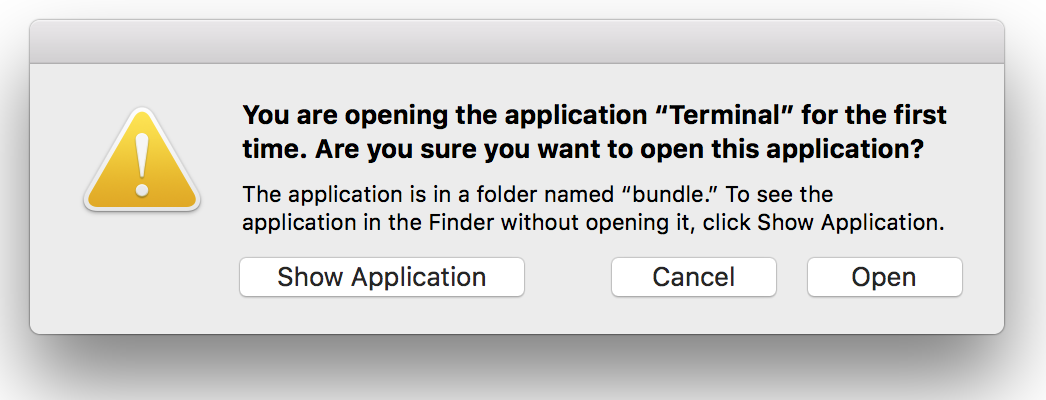
Additionally, the bundle flags for the modified Terminal no longer include launch-disabled in the Launch Services database after the user clicks Open.
...
--------------------------------------------------------------------------------
Container mount state: mounted
bundle  id:            2740
        Mach-O UUIDs:  67FFA762-AB52-31F0-AC80-E72008760B13
...
        path:          /Volumes/bundle/Terminal.app
...
        bundle flags:  apple-internal  has-display-name  (0000000000000003)
...
Timeline
- February 19, 2018—Vulnerabilities reported to Apple
- February 19, 2018—Apple acknowledges the report
- February 21, 2018—Proof of concept provided to Apple
- February 21, 2018—Apple confirms it is investigating
- March 29, 2018—Apple releases security updates