

Visual comparison is a useful but fragile form of automated testing. Playwright ships with built-in screenshot assertions, yet the surrounding configuration — baselines, crawlers, viewport handling — is where most of the work lives.
Screenshot tests establish a baseline image set that later runs compare against. Their results depend on factors you cannot fully control, such as timing, variable hardware resources, or randomized content, and the baselines must be persisted between runs — meaning the test code alone does not fully describe expectations. Playwright's visual comparison feature relies on very few external packages, which keeps the dependency footprint small.
Project layout and configuration
Although npm init playwright@latest provides a recommended scaffold, setting everything up manually makes the individual pieces easier to understand. Snapshot tests tend to run only on rare occasions, so isolating them in a dedicated test/visual subdirectory keeps the main suite uncluttered. Dependencies go in package.json, along with a few helper scripts:
{
  "scripts": {
    "test": "playwright test",
    "report": "playwright show-report",
    "update": "playwright test --update-snapshots",
    "reset": "rm -r ./playwright-report ./test-results ./viz.test.js-snapshots || true"
  },
  "devDependencies": {
    "@playwright/test": "^1.49.1"
  }
}
If the dependency does not belong in the root project and node_modules should not be buried in a subdirectory, npm install --no-save @playwright/test in the root directory installs it on demand. After npm install pulls down Playwright, npx playwright install fetches the headless browsers.
The test environment is defined in playwright.config.js:
import { defineConfig, devices } from "@playwright/test";

let BROWSERS = ["Desktop Firefox", "Desktop Chrome", "Desktop Safari"];
let BASE_URL = "http://localhost:8000";
let SERVER = "cd ../../dist && python3 -m http.server";

let IS_CI = !!process.env.CI;

export default defineConfig({
  testDir: "./",
  fullyParallel: true,
  forbidOnly: IS_CI,
  retries: 2,
  workers: IS_CI ? 1 : undefined,
  reporter: "html",
  webServer: {
    command: SERVER,
    url: BASE_URL,
    reuseExistingServer: !IS_CI
  },
  use: {
    baseURL: BASE_URL,
    trace: "on-first-retry"
  },
  projects: BROWSERS.map(ua => ({
    name: ua.toLowerCase().replaceAll(" ", "-"),
    use: { ...devices[ua] }
  }))
});
The config assumes a static site already built into the root dist folder and served at localhost:8000 (see SERVER — Python is a convenient choice because it is widely available). Several browsers are listed for illustration; trimming the BROWSERS list and mapping it to Playwright's projects structure speeds things up. The IS_CI handling can be dropped entirely when continuous integration is not needed.
Running a first comparison
A minimal test file establishes the workflow:
import { test, expect } from "@playwright/test";

test("home page", async ({ page }) => {
  await page.goto("/");
  await expect(page).toHaveScreenshot();
});
npm test picks the file up via test/visual's file-name conventions. The first run always fails, because it creates the baseline snapshots; a second invocation reports a pass. Touching the build artifacts in dist makes the test fail again, and the failure output offers several options for comparing expected and actual visuals:
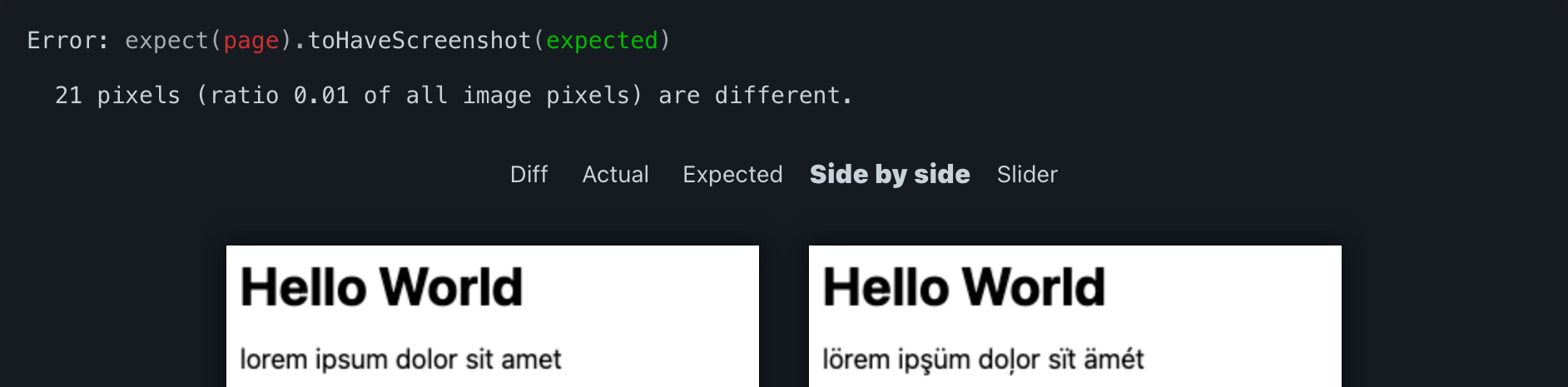
Baselines are stored in a folder named after the test file, e.g. sample.test.js-snapshots, with file names derived from the test title, such as home-page-desktop-firefox.png.
Crawling the site
Covering every page by hand means writing and maintaining repetitive tests. Instead, a small crawler collects the site's URLs once and the test file generates one test per URL at runtime. Playwright's global setup does the preparatory work before test discovery begins. Passing the URL list through a file on disk — rather than other channels between setup and discovery — makes it easy to hand-edit the list between runs, for instance to skip irrelevant pages temporarily.
The config gains a globalSetup entry and exports two configuration values:
export let BROWSERS = ["Desktop Firefox", "Desktop Chrome", "Desktop Safari"];
export let BASE_URL = "http://localhost:8000";

// etc.

export default defineConfig({
  // etc.
  globalSetup: require.resolve("./setup.js")
});
Despite using ES modules, the setup can call CommonJS-specific APIs like require.resolve and __dirname; some Babel transpilation appears to run in the background, so the executed code is probably CommonJS. The exported values are reused in a new setup.js, which launches a headless browser to crawl the site — simpler here than bringing in a separate HTML parser:
import { BASE_URL, BROWSERS } from "./playwright.config.js";
import { createSiteMap, readSiteMap } from "./sitemap.js";
import playwright from "@playwright/test";

export default async function globalSetup(config) {
  // only create site map if it doesn't already exist
  try {
    readSiteMap();
    return;
  } catch(err) {}

  // launch browser and initiate crawler
  let browser = playwright.devices[BROWSERS[0]].defaultBrowserType;
  browser = await playwright[browser].launch();
  let page = await browser.newPage();
  await createSiteMap(BASE_URL, page);
  await browser.close();
}
The crawling itself lives in sitemap.js. createSiteMap determines the URLs and writes them to disk; readSiteMap reads a previously created map back from disk and forms the basis for test generation. extractLocalLinks runs inside the browser context and can therefore use DOM APIs such as document.links, while everything else runs in the Playwright (Node) environment:
function extractLocalLinks(baseURL) {
  let urls = new Set();
  let offset = baseURL.length;
  for(let { href } of document.links) {
    if(href.startsWith(baseURL)) {
      let path = href.slice(offset);
      urls.add(path);
    }
  }
  return Array.from(urls);
}
Wrapped in glue code, sitemap.js looks like this:
import { readFileSync, writeFileSync } from "node:fs";
import { join } from "node:path";

let ENTRY_POINT = "/topics";
let SITEMAP = join(__dirname, "./sitemap.json");

export async function createSiteMap(baseURL, page) {
  await page.goto(baseURL + ENTRY_POINT);
  let urls = await page.evaluate(extractLocalLinks, baseURL);
  let data = JSON.stringify(urls, null, 4);
  writeFileSync(SITEMAP, data, { encoding: "utf-8" });
}

export function readSiteMap() {
  try {
    var data = readFileSync(SITEMAP, { encoding: "utf-8" });
  } catch(err) {
    if(err.code === "ENOENT") {
      throw new Error("missing site map");
    }
    throw err;
  }
  return JSON.parse(data);
}

function extractLocalLinks(baseURL) {
  // etc.
}
Generating tests from the map
With the URL list in hand, a simple loop generates the tests:
for(let url of readSiteMap()) {
  test(`page at ${url}`, async ({ page }) => {
    await page.goto(url);
    await expect(page).toHaveScreenshot();
  });
}
readSiteMap has to be synchronous because Playwright does not currently support top-level await in test files. In practice the map may not exist yet, so the real test file, viz.test.js, reports that condition clearly:
import { readSiteMap } from "./sitemap.js";
import { test, expect } from "@playwright/test";

let sitemap = [];
try {
  sitemap = readSiteMap();
} catch(err) {
  test("site map", ({ page }) => {
    throw new Error("missing site map");
  });
}

for(let url of sitemap) {
  test(`page at ${url}`, async ({ page }) => {
    await page.goto(url);
    await expect(page).toHaveScreenshot();
  });
}
Handling flakiness
Visual testing is inherently flaky, so targeted exceptions are sometimes necessary. Injecting custom CSS is usually the simplest and most effective compensation in viz.test.js:
// etc.
import { join } from "node:path";

let OPTIONS = {
  stylePath: join(__dirname, "./viz.tweaks.css")
};

// etc.
  await expect(page).toHaveScreenshot(OPTIONS);
// etc.
That allows exceptions to be declared in viz.tweaks.css:
/* suppress state */
main a:visited {
  color: var(--color-link);
}

/* suppress randomness */
iframe[src$="/articles/signals-reactivity/demo.html"] {
  visibility: hidden;
}

/* suppress flakiness */
body:has(h1 a[href="https://css-tricks.com/wip/unicode-symbols/"]) {
  main tbody > tr:last-child > td:first-child {
    font-size: 0;
    visibility: hidden;
  }
}
Capturing the full page
A subtle trap: .toHaveScreenshot captures only the viewport, not the whole page — styling changes further down can slip past unnoticed. The config is extended accordingly:
export let WIDTH = 800;
export let HEIGHT = WIDTH;

// etc.

  projects: BROWSERS.map(ua => ({
    name: ua.toLowerCase().replaceAll(" ", "-"),
    use: {
      ...devices[ua],
      viewport: {
        width: WIDTH,
        height: HEIGHT
      }
    }
  }))
…and the generating loop in viz.test.js is adjusted:
import { WIDTH, HEIGHT } from "./playwright.config.js";

// etc.

for(let url of sitemap) {
  test(`page at ${url}`, async ({ page }) => {
    checkSnapshot(url, page);
  });
}

async function checkSnapshot(url, page) {
  // determine page height with default viewport
  await page.setViewportSize({
    width: WIDTH,
    height: HEIGHT
  });
  await page.goto(url);
  await page.waitForLoadState("networkidle");
  let height = await page.evaluate(getFullHeight);

  // resize viewport for before snapshotting
  await page.setViewportSize({
    width: WIDTH,
    height: Math.ceil(height)
  });
  await page.waitForLoadState("networkidle");
  await expect(page).toHaveScreenshot(OPTIONS);
}

function getFullHeight() {
  return document.documentElement.getBoundingClientRect().height;
}
The loop also adds a waiting condition that holds until network traffic settles, a crude way to account for lazy-loaded images. Full-page captures are more resource-intensive and not always reliable: layout shifts can interfere, and long or asset-heavy pages may hit timeouts, so the approach can make flakiness worse.