What RAG brings to generative AI
Retrieval-augmented generation, or RAG, is a method that lets AI tools pull in outside information to shape their outputs. The appeal for organizations is clear: RAG can make a model aware of proprietary or recent data without retraining it. A model without RAG can only reference information from its training cutoff; with RAG, it can draw on a database that includes newer material and respond more accurately.
To see how RAG fits into current AI tooling, we spoke with Idan Gazit, Senior Director of Research at GitHub Next, and Colin Merkel, Software Engineer at GitHub Next.
RAG versus fine-tuning
Most organizations don't train models from scratch. They customize pre-trained models, and the two common paths are RAG and fine-tuning. Fine-tuning changes a model's weights, producing a specialized model that handles a narrow task well. That's useful when, say, your codebase uses a niche language that the base model wasn't trained on much.
RAG takes a different route. There's no weight adjustment. Instead, it gathers data from chosen sources and augments the user's prompt with it, so the model generates a response that is more grounded in relevant context. Some teams use RAG for general needs and fine-tune for specific ones; for others, RAG alone is enough.
Why context matters
Generative AI tools are powered by large language models (LLMs), which are transformers. Every transformer LLM has a context window: the amount of data it can take in for a single prompt. Context windows are limited in size, though they keep expanding as models grow more capable.
What fills that context window depends on the tool. For GitHub Copilot in the IDE, the input includes the code in your current file. The Fill-in-the-Middle (FIM) paradigm makes Copilot aware of the prefix before the cursor and the suffix after it. Copilot also looks at code from other open tabs, called neighboring tabs, and scans the most recently reviewed ones when many are open.
The limited size of the context window is why machine learning engineers think hard about which input data to add and in what order. That decision process is known as prompt engineering.
How RAG widens the context
With RAG, an LLM is not restricted to its training data. It can pull from a broader range of sources, including customized ones.
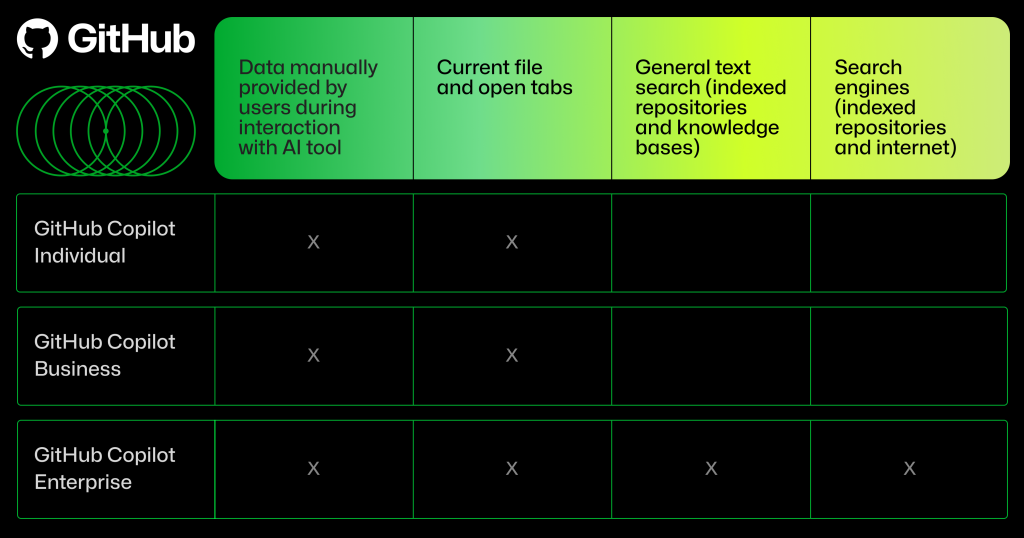
For GitHub Copilot Chat on GitHub.com and in the IDE, input data can include your conversation with the assistant, whether it's code or natural language, through a mechanism called in-context learning. It can also include data from indexed repositories, which may be public or private, from a collection of Markdown documentation that serves as a knowledge base, and from integrated search engine results.
RAG retrieves extra data from these sources and folds it into the original prompt. The result is a response that is more relevant than a model could produce from its static knowledge alone. Which sources Copilot uses depends on the plan you're on.
Semantic search underneath the hood
Unlike keyword search or Boolean operators, semantic search uses trained models to understand relationships between terms. A keyword search treats "cats" and "kittens" as independent strings; a semantic search system knows the two are often related and can rank a cute animal video at the top for a query using either word.
That capability improves RAG retrievals. When RAG pulls from a custom database or search engine, semantic search helps find well-matched context, which makes the final AI output more useful. "It surfaces great examples that often elicit great results," Gazit says.
Semantic search is not the only retrieval path. It's worth clarifying that RAG does not require embeddings or vector databases. A RAG system may use embeddings, but it can just as well draw on traditional databases or search engines, then format the retrieved snippets into the prompt.
Vector databases and embeddings
Vector databases are optimized for storing embeddings: high-dimensional vectors that represent code and documentation in a searchable form. To prepare data for retrieval, code and documentation are converted into embeddings and stored. Later, an AI coding tool searches the database by embedding similarity to find snippets related to what you're working on, and those snippets boost the relevance of the generated suggestion.
Embedding similarity is powerful because it finds subtle relationships. "Embedding similarity might surface code that uses the same APIs, or code that performs a similar task to yours but that lives in another part of the codebase," Gazit explains. "When those examples are added to a prompt, the model's primed to produce responses that mimic the idioms and techniques that are native to your codebase—even though the model was not trained on your code."
Text search, internal search, and the open web
General text search works differently. Documents are indexed in advance and stored for later retrieval. RAG in GitHub Copilot Enterprise, for example, can pull data from indexed repository files and Markdown documents across repositories.
RAG can also reach external search engines, which gives it access to the broader internet, or internal search engines, which let it find information within your organization. Copilot Enterprise on GitHub.com integrates both Bing and an internal search engine built by GitHub. The Bing integration lets Copilot Chat search for current information, such as details about the latest Java release. Without an internal engine, "Copilot Chat on GitHub.com cannot answer questions about your private codebase unless you provide a specific code reference yourself," Merkel notes. He helped build GitHub's internal search engine from scratch.
Here's what that looks like in practice. When a developer asks about a repository, Copilot Enterprise's internal search engine conducts a semantic search over the indexed repository's documents and ranks them by relevance. RAG then performs another semantic search step and retrieves the most relevant snippets from the top-ranked documents. The snippets go into the prompt, and Copilot Chat generates an answer grounded in them.
What to remember
RAG is an effective way to keep AI outputs current with organizational knowledge, best practices, and the latest developments online. In GitHub Copilot, RAG extends the quality of input data across vector databases, general text search, and search engines, with the latter two offering more cost-efficient retrieval paths.
The quality of generative AI output tracks the quality of its input. As Gazit puts it, "Quality in, quality out."