
Finding text that search used to miss
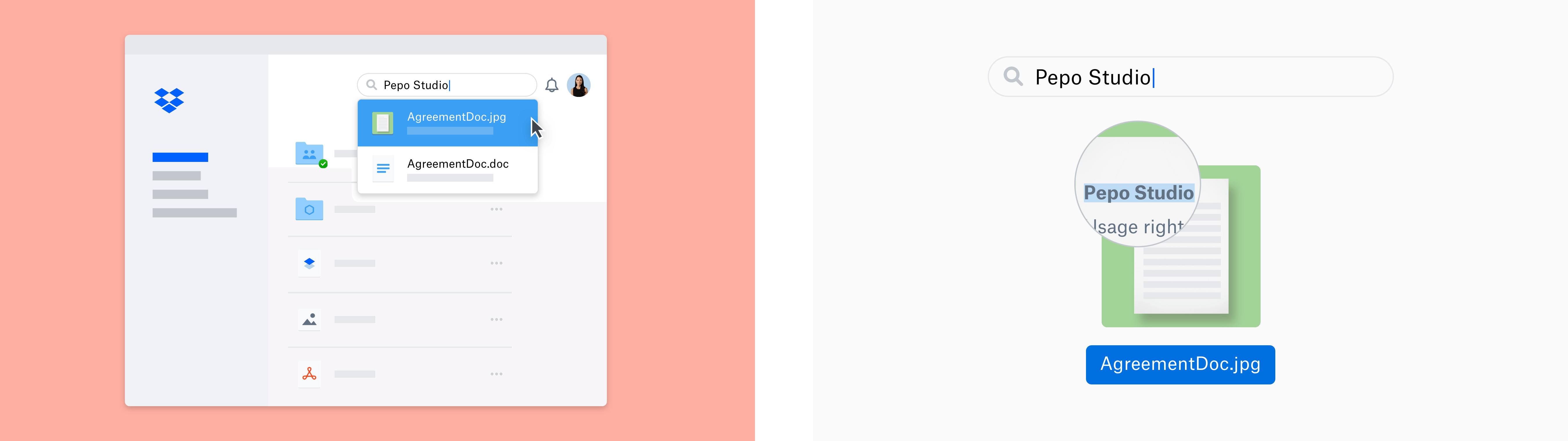
Dropbox now offers automatic image text recognition to Professional and Business Advanced/Enterprise customers, letting them search for English text inside images and PDFs. The feature grew out of the company’s earlier work rebuilding search with Nautilus and modernizing its OCR pipeline. The scale of the opportunity is large: more than 20 billion images and PDFs are stored in Dropbox, and 10–20% of those image files are photos of documents such as receipts and whiteboards. Another 25% of PDFs are scans of documents — all of it currently invisible to text search.
Computers distinguish sharply between a document and a picture of one. Text documents in formats like TXT, DOCX, or HTML contain indexable text, while image formats like JPEG, PNG, and GIF are just pixel collections with no text layer. PDFs sit in between, mixing both text and image content. Automatic image text recognition classifies each file by what it actually contains, then runs OCR where it can help.
Sizing up the job
Before building anything, Dropbox needed to know how much data the feature would touch and whether the effort would pay off. The team examined which file types lacked indexable text, which of those were likely to contain recognizable text, and, for multi-page documents, how many pages were worth processing.
The target set was image formats and PDFs without embedded text. But not all of those files have text worth recognizing — many are plain photos or illustrations. The key gatekeeper was a convolutional neural network that makes a binary call on whether a given image has text with a good chance of being recognized by the OCR system. Its scope excludes, say, an image with a random street sign, but includes scans and photos of documents.
Some quick statistics guided the effort. For JPEGs, the most common image type, roughly 9% are likely to contain text. PDFs complicate the picture because each page falls into one of three buckets:
- Page has embedded, indexable text.
- Page has text only as an image, not currently indexable.
- Page has no substantial text content.
Only the second bucket benefits from OCR. Across sampled PDFs, the distribution of pages is 69% in the first category, 28% in the second, and 3% in the third. The target user base has about twice as many JPEGs as PDFs, but PDFs average 8.8 pages each and are much more likely to contain text images. PDFs therefore contribute over 10 times more load than JPEGs do.
Limiting pages per document
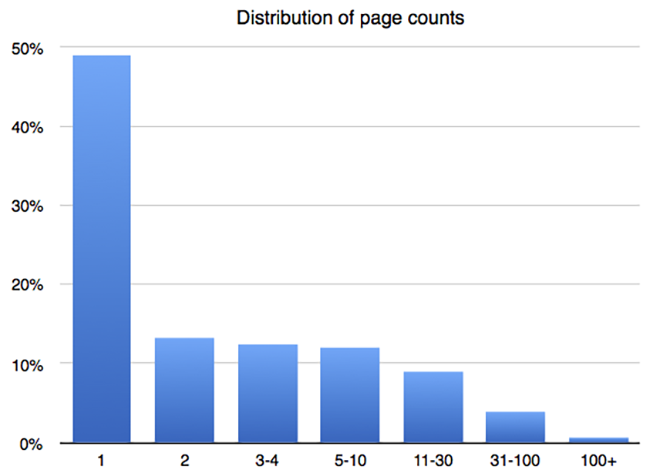
Long PDFs are expensive to process in full, but indexing even a few pages makes a document much more discoverable. Looking at the distribution of page counts, half of PDFs have just one page and about 90% have ten or fewer. Dropbox set a cap of ten pages, processing the first ten in each document. That indexes almost 90% of documents completely and makes the remaining long files searchable with a good sample of their content.
How the system is put together
Rendering whole pages
Extracting text from OCR-able files raised a design question: should the system pull out embedded raster image objects from the PDF stream, or render entire pages to raster images? Dropbox chose the latter, reusing its large-scale PDF rendering infrastructure built for file previews. The approach extends naturally to other formats that embed images, including PowerPoint and PostScript, and it preserves the order and layout of text tokens better than extracting separate images from a multi-image page.
The server-side renderer is based on PDFium, the PDF engine from the Chromium project, which is also used for body text detection and for deciding whether a document is image-only. Pages render in parallel, with a resolution that fills a 2048-by-2048-pixel rectangle while preserving aspect ratio, and with the ten-page cap enforced.
Classifying documents
The OCR-able classifier originated in Dropbox’s document scanner feature, which suggests when a user’s recent photos might be scanned documents. It uses a linear classifier over image features from GoogLeNet/Inception, a pre-trained ImageNet model. The training data was several thousand images from public sources, user donations, and employee donations. Development used Caffe, with a later conversion to TensorFlow.
An important tuning lesson came from false positives. Early on, the classifier flagged images of blank walls, skylines, and open water as text-bearing. These look different to people but share smooth backgrounds and horizontal lines, which confuses the model. Adding such “hard negatives” to the training set significantly improved precision, teaching the classifier to reject images with document-like features that lack actual text.
Finding corners
Before OCR, the system locates the document’s corners to define its roughly quadrangular shape. Given those coordinates, a simple geometric transformation rectifies the image into a right-angled rectangle. Corner detection uses DenseNet-121, another ImageNet convolutional network, with its top layer replaced by a regressor outputting quad corner coordinates.
Training data was sparse: only a few hundred images, labeled by Mechanical Turk workers using a custom UI, plus annotations from the machine learning team. Some training images have corners outside the frame, requiring human judgment to fill in missing positions. Because the network sees scaled-down images, the predicted quad is low-resolution. A two-step process fixes that: first get the initial quad, then run a second regression on a higher-resolution patch around each corner.
Extracting tokens
The OCR engine itself, described in the earlier pipeline post, runs on the rectified images. It generates token detections — text plus bounding boxes for each token — arranged into a roughly sequential list and added to the search index. Multi-page documents concatenate the per-page token lists into one larger list.
Orchestrating the OCR pipeline
With the underlying models ready, Dropbox needed an orchestration layer to route incoming file events to the OCR work. The company built this on Cape, its asynchronous event-stream processing framework. A new Cape micro-service "lambda" now handles OCR as part of the general search indexing infrastructure.
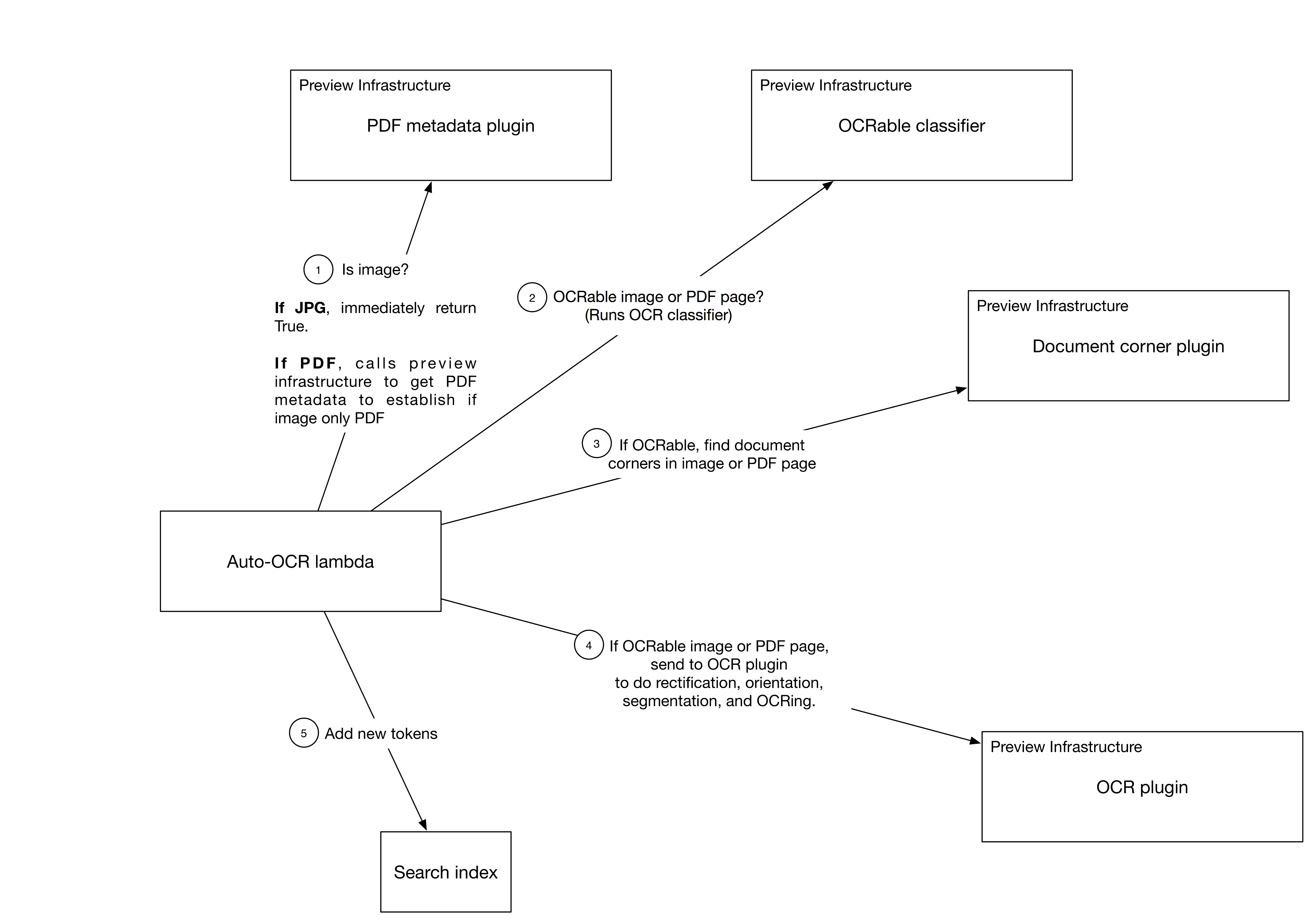
The first processing stages reuse Dropbox's existing previews infrastructure, a plugin-based system that transforms binary files (e.g., generating a thumbnail from a PowerPoint file). Plugins cache their output, so repeated transformations only execute once. For this feature, Dropbox added several new plugins that, in sequence: check file eligibility (JPEG, GIF, TIFF, or PDF without embedded text for eligible users), run the OCR-able classifier to detect text in an image, run a corner detector to rectify the document, extract tokens with the OCR engine, and finally add those tokens to the user's search index.
Reliability and throughput
Transient remote-call errors are handled with exponential backoff with jitter. Retrying PDF metadata extraction a second and third time cut the failure rate by 88%.
Initial testing on a fraction of live traffic revealed a serious scaling problem: the machine learning models' computational overhead would demand an impractically large cluster. Worse, the observed traffic was roughly 2x the volume estimated from historical growth rates. The team focused on improving OCR model throughput, reasoning that this offered the most leverage on cluster size.
For accurate benchmarking, the team built a dedicated sandboxed environment with command-line tools to measure throughput and latency of each sub-service independently, using stopwatch logs sampled from live traffic.
Optimization proceeded from the outside in. First came configuration: TensorFlow, the deep learning framework used for character prediction, defaults to multicore support. Since Dropbox runs code touching user content inside software jails—typically one jail per core, each running single-threaded code—the multi-threaded TensorFlow caused heavy context-switching overhead. Disabling multicore support improved throughput roughly 3x.
Even then, requests bottlenecked before reaching the models. Tuning the number of pre-allocated jails and RPC server instances to match CPU cores finally yielded expected throughput. Additional gains came from enabling vectorized AVX2 instructions in TensorFlow and pre-compiling the model and runtime into a C++ library via TensorFlow XLA. Profiling identified 2D convolutions on narrow intermediate layers as hotspots; manually unrolling them in the graph sped things up further.
Corner detection and orientation prediction both use deep convolutional neural networks. The team swapped the original Inception-Resnet-v2 model for Densenet-121, which was almost twice as fast and only slightly less accurate at predicting document corners. An A/B test comparing how often users manually corrected predicted corners showed the accuracy difference was negligible, justifying the performance trade-off.
Automatic image text recognition represents a step toward deeper understanding of document structure and content, which could eventually help Dropbox users organize files more effectively.


