

The case for restraint
Keeping pace with the AI news cycle is a job in itself. New models, new tools, new features, and new "this-one-trick" posts appear daily. Most of that noise isn't worth your time. The consistent productivity gains come not from exotic configurations but from the harness and your command of it. This walkthrough relies entirely on existing GitHub Copilot capabilities—no clever prompts, no hidden skills—and it works because the harness is doing the heavy lifting.
Know your environment
GitHub Copilot spans multiple surfaces: the CLI, the GitHub Copilot app, VS Code, Visual Studio, and JetBrains. The details shift by tool, but the underlying harness is converging. Learn it once, and you can apply it across every surface. For newcomers, the CLI is the ideal starting point—it strips away UI, leaving only text, prompts, and actions. This demonstration uses the GitHub Copilot app, which relies on the same harness found in the CLI and editors.
Productivity with an agent depends on autonomy. That means enabling /allow-all, commonly called "YOLO mode," which lets the agent execute commands without waiting for approval on each step. Without this, you'll spend your day approving trivial actions—you might as well write the code yourself. Constant approvals also train you to approve blindly, which defeats oversight. That said, keep agents away from your local machine and sensitive organizational data. Sandboxes such as GitHub Codespaces or development containers are the right place for autonomous agents.
Prototype before you build
The ability to prototype cheaply has changed the design process. What once required a dedicated, often costly phase is now a single prompt away. Consider a date picker web component. It looks simple but hides complexity: navigation flow, selected states, range behavior, and interactions across year, month, and day views. Rather than trying to specify all of this in advance, ask the agent for multiple visual mocks in a single HTML file:
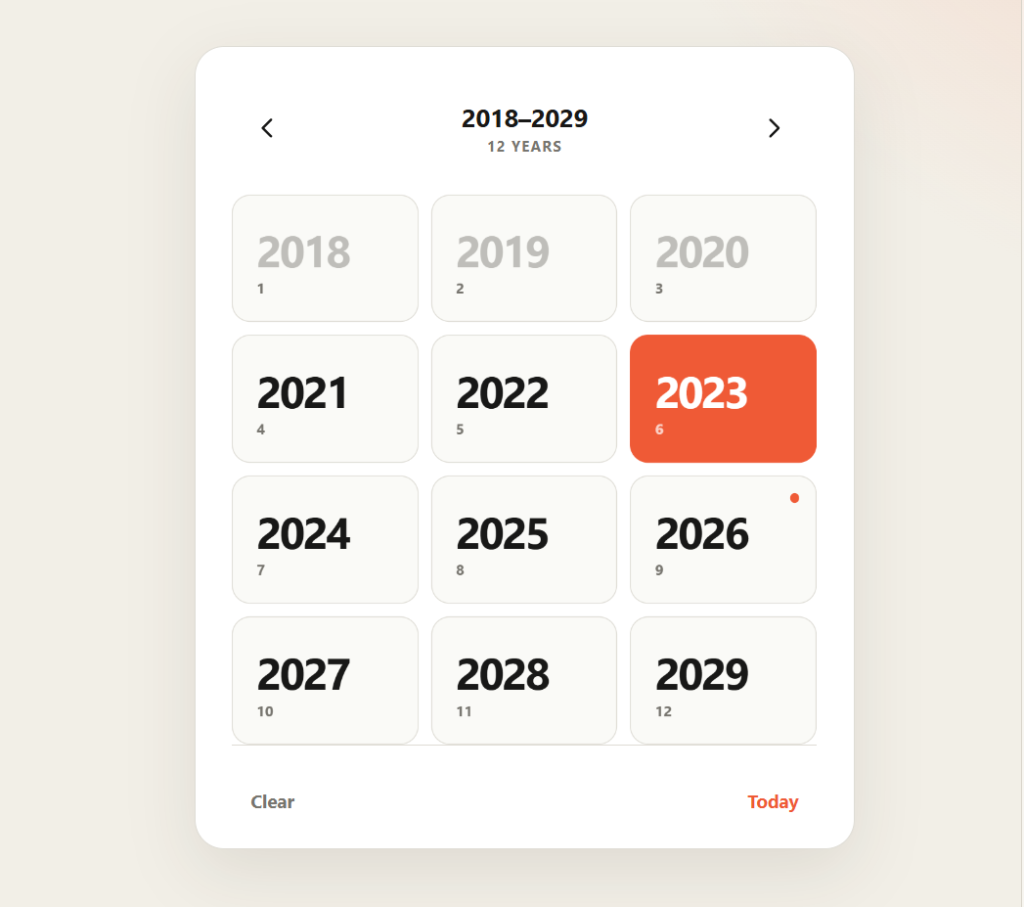
Give me 20 mocks for a date picker web component. Put them all in an HTML file so I can compare.While the generated variations may not always match your vision, they expose design choices you wouldn't have anticipated—such as a year-first view that enables zoom-out and zoom-in navigation. Soon after creation, you can generate dozens of layout candidates for thorough comparison with little effort:
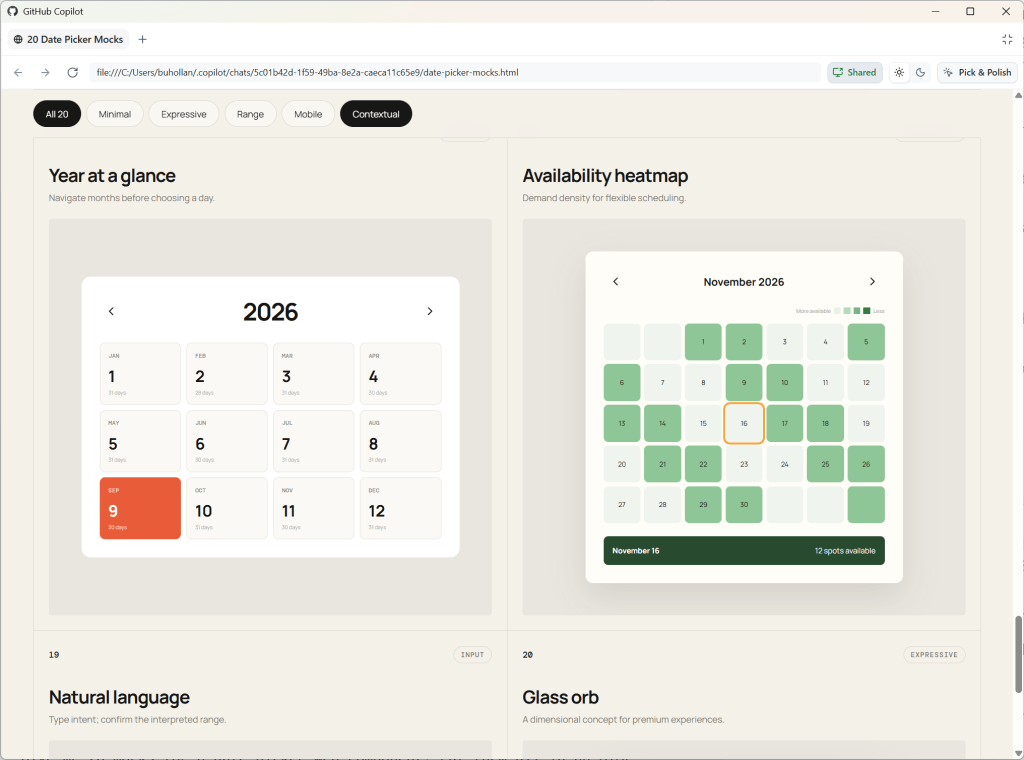
This practice applies equally to non-visual work. When planning a new API endpoint, visual diagrams mapping alternative implementations clarify tradeoffs and constraints before writing code:
Create a visual mockup of the API for this project. Add five options for how we could handle a new API endpoint that allows the user to download their analytics data.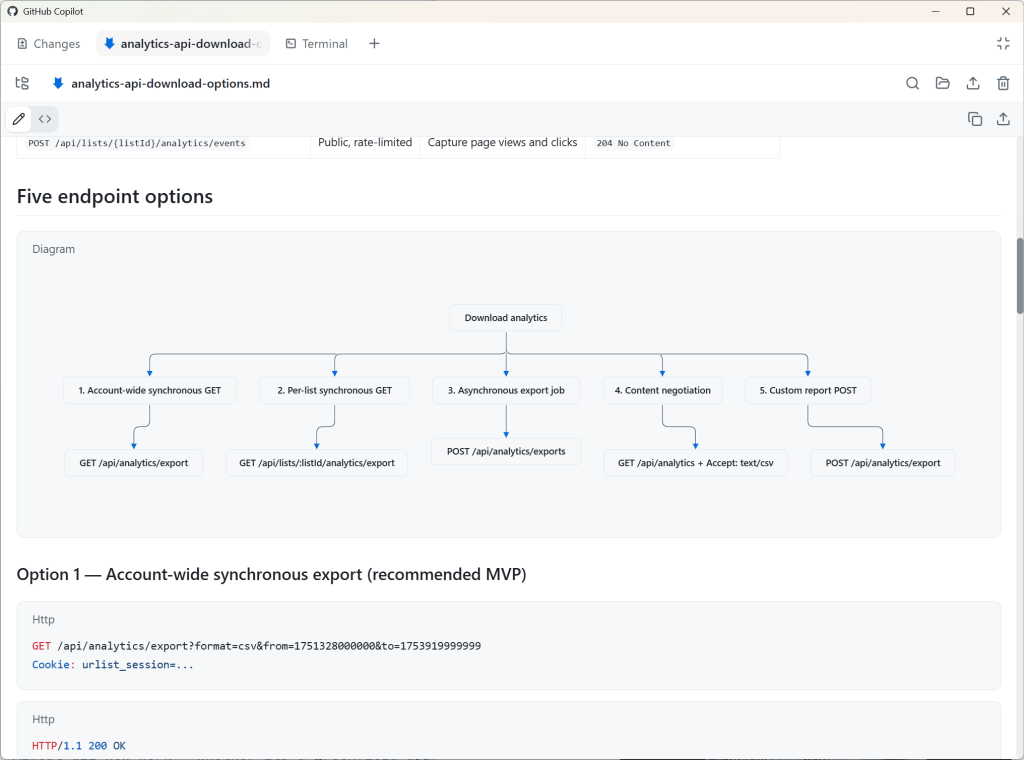
Working with agents is inherently nuanced, and prototyping surfaces those nuances early, preventing costly rework. For these tasks, a medium-sized model on medium reasoning—something like GPT 5.6 Terra or Claude Sonnet—strikes the right balance. Stay with the same model and reasoning level for the entire feature to benefit from prompt caching discounts. Switching models or reasoning mid-stream defeats the purpose and costs tokens.
Plan with intent
Once prototyping clarifies the goal, switch to plan mode in the same session. Vagueness at this stage is fine—planning is precisely how you add the missing context. The objective is not to have the model think for you; it's to trigger a thorough requirements analysis. An agent will raise edge cases you hadn't considered:
- Can start and end dates be the same?
- Are partial selections valid?
- Should a clear action be available?
- Is "today" always visible?
- Should manual date entry be supported?
- What is the storage format?
- Is pasting allowed?
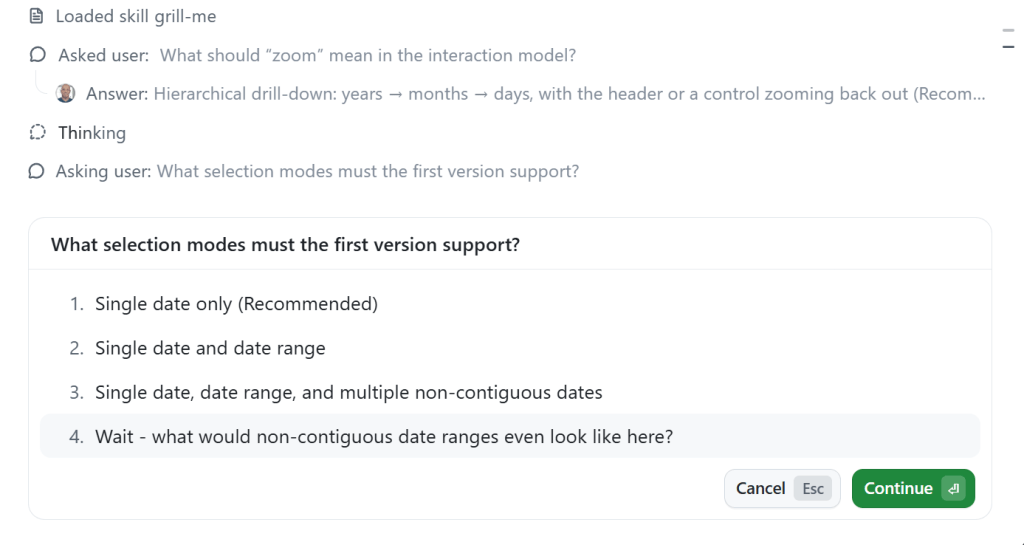
/plan Build a date picker web component. I want the user to be able to zoom in and out of years, months, and days.In plan mode, if the agent asks about ambiguous details—like
non-contiguous dates"—ask for clarification. Interrupted planning resumes smoothly. Skills can push deeper. Installing the "grill-me" skill by Matt Pocock increases the volume and aggressiveness of edge-case questioning:/plan /grill-me Build a date picker web component. I want the user to be able to zoom in and out of years, months, and days.Plan mode's value lies in your engagement with the questions, not blind acceptance of all answers. Your expertise shapes the plan and guides the model toward the actual constraints of the project. Answering the model back works both ways because the planning process runs continuously without reset:
Execution with Autopilot
When planning completes, GitHub Copilot typically suggests moving into Autopilot to start implementation. Autopilot is a verification loop that forces the model to confirm each planned item is actually implemented before proceeding. During this phase, the agent orchestrates actively, dispatching the Explore subagent with a small model to read relevant files and a General Purpose subagent with a larger model for complex actions. Designed flexibility is already there.
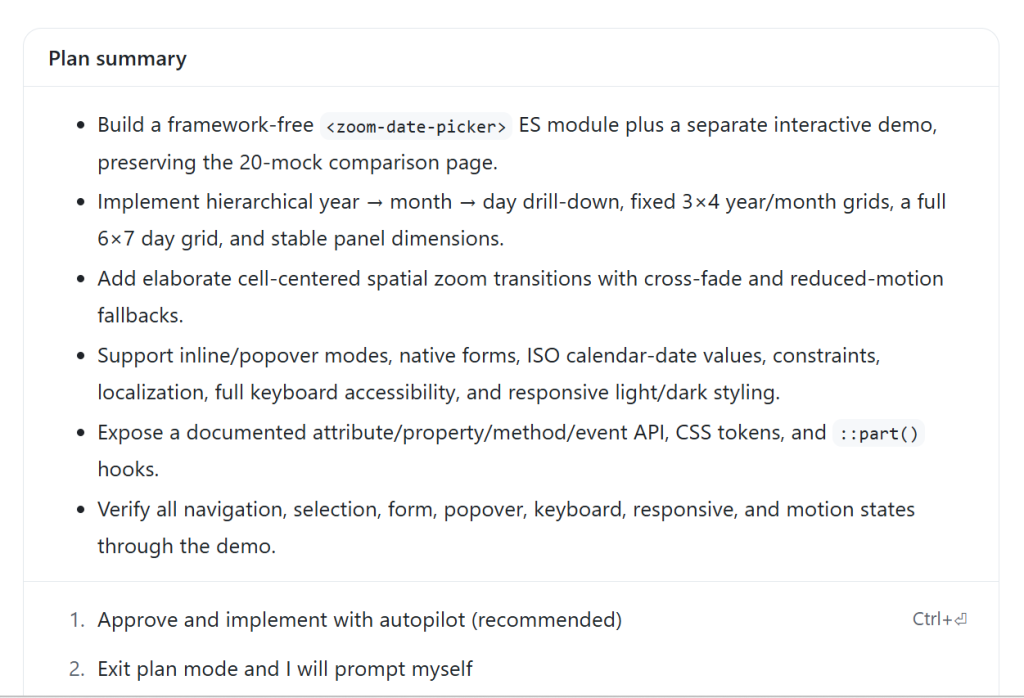
Out-of-the-box, you get the benefits of subagents and multi-model workflows without configuration. Never using custom agents or instructions to override the details means minimal effort for complete coverage.
The discerning eye
Eventually you get to inspect the output, and that inspection matters. Initial results will likely disappoint—not unexpected. Iteration is part of the process. Review the agent's work with the same scrutiny as any developer's output. Examine every visual and functional detail, from inconsistent animations, text contrast issues, redundant labels, and behavior quirks like the Today button failing to switch views, to your own aesthetic dissatisfaction with its AI look. Follow-up prompts address each issue distinctly. If a richer aesthetic is your goal, feeding the model a CSS framework like my own Postrboard or any other helps steer style decisions significantly.
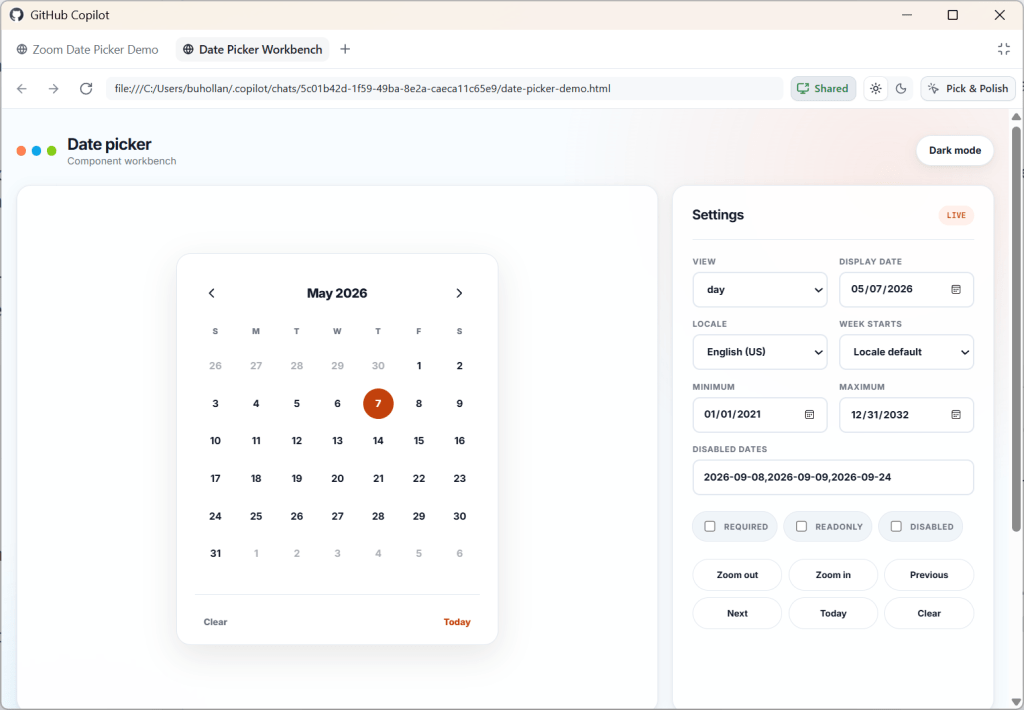
ok - we don't need a landing page here - just the component, output and settings panel in a minimal setting. Use the /postboard skill for the design and colors.

For the date picker, when I click on the day, it tries to zoom in, but can't because there is nothing to zoom to. There should be no zoom there.

It doesn't need to say "Zoom Out" at the top

When I mouse over a month or year that contains the selected day, I cannot read the hover text.

When I click "Today" it should take me to that day view, even if I'm on the month or the year.

The months don't need numbers under them and they don't need to be in boxes

Same goes for years. And it doesn't need to say "12 years" at the top."
Don't settle for "good enough" output—demand quality. The ability to distinguish executive-grade results from merely adequate ones remains uniquely human, and your taste makes the final product your own. Never underestimate that role; no model will replace your discerning touch and creativity.
Getting an outside opinion before you commit
After a few Agent iterations, pause and ask GitHub Copilot for a Rubber Duck review. The agent requests a code review from a model in a different AI family — in this case, against Sonnet rather than GPT 5.6 Terra. A fresh set of eyes from a model trained on different data surface edge cases one model is likely to miss.
Perform a rubber duck review on this date picker component implementationYou can trigger this anywhere in the pipeline. Ask a model to rubber duck a prototype before writing tests, or rubber duck the plan before coding kicks in. If you want a continuous pass, chain Rubber Duck with Autopilot and let both models iterate in a loop until the final result is stronger.
/autopilot rubber duck this date picker implementation. When you have the result, review it carefully and make any necessary adjustments. Repeat the rubber duck review until both you and the reviewing model agree that the only items that remain have diminishing returns.That extra loop costs tokens, but it buys you edge-case coverage and less debugging later. That cost is cheaper than the time you’ll sink into fixing bugs a second set of eyes would have caught.
Wrapping up the workset
Commit and stage the feature or roll straight on to another enhancement in the same pull request. When the next task doesn't touch the date picker, start a fresh chat session — sessions are a topic construct. Run a couple of divergent topics in one chat and you'll burn context and confuse state.
Building dates does feel contrived, but it's a solid stress test for this harness. A reusable date picker used to be one of those notoriously hard components. That it can be scaffolded this quickly is a useful reminder of what the AI stack handles now.
Simplify the harness, then learn it cold
Most people get all the signal they need out of that basic routine — one planner, one executor, a review loop. Simpler means you can chain agents without untangling which one is in what state. It also respects the limited context window sitting between you and the result.
Sure, there's a universe of configuration to customize: MCP server connections, skills, instruction files, bespoke agents, virtual dev teams, and multi-agent feedback workflows. Plenty of room to experiment, and plenty of missing. No one has this figured out in production yet. A lot of today's proven recipe is next quarter's anti-pattern.
Stay repeatable: find the simplest working setup that produces solid code, and learn that harness inside and out. It is doing more of the heavy lifting than the model behind it.


