

Prompting Is Interaction Design
Most designers treat AI prompts like search queries: a quick instruction, a hope for the best, and frustration when the result feels generic. That misses what prompting actually is. A well-built prompt combines a creative brief with conversation design — you’re not just telling a machine what to do, you’re shaping how it behaves, responds, and iterates.
This matters because AI has no context of its own. Think of it as a capable but inexperienced intern: fast, knowledgeable, and entirely dependent on your direction. That framing changes how you work with it. You wouldn’t brief a human collaborator with “design a landing page” and expect strong work, so why accept that from an AI?
Prompting draws on the same skills you already use to design interactions for people. Structure, clarity, and intent guide a user through an interface; they do the same for an AI’s responses. When you treat prompting as a design act, you stop relying on saved prompts from others and start building your own, tailored to your goals and context. Someone else’s prompt is like a Figma template — it works, but mastery comes from understanding the underlying structure, not just copying it.
Note: All prompts in this article were tested using ChatGPT, but any LLM with a decent attention span will work. Results vary based on the model, training, and other factors.
Privacy PSA: Don’t share anything you wouldn’t want leaked, logged, or used elsewhere. Keep inputs safe, legal, and user-respecting.
Three Shifts In How You Think About AI
Watching a designer work through a first AI-augmented sprint surfaces three mental shifts that separate effective prompting from random trial and error.
- AI is an intern, not a co-pilot. It has broad knowledge, fast execution, and reliable recall — but no context. Approaching every interaction as management, not magic, sets the right expectations.
- Guide, coach, and verify. Like any intern, AI needs supervision. Designerly skills carry over directly: curiosity to explore, observation to spot bias, empathy to humanize output, and critical thinking to push back on what feels wrong.
- A prompt is a brief and a conversation script. It frames the task, sets the tone, and defines what good looks like. It also dictates how the AI sequences its work, handles ambiguity, and responds to refinement.
The Brief And The Script
A creative brief for a human collaborator includes role, goal, context, tone, and output expectations. A good prompt needs the same elements. The AI has no instincts or opinions of its own, so the prompt replaces those with explicit direction — the more complete the brief, the less room for generic output.
Beyond the brief, a prompt is also a piece of conversation design. It defines how the AI interprets your request, how it breaks down the work, and how it should respond when something is unclear. You are designing the flow of the exchange itself, not just the final output. That is what separates a one-off command from a repeatable, reliable prompting practice.
Prompts As Creative Briefs: Why Context Alone Isn’t Enough
When designers prompt an AI, they’re actually writing a creative brief — only the brief goes to a machine instead of a human collaborator. A bare instruction such as “Read this customer feedback and tell me how we can improve our app for Gen Z users” leaves the model to guess at the missing context, the desired format, and the boundaries of the task. The result is typically generic, requiring several rounds of corrective follow-ups before it’s usable.
This is the role of W.I.R.E.+F.R.A.M.E., a prompt design framework built on UX thinking. Its first four letters — WIRE — form the essential skeleton: role, input, rules, and expected output. Its next five — FRAME — add refinement in tone, work flow, reusability, and iteration. Just as a wireframe guides without dictating the final visual, this structure tells the AI what it needs to know without assuming one correct answer.
W: Who & What
Declare the AI’s role and the task you’re handing over.
You wouldn’t brief a strategist and a copywriter the same way. Assign the AI a specific persona and mandate so it can apply the right patterns of reasoning.
Example: “You are a senior UX researcher and customer insights analyst. You specialize in synthesizing qualitative data from diverse sources to identify patterns, surface user pain points, and map them across customer journey stages.”
I: Input Context
Supply the background that frames the work: audience, goals, and data sources.
Context distinguishes your project from ten thousand other ambiguous app-improvement requests.
Example: “You are analyzing customer feedback for Fintech Brand’s app, targeting Gen Z users, from app store reviews, survey feedback, and usability test transcripts.”
R: Rules & Constraints
Bound the task so the model doesn’t wander into invented territory.
Constraints focus output. Specify what’s off-limits, what must not be fabricated, and the register expected.
Example: “Only analyze the uploaded feedback. Do not fabricate pain points, quotes, journey stages, or patterns. Use clear, neutral, stakeholder-facing language.”
E: Expected Output
Define the deliverable’s format so the AI doesn’t guess at it.
An explicit structure — for example, theme names, summaries, representative quotes pulled strictly from the data, frequency counts, a 1–5 severity score (where 1 = minor annoyance, 3 = frustrating with a workaround, 5 = blocking), and effort estimation (Low = copy tweak, Medium = logic/UX change, High = significant redesign) — produces a shareable artifact on the first pass rather than a raw brainstorm.
Once WIRE anchors the interaction, five further elements refine it.
F: Flow of Tasks
Model the workflow explicitly when the task has stages.
A multi-part job should be decomposed into ordered steps rather than compressed into one sentence. In the synthesis context, that means parsing data for pain points, grouping them into themes, scoring each on frequency (from the data) and severity (from content), mapping themes to journey stages, and writing problem statements grounded only in the provided material.
R: Reference Voice or Style
State the tone instead of assuming the model shares your house style.
A useful default for research work is the register of an insights deck: concise, pattern-driven, and scannable by product managers and design leads.
A: Ask for Clarification
Invite questions before the model commits to an answer.
If the uploaded data is missing, unstructured, or inconsistent — or the scoring criteria feel ambiguous — the prompt should request clarification rather than proceed on assumptions.
M: Memory (Within The Conversation)
Reuse what’s already working across turns.
Stating that the established workflow (analyze, group into themes, rank, then suggest actions) should persist unless otherwise stated keeps later requests aligned with earlier outputs.
E: Evaluate & Iterate
Build the revision loop directly into the brief.
After producing the structured themes, the model can identify the highest-priority one from its own frequency/severity/effort scoring, critique its own framing and evidence, rewrite that entry incorporating one improvement, and explain briefly why the revision is stronger for product or design teams. That turns a single generation into a self-reviewing cycle.
Assembled, the full WIRE+FRAME prompt runs to around 400 words. Length itself isn't the obstacle — modern models handle thousands of words without issue. The gain is intentional structure:
| Framework Component | Description |
|---|---|
| W: Who & What | Define the AI persona and the core deliverable. |
| I: Input Context | Provide background or data scope to frame the task. |
| R: Rules & Constraints | Set boundaries |
| E: Expected Output | Spell out the format and fields of the deliverable. |
| F: Flow of Tasks | Break the work into explicit, ordered sub-tasks. |
| R: Reference Voice/Style | Name the tone, mood, or reference brand to ensure consistency. |
| A: Ask for Clarification | Invite AI to pause and ask questions if any instructions or data are unclear before proceeding. |
| M: Memory | Leverage in-conversation memory to recall earlier definitions, examples, or phrasing without restating them. |
| E: Evaluate & Iterate | After generation, have the AI self-critique the top outputs and refine them. |
Not every brief needs the FRAME additions. WIRE alone is often enough for routinized tasks. But strategic design work with real context and consequences benefits from the optional components. A framework approach also means you’re not reconstructing prompts from scratch with every new request — you’re adapting one that already produces reliable structure, the way a design system reuses proven patterns.
| Scenarios | Description | Recommended |
|---|---|---|
| Simple, One-Off Analyses | Quick prompting with minimal setup and no need for detailed process transparency. | WIRE |
| Tight Sprints or Hackathons | Rapid turnarounds, and times you don’t need embedded review and iteration loops. | WIRE |
| Highly Iterative Exploratory Work | You expect to tweak results constantly and prefer manual control over each step. | WIRE |
| Complex Multi-Step Playbooks | Detailed workflows that benefit from a standardized, repeatable, visible sequence. | WIRE+FRAME |
| Shared or Hand-Off Projects | When different teams will rely on embedded clarification, memory, and consistent task flows for recurring analyses. | WIRE+FRAME |
| Built-In Quality Control | You want the AI to flag top issues, self-critique, and refine, minimizing manual QC steps. | WIRE+FRAME |
The payoff for the extra effort shows in the output. The unstructured one-liner about improving an app returns a flat list of improvement ideas: fix reliability issues, add budgeting tutorials, make Zelle transfers clearer, reduce app lag — every one of which still needs formatting, evidentiary support, and prioritization before it can inform teammates.
The structured version of the same request, over the same dataset, returns:
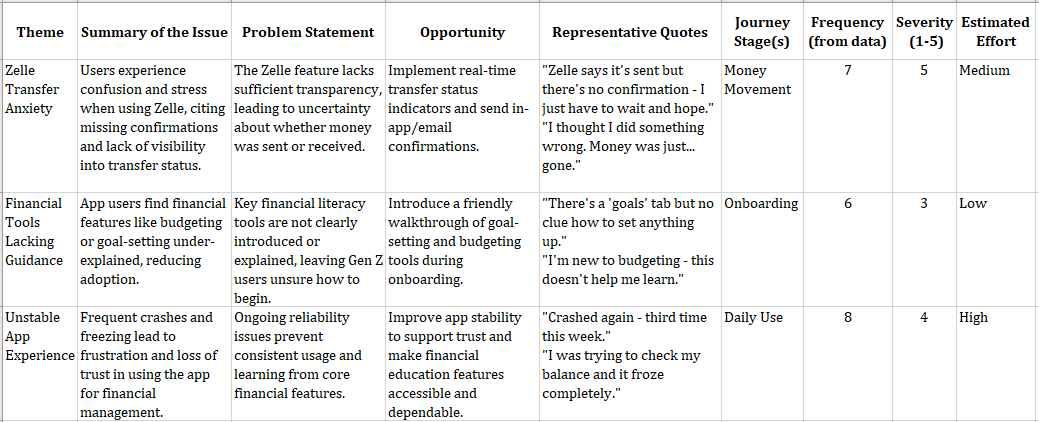
Instead of bullet points alone, the framework yields themes supplied with representative language from the data, mapping to journey stages and scored across frequency, severity, and estimated effort. The difference is the difference between an assistant’s shorthand and a deliberative brief.
Still, structure doesn’t confer accuracy. Models are highly fluent pattern predictors, not fact-checkers. Treat output like the work of a capable intern: fast, confident, and occasionally wrong. A low “estimated effort” rating on a tooling-onboarding fix, for instance, may well be deceptive. Validate every claim against the original data.
Prompts as a Component Library
Just as design systems standardize UI elements, prompting benefits from reusable, pre-tested components. The WIRE+FRAME framework can be broken down into modular parts that encode your team’s standards, voice, and strategy. Instead of rewriting a full prompt from scratch, you assemble it from tested pieces — much like pulling buttons and cards from a library.
For example, the “W: Who & What” section can have multiple saved variants depending on the task at hand. An insights analyst persona and an information architect persona are two distinct components that can be dropped into different prompts when their respective skills are needed:
W: Who & What
- You are a senior UX researcher and customer insights analyst. You specialize in synthesizing qualitative data from diverse sources to identify patterns, surface user pain points, and map them across customer journey stages. Your outputs directly inform product, UX, and service priorities.
- You are an experienced information architect specializing in organizing enterprise content on intranets. Your task is to reorganize the content and features into categories that reflect user goals, reduce cognitive load, and increase findability.
Save components and variations for every part of the framework so your team can assemble prompts quickly by combining existing modules rather than starting fresh each time.
Common Concerns About Structured Prompting
Will using a framework every time make outputs predictable?
Partially. Consistent rules, examples, and reference voices will guide the AI toward a predictable format and style. However, the framework doesn’t flatten the generative nature of AI — it focuses that generation on what matters to you. Structure directs, it doesn’t constrain creativity.
Could model updates break the framework?
AI models evolve faster than any prior technology — ChatGPT recently moved to GPT-5 to mixed reviews. Yet that update didn’t change the core principles of prompting or the WIRE+FRAME structure. Some prompting details may shift with future releases, but the need to communicate clearly with AI won’t. Think of delegating to an intern versus a seasoned colleague: you still provide detailed instructions the first time either performs a task; only the level of detail changes. WIRE+FRAME is built on timeless elements — clarifying intent, sharing context, defining constraints, and guiding tone — that remain relevant regardless of model intelligence.
Can prompts include images or sketches?
Yes. Multimodal models like GPT-5 accept screenshots, whiteboard sketches, and wireframes as part of the Input Context or to help define the Expected Output. The same principles apply: you set context, tone, and format using images plus text. Whether the input is a paragraph or a visual, you are still designing the interaction.
Designerly Prompting and Next Steps
Effective prompts aren’t borrowed — they are written for your specific context. WIRE+FRAME turns prompting into a guiding tool for collaborating with AI rather than gambling on a one-line request. The designerly skills you already practice daily are the same ones that improve prompting:
- Curiosity to explore AI capabilities and frame better prompts.
- Observation to detect bias or blind spots in outputs.
- Empathy to make machine outputs feel human.
- Critical thinking to verify and refine results.
- Experiment & Iteration to learn by doing.
- Growth Mindset to keep pace with evolving technology.
Once you have prompts and components that work, document them for reuse. The next step is embedding your best prompts into a custom AI assistant — fluent in your voice and trained on your context. That build — from defining the assistant’s job description to uploading knowledge, testing, and sharing — is the focus of the next article in this series.
Resources
- GPT-5 Prompting Guide
- GPT-4.1 Prompting Guide
- Anthropic Prompt Engineering
- Prompt Engineering by Google
- Perplexity
- Webapp to guide you through the WIRE+FRAME framework



