An agent asked to organize folders, rename files, or prepare materials for sharing needs more than a prompt: it needs the files and context behind the request, somewhere to run software, and a way for people to review and undo what it does. Dropbox's agent lives inside an isolated workspace in its data centers, bound to existing permissions, sharing, version history, and rollback so that every change can be traced and reversed. The implementation grew out of two side projects by engineers Daniel Reiter Horn and Rich Chan, who independently hit the same constraint: agents could reach their Dropbox files, but control over changes and recovery from mistakes was missing.
Two prototypes, one gap
Horn's prototype began with software the agent needed rather than had. To build a 3D-printed cityscape for his son's diorama — on a family laptop with no modeling software — he assembled a sandbox, an isolated computing environment, around a coding agent. He connected it to Dropbox with rclone, which floats online files into the sandbox as if local. Through an experimental command-line interface he could describe changes, preview the model on dropbox.com, and refine it until it was ready to print overnight. The prototype ran outside the web experience and lacked permission controls and conversation-specific undo, but it proved an agent run in Dropbox's environment could produce useful work without software on a user's laptop.
Chan took the desktop route. His weekly chore of turning receipt images into expense reports required copying files to an agent-accessible location every time. Over a week he built a graphical interface into the Dropbox desktop app, combining usability, safety controls, and permission checks enough to trust on his own data. The interface hooked into Dropbox's folder pickers, live previews, and revision history, so a changed file could be opened and a revision traced back to its conversation — giving users a way to follow the agent's work through the files themselves.
The two halves fit together: Chan's app supplied the interface and permission model, Horn's sandbox supplied a server-side place to run software. Joining them produced a workspace equipped for tasks such as video editing, audio transcription, diagramming, and spreadsheet editing, all governed by Dropbox's access rules.
Streaming activity to a chat UI
Showing what a coding agent is doing requires a uniform stream of updates — commands, tool calls, file changes, plan revisions. Chan's chat interface is built on the Codex App Server API, which exchanges structured JSON-RPC messages with the agent over JSONL, one message per line. The protocol has three levels: threads hold conversations that can be started or resumed, turns group the agent's work in response to a submitted user message, and items represent the messages, commands, file changes, or proposed plans within a turn.
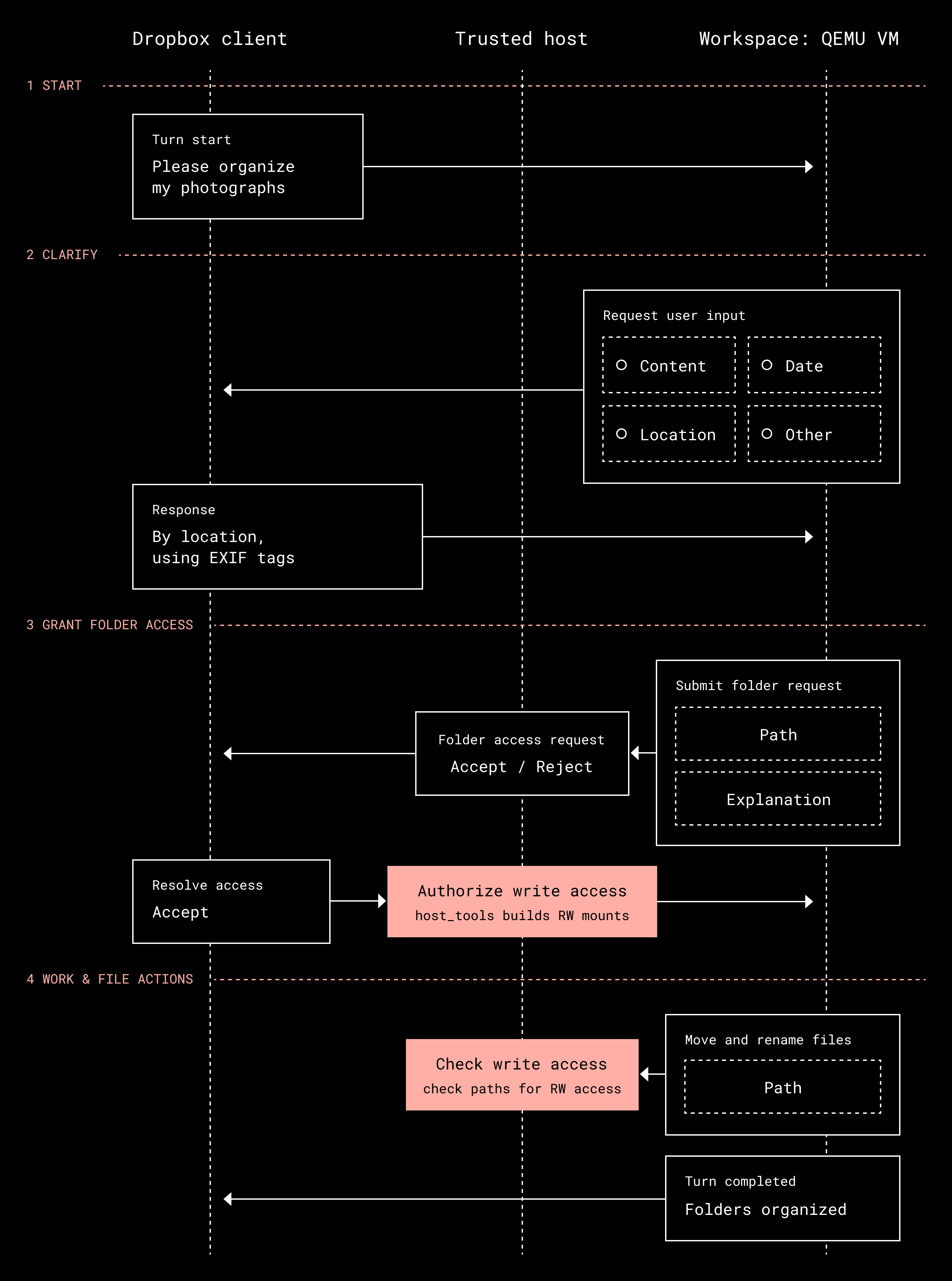
The app renders those events as cards for commands and file changes, status indicators, and activity grouped under the relevant plan step. For a broad request like organizing a folder of photos, the agent is blocked from requesting file permissions until it proposes a plan — here, a card offering to sort by location taken, date taken, or photo content. Once a plan is accepted, the agent explicitly requests access to the folders it needs before proceeding; it cannot grant that access itself. Progress appears as a checklist of steps underway or complete, and the user can interrupt or steer the conversation without understanding the code beneath. A folder-access tool triggers an Allow or Deny card in the app; approval lets the trusted host layer open that location in the sandbox and the turn completes.
The interface is kept harness-agnostic. An adapter translates messages from Pi, another coding agent harness, into the Codex protocol so its inputs, responses, and plans look the same. The team can therefore swap harnesses while preserving the UI, and because permissions are enforced outside the sandbox, new harnesses inherit the same controls without rebuilding them.
Workspace model and isolation
The workspace builds on Horn's prototype: Ubuntu with a command-line interface, letting the agent combine existing software via text commands for document conversion, image processing, and other workflows without a bespoke integration per task. Running it in Dropbox data centers keeps the software and its file access under the company's control, whatever a user has installed.
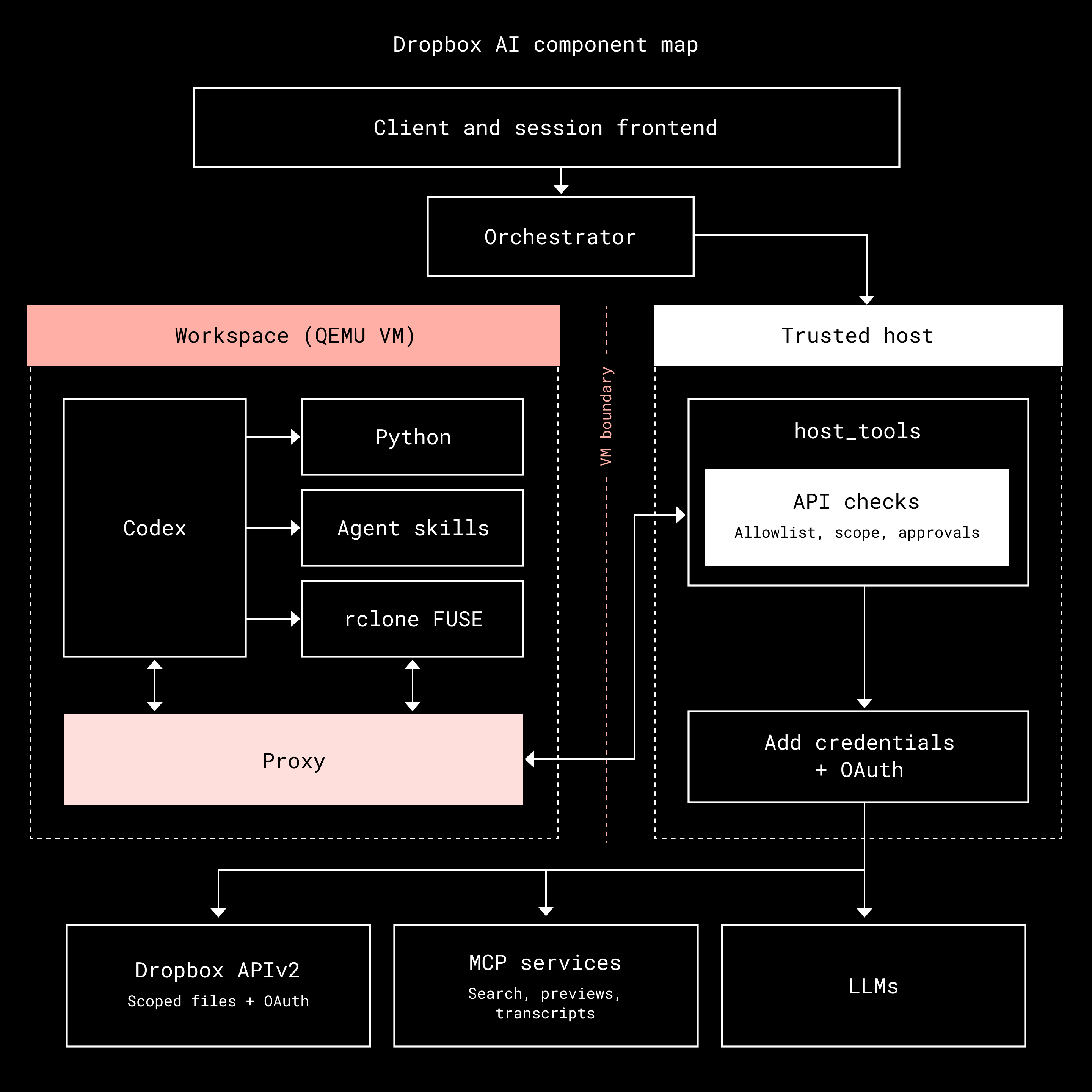
Dropbox's Riviera content-processing platform already created Office previews by opening documents in fresh VMs and converting them to PDF; it uses QEMU to restore a snapshot of memory so VMs start in tens of milliseconds. Each agent conversation gets the same treatment: a fresh workspace, online in tens of milliseconds, then connected to the person's Dropbox files.
Credentials live outside the VM. A proxy forwards outgoing requests to host_tools, a separate process that validates destination and operation — and, for file modifications, that the user has granted permission — before attaching the required credentials. The workspace has no general internet access, making this the only path out, and the checks apply equally to tool calls and to programs like rclone reading or writing a file. Model requests go through Dropbox's model-access service and security checks. Because enforcement is outside the VM, the agent cannot widen its own access.
VM startup is fast; connecting to files dominates preparation. In testing, 75% of workspaces connected to Dropbox and were ready to send the agent's first model request within 300 milliseconds of the initial VM start request. To hide the wait, the system begins preparing the workspace once someone has typed more than a few words, before the message is submitted.
Baking tools into the sandbox snapshot meant rclone or proxy updates forced a rebuild. Those tools now sit on a separate virtual disk read at startup: the workspace copies the newest tools in while keeping the rest of its prepared setup, so updates no longer require rebuilding the snapshot or slowing launch.
Approval granularity and scoping permissions
Access enforcement raises a second question: how frequently should the agent pause for approval? A photo reorganization could touch hundreds of files, and per-change confirmation would make the work unwieldy. Reviewing a multi-step plan instead lets someone judge the overall approach, while folder permissions set the boundaries for where changes may occur. Less involved tasks can take a shorter route — generating a video clip while leaving the original intact only requires access to the destination folder, requested when needed.
Undo that targets a single conversation
Plan approval does not guarantee the outcome is what the requester intended. While building the cityscape, Daniel hit skybridges and overhangs that would not print, forcing him to revert and redesign. Dropbox Rewind let him restore earlier versions, but unrelated changes from the same window had to be avoided by hand. Daniel and Rich took this as a signal that agents need a more precise rollback mechanism, particularly in shared folders where other people or agents are writing concurrently.
The solution records which conversation produced each version of every file the agent edits. Selecting undo uses that record to isolate the changes tied to the conversation and leaves other files untouched. If the agent adds a chamfer to both buildings and skybridges when only one was requested, that turn can be selected to bring the cityscape files back to their prior state.
Edits made afterward complicate the story: if a person or another agent has modified an affected file since, the restored version is kept as a separate, renamed copy so that later work survives. Conversation attribution also serves transparency — from a file's activity and version history, users can open the conversation at the moment of the agent's change, see the originating request, and choose whether to keep or undo the result.
Lessons carried into the product
Both experiments demonstrated what an agent can do with direct file access. Delivering it to customers required more than a working prototype. The new Dropbox experience embeds the software and its controls so users work from intent rather than setup, with no copying of files to make them reachable.
Three requirements emerged from the work:
- Isolation with flexibility. Tasks vary widely, so the agent runs in an isolated workspace where it can execute and combine programs.
- Credential boundaries. That flexibility is only safe if credentials and permission controls stay outside the agent's reach.
- Traceability and reversal. Because agents make mistakes, every change must map back to a conversation and be undoable.
With the new experience rolling out, customers can ask questions about their files and direct Dropbox to act on them, then review and refine the output. The cityscape started as an idea and developed through a series of changes Daniel could inspect and judge — a pattern of trying, evaluating, and redirecting that now sits inside Dropbox itself.
~ ~ ~
If building innovative products, experiences, and infrastructure excites you, come build the future with us! Visit dropbox.jobs to see our open roles.