

Copilot as a second pair of eyes during review
Pull requests and code reviews are where a lot of the real engineering work happens, but they can also be the most time-consuming part of the day. GitHub Copilot has expanded well beyond inline completions, and it can now assist with the review loop itself. A practical approach: when you see a change that could be improved but you don’t have time to write the refactored version yourself, invoke Copilot’s suggestion feature right next to the lines in question.
During a recent review of a Ruby file, for example, I noticed repetitive code blocks. Rather than typing out the refactor myself, I clicked the Copilot icon next to the code and asked for a suggestion:
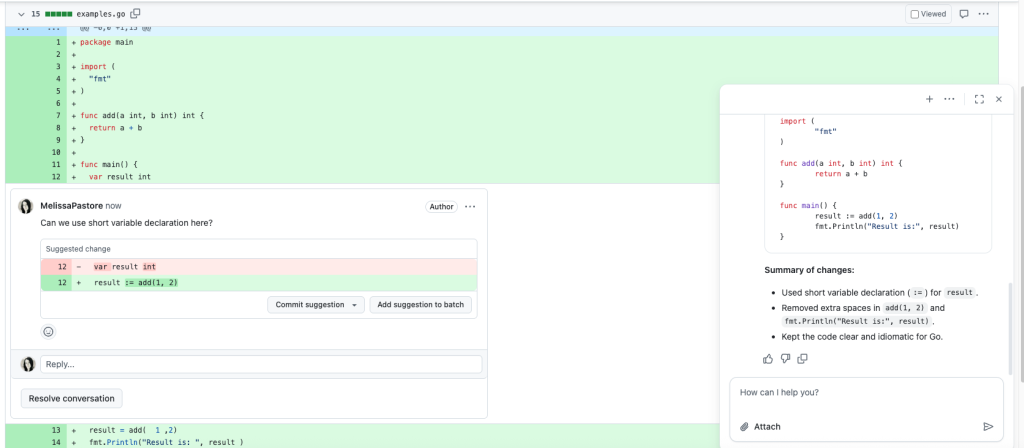
> “Can you refactor this Ruby on Rails code to reduce repetition?”Copilot’s response matched what I’d have written and saved me several minutes, leaving more room for higher-level feedback. The same approach works across languages, which matters if you move between Ruby, TypeScript, and Go frequently. When reviewing Go code and needing a refresher on idiomatic best practices, I prompted Copilot with:
> “Is this code addition following Go best practices for variable assignment? If not, can you suggest improvements?”The resulting suggestion formed the core of my review comment, making it actionable without the usual back-and-forth.
Turning raw data into readable pull request descriptions
Rich context makes a pull request easier to review, but translating spreadsheets and measurements into Markdown is tedious. Copilot can handle that formatting step directly. When I was working on reducing a React page’s load time, I kept a spreadsheet of before-and-after performance numbers. To put those in the pull request description cleanly, I gave Copilot this prompt:
Format this data into a GitHub flavored markdown table that I can paste into a GitHub pull request description:

Load Time Before (in seconds)	Load Time After Updates (in seconds)
	1.3	1.2
	1.2	1.1
	1.1	0.885
	1.3	1.3
	1.2	0.918

Average	1.22	1.0806
Copilot’s response formatted the data instantly:
Here’s your data formatted as a GitHub-flavored markdown table, ready to paste into a pull request description:
Markdown
| Test Run | Load Time Before (seconds) | Load Time After Updates (seconds) |
|----------|---------------------------|-----------------------------------|
| 1        | 1.3                       | 1.2                               |
| 2        | 1.2                       | 1.1                               |
| 3        | 1.1                       | 0.885                             |
| 4        | 1.3                       | 1.3                               |
| 5        | 1.2                       | 0.918                             |
| **Average** | **1.22**                  | **1.0806**

Let me know if you’d like any adjustments!
This saves a meaningful chunk of time whenever a PR description benefits from tables, lists, or other structured content.
Drafting pull request summaries
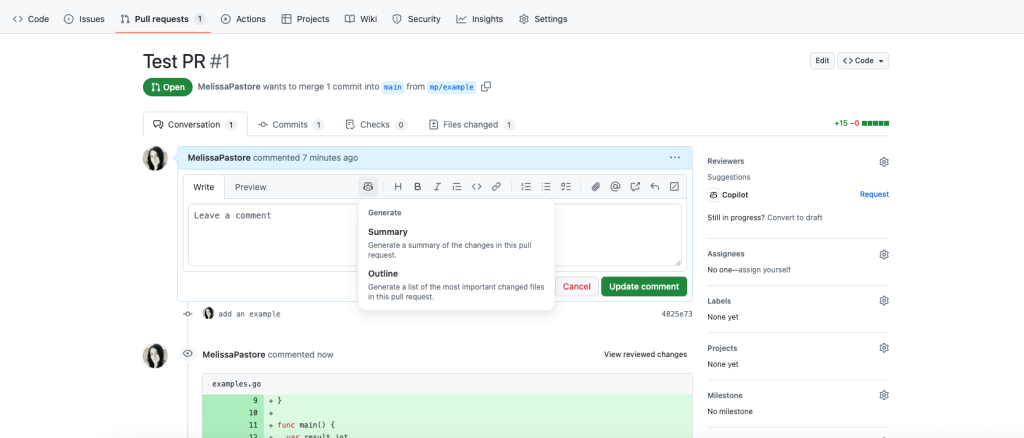
Writing the summary is often the last thing you want to do after a long debugging session. The Copilot icon in the PR description editor provides a starting draft based on your changes. Even if you end up editing the output, having an initial structure in place makes the task far less daunting.
Using Copilot to accelerate code review workflows
Beyond writing and formatting, Copilot is useful for understanding unfamiliar code. Before marking a pull request as ready for review, I will often request an initial code review from Copilot to catch issues I may have overlooked. It is worth configuring the custom instructions in your repository so the review focuses on the specific concerns your team cares about.
When reviewing a teammate’s PR and I do not understand a particular change, I simply ask Copilot to explain it. This is especially useful for parts of the codebase I rarely touch. Getting the context quickly means my feedback is more thoughtful, and I can fully assess the potential impact of a change before approving it.
Copilot does not replace a genuine, engaged review process. But it does streamline the work that surrounds it: generating refactors, formatting Markdown, drafting summaries, and explaining unfamiliar logic all reduce friction. That leaves more room for the higher-level engineering discussion that actually moves a project forward. As the tool continues to evolve, expect it to keep changing not just how code is written, but how developers collaborate on it.


