

Working With AI as a Developer
The conversation around AI in programming often starts with job displacement fears. But for working developers, the more immediate and practical reality is different: AI tools — and ChatGPT in particular, since it went public in late November 2022 — are capable of removing a surprising amount of drudgery from a day of coding.
What made ChatGPT notable was its ability to do more than chat. Because its underlying model, GPT-3, was trained on programming languages and code excerpts alongside natural text, it can generate code, explain logic, and answer technical questions in seconds. That capability has clear applications for anyone building software.
ChatGPT is not the only option. Similar tools like YouChat and Cogram are available, but ChatGPT stands out because it is free to use on OpenAI’s website and has a gentle learning curve. That makes it the most accessible starting point for developers who want to experiment with AI in their workflow.
AI tools such as ChatGPT are meant to streamline your workflow, not take over and replace your thinking and problem-solving.

With that boundary in mind, the practical question is where AI fits into the programming process and how it actually speeds things up.
Treating AI as a Brainstorming Partner
One of the most straightforward uses is turning ChatGPT into a sounding board. When you are sketching out a feature or a solution, describing the problem in plain language to the AI can surface perspectives you did not initially consider. The tool can act as a rubber duck that talks back.
That same idea extends to planning larger pieces of work. Asking for a high-level breakdown of a programming task can produce a list of subtasks that is ready for refinement. The output is rarely production-ready, but it is useful as a starting point for your own organization.
Using AI for Code Explanation and Learning
When working in an unfamiliar codebase or picking up a language you do not use daily, the ability to paste in a chunk of code and ask for an explanation is immediately valuable. ChatGPT can walk through what each part does in a clear, structured way.
This is often faster than switching context to search for documentation or piece together answers from forum threads. It is also useful for leveling up: asking for an explanation of a specific pattern, API, or concept — and following up with more detailed questions when you need them.
Writing Code in Collaboration
ChatGPT is also capable of generating code snippets based on a written description. For common tasks, such as implementing standard algorithms, fetching data from APIs, or writing SQL queries, the generated output is often close enough that you can adjust it to fit your exact context.
The real productivity gain comes from working with the output instead of copying it wholesale — an iteration pattern of: request code, review it critically, adjust where it needs changing, and run your tests. The AI handles the repetitive scaffolding of a solution while you focus on the parts that require actual judgment.
Debugging With AI Assistance
Debugging is another area where AI tools can compress time. Explaining an issue and including the relevant error message can produce likely causes and concrete things to check. The suggestions usually go beyond simply recommending a Google search. Often, it will examine your snippet and point at a possible cause, edge case, or typo you missed.
This does not mean that the answers are infallible. But combined with your own reading of the code and your tests, it gives another avenue for troubleshooting quickly and avoids getting stuck on a problem that has an obvious-but-easily-missed root cause.
Reverse Engineering Code With AI
Understanding code written by someone else — whether legacy code we no longer understand or code recently added by another dev — is an everyday headache. ChatGPT can help you untangle it piece by piece, turning it into high-level explanations, summaries, or descriptions of the intent of each block.
This turns an lengthy exploration into a quicker, incremental process. A tool that can demystify a function or class at the point where you are reading it reduces the time spent following call stacks or jumping between files to rediscover context.
Starting the Process
It is not necessarily the AI doing the work that leads to a bigger output. It’s the altered workflow that gives you time to do more — to experiment with the results, write better tests, and design more robust solutions. If you approach it as one additional tool in your toolbox, the effect on your programming productivity can be considerable.
You can start experimenting now: create a free account, try a small script, or ask for an explanation of a function you wrote months ago. It may seem odd at first, but the fastest way to get results is to treat the AI like a fresh developer on your team — ask a clear question, give it context, and review its answers carefully.
Five Everyday Coding Problems That AI Can Help Solve
Based on real-world usage, here are five common pain points where an AI assistant can make a noticeable difference in a developer’s daily workflow.
- Getting past programmer’s block on new projects;
- Reducing time spent debugging;
- Parsing lengthy documentation;
- Building more thorough developer tests;
- Finding optimization opportunities.
Jump-Starting New Projects
Programmer’s block is the coding equivalent of writer’s block. Staring at a blank file when starting a large task — say, a multi-page website — can stall progress before a single line is written.
AI shines here as a skeleton generator. Instead of producing a finished project, it can lay down the boilerplate structure so you can spend your energy on the parts that matter. In one example, asking for a basic landing page template in HTML and CSS with a specific color scheme returned a workable starting point immediately.
Prompt: Can you provide a basic structure for a sleek and modern single online store landing page, with red as the main color, for my new programming book in HTML and CSS?
index.html
<!DOCTYPE html>
<html>
<head>
  <meta charset="UTF-8">
  <meta name="viewport" content="width=device-width, initial-scale=1.0">
  <meta http-equiv="X-UA-Compatible" content="ie=edge">
  <title>Your Book Title</title>
  <link rel="stylesheet" href="style.css">
</head>
<body>
  <header>
    <nav>
      <ul>
        <li><a href="#">Home</a></li>
        <li><a href="#">About</a></li>
        <li><a href="#">Contact</a></li>
      </ul>
    </nav>
  </header>
  <main>
    <section>
      <h1>Programming book title</h1>
      <p>A comprehensive guide to becoming a proficient programmer</p>
      <button>Learn More</button>
    </section>
    <section>
      <h2>Features of the Book:</h2>
      <ul>
        <li>Step-by-step tutorials for learning core programming concepts</li>
        <li>In-depth explanations of commonly used programming languages</li>
        <li>Hands-on exercises and real-world projects to reinforce learning</li>
        <li>Case studies to illustrate the application of programming in various industries</li>
        <li>Tips and tricks for efficient and effective programming practices</li>
      </ul>
    </section>
  </main>
  <footer>
    <p>Copyright 2023</p>
  </footer>
</body>
style.css
body {
  font-family: Arial, sans-serif;
  display: flex;
  flex-direction: column;
  align-items: center;
  margin: 0;
  padding: 0;
}

header, footer {
  background-color: red;
  color: white;
  display: flex;
  justify-content: center;
  align-items: center;
  width: 100%;
  height: 50px;
  box-shadow: 0px 4px 10px rgba(0, 0, 0, 0.25);
}

nav ul {
  display: flex;
  list-style: none;
  margin: 0;
  padding: 0;
}

nav a {
  color: white;
  display: block;
  padding: 10px 20px;
  text-decoration: none;
}

main {
  display: flex;
  flex-direction: column;
  align-items: center;
  width: 100%;
  height: calc(100vh - 100px);
}

section {
  max-width: 800px;
  padding: 40px;
  margin-top: 100px;
  text-align: center;
  background-color: white;
  box-shadow: 0px 4px 10px rgba(0, 0, 0, 0.25);
  border-radius: 10px;
  margin-bottom: 20px;
  margin-left: auto;
  margin-right: auto;
}

h2 {
  margin-top: 40px;
}

ul {
  list-style: none;
  margin-top: 20px;
  padding-left: 0;
}

li {
  margin-bottom: 10px;
}
That renders as a simple but functional starting template.
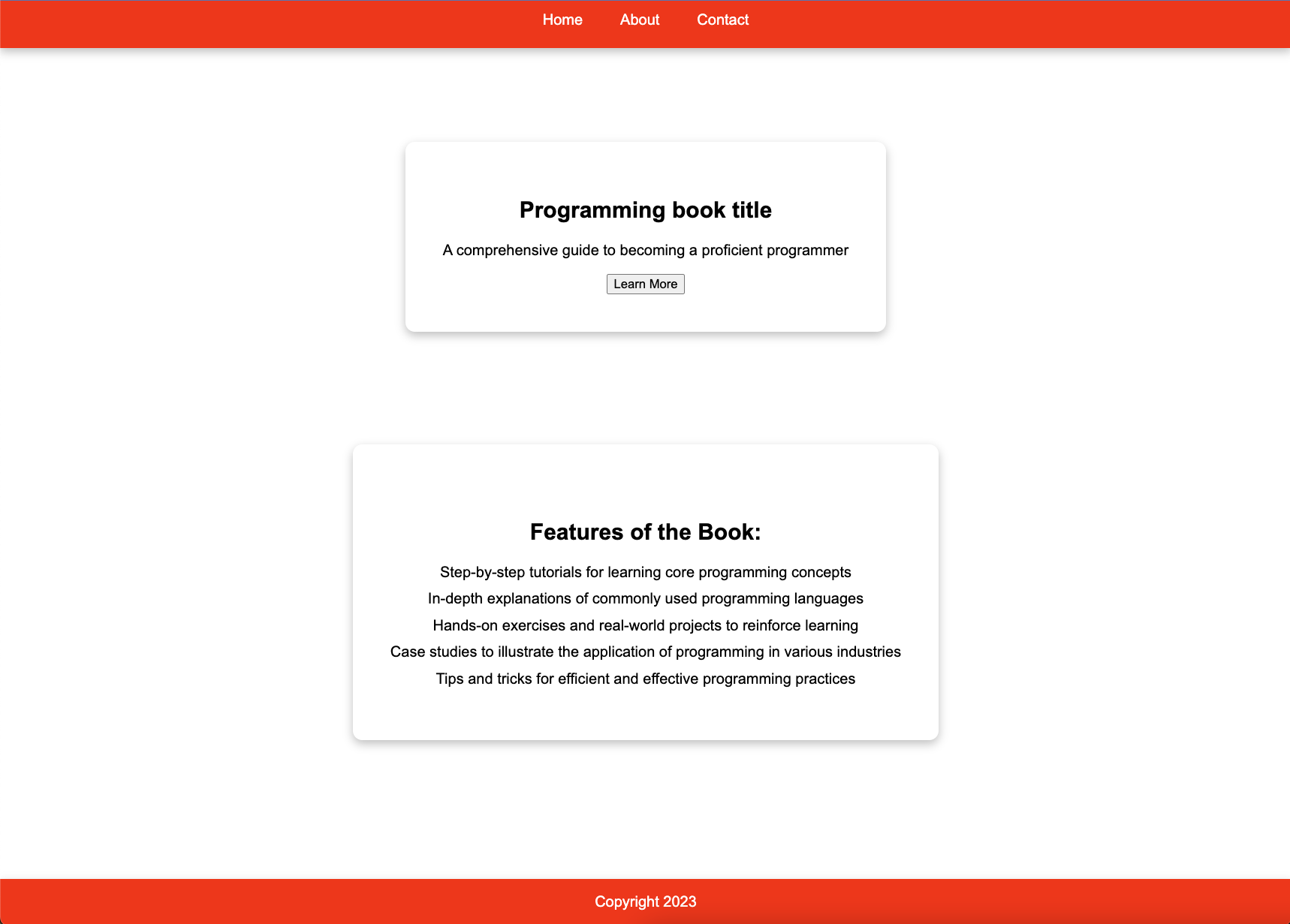
index.html and style.css. (Large preview)The result is not impressive on its own, but it turns a blank page into a scaffold in minutes. This approach lets developers skip the menial structuring work and move directly to custom styling and features. Personal projects, such as a sentence-length counter, can be built from scratch in under an hour by merging AI-generated foundations with your own additions.
Cutting Down Debugging Time
Debugging is inherently time-intensive. While AI won't replace the fundamental debugging skills a programmer needs, it works well as a supplementary tool in two specific ways.
- Explaining unfamiliar runtime errors. Instead of hunting through forums for an obscure error message, a direct prompt can yield the explanation and fix you need.
- Providing context-aware suggestions. Even when you find a solution online, applying it to your own code can be tricky. AI can bridge that gap.
For instance, a common JavaScript error like the following can be resolved quickly with the right question.
Uncaught TypeError: Cannot read property 'value' of undefined.
Prompt: I found the error “Uncaught TypeError: Cannot read property value of undefined.” in my Python code. How do I resolve it?

value of undefined.” (Large preview)This method cuts out large chunks of web searching and replaces them with direct answers. You still need to know how to implement the fix, but the time to reach that point drops significantly.
Translating Dense Documentation
Learning a new library or API often means wading through pages of dense technical text. This is precisely where a natural language model excels. Instead of reading entire documents, you can use AI to:
- Generate concise summaries of long code documentation.
- Answer specific questions without requiring a full read-through.
- Explain technical terms in plain language for yourself or less technical team members.
- Provide practical examples for each concept covered.
- Generate code snippets for you to experiment with.
This acts like a context-aware search engine for documentation. In practice, it lets you grasp and apply a new library in a fraction of the usual time, skipping straight from reading to writing and testing code.
Strengthening Developer Tests
A common weakness in test writing is the blind spot: you don’t always know what edge cases you’ve missed. Manually brainstorming every possible invalid input is tedious and fallible.
Having AI suggest tests that cover all edge cases is a great way to provide an objective and well-rounded testing phase for your projects.
Take a payment form as an example. Once you have a form with fields for processing customer details, AI can generate test cases that cover inputs you might not have considered.
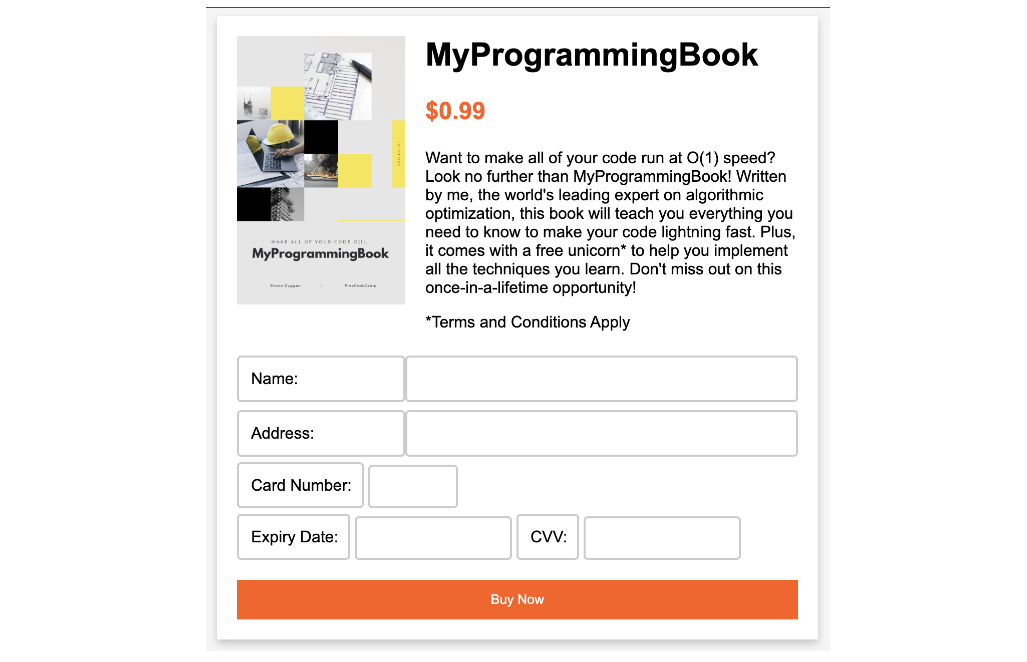
script.js
// Get references to the form elements.
const form = document.getElementById("payment-form");
const cardNumber = document.getElementById("card-number");
const expiryDate = document.getElementById("expiry-date");
const cvv = document.getElementById("cvv");
const submitButton = document.getElementById("submit-button");

// Handle form submission.
form.addEventListener("submit", (event) => {
  event.preventDefault();

  // Disable the submit button to prevent multiple submissions.
  submitButton.disabled = true;

  // Create an object to hold the form data.
  const formData = {
    cardNumber: cardNumber.value,
    expiryDate: expiryDate.value,
    cvv: cvv.value,
  };

  // Perform client-side validation on the form data
  if (!validateFormData(formData)) {
    // If the data is invalid, re-enable the submit button and return
    submitButton.disabled = false;
    return;
  }

  // Send the form data to the server.
  // The following is just an example and should not be used in a real-world scenario
  // as it lacks security measures and proper payment gateway integration.
  fetch("/charge", {
    method: "POST",
    body: JSON.stringify(formData),
    headers: {
      "Content-Type": "application/json",
    },
  })
    .then((response) => response.json())
    .then((data) => {
      // Handle the server response.
      if (data.success) {
        // Payment was successful.
        alert("Payment successful!");
      } else {
        // Payment failed.
        alert("Payment failed. Please try again.");
        submitButton.disabled = false;
      }
    })
    .catch((error) => {
      console.error(error);
      alert("An error occurred. Please try again.");
      submitButton.disabled = false;
    });
});

// Perform client-side validation on the form data.
function validateFormData(data) {
  // Example validation checks.
  if (!data.cardNumber || data.cardNumber.length !== 16) {
    alert("Please enter a valid card number.");
    return false;
  }
  if (!data.expiryDate || data.expiryDate.length !== 5) {
    alert("Please enter a valid expiry date in the format MM/YY.");
    return false;
  }
  if (!data.cvv || data.cvv.length !== 3) {
    alert("Please enter a valid CVV.");
    return false;
  }
  return true;
}
Prompt: Can you help to come up with some edge cases to ensure that the form does not accept any invalid inputs in collecting payment details?
test.js
// Test Case 1: Check if form doesn't submit when fields are empty.
document.querySelector("form").addEventListener("submit", function(e) {
  e.preventDefault();
  var name = document.querySelector("input[name='name']").value;
  var address = document.querySelector("input[name='address']").value;
  var cardNumber = document.querySelector("input[name='card-number']").value;
  var expiryDate = document.querySelector("input[name='expiry-date']").value;
  var cvv = document.querySelector("input[name='cvv']").value;

  if (!name || !address || !cardNumber || !expiryDate || !cvv) {
    alert("All fields are required");
    return;
  }

  // Check if all the fields contain valid inputs.
  if (!validateName(name) || !validateAddress(address) || !validateCardNumber(cardNumber) || !validateExpiryDate(expiryDate) || !validateCVV(cvv)) {
    return;
  }

  // Continue with payment processing.
});

// Test Case 2: Check if name input is valid.
function validateName(name) {
  var nameRegEx = /^[a-zA-Z ]+$/;
  if (!nameRegEx.test(name)) {
    alert("Invalid name. Please enter a valid name");
    return false;
  }
  return true;
}

// Test Case 3: Check if address input is valid.
function validateAddress(address) {
  var addressRegEx = /^[a-zA-Z0-9\s,'-]*$/;
  if (!addressRegEx.test(address)) {
    alert("Invalid address. Please enter a valid address");
    return false;
  }
  return true;
}

// Test Case 4: Check if card number input is valid.
function validateCardNumber(cardNumber) {
  var cardNumberRegEx = /^\d{16}$/;
  if (!cardNumberRegEx.test(cardNumber)) {
    alert("Invalid card number. Please enter a valid card number");
    return false;
  }
  return true;
}
This automates a repetitive task and improves coverage at the same time. The result is a more comprehensive testing phase without the manual grind.
Guiding Code Optimization
AI cannot perform optimization itself, but it can point you in the right direction. Useful applications include:
- Code suggestions for alternative, faster implementations.
- Best practices based on a broad training set of code patterns.
- Refactoring advice to improve efficiency and readability without changing behavior.
- Knowledge sharing on whether a library, framework, or language feature already solves your problem.
The actual optimization work remains manual, but having an AI to surface insights and architectural alternatives helps you produce cleaner, higher-performing code with less trial and error.
Know the Boundaries Before You Trust the Output
AI assistants can feel limitless when you first start using them, but they have real, hard limits that matter in production work. The models behind tools like ChatGPT are recent inventions and still struggle with reliability and accuracy in several specific ways:
- Limited understanding. Models have a shallow grasp of code and may not see the implications or trade-offs of the decisions they suggest.
- Training data gaps. Output quality depends entirely on the data used. ChatGPT, for example, was trained only on data through 2021, so newer language features or changes may be missing from its answers.
- Bias. The training data skews the model toward certain patterns or solutions, which can lead to suboptimal or just plain wrong suggestions.
- Lack of context. Without a full picture of the problem and the desired outcome, the model tends to give generic or irrelevant advice. Specific prompts help, but complex tasks still resist reliable automation.
These weaknesses are a modest cost compared to the productivity upside, but they are non-negotiable to remember when you rely on AI in a professional environment. The safe working assumption is that AI augments your existing skills rather than replacing them. Use it deliberately, keep your own judgment in the loop, and you get the speed without surrendering your competence.
Where AI Is Heading Next
The coding-specific uses are only one slice of the AI expansion. Beyond refactoring and debugging, AI is moving into adjacent parts of the developer's day. General writing tools already help produce code documentation and API docs, and they have settled into the workflow as accepted helpers. AI-powered notetaking and productivity apps are gaining traction too, particularly among developers and students who process heavy volumes of information daily.
None of these tools replace the developer; they absorb the repetitive, labor-intensive parts of the job. That trend will continue. Wherever a task is tedious and well-defined, expect AI to appear.
The Takeaway
The opening of this guide made the case, and the closing repeats it: the real value of AI is not in outsourcing your work but in upgrading it. Knowing what the tools cannot do is as important as knowing what they can. With that balance, AI becomes a durable part of your programming arsenal and a genuine time-saver.
Rather than bracing against the wave of new AI technology, learn to ride it. Adapt the techniques to your own routines — every developer works differently, but the underlying principles and the known limitations apply equally. Use AI as your assistant, not your replacement, and the productivity gains follow.


