
Playwright MCP and GitHub Copilot: Automating the Repro Walkthrough
Bug reports with clear repro steps are valuable, but manually stepping through them to confirm the issue and then track down the root cause is slow, repetitive work. And if your project doesn't have a strong end-to-end test suite, that process often falls entirely on you.
With GitHub Copilot in agent mode and the Playwright Model Context Protocol (MCP) server, you can hand that chore to the AI. Copilot can use Playwright's tools to launch your app, follow the repro steps, verify the bug, investigate the code, and then re-test its own fix against the live site.
What Playwright MCP Adds to Copilot
Playwright is an end-to-end testing framework for web apps. It lets you script a user's actions and verify that the application behaves correctly. MCP, originally developed by Anthropic, is an open protocol that exposes tools to AI agents — either to provide extra context or to let the agent perform actions directly.
The Playwright MCP server bridges those two: it gives an AI agent (here, GitHub Copilot) the actual Playwright tools. That means Copilot can drive the browser itself rather than just reasoning about code. It can create scripts, run them, and observe the results, which makes it possible to automate the entire debug loop from repro to fix.
Getting the Playwright MCP Server Running in VS Code
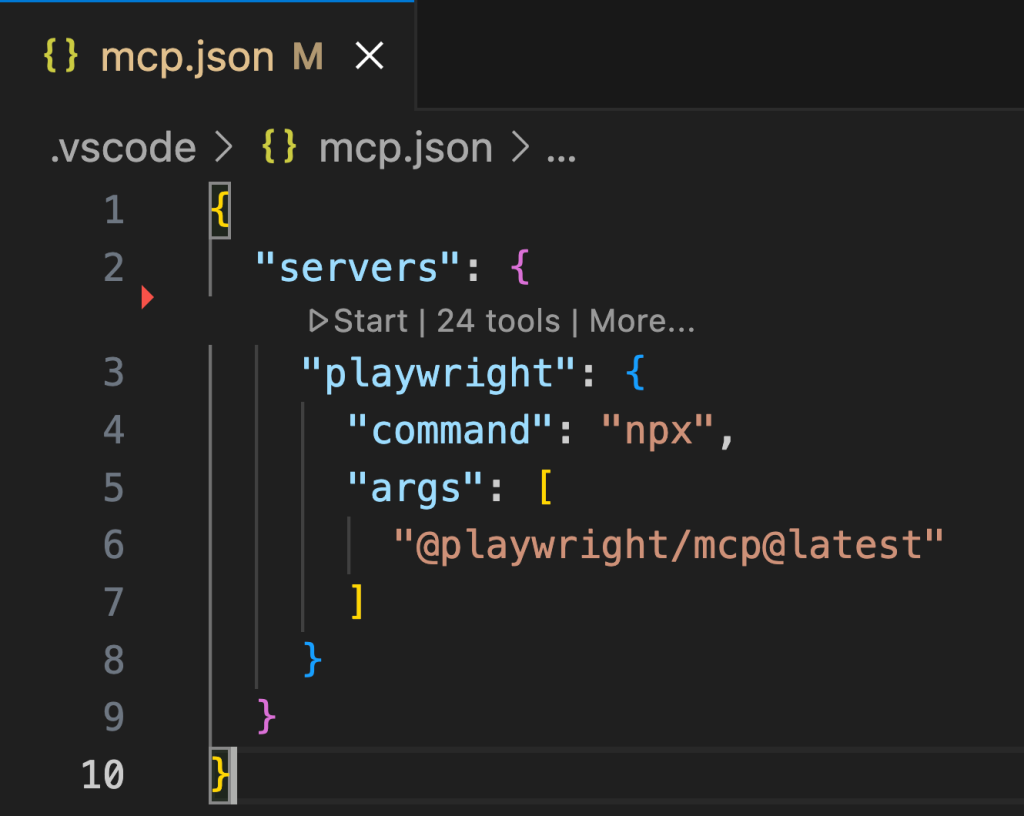
To use the server, it first has to be visible to your IDE. In VS Code you have two options: install the Playwright MCP server globally so it's available to all projects, or scope it to a single repo by adding a .vscode/mcp.json file:
{
  "servers": {
    "playwright": {
      "command": "npx",
      "args": [
        "@playwright/mcp@latest"
      ]
    }
  }
}
Once that file is in place, a play button appears above the playwright entry. Clicking that starts the server and makes it available to Copilot agent mode.
You'll likely want to configure Playwright for your project, especially if the app has a non-trivial startup routine. The project used in the Agents in SDLC workshop — a frontend written with Astro & Svelte and a backend using Flask — already had a Playwright config that included a proper webServer block to start the app. In fact, Copilot itself can generate that configuration for you. A prompt along these lines, adapted to your stack, will do it:
Add Playwright to this project. When configuring Playwright, note the startup script for the site. Ensure the configuration uses this startup script, and reuses the server if one is already launched.A Sample Bug Hunt
Consider a crowdfunding site for DevOps-themed board games. The user can filter listings by publisher and by category. A user files an issue stating the publisher filter does nothing:
## Error

The publisher filter doesn't actually filter the games by publisher.

## Repro steps

1. Go to the homepage.
2. Select a publisher from the dropdown list; the page updates.
3. Review the updated list, noting no change in the games listed.

## Expected behavior

The only games displayed are ones published by the selected publisher.

## Actual behavior

All games are still displayed.
Agent mode is designed to act as a peer programmer: you describe the problem and the expected outcome, then review the work it does. In the demo, the reporter's issue was paraphrased before being handed to Copilot, which is a useful habit since it forces you to understand the ask clearly and can surface questions for the original reporter.
The following prompt was sent to Copilot agent mode:
A user is reporting the publisher filter doesn't do anything. Can you please use Playwright to confirm this is an issue, and if so track it down? Start by going to the landing page, using the dropdown for publisher, and seeing what happens. Thanks!| 💡 Pro tip: If you want to be fancy, you can also incorporate the GitHub MCP server into the flow by asking Copilot to track down the issue and to read the text directly. To streamline this blog, I’m going to stick to just the Playwright MCP server (but you can learn more about the GitHub MCP server and how to use it in our guide). |
Copilot then took over. It used the Playwright MCP server to boot the site and execute the repro steps, confirming that the publisher filter indeed had no effect. From there it inspected the frontend, which looked correct. Playwright MCP was again used to confirm that the frontend was actually hitting the API. The backend inspection turned up the culprit: a simple typo.
Notably, after proposing a fix, Copilot went back to Playwright to verify the correction worked in the running app. That completed the loop: repro confirmed, cause found, fix generated, and fix validated — all before a human started the code review and pull request.
Why This Matters for Debugging
The sample bug is deliberately trivial to keep the focus on the workflow, but the approach scales to more complex problems. Giving Copilot agent mode hands-on browser control means it can see the consequences of its changes directly. You can get Playwright configured for your project quickly — with Copilot's help, if needed — and if you don't already have end-to-end tests, this setup is a natural first step toward adding them.


