
Durable video AI pipelines without the state-machine boilerplate
AI workflows tend to die at the worst possible moment. A content moderation check succeeds, video chapter generation is underway, and then a provider rate limit or network timeout kills the run. The developer is left with a choice: restart from zero and pay for work already completed, or hand-roll the state management needed to resume mid-pipeline.
Mux faced this problem head-on while building @mux/ai, an open-source SDK for adding AI features to Mux video infrastructure. The team wanted developers to compose multi-step AI workflows — fetching metadata, generating transcripts, running moderation, creating summaries — without forcing them to build production-grade orchestration from scratch.
Their solution: build on Vercel's Workflow DevKit, which provides durable execution through code annotations rather than infrastructure mandates.
Why video pipelines need durable execution
A typical AI video workflow chains several potentially slow or failure-prone operations:
- Fetch video metadata via the Mux API
- Auto-generate a transcript
- Fetch thumbnail images or a storyboard
- Run LLM-based content moderation
- Generate a summary and tags with an LLM
- Generate chapters with an LLM
- Produce translated subtitles
Implementing this correctly by hand means building custom orchestration with message queues, state machines, retry logic, and observability. That is a significant infrastructure lift for what should be a feature, not a project.
The design constraints behind the SDK
Mux evaluated durability solutions against three principles:
- No hard infrastructure requirements. Functions from
@mux/aimust run in any Node.js environment like a normal SDK. - Opt-in durability. Adding persistence, observability, and error handling should be an easy layer, not a rewrite.
- Familiar patterns. No new DSLs, no YAML, no state machine definitions — just JavaScript.
Workflow DevKit fit those constraints. The "use workflow" and "use step" directives mark functions for durable execution without altering how the code is written. In a standard Node environment, the directives are a no-op. When running under Workflow DevKit, they activate automatic retries, state persistence, and observability.
The key property: the same code runs everywhere but gains durability guarantees when deployed to a supporting environment. Mux added these annotations without taking an explicit dependency on Workflow DevKit. The SDK keeps working as a plain Node package for everyone else.
Resumable steps in practice
With the directives in place, each "use step" function runs in isolation. If the moderation API fails after summary and tag generation already completed, the workflow resumes from the point of failure — no work is lost or paid for twice. Execution is distributed across multiple serverless function invocations, so long-running AI operations avoid timeout limits.
import { getSummaryAndTags, getModerationScores } from '@mux/ai/workflows';
export async function processVideo(assetId: string) {
"use workflow";
const summaryResp = await getSummaryAndTags(assetId);
// ✅ Step succeeds. The summaryResp is persisted.
const moderationResp = await getModerationScores(assetId, {
thresholds: { sexual: 0.7, violence: 0.8 }
});
// ❌ Step fails. Workflow is suspended.
// ✅ Replay happens and picks back up right here
// without re-doing the getSummaryAndTags work above.
// ✅ Step succeeds. The moderationResp is persisted.
// With Workflow DevKit, you can nest your own "use workflow"
// and "use step" functions inside a larger "use workflow"
const emailResp = await emailUser(assetId);
// ✅ The nested workflow succeeds. Each step
// inside your emailUser workflow is treated as an
// isolated step.
return { summaryResp, moderationResp, emailResp };
}
Workflow DevKit's observability dashboard shows the full execution history, including failures and retries. A step that fails on the first attempt and succeeds on retry is fully visible for debugging.

The SDK also exports lower-level primitives — singular units of work such as fetchTranscriptForAsset and getStoryboardUrl — each annotated with "use step". Developers can pull these into their own custom workflows as discrete, resumable steps.
Portability through Worlds
Workflow DevKit handles portability with the concept of "Worlds," which define where workflow state gets stored. Locally, that means JSON files on disk. On Vercel, state is managed automatically. Teams can also self-host with Postgres, Redis, or a custom implementation.
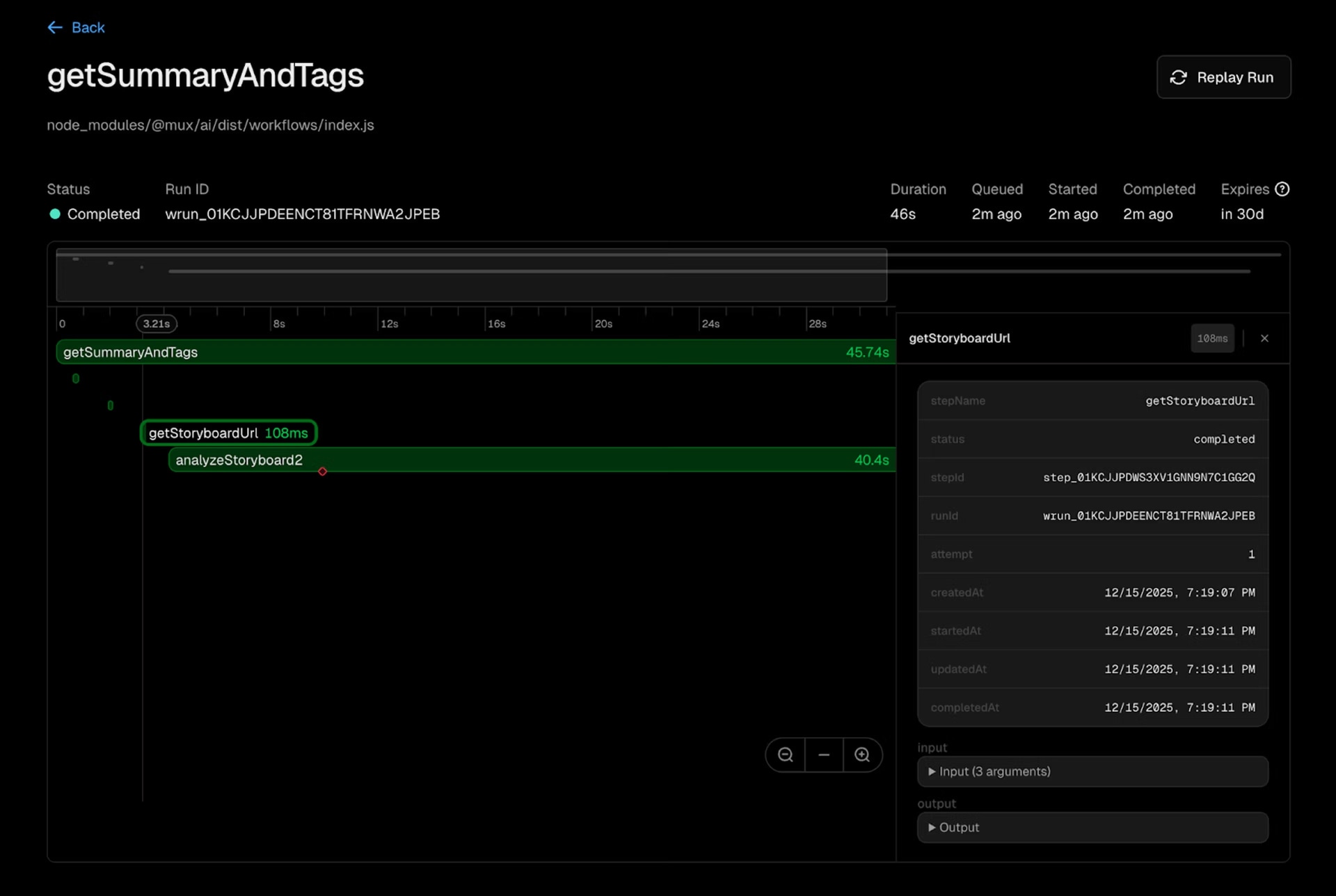
The default path is deliberately simple: develop and test locally with the Local World, then deploy to Vercel, which provisions everything automatically — including the observability dashboard. For teams on Vercel, that means zero infrastructure configuration, built-in tracing and metrics with replay and time-travel debugging, and automatic scaling from tens to tens of thousands of videos.
What ships out of the box
@mux/ai includes pre-built workflows for common video AI tasks:
- Summaries and tags: categorize a video library automatically
- Chapter generation: create navigation points from content structure
- Content moderation: flag problematic content before it reaches users
- Translation and dubbing: expand reach across languages
- Embeddings: generate vectors for nearest-neighbor search
Workflows are model-agnostic — OpenAI, Anthropic, or Gemini all work depending on the task. The project is open source under Apache 2.0, with live eval results, public CI, and test coverage. Getting started is a single install: npm install @mux/ai. Local development needs no extra setup; enabling durability on Vercel is just a matter of adding the Workflow DevKit integration.
The durable execution pattern extends well beyond video: document processing, data synchronization, and agent orchestration all benefit from resumable multi-step logic. Workflow DevKit supplies the foundation — the workflows on top are up to the developer.


