
What makes generative AI different from earlier automation
Developers have relied on AI and automation for years—security scanning, CI/CD pipelines, and similar tooling are already part of everyday workflows. Machine learning-powered tools such as CodeQL on GitHub, for instance, have long been used to hunt down security vulnerabilities. What separates generative AI from that prior generation of tooling is its ability to produce novel content rather than merely classify, detect, or act on predefined rules.
| Automation: 🛤 You know what needs to be done, and you know of a reliable way to get there every time. |
Rules-based logic: 🔎 You know the end goal, but there’s more than one way to achieve it. |
Machine learning: 🧠 You know the end goal, but the amount of ways to achieve it scales exponentially. |
Generative AI: 🌐 You have big coding dreams, and want the freedom to bring them to life. |
| You want to make sure that any new code pushed to your repository follows formatting specifications before it’s merged to the main branch. Instead of manually validating the code, you use a CI/CD tool like GitHub Actions to trigger an automated workflow on the event of your choosing (like a commit or pull request). | You know some patterns of SQL injections, but it’s time consuming to manually scan for them in your code. A tool like Code QL uses a system of rules to sort through your code and find those patterns, so you don’t have to do it by hand. | You want to stay on top of security vulnerabilities, but the list of SQL injections continues to grow. A coding tool that uses a machine learning (ML) model, like Code QL, is trained to not only detect known injections, but also patterns similar to those injections in data it hasn’t seen before. This can help you increase recognition of confirmed vulnerabilities and predict new ones. | Generative AI coding tools leverage ML to generate novel answers and predict coding sequences. A tool like GitHub Copilot can reduce the amount of times you switch out of your IDE to look up boilerplate code or help you brainstorm coding solutions. Shifting your role from rote writing to strategic decision making, generative AI can help you reflect on your code at a higher, more abstract level—so you can focus more on what you want to build and spend less time worrying about how. |
Inside the models: LLMs, transformers, and attention
At the core of modern generative coding tools are large language models (LLMs)—algorithms trained on vast amounts of code and natural language that can predict coding sequences and generate original content from prompts. The current state of the art is the transformer architecture. Transformers rely on an attention mechanism, which lets the model flexibly connect different tokens from the user input to output it has already produced. Unlike older approaches, this enables contextually relevant answers across longer stretches of text or code.
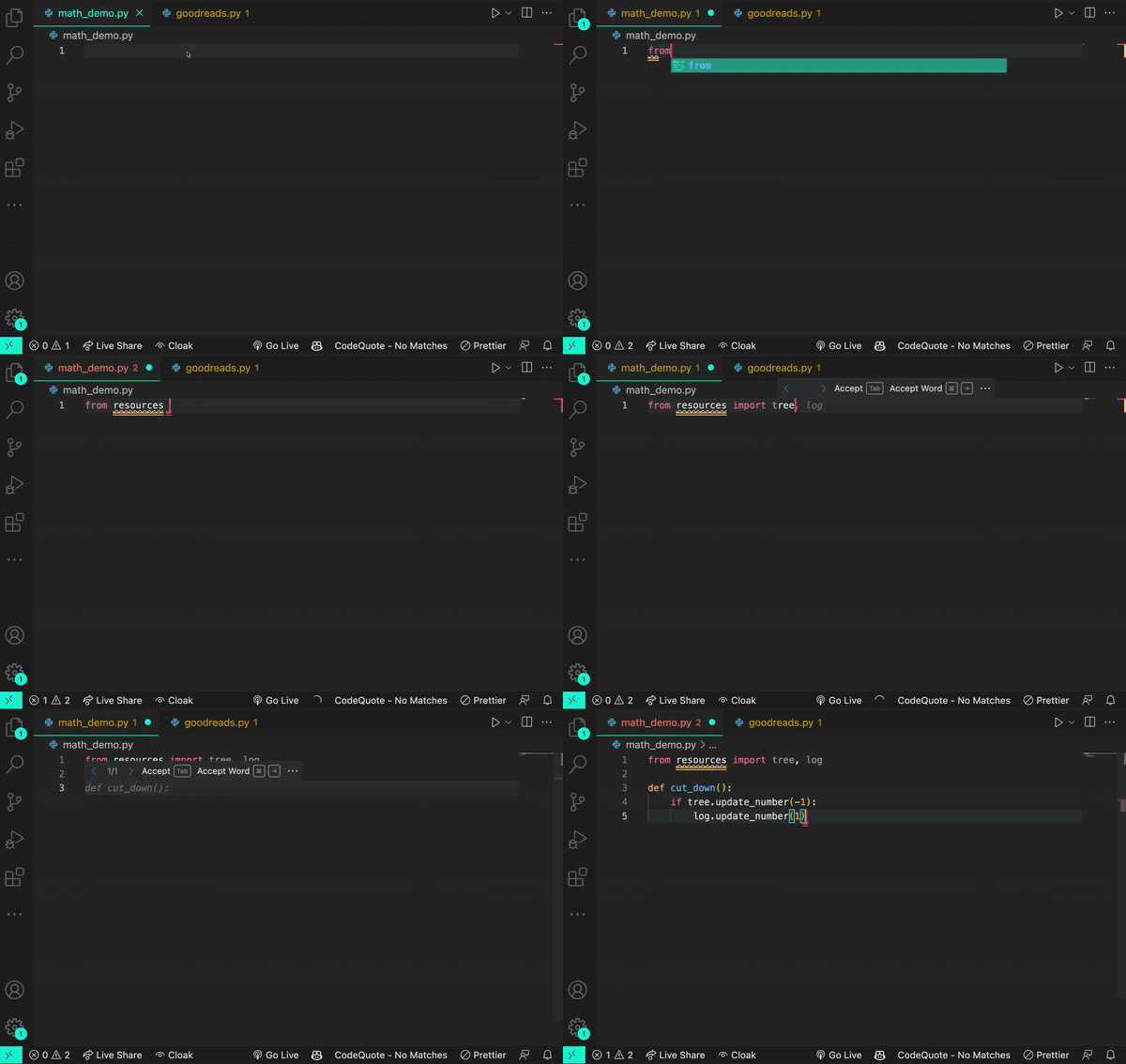
Consider how a transformer interprets the word log based on surrounding code. Given the input from math import log, the model infers a logarithmic function is intended.

Change the prompt to from logging import log, and the model correctly understands a logging function is meant.
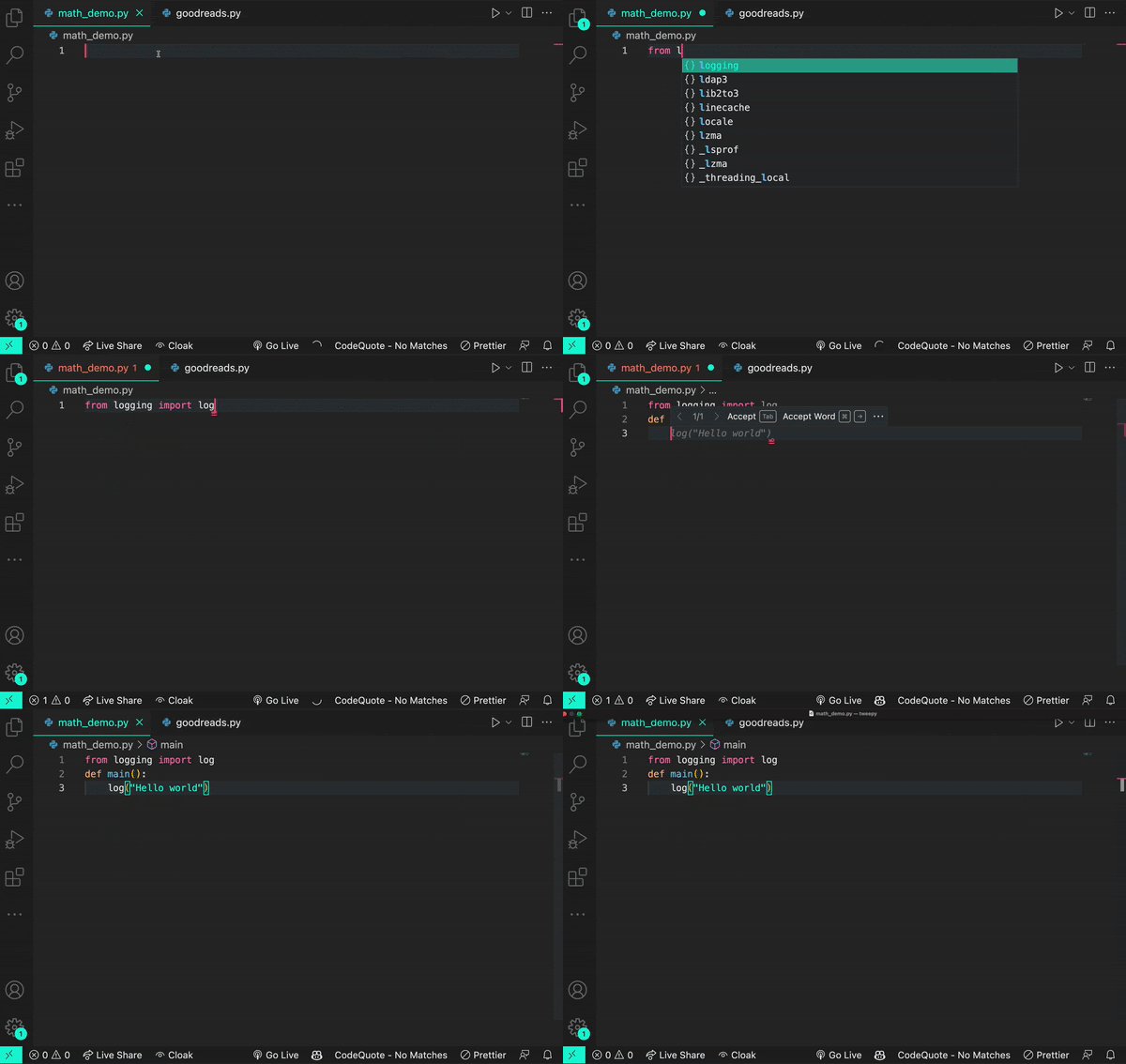
Sometimes the context is ambiguous—though often, a log is just a log.
Non-transformer LLMs, such as those based on recurrent neural networks or long short-term memory, inherit two significant drawbacks: they stumble on long sentences and paragraphs, and they typically require labeled training data, making the training process labor intensive. Transformers break past those limits. Through self-supervised learning, they train on unlabeled data by setting their own learning objectives, testing those goals on a portion of the input, and then extrapolating across the rest. The result is the ability to process enormous, unlabeled datasets—and the larger the dataset, the better they scale.
How coding assistants turn models into suggestions
Assistants like ChatGPT and GitHub Copilot are built atop LLMs such as OpenAI’s GPT-3, GPT-4, and Codex, trained on large volumes of natural language and publicly available source code. When a developer uses GitHub Copilot, the process works roughly as follows:
- Code preceding the cursor in the IDE is passed through algorithms that determine which parts Copilot should process.
- The transformer-based LLM applies patterns abstracted from its training data to that input.
- The output is contextually relevant, original code suggestions. GitHub Copilot additionally filters out known security vulnerabilities, vulnerable code patterns, and code that matches other projects.

Generative AI’s defining purpose is creating novel content—text, code, or images. LLMs abstract patterns from training data, apply those patterns to existing language, and then produce output that follows those patterns. Given the scale of these models, they may generate sequences that do not exist anywhere yet. The same diligence applied to reviewing a colleague’s code should apply to AI-generated code: assess it, validate it, and use your judgment before integrating it.
Context windows and the push for richer input
Helpful prompt engineering matters because all transformer LLMs carry a context window—the limit on the volume of data the model can process at once. Models can’t yet consume infinite context, though that window has grown. The Codex model, for example, holds enough context to process a couple of hundred lines of code, which has already accelerated tasks like code completion and code change summarization.
Because developers routinely draw context from pull requests, project folders, open issues, and other sources, the practical challenge with a bounded context window is deciding which data beyond raw code will yield the best suggestions. The order of that data proves equally important. GitHub recently adjusted Copilot to consider not just code before the cursor but also some code after it. The so-called Fill-In-the-Middle (FIM) paradigm positions a gap in the code for the tool to fill, giving the model more signals about the developer’s intent and how the fill should align with the rest of the program. That approach produces higher-quality suggestions without added latency.
Visual information can also serve as context. Multimodal LLMs (MMLLMs) extend transformer architectures to accept images and video in addition to text. GPT-4 from OpenAI and Microsoft’s Kosmos-1 are two recent examples, designed to respond to sequences mixing text with images, image caption pairs, and related inputs. Extending context this way points to creative and productive possibilities that go well beyond filling in code at the cursor.
Translating and modernizing legacy code
One of the more practical uses of generative AI in development is as a starting point for code translation. Research presented at the 2021 International Conference on Intelligent User Interfaces found that developers using AI-generated suggestions to port legacy source code into Python received a useful skeletal framework to build on. Even when the generated code contained errors, participants found it simpler to review and correct those mistakes than to hand-translate the original code from zero. Several noted that evaluating and fixing AI output felt similar to their normal workflow of reviewing code written by teammates.
A practical example is GitHub Copilot Labs, a companion extension for Visual Studio Code that depends on the main GitHub Copilot extension. It lets developers convert code between programming languages in a few steps—GitHub Developer Advocate Michelle Mannering has demonstrated translating her own Python code into Ruby with the tool.
Faster completion and longer flow states
IDEs have had basic autocomplete for years, but large language models raise the ceiling by generating longer, more contextually relevant suggestions—sometimes spanning multiple lines. A 2022 study in the Proceedings of the Association for Computing Machinery on Programming Languages (PACMPL) tracked 20 programmers who used GitHub Copilot and observed that end-of-line suggestions for function calls and argument completions helped developers code faster and remain in flow for longer stretches.
GitHub's internal research aligns with this. Developers using Copilot completed tasks up to 55% faster than those who didn't, and productivity gains weren't purely about speed: 74% of respondents said they felt less frustrated while coding and could devote energy to more satisfying work.
Creative problem-solving and API discovery
The PACMPL research also highlighted how developers reach for generative AI when they're blocked. When unsure how to proceed, participants used Copilot to propose next steps, work through unfamiliar syntax, select the right API, or identify the correct algorithm. This made the tool a resource for creative exploration rather than just mechanical completion.
I was one of the developers who wrote GitHub Copilot, but prior to that work, I had never written a single line of TypeScript. That wasn’t a problem because I used the first prototype of GitHub Copilot to learn the language and, eventually, help ship the world’s first at-scale generative AI coding tool.
Some participants treated Copilot's multi-suggestion pane like a built-in Q&A forum. Because they could describe their intentions in natural language, they could request implementation ideas and press Ctrl/Cmd + Enter to display a list of 10 candidate solutions. While this mode of exploration didn't necessarily produce deep understanding, one developer confirmed it was enough to start using an API they had never worked with before.
Cutting down on context switching
Generative AI tools also relieve developers of frequent trips to search engines. A 2023 study published by GitHub in the Association for Computing Machinery's Queue highlighted that having answers available at the point of coding reduces context switching and conserves mental energy. GitHub's broader plan for AI-powered development includes a ChatGPT-like assistant that lives inside the editor; GitHub Copilot Chat, for example, can be used to locate and fix bugs without leaving the IDE.
Strengthening test coverage
Because many generative AI tools are strong at pattern recognition and completion, developers are using them to generate unit tests, functional tests, and even security tests from natural language prompts. Some tools also filter for security vulnerabilities, alerting developers if they're about to introduce a flaw into the codebase.
GitHub Developer Advocate Rizel Scarlett has demonstrated how Copilot can be used to think through and build out tests for an existing codebase.
The emerging shape of AI-assisted development
What's taking form is a new mode of interaction with code that goes beyond offloading drudgery. Developers describe feeling more creative, more willing to take on unfamiliar problems, and better equipped to model large, complex solutions. Generative AI can help accelerate language and framework learning, generate clearer comments and documentation, and offer alternative implementations that wouldn't have occurred to the developer otherwise.
These patterns point to the direction of the next wave of tooling, but they are still early evidence. The day-to-day practice of AI-assisted software development will keep evolving as developers continue to experiment with what these tools can—and cannot—do well.


