

GPT-5 arrives in GitHub Copilot
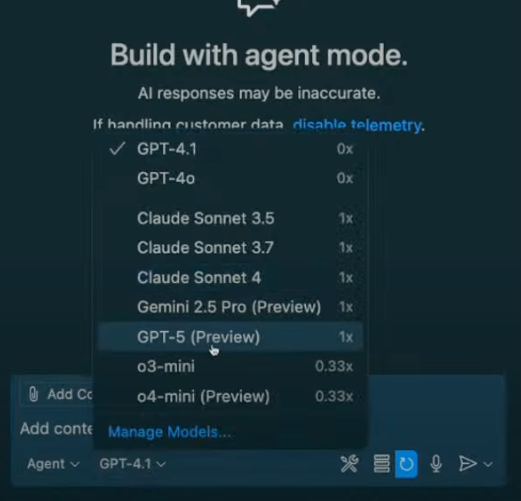
OpenAI's GPT-5 reasoning model is now available in public preview for GitHub Copilot, and it works across ask, edit, and agent modes in VS Code. That broad mode support matters: not every model in Copilot is accessible in every context. In practice, GPT-5 in agent mode is where it becomes most useful for multi-step tasks.
The model's response speed stands out for a reasoning model. Suggestions arrive quickly enough to keep a build session moving without the usual pause-and-wait rhythm. To switch, open the model picker in the Copilot interface and select GPT-5.
| Enterprise note: If you’re using GitHub Copilot through your company, enterprise and business administrators need to opt in to enable GPT-5 access. Chat with your IT team if you don’t see it available yet. |
Testing GPT-5: a game in under a minute
A practical test: building a Magic Tiles-style game live during a stream. The approach used was spec-driven development — getting the model to write product requirements before touching code. The first prompt asked GPT-5 to act as a product manager and generate a full MVP spec.
Do you know the game Magic Tiles? If you do, can you describe the game in simple MVP terms? No auth, just core functionality.The model returned a structured response covering the task breakdown, core gameplay loop, minimal feature set, data model, and a build checklist. That upfront context is what makes the subsequent code generation cohesive rather than piecemeal.
With the spec in hand, the build prompt was deliberately terse:
Build this.No framework or stack restrictions were given. GPT-5 chose HTML, CSS, and plain JavaScript for the MVP — a canvas-based game with input handling, scoring, combo tracking, speed progression, and a game-over state. The entire implementation came back in under a minute.
Refinement was equally conversational. When the game needed clearer user instructions, a follow-up request produced updated HTML with guidance baked in, along with suggestions for the next feature batch.
Can you provide user instructions on how to play the game before the user clicks start?The GitHub MCP server
The second major release covered in the stream was GitHub's Model Context Protocol (MCP) server. MCP is an open standard that connects AI assistants to external tools — repositories, issues, email, databases, design files. Without it, an LLM is confined to what it can see in the chat window. With it, the model can act on your development ecosystem directly.
MCP follows a client-server model similar to REST APIs. In VS Code, the editor serves as both host and client, connecting to MCP servers you configure.
Setup is minimal. Create a .vscode/mcp.json file in your workspace root:
{
  "servers": {
    "github": {
      "command": "npx",
      "args": ["-y", "@github/mcp-server-github"]
    }
  }
}
Then click the "Start" button in the MCP configuration. Authentication runs through the standard GitHub OAuth flow, with passkey support. Once authenticated, the GitHub MCP server's tools appear in the Copilot interface. No API keys to manage, no separate configuration step.
Automating GitHub workflows in natural language
With the server connected, repository management becomes a conversational task. During the stream, a request to create a GitHub repo for an existing local project ("Teenyhost," a temporary document deployment tool) was handled entirely from the editor.
Can you create a repository for this project called teenyhost?Copilot asked for the required metadata — repository name, description, visibility settings — through the MCP server:
- Repository name: teenyhost
- Owner: my GitHub username
- Visibility: public
- Optional description
Once provided, the server created the repository on GitHub, pushed the local code, and set up the Git remote automatically. No browser tab, no context switch.
The more compelling workflow was bulk issue creation. After asking Copilot to brainstorm improvements for the project, it returned categorized suggestions — quick wins, robustness fixes, UX enhancements, and advanced features.
What additional features and improvements can I implement in this app?A follow-up instruction to file the issues produced five properly formatted GitHub issues, each with a descriptive title, detailed body, implementation suggestions, and relevant labels. This turns brainstorming sessions into actionable backlog items without manual ticket transcription.
Why the combination matters
Three properties make this pairing genuinely useful rather than a demo trick:
- Speed preserves flow. Fast responses from a reasoning model let you stay in a build state instead of breaking context while waiting.
- Natural language removes friction. The MCP server eliminates the hop between editor and github.com for repo creation, issue filing, and similar chores.
- Human oversight stays in place. Automation is not silent. When Copilot attempted to push directly to the main branch, the action could be cancelled mid-flight. The AI handles the mechanical work; the developer keeps decision authority.
Trying it yourself
To start with GPT-5: open Copilot in VS Code, switch to the GPT-5 model, and try agent mode for more complex builds. The spec-driven pattern — ask for requirements first, then generate code — is worth testing on your own projects.
For the GitHub MCP server, the steps are:
- Create
.vscode/mcp.jsonin your workspace and add the GitHub MCP server configuration. - Authenticate via the OAuth flow.
- Experiment with repo creation, issue generation from notes or sessions, and the other tools the server exposes.
The broader shift here is from interface-driven workflows to intent-driven ones. Instead of navigating menus and forms, you describe what should happen and the tooling executes it. Both GPT-5 and the GitHub MCP server are available now, and the barrier to trying them is a configuration file and an OAuth login. The next step for anyone interested is simply to build something with them.


