
Copilot gains an agent mode
GitHub has been positioning Copilot as a pair programmer since 2021, but the latest update shifts that relationship: Copilot can now take the controls more directly. The company is introducing agent mode in preview for VS Code, making Copilot Edits generally available, adding Gemini 2.0 Flash to the model picker, and offering an early look at an autonomous software engineering agent it calls Project Padawan.
Agent mode, available today in VS Code Insiders, goes beyond generating code from a prompt. Copilot iterates on its own output, detects errors, and fixes them without requiring you to copy terminal output back into chat. It can also suggest terminal commands and ask you to run them. The key difference from previous chat-based workflows is that Copilot infers subtasks that aren't explicitly stated but are needed for the primary request to work, then works through them until the prompt is fully satisfied.
To try agent mode:
- Download VS Code Insiders.
- Enable the agent mode setting for GitHub Copilot Chat:

Once enabled, switch from Edit to Agent in the Copilot Edits panel, next to the model picker. GitHub says agent mode will eventually come to all IDEs that support Copilot, but the current preview is limited to VS Code Insiders and will evolve based on user feedback.
Copilot Edits reaches GA
Copilot Edits, announced at GitHub Universe in October, is now generally available in VS Code. The feature combines chat and inline editing: you specify a set of files to modify, describe the change in natural language, and Copilot applies edits across those files in a review-friendly interface. The GA release incorporates feedback GitHub collected through its VS Code Copilot release issue tracker.
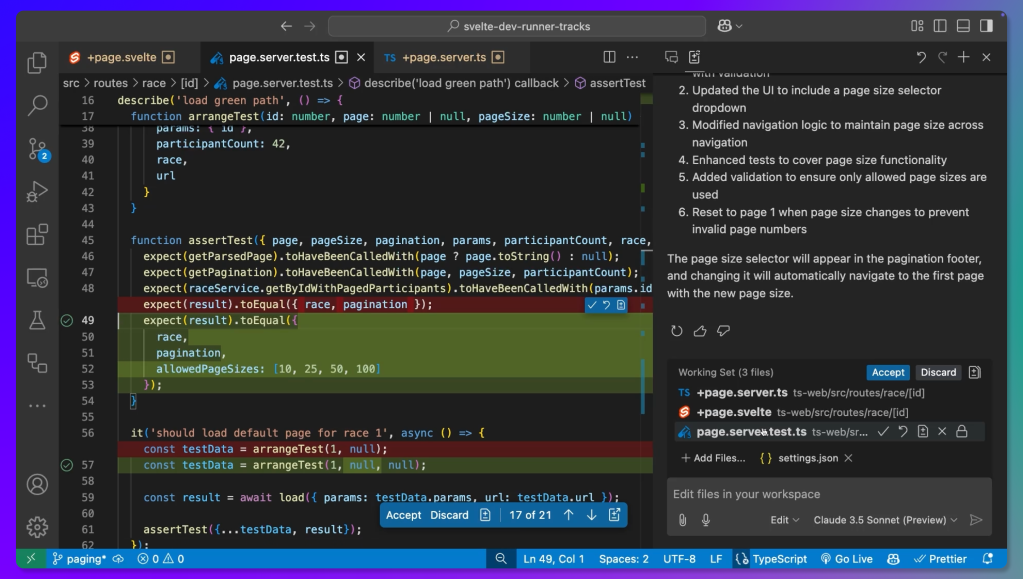
Under the hood, Copilot Edits uses a dual-model setup. A foundation model generates edit suggestions from the full session context; you can choose between OpenAI's GPT-4o, o1, and o3-mini, Anthropic's Claude 3.5 Sonnet, or Google's Gemini 2.0 Flash. The proposals go to a speculative decoding endpoint optimized to apply file changes quickly.
The interface lives in the Secondary Side Bar by default, so you can keep the Explorer, Debug, or Source Control views open on the left while reviewing edits on the right — for example, watching unit tests run in the Testing view as Copilot iterates. Voice input is also supported in Copilot Edits, and changes can be undone to return to a previous working state.
Copilot Edits is also now in preview for Visual Studio 2022. Upcoming roadmap items include improving the speculative decoding endpoint's performance, preserving context when moving from Copilot Chat into an Edits session, suggesting files to add to the working set, and supporting undo on individual suggested chunks.
Project Padawan: autonomous SWE agents
GitHub also offered a first look at Project Padawan, an autonomous software engineering agent expected to ship later this year. When it launches, you'll be able to assign issues to Copilot from any GitHub client. Copilot will then produce fully tested pull requests, assign human reviewers, and iterate on their feedback — functioning like a contributor added to every repository.
For each assigned task, Copilot can spin up a secure cloud sandbox, clone the repository, configure the environment, analyze the codebase, make the necessary edits, then build, test, and lint the code. It will also consider discussion in the issue or PR and any custom repository instructions to understand both intent and project conventions.
GitHub plans to open integration points for partners and customers in a feedback loop, similar to how it handled Copilot Extensions and the model picker. The company sees Padawan initially handling tasks like bug fixes and test maintenance, freeing developers for more complex work. The project name is a deliberate nod to the theme: agents will be trained carefully rather than turned loose prematurely.


