

Designing For Agency, Not Just Autonomy
The leap from generative AI to agentic AI is a shift from systems that suggest to systems that act. That shift makes the design of the user experience more important, not less. A technically capable agent that acts opaquely will not earn user trust; however well it performs, it will feel risky. Design patterns are the mechanisms that let users grant autonomy as a privilege, rather than have it seized by the system. The following patterns address the three pillars of that experience: transparency, control, and accountability.
The Essential UX Patterns For Agentic Systems
These patterns translate the principles of trustworthy autonomy into concrete interface and interaction decisions. They give users a palpable sense of agency even as the system operates independently.
Making Agent Reasoning Visible
Users cannot trust what they cannot understand. Design interfaces that surface the agent’s reasoning process, not just its conclusions. Instead of a finished result, show the chain of decisions that led to it. This could be a timeline of actions taken, the information sources consulted, or the key considerations weighed at each choice point. This visibility turns the agent from a black box into a collaborator whose logic users can audit.
The Power Of The Pre-Flight Check
Before an agent takes a consequential action, require it to present its planned course of action for user approval. Think of this as a “takeoff checklist.” This pre-flight briefing should outline the intended action, the rationale, and the anticipated impact. It changes the user’s role from passive observer to active approver, creating a natural and lightweight approval checkpoint for high-stakes or irreversible operations.
Actionable Consent, Not Blanket Approval
Consent must be granular. Interfaces should push decisions to the user at the moment of consequence, allowing them to approve or reject with full context. Where the source is proposing recurring-trigger or human-in-the-loop consent prompts, avoid generic, one-time authorizations. Instead, ensure permission is scoped to the specific type of action, its frequency, and its context. This gives users control without burdening them with trivial choices.
The Undo Safety Net
Mistakes are inevitable in complex workflows. A safety net that allows reversal of agent actions is critical. Every consequential agent action should have a match. This “undo” mechanism restores the state to the point before the action, giving users the confidence to experiment with autonomy. The presence of a reliable safety net lowers the perceived risk of delegation and increases willingness to trust the agent with more complex tasks.
The Interrupt And Redirect Channel
Autonomous does not mean unfettered. Users need a clear, always-available channel to stop or steer the agent in real time. This goes beyond the initial prompt. A persistent control panel or chat channel lets the user interrupt an ongoing workflow, inject new constraints, or redirect priorities mid-task. This addresses the feeling of being trapped in a process that is no longer aligned with current intent.
These patterns treat trust as a property that the interface instills, not a quality of the AI model itself.
Six UX Patterns That Keep Agentic AI Accountable
Designing for agentic AI is designing for a relationship. Like any successful partnership, that relationship depends on clear communication, mutual understanding, and established boundaries. These six UX patterns follow the functional lifecycle of an agentic interaction, covering the moments before, during, and after an agent takes action.
1. The Intent Preview: Informed Consent Before Action
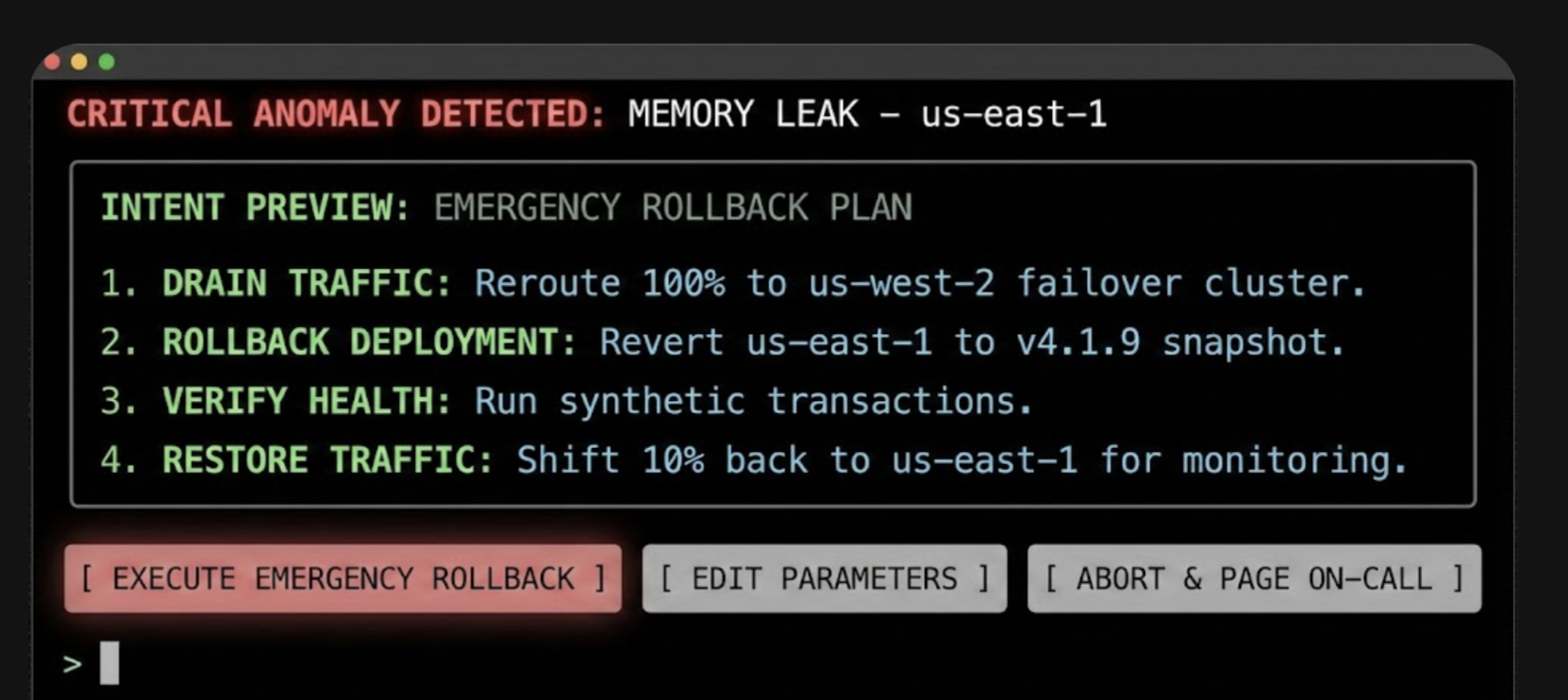
Before an agent takes any significant action, the user needs an unambiguous understanding of what is about to happen. The Intent Preview — a conversational pause before action — establishes informed consent by transforming autonomous processes into a transparent, reviewable plan.
An effective preview has three characteristics:
- Clarity and conciseness: Summarize actions in plain language. Instead of “Executing API call to cancel_booking(id: 4A7B),” state “Cancel flight AA123 to San Francisco.”
- Sequential steps: Outline the key phases of multi-step operations so users can spot issues in the proposed sequence.
- Clear user actions: The preview is a decision point, not a notification. It must offer explicit choices — intentional friction that ensures conscious consent, especially for irreversible or high-stakes actions.
The pattern is non-negotiable for any action that is irreversible, involves a financial transaction, shares information with others, or makes a change the user cannot easily undo. Without it, users feel ambushed and disable the feature to regain control.
Metrics for success:
- Acceptance Ratio: Plans accepted without edit / total plans displayed. Target > 85%.
- Override Frequency: Total “Handle it Myself” clicks / total plans displayed. A rate > 10% triggers a model review.
- Recall Accuracy: Percentage of test participants who can correctly list the plan’s steps 10 seconds after the preview is hidden.

In high-stakes domains, this pattern becomes a safety barrier. Consider a DevOps Release Agent managing cloud infrastructure: the interface must use specific terminology (Drain Traffic, Rollback), and actions must be binary and impactful. The user authorizes a major operational shift based on the agent’s logic — not merely approves a suggestion.
2. The Autonomy Dial: Progressive Authorization
Trust is a spectrum, not a binary switch. A user may trust an agent with low-stakes tasks autonomously while demanding confirmation for high-stakes decisions. The Autonomy Dial implements progressive authorization, typically on a per-task-type basis:
- Observe & Suggest: Notify the user of opportunities or issues, but never propose a plan.
- Plan & Propose: The agent can create plans, but the user must review every one.
- Act with Confirmation: For familiar tasks, the agent prepares actions and the user gives a final go/no-go.
- Act Autonomously: For pre-approved tasks, the agent acts independently and notifies after the fact.
Granularity is key. An email assistant, for instance, might have separate dials for scheduling meetings versus sending emails. This pattern is essential during onboarding, letting users start with low autonomy and increase it as confidence grows. Without it, a single failure drives users to abandon the agent entirely rather than dial back permissions.
Metrics for success:
- Trust Density: Percentage breakdown of users per setting.
- Setting Churn: Number of setting changes / total active users per month. High churn indicates trust volatility.
3. The Explainable Rationale: Answering “Why?” Proactively
When an agent acts — especially autonomously — the immediate question is Why did it do that? The Explainable Rationale pattern answers this before it’s asked, translating raw system logic into human-readable justification grounded in the user’s stated preferences and prior inputs.
Effective rationales share two traits:
- Grounded in precedent: Link back to a rule, preference, or prior action.
- Simple and direct: Avoid complex conditional logic; use a “Because you said X, I did Y” structure.
This pattern is critical for any autonomous action where the reasoning isn’t immediately obvious — especially background actions triggered by external events. Without it, users interpret valid autonomous actions as random behavior or bugs, preventing them from building a correct mental model.
Metrics for success:
- Why? Ticket Volume: Support tickets tagged “Agent Behavior — Unclear” per 1,000 active users.
- Rationale Validation: Percentage of users who rate the explanation as ‘Helpful’ in post-interaction microsurveys.
4. The Confidence Signal: Surfacing Uncertainty
To help users calibrate their trust, the agent should surface its own confidence in its plans and actions. This makes the agent’s internal state legible and helps users decide when to scrutinize a decision.
Implementation options include a confidence score (e.g., a simple percentage), a scope declaration stating the agent’s area of expertise, and visual cues like a green checkmark for high confidence or a yellow question mark to prompt closer review.
This pattern matters most when agent performance varies with input data quality or task ambiguity — especially in expert systems where a human must critically evaluate the AI’s output. Without it, users either blindly accept low-confidence hallucinations or anxiously double-check high-confidence work.
Metrics for success:
- Calibration Score: Pearson correlation between model confidence score and user acceptance rate. Target > 0.8.
- Scrutiny Delta: Difference between average review time of low-confidence versus high-confidence plans. Expected to be positive.
5. The Action Audit & Undo: The Safety Net
The most powerful mechanism for building user confidence is the ability to easily reverse an agent’s action. A persistent, readable Action Audit log with a prominent Undo button for every action dramatically lowers the perceived risk of granting autonomy.
Design best practices include a chronological timeline view of all agent-initiated actions, clear status indicators (successful, in progress, undone), and transparent time limits for reversible actions. When an action becomes irreversible — like a non-refundable booking — the UI must clearly communicate that window. Honesty about when an action becomes permanent builds trust.
This foundational pattern applies to nearly all agentic systems. It is non-negotiable when introducing autonomous features or when the cost of an error is high. Without it, a single error permanently destroys trust.
Metrics for success:
- Reversion Rate: Undone actions / total actions performed. If > 5% for a specific task, disable automation for that task.
- Safety Net Conversion: Percentage of users who upgrade to Act Autonomously within 7 days of successfully using Undo.
6. The Escalation Pathway: Handling Ambiguity Gracefully
Even the most advanced agent will encounter situations where user intent is unclear. A well-designed agent doesn’t guess; it escalates. Escalation patterns include:
- Requesting clarification: “You mentioned ‘next Tuesday.’ Do you mean September 30th or October 7th?”
- Presenting options: “I found three flights that match your criteria. Which one looks best?”
- Requesting human intervention: For high-stakes or highly ambiguous tasks, provide a pathway to loop in a human expert: “This transaction seems unusual. Would you like me to flag this for a human agent to review?”
Prioritize this pattern where user intent can be ambiguous or highly context-dependent, or when the agent operates with incomplete information. Without it, the agent will eventually make a confident, catastrophic guess that alienates the user.
Metrics for success:
- Escalation Frequency: Agent requests for help / total tasks. Healthy range: 5-15%.
- Recovery Success Rate: Tasks completed post-escalation / total escalations. Target > 90%.
| Pattern | Best For | Primary Risk | Key Metric |
|---|---|---|---|
| Intent Preview | Irreversible or financial actions | User feels ambushed | >85% Acceptance Rate |
| Autonomy Dial | Tasks with variable risk levels | Total feature abandonment | Setting Churn |
| Explainable Rationale | Background or autonomous tasks | User perceives bugs | “Why?” Ticket Volume |
| Confidence Signal | Expert or high-stakes systems | Automation bias | Scrutiny Delta |
| Action Audit & Undo | All agentic systems | Permanent loss of trust | <5% Reversion Rate |
| Escalation Pathway | Ambiguous user intent | Confident, catastrophic guesses | >90% Recovery Success |
When Agents Get It Wrong
Mistakes are inevitable in any agentic system. The distinction between a good product and a bad one often comes down to how gracefully it recovers when things go wrong. A robust repair and redress framework isn’t a nice-to-have; it’s a core feature that determines long-term success.
From a service design perspective, there’s a well-documented opportunity here: the service recovery paradox. A customer who experiences a failure followed by an empathetic, successful recovery can end up more loyal than one who never hit a problem. A well-handled error can build more trust than a flawless track record.
Treat the error message as an apology—one that needs psychological precision. A good one has three parts:
- Acknowledge the error. State plainly that a mistake occurred. Example: “I incorrectly transferred funds.”
- State the immediate correction. Follow up with the remedial action right away. Example: “I have reversed the action, and the funds have been returned to your account.”
- Provide a path for further help. Always offer a clear link to human support. This de-escalates frustration and signals that accountability extends beyond the agent itself.
A well-designed repair UI makes this concrete:
We made a mistake on your recent transfer.
I apologize. I transferred $250 to the wrong account.
✔ Corrective Action: The transfer has been reversed, and your $250 has been refunded.
✔ Next Steps: The incident has been flagged for internal review to prevent it from happening again.
Need further help? [ Contact Support ]
Governance as a Strategic Asset
User-facing design patterns only work when supported by an internal governance engine. This isn’t about bureaucratic drag; it’s a competitive advantage. Organizations with mature governance frameworks can ship more ambitious agentic features faster, knowing guardrails exist to mitigate brand risk.
The engine should function as a formal body—an Agentic AI Ethics Council—bringing together UX, Product, and Engineering, with support from Legal, Compliance, and Support. In smaller teams, these roles often collapse into a triad of Product, Engineering, and Design leads.
Who Owns What
- Legal/Compliance. The first line of defense, keeping the agent within regulatory and legal boundaries. They define the hard no-go zones for autonomous action.
- Product. The steward of the agent’s purpose. They define operational boundaries through a formal autonomy policy and own the Agent Risk Register.
- UX Research. The voice of user trust and anxiety. They run trust calibration studies, simulated misbehavior tests, and qualitative interviews to track evolving mental models.
- Engineering. Builds the technical underpinnings: robust logging, one-click undo functionality, and hooks for explainable rationales.
- Support. Front-line incident response. They need training on agent errors and a direct feedback loop to the Ethics Council on real-world failure patterns.
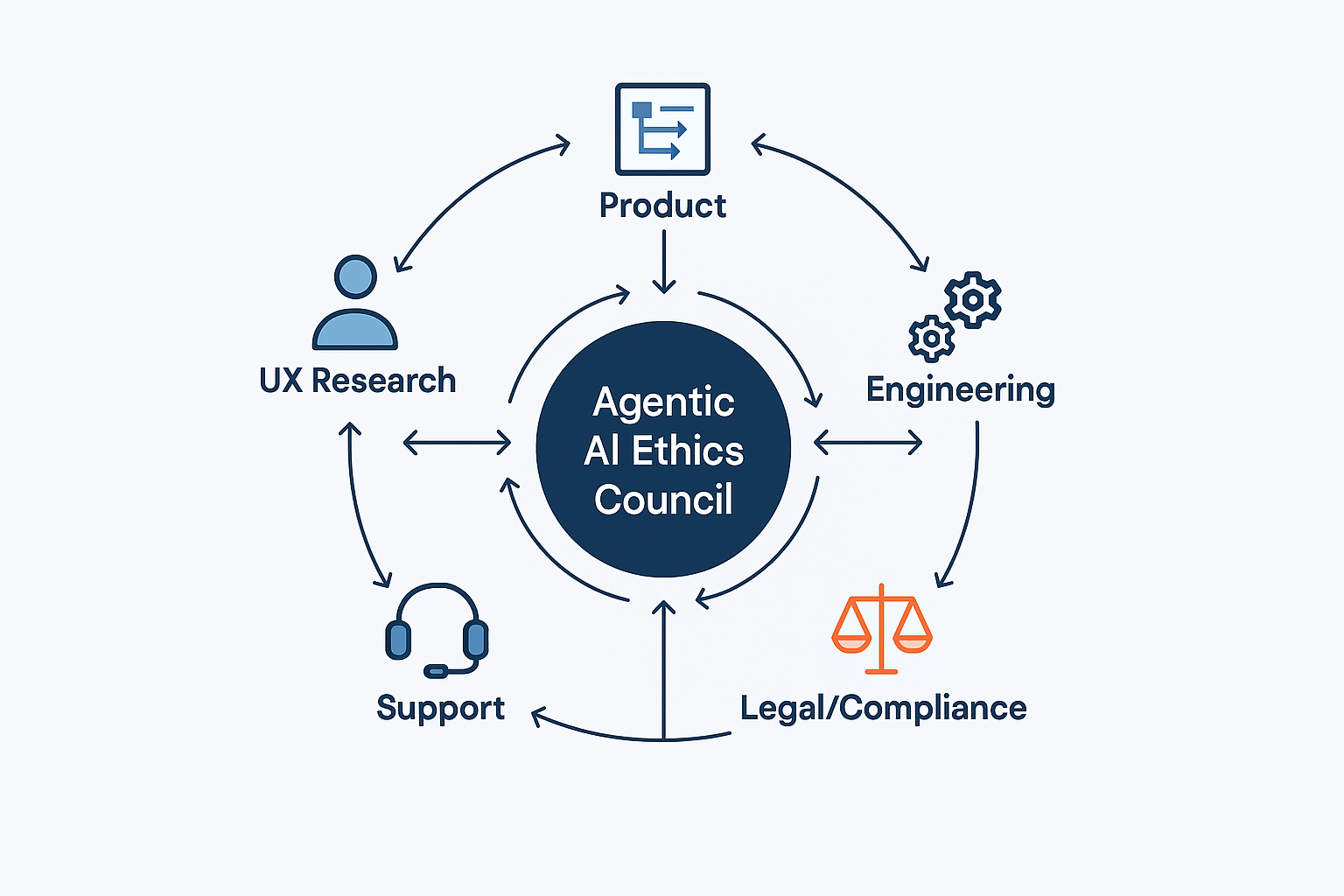
The governance structure should maintain living documents: an Agent Risk Register that identifies potential failure modes, Action Audit Logs that are regularly reviewed, and formal Autonomy Policy Documentation.
A Phased Roadmap for Product Leaders
Integrating agentic AI shouldn’t be treated as a single launch. A phased journey builds technical capability and user trust in parallel.
Phase 1: Foundational Safety (Suggest & Propose)
The goal here is trust-building without autonomous risk. Limit the agent to analysis and suggestion.
- Implement a rock-solid Intent Preview as the core interaction model. Get users comfortable with the agent formulating plans while they retain full control over execution.
- Build the Action Audit & Undo infrastructure now, even if the agent isn’t acting yet. This preps the system for future autonomy and reassures users a safety net exists.
Phase 2: Calibrated Autonomy (Act with Confirmation)
Once users are comfortable with proposals, introduce low-risk autonomy. This phase teaches users how the agent thinks and lets them set the pace.
- Introduce the Autonomy Dial with limited settings, starting with Act with Confirmation.
- Deploy Explainable Rationale for every action. Clear explanations demystify the agent’s logic and reinforce that it operates on user preferences.
Phase 3: Proactive Delegation (Act Autonomously)
Only proceed when data from prior phases shows user trust.
- Enable Act Autonomously for specific, pre-approved tasks. Use Phase 2 data—high Proceed rates, low Undo rates—to identify the first candidate tasks for full automation.
- Monitor and Iterate. Launching autonomous features is the beginning, not the end. Continuously review performance, gather feedback, and refine scope based on real-world data.
Design as the Final Safety Lever
Agentic AI promises proactive assistance, but that power carries responsibility. The controls users see, the pathways for repair, and the governance behind the scenes are the levers that make autonomy viable.
Autonomy is an output of a technical system, but trustworthiness is an output of a design process. Our challenge is to ensure that the user experience is not a casualty of technical capability but its primary beneficiary.

The work isn’t interface design in the traditional sense. It’s relationship architecture. The future of AI’s utility and acceptance depends on designing these systems with respect for the user’s ultimate authority—and building the structures that make that respect operational.


