Building blocks: segmentation and recognition
Dropbox’s mobile document scanner turns phone photos of receipts, invoices and similar items into clean PDFs — but the output is only pixels. To make that text searchable and copyable, the company built an in-house OCR pipeline. The first version of the scanner used a licensed commercial OCR SDK for product validation. That proved user demand, but also exposed three problems: per-scan licensing costs scaled with usage, the vendor’s engine was tuned for flatbed-scanner images rather than unconstrained phone photos, and the team wanted more control over future OCR-driven features.
The OCR architecture was split into two components. A Word Detector uses computer vision to segment a document image into lines and individual words. A Word Deep Net then converts each word image into text using deep learning — specifically bi-directional LSTMs, CTC and convolutional layers. Because the word detector was considered the more tractable problem, the team focused initial research on the recognition half.
Research and prototyping
The first question was whether a state-of-the-art OCR system could be built at all. That required data. Dropbox asked a small percentage of users to donate document images matching likely scanner uploads — receipts, invoices, letters. Donation was optional, and donated files were kept private and secure, never stored permanently on local machines, with auditing and strong authentication required for access.
Deep learning is strongly supervised, so every donated image needs a ground-truth transcription. Using Amazon’s Mechanical Turk was ruled out for user data, since outside workers would see the content. Instead, Dropbox built DropTurk, an internal annotation platform that can route jobs either to MTurk for public, non-user data or to a small pool of contractors under non-disclosure agreements for user-donated images. DropTurk provides reusable template UIs for annotation tasks — workers transcribe the text in a word image, or mark it as misoriented, non-English script, unreadable or blank — plus dashboards for monitoring job progress and worker-level analytics during labeling to catch quality problems early.
Two datasets were collected: a word-level set of individual word images with transcriptions, and a full-document set of complete images such as receipts with fully transcribed text. The document set was used to benchmark existing state-of-the-art OCR engines, establishing a target accuracy in the mid-90s that the in-house system would have to match or beat.
From model to production
Beyond research, making a deep-learning OCR system production-ready at Dropbox scale requires significant engineering effort for inference serving, continuous accuracy measurement and automated retraining. A production-grade pipeline depends on having labeled data flowing in from real usage, not just the original donated corpus, so that models stay accurate as the input distribution shifts — for example, as mobile cameras improve, as new document types appear, or as users in different regions upload content in different languages. Each new round of real-world images re-enters the annotation queue, with safeguards to protect user privacy throughout.
Teaching a Network to Read Words
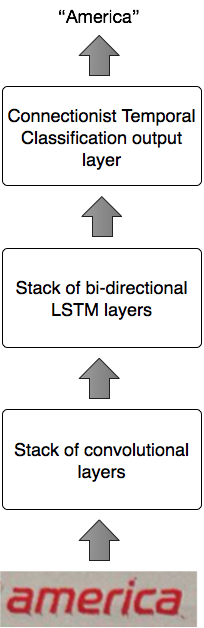
At the heart of the OCR engine is the Word Deep Net, a hybrid model that borrows architectures from both computer vision and speech recognition. The network first passes a cropped word image through a series of convolutional layers in a CNN, extracting visual features. These features are then fed, in sequence, into a Bidirectional LSTM—a staple of speech recognition systems—which interprets the "pieces" of the word. Finally, a Connectionist Temporal Classification (CTC) layer produces the text output. Batch normalization is applied where appropriate throughout the network.
With the architecture settled, the next hurdle was data. Deep learning models are notoriously data-hungry, and manual labeling is slow and costly. For many vision problems, synthetic data is a dead end because it is too hard to simulate the infinite variety of real-world scenes. Text, however, is different. Because documents and characters are inherently synthetic and constrained, we could render realistic training examples programmatically.
The generation pipeline was built around three components: a corpus of words, a set of fonts, and a suite of geometric and photometric transformations. The algorithm sampled from each group to compose unique examples. The first iteration was basic—19th-century books from Project Gutenberg, roughly a thousand fonts, and simple distortions like rotation and blur. Training on a million synthetic words landed us at about 79% accuracy. Acceptable, but far from production-ready.
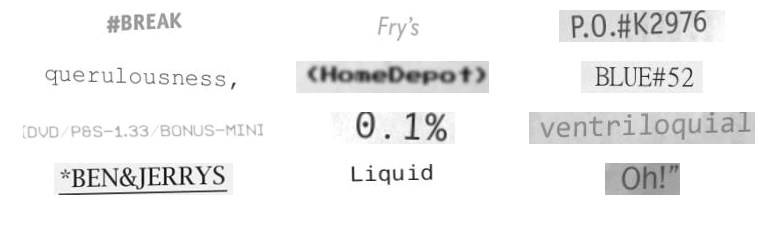
Refining the pipeline became a major project in itself. Insights came from studying failure modes:
- Receipts were a weak spot, so we added the Uniform Product Code (UPC) database to the corpus to cover vocabulary like "24QT TISSUE PAPER" that shows up on transactional documents.
- The network struggled with letters having disconnected segments. Real thermal printer output—common on receipts—often has stippled or smudged characters. Our data only used smooth laser-printed fonts or lightly bit-mapped ones. We eventually sourced representative ancient thermal printer fonts from a vendor in China.

- Initial font selection was too naive. We hand-curated about 2,000 fonts and built a sampling system that weight-common typefaces like Helvetica or Times New Roman more heavily while keeping a long tail of rarer ones. We also had to manually filter fonts with incorrect symbol mappings, mismatched letter cases, or missing glyphs that rendered as squares.
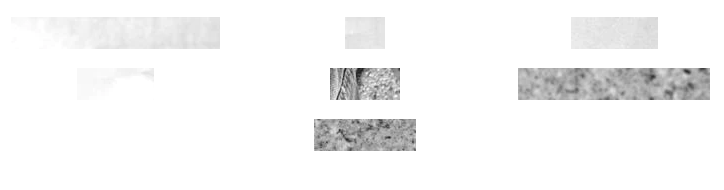
- The upstream detector was tuned for high recall at the cost of precision, meaning it frequently returned crops that contained no text at all. To prepare the Word Deep Net for that noise we generated negative training examples: empty frames with textured backgrounds such as wood or marble.
- Histograms of the generated words showed that symbols like
/and&were underrepresented. We artificially boosted their frequency by synthesizing dates, prices, and URLs. - Visual augmentation grew to include warping, fake shadows, fake creases, and a host of other transformations.

Data quality was treated as seriously as model design. We ran training experiments in parallel on Amazon EC2 G2 GPU instances, with every run logged in a lab notebook that captured the code git hash, S3 pointers to datasets and results, evaluation graphs, and the experiment's goal. This reproducibility framework let us trace unexpected changes in accuracy back to specific changes in data or code. We also built custom tools to visualize fonts and debug the network's mistakes.
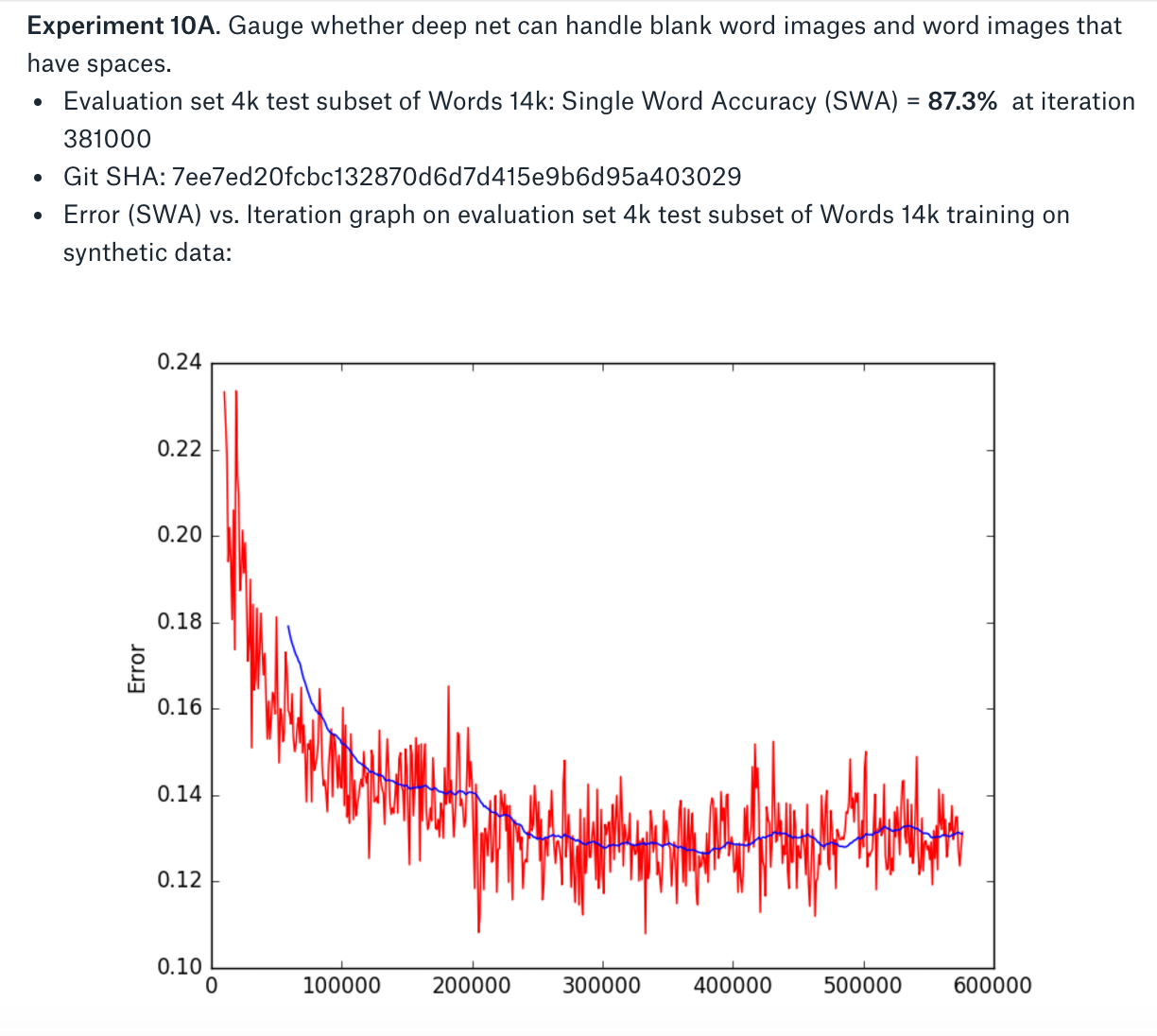
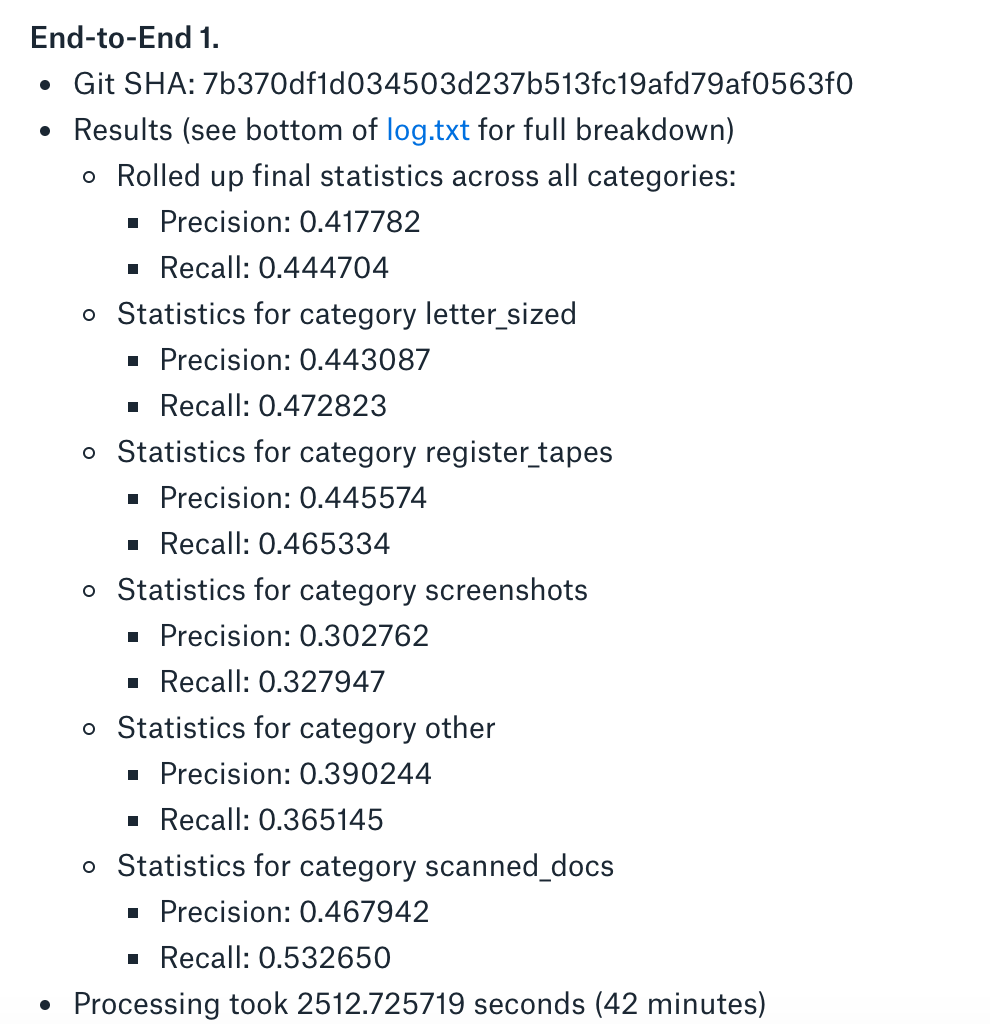
Progress was measured using a metric we called Single Word Accuracy (SWA) on a benchmark set. We tracked both precision and recall: precision is the fraction of returned words that are correct, while recall is the fraction of ground-truth words that were found. Early end-to-end tests—pairing a real detector with the trained deep net—performed terribly at the start. As the synthetic pipeline improved, SWA on the benchmark climbed into the high-80s. At that point we fine-tuned the model on about 20,000 real word images, pushing SWA into the mid-90s.
Finding Words in Documents
With the Word Deep Net performing well on isolated words, attention shifted to the document-level Word Detector. We chose not to use a deep learning-based object detector. At the time, systems like RCNN were designed to find one-to-five objects per image, while a document can contain hundreds or thousands of words—likely an order-of-magnitude mismatch. Beyond scalability, traditional computer vision features are easier to debug than the opaque internal representations of neural networks.
The chosen approach was Maximally Stable Extremal Regions (MSERs), implemented via OpenCV. MSER finds connected regions across different image intensity thresholds, detecting blobs that are particularly well-suited for text. The Word Detector first locates MSER features, then groups them into word and line detections. One wrinkle: the deep net requires fixed-size inputs. This means the detector may need to merge multiple words into one box or split a single long word in half, propagating that segmentation information down the pipeline so it can be reassembled after recognition. The detector also had to handle white text on dark backgrounds, in addition to the more common dark-on-light case.
From Prototype to Product
Once the Word Detector and Word Deep Net were individually acceptable, we chained them together and benchmarked the full system against document-level images. The first end-to-end measurements landed at roughly 44% accuracy—well short of the state of the art. The failure modes were mostly spacing errors: we'd merge distinct words like “helloworld” or fragment one into “wo rld,” often because image noise triggered spurious detections.
We addressed this by modifying the Connectionist Temporal Classification (CTC) layer to also emit a confidence score alongside the predicted text. That score let us bucket predictions into three categories:
- High confidence—keep the prediction unchanged.
- Low confidence—drop it, betting it was noise.
- Middle confidence—run it through a lexicon built from the Oxford English Dictionary, testing transformations that combined or split word boxes to find dictionary matches.
The Word Deep Net's fixed receptive field still caused trouble: a single window could hold multiple words or just part of a long one. We handle those cases and the original Word Detector outputs with a module we call the Wordinator, which produces discrete bounding boxes for every OCRed word. The debug visualization below shows detected boxes before the Wordinator runs:

With the full chain working, we generated over ten million synthetic words and trained for a very large number of iterations to maximize accuracy. Final accuracy, precision, and recall all met or exceeded the published OCR state of the art. Then the real work began.
Production Architecture
Our prototype was a set of Python and Lua scripts wrapping Torch, plus a trained model—nowhere near a service that could scale to millions of users with solid reliability and engineering. We built a distributed pipeline that could run alongside the existing commercial off-the-shelf OCR system without disruption. Here's what the productionized pipeline looks like:
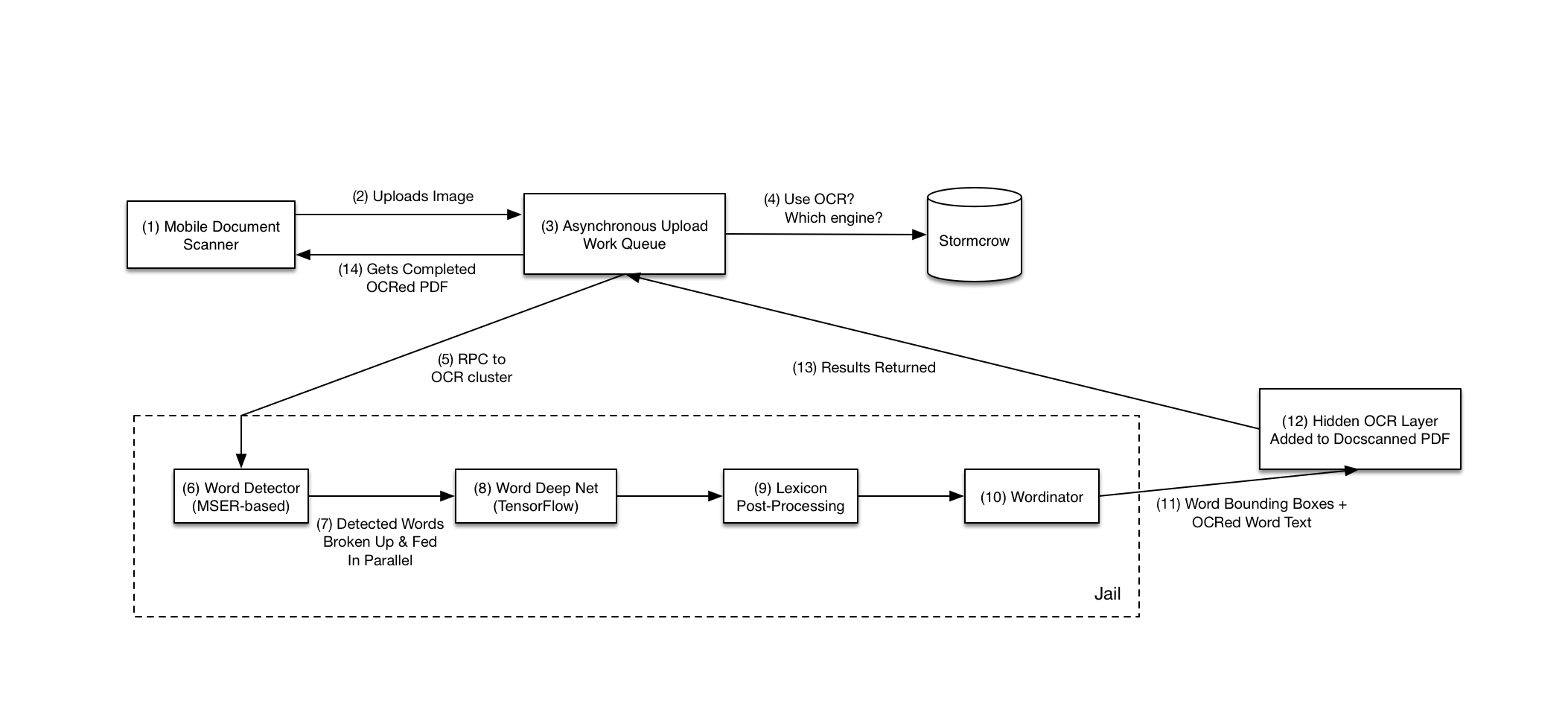
We introduced an abstraction layer for OCR engines—our own and the commercial one—and used our in-house experiments framework, Stormcrow, to gate features. That let us roll out the new pipeline incrementally to Business customers already relying on the incumbent system.
We also ported the Torch model (including its CTC layer) to TensorFlow. The reasons were practical: TensorFlow was already our production standard, making model deployment and management easier, and it has excellent Python bindings, so we could drop Lua entirely.
In the new architecture, mobile clients upload scanned documents to an asynchronous work queue. When an upload finishes, the image is sent via Remote Procedure Call (RPC) to a cluster hosting the OCR service.
The OCR service itself is C++ code built on OpenCV and TensorFlow—both with complicated dependencies, which makes security a real concern. We isolate the actual OCR portion inside jails using LXC, CGroups, Linux Namespaces, and Seccomp, with whitelisted syscalls and IPC for communication in and out. A compromise inside the jail stays contained, fully separated from the rest of our systems.
Our jail infrastructure sets up expensive resources—like loading trained models—once at startup, then clones them via Copy-on-Write to service individual OCR requests. Since our models are read-only in this flow, the fork is efficient and fast. We had to patch TensorFlow to make forking easier in this style; that patch was submitted upstream.
Once word boxes and their OCRed text are ready, we merge them back into the original PDF as a hidden OCR layer. The user gets a PDF that retains both the scanned image and detected text. The text also goes into Dropbox's search index. Result: users can highlight and copy text from a scanned PDF with correct placement (thanks to the hidden word coordinates), and can find that PDF via text search.
Inference Performance
We had an engineered pipeline with unit tests and CI, but performance targets were still unmet. The first decision: CPUs or GPUs at inference time. GPUs are indispensable for training, but adding high-end GPUs to a production data center fleet is unconventional: they're pricier, and hardware configurations turn over quickly with each generation. After analyzing both the Word Detector and Word Deep Net on CPUs—assuming full core utilization and real CPU characteristics—we settled on CPUs to hit our targets at similar or lower cost than GPU machines.
Next we tuned the system for CPU inference:
- Optimized the BLAS libraries used by the Word Deep Net, adjusted network parameters, and configured TensorFlow to use all available cores.
- Rewrote OpenCV's C++ MSER implementation in a modular way to eliminate duplicated work between its two passes (handling both dark-on-light and light-on-dark text), expose the underlying MSER tree hierarchy to Python for more efficient downstream processing, and improve readability.
- Vectorized and tuned parts of the post-MSER Word Detection pipeline that were slow.
With these optimizations, we had a high-performance system ready for a “shadow turn on” with a small set of users—moving us into the final refinement phase.
Validation in Production
Once the proposed pipeline was running silently alongside the incumbent commercial OCR engine, the team needed proof that the deep learning approach actually matched or outperformed the legacy system on real-world user data. Privacy constraints ruled out casual inspection of random scanned documents. Instead, Dropbox relied on its existing user-image donation flow to assemble an evaluation set. A qualitative, end-to-end blackbox comparison of the two systems against those donated images showed parity or better quality from the new pipeline, which cleared the way for rolling it out to 100% of Dropbox Business users.
Fine-Tuning Revisited
The team also checked whether fine-tuning the deep net on the donated document images would yield better accuracy than the handpicked fine-tuning set used during development. The result was a wash; the additional data brought no measurable improvement.
Handling Rotation
One capability missing from the original pipeline was orientation detection. Mobile scanner captures can arrive rotated 90 degrees or flipped 180 degrees. Dropbox added an orientation predictor built on the Inception Resnet v2 architecture, swapping the final layer to output orientation classes. The model was fine-tuned from an ImageNet-pretrained checkpoint using a dedicated orientation training and validation set, then inserted ahead of the word detection and OCR stages so that images could be rotated upright before processing.
A subtlety in that design was preserving the most common case: upright images. Because only a small fraction of captures are actually rotated, the predictor had to be careful not to spin already-correct images. The team also had to untangle how the uprighted images interacted with the PDF format's own rotation transformation matrices.
PDF Rendering Quirks
Even with OCR quality solved, the hidden text layer inside the PDFs produced its own headaches. Most PDF renderers respect embedded spaces for copy-and-paste fidelity, but Apple's Preview app applies its own position-based heuristics for word boundaries. The result was unacceptable: spaces were dropped and words ran together when users copied text in Preview. Resolving that required broad testing across PDF renderers to discover the right PDF constructs and workarounds.
Timeline and Result
Research, productionization, and the refinement round together spanned roughly eight months. The outcome was a modern OCR pipeline deployed to millions of users, replacing a commercial SDK with an in-house system built on computer vision and deep neural networks — and leaving Dropbox with a base for future OCR products.


