

GitHub bakes its support assistant into the contact form
GitHub has made its AI-powered support assistant, Copilot in GitHub Support, generally available. The tool, which is trained on official GitHub documentation, is designed to answer GitHub-specific questions conversationally without requiring a deep search through help pages or a round-trip ticket to a human support agent.
The feature was first tested in August 2023 with a randomly selected group of GitHub Enterprise customers. It is now rolling out to a broader audience through the existing GitHub Support contact form.
What the assistant does
Copilot in GitHub Support pulls relevant information from multiple GitHub documentation pages at once and compiles it into a concise, tailored answer. This reduces the time spent researching a topic across different parts of the docs and, in many cases, eliminates the need for a traditional support ticket.
Every response includes links to the documentation used to craft the answer, so you can verify the material or save it for later reference.
Starting a conversation
There is no separate interface or command to invoke the assistant. It is embedded directly in the GitHub Support contact form. To use it, select your account, describe the issue you need help with, and click Start chat.
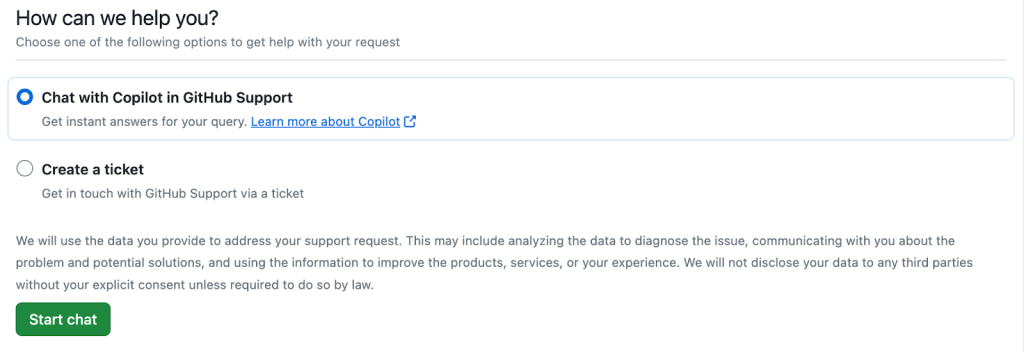
If the conversation is not resolving the issue, you can exit the chat at any time and open a ticket for human assistance by clicking Submit a ticket. If the assistant solved the problem, click My problem is solved to close the session.

Getting useful responses
You can interact with Copilot in GitHub Support the same way you would with a human support agent. When describing a problem, include relevant details such as error messages, the steps you have already tried, and what happened as a result. If the assistant misunderstands, you can correct it or add additional context, which often produces a more relevant answer.
GitHub is also using feedback from the tool to improve it. Each response includes a thumbs up and thumbs down option for rating the quality of the answer.


