
Copilot’s New Shape: Less Autocomplete, More Workflow
When GitHub Copilot first appeared as a gray box in the editor, it was a novelty—fast, occasionally baffling, but a clear signal that AI could do more than predict your next keystroke. The landscape has since filled with competitors like Cursor, Windsurf, Claude Code, Gemini, and OpenAI Codex, each pushing agentic workflows and multi-file editing. Developers have options, which is healthy. But by the numbers, Copilot remains the default choice: a Pragmatic Engineer survey places it as the most-used AI developer tool among 20 million-plus developers, with over 3 billion accepted code suggestions and roughly 1.2 million pull requests contributed per month directly within GitHub.
That scale is possible because Copilot sits where the code already lives. GitHub hosts the pull requests, reviews, tests, and actions that make up the modern delivery pipeline, and Copilot taps into that context—not just the file open in your editor. The GitHub MCP Server extends that reach, letting any AI tool query your GitHub context securely without leaving the platform.
Beyond the Single File
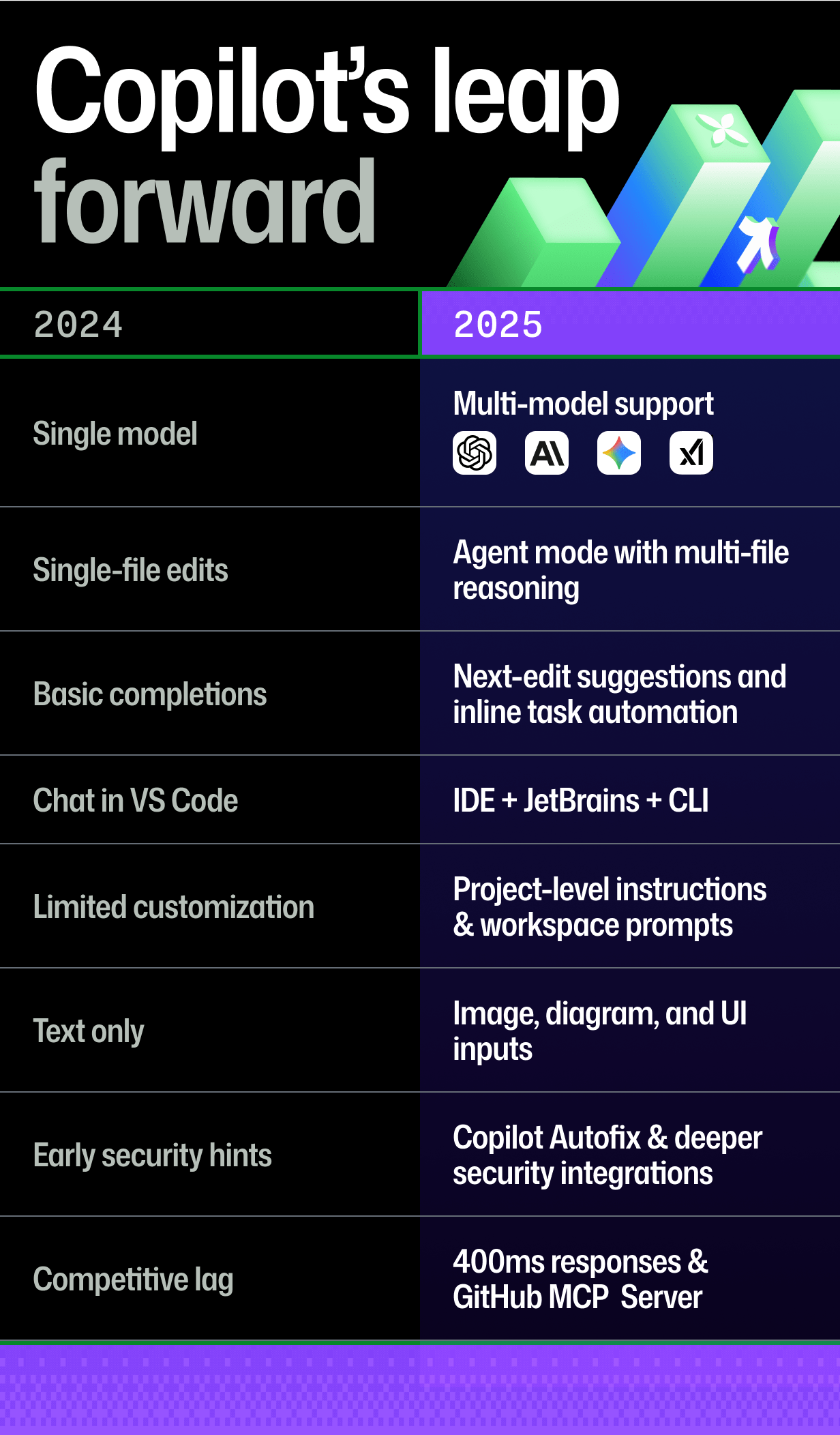
The shift from 2024 to 2025 has been about moving from “what’s possible” to “what’s practical.” Copilot now supports models from multiple providers—including recent OpenAI releases and Google’s Gemini 2.0 Flash—and has gained the agentic workflows developers asked for. Some of the notable additions:
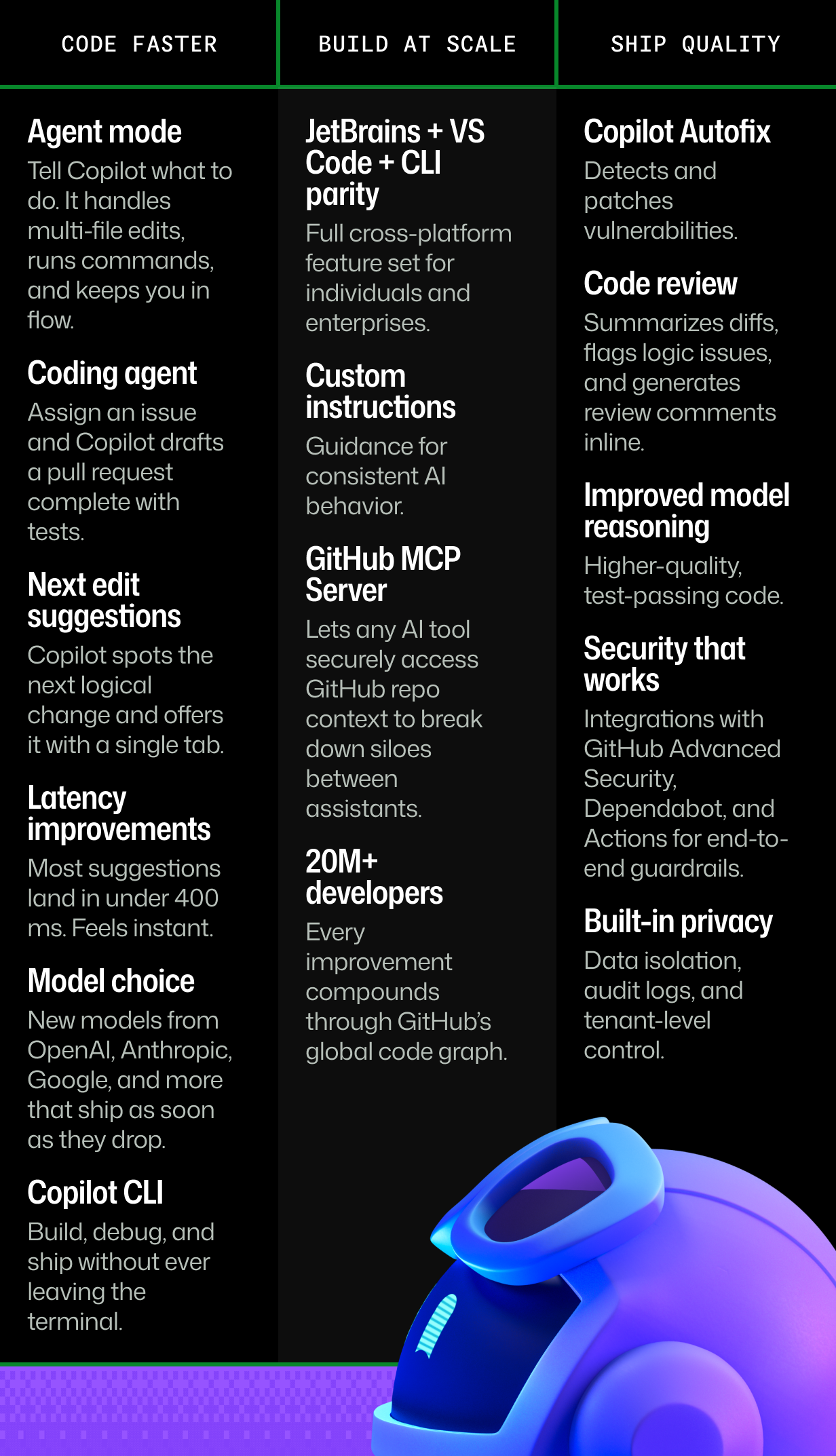
- Agent mode: Handles cross-file tasks, runs commands, refactors modules, and proposes terminal operations without leaving the editor.
- Coding agent: Takes an assigned issue and drafts a pull request complete with code, tests, and project context. It now contributes to roughly 1.2 million pull requests monthly.
- Next-edit suggestions: Predicts the next change you plan to make and offers it inline, so a single Tab applies it.
- Low-latency completions: Most responses render in under 400 ms, fast enough to feel immediate.
- Copilot CLI: Brings the same assistance to the terminal for setup, debugging, and scripting without switching windows.
- Multi-model routing: Different tasks can use different LLMs from leading frontier AI firms, matched to the job at hand.
The result is a tighter loop: fewer interruptions, faster iterations, and less context switching.
Built Into the Platform, Not Bolted On
Copilot avoids the “new environment to learn” problem by living inside the ecosystem developers already use. Key features include:
- JetBrains + VS Code + CLI parity: The same Copilot experience across environments.
- Custom instructions: A
.copilot-instructions.mdfile in the repo teaches Copilot your naming conventions, test frameworks, and comment style. - Workspace prompt files: Reusable prompt templates for consistent team behavior.
- GitHub MCP Server: Secure, API-level access to pull requests, issues, and Actions for any AI tool.
- Scale benefits: With 20 million-plus developers, every update is refined against the largest dataset of real development behavior and feedback.
Copilot’s positioning is as part of a full-stack development platform: it’s not a separate tool you add, but an assistant that helps you build, test, secure, and ship from one place.
Speed Means Little Without Quality and Safety
Fast output is only useful if it’s correct. GitHub has focused on improving Copilot’s code quality and security guardrails:
- Copilot Autofix: Automatically detects and patches vulnerabilities; used to fix over a million vulnerabilities this year alone.
- Code review: Summarizes diffs, flags logic bugs, and suggests fixes within pull requests, powering millions of reviews each month.
- Improved model reasoning: Generates code that’s more readable, passes tests, and produces fewer lint errors and regressions.
- Integrated security stack: Works with GitHub Advanced Security, Dependabot, and GitHub Actions to keep the supply chain solid.
- Built-in privacy controls: Enterprise isolation, audit logs, and tenant-level control keep your work protected.
Internal research indicates that code written with Copilot tends to score higher on readability, reliability, and maintainability. That work is backed by the same security infrastructure that protects the largest open source ecosystem and over 90% of the Fortune 100.
Why Context Matters More Than the Model
Competing tools bring real polish to agentic coding and multi-file edits. But they are often disconnected from the surrounding workflow—the PRs, CI runs, and reviews that define shipping. Copilot’s edge is proximity: GitHub processes over 3 million pull request merges and 50 million Actions runs daily, and Copilot operates within that flow.
The practical differences:
- No migration: It lives in the IDEs and CLI you already use, so there’s no new toolchain to adopt.
- Full-stack awareness: Pull requests, reviews, tests, and workflows are all part of the same conversation.
- End-to-end coverage: Assistance extends from initial code to real-world delivery.
GitHub Universe 2025 kicks off at the end of this month, and more news is expected around agent workflows, multi-model integration, and security features. The goal remains unchanged: helping developers turn TODOs into committed code.


