
Why LLMs Need Precision, Not Politeness
Cooking and design share a fundamental truth: preparation determines the outcome. Spend the time chopping, marinating, and setting timers before the heat hits the pan, and you’ll spend less time fixing problems later. The same logic applies to prompting AI tools like Figma Make. Structured prompts turn AI from a probabilistic guessing game into a reliable design partner.
For product designers, this is a uniquely critical skill. LLMs are stochastic by nature—their outputs are probabilistic rather than fully deterministic. Design is the opposite: precise, repeatable, and intentional. Bridging that gap requires systems thinking, not just language skills. Code has structure; AI has randomness. Design sits in the middle and has to be legible. You can’t simply “vibe” your way to a working prototype—you need inputs that collapse uncertainty into structure.
And while tools like LLMs don’t require empathy, they do require clarity. Politeness introduces ambiguity. A well-built prompt disambiguates intention, just as a great design system provides structure and guidance to a designer.
Mise en place for Prompts
Mise en place—"everything in its place"—is how haute cuisine brings order to chaos before cooking begins. Prompting needs the same preparation. Every prompt needs clarity, context, and constraints.
I’ve built a framework around this called TC-EBC: Task, Context, Elements, Behavior, Constraints. This structure isn’t unique to me. It aligns with what prompt engineers and system designers are converging on across disciplines. A well-circulated checklist from a Reddit user with 1,000+ hours of LLM prompting arrives at the same priorities: a clear task, explicit constraints, and modular sequencing. Microsoft’s Semantic Kernel documentation reinforces this, too, emphasizing intent definition, modular construction, and predictability over cleverness.
Consider a prompt for a new Figma Make that generates recipes from pantry photos. A natural-language approach might look like this:
Please build a new app that allows home cooks to take a picture of their pantry or freezer to suggest recipes. Remember any allergies or preferences. Thanks!
That’s the equivalent of throwing all ingredients into a pot and hoping for a meal. The result is generally lacking—not a bad starting point, with some basic features, but uninteresting and barely a step above a wireframe.
Now reshape the same request with the TC-EBC format:
Task: Build an AI-powered meal suggestion app using pantry/fridge photo inputsContext: Home cooking assistant for households with dietary restrictionsElements: Camera input, pantry scanner, dietary settings form, meal suggestions list, recipe cardsBehavior: User uploads photos; app scans inventory, filters by diet prefs, suggests recipesConstraints: Mobile-first, iOS/Android, accessible UI, supports multiple household profiles
The structured version is clear, scannable, and explicit about desired behavior and UI. It replaces guesswork with clear guidance—and the resulting initial one-shot output reflects that. The context, elements, and constraints provided the model what it needed to build the intended app, yielding a richer, more visually appealing design with better scaffolding to build upon.
Ask what context your model needs to succeed, then remove everything else. Unnecessary fluff slows down the process, confuses the model, or forces the LLM to spend extra cycles deciphering meaning. Elegance in AI, like elegance in design, is a process of subtraction.
Refine the Recipe
A well-structured prompt reads like a recipe card: short, direct, and instructive. Every “maybe,” “just,” or “please” dilutes intention and adds noise. The goal isn’t to be verbose or polite—it’s to be clear.
TC-EBC creates that structure:
- Task defines what you’re building.
- Context frames why and for whom, preventing drift.
- Constraints set guardrails, keeping the system controlled and consistent.
Each part narrows ambiguity and strengthens intent, turning guesswork into guidance. For anyone who has watched an LLM cycle through thinking-waiting-reasoning-adjusting-deciding status messages, precision is an energy-saving, clarity-building design choice. Consuming fewer tokens becomes an exercise in efficiency.
Here’s another scenario most product designers face:
Vague prompt:
Write a description for this feature. Keep it simple but also exciting. Maybe like how Apple does it?
TC-EBC prompt:
Task: Write a short product feature description.Context: For a new “One-Click Export” feature in a design tool.Elements: Headline (max 7 words), subheadline, single-sentence body copy.Behavior: Body should imply speed, simplicity, and trust.Constraints: No jargon. Match the brand tone of Duolingo or Notion. Total length: under 200 characters.
The TC-EBC prompt better defines not just what you want, but how to get there. Specific constraints on elements and behaviors will get you closer to your mark, faster and more precisely.
Specificity doesn’t mean rigidity. It’s precision paired with adaptability—tight enough to hold its shape, flexible enough to evolve. As design and cooking both teach, it’s about balance. The more direct the language, the more efficient the exchange.
Treating prompt revision as iterative design
Prompting is rarely a one-shot exercise. More often it's a loop: generate, inspect, adjust, and generate again. Each pass either sharpens the model's output or exposes where it's misreading intent. That's true whether you're assembling a workflow in Make, drafting a book outline with ChatGPT, or generating code with Cursor and Figma's MCP server. Revision prompts are how you keep layering in context until the result matches what you had in mind.
One practical shortcut is to use an LLM as a prompt partner. Teach a model like ChatGPT, Claude, or Gemini the TC-EBC framework and ask it to help refine your revision prompts, feeding in screenshots, desired outcomes, and constraints. When writing revisions, put explicit "do not adjust" directions in the Constraints section so the tool knows what's off-limits.
Getting the most from revisions also means deciding what the model should see at all. Anthropic calls this context engineering: curating what the model weighs when it responds. Context keeps the intent intact just as mise en place keeps the kitchen organized — preparation, applied as discipline.
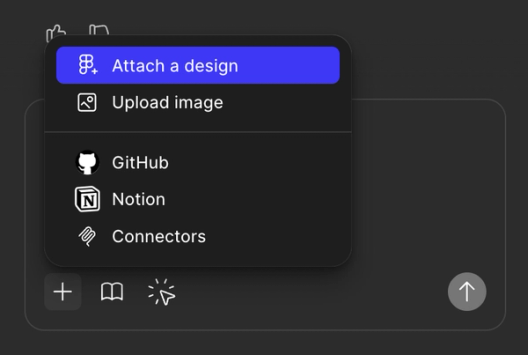
In Figma Make, that context can come in several forms. Uploading screenshots works, but linking a Figma frame yields better output because the model receives structured design data instead of a flat image it must interpret. The design frame is already in a language the model handles well. You can also specify external dependencies like three.js or D3.js directly in the prompt. 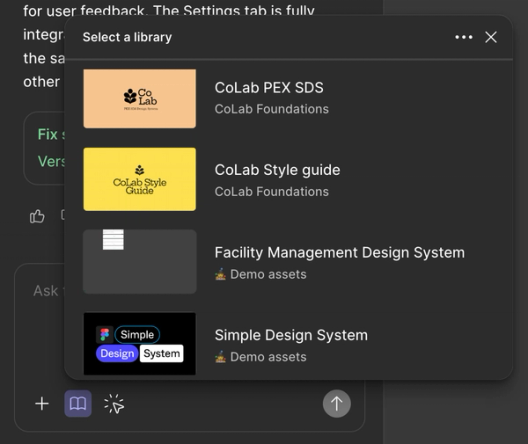
Style context can be layered in through a library reference, while behavioral and structural guardrails go into Make's guidelines. Deeper background can be attached via MCP connectors to Notion, Asana, GitHub, Atlassian, Linear, or Monday.com — rather than describing a change, you attach the PRD or task that defines it.
This is creative debugging in practice. Over time, the model learns your design patterns and you learn where it strains: how much complexity it can hold, where it wants structure, and when less input is better. Each revision cycle makes the next one faster.
Adding design context makes the process more deterministic overall. The aim isn't to eliminate guesswork entirely, but to make the output traceable to the decisions you made — less like throwing ingredients at the stove and hoping, more like practiced technique.
Matching the model to the task
Models vary in how they interpret prompts. Architecture, training data, and alignment give each one distinct strengths. Knowing those edges lets you pick the right tool for a given workflow rather than expecting one model to handle everything.
Figma Make defaults to Claude Sonnet 4.5. It handles summarization, nuanced structure, and a friendly tone well. Given clear prompts, it infers intention gracefully and follows embedded logic — which makes it a strong match for the TC-EBC framework. Think of it as a trained sous chef: sharp instructions produce sharp results, but vague input will get you a too-eager attempt to please.
Gemini 3 (Nano Banana Pro) is now available as an alternative. It's fast and structured, especially with short prompts and tight constraints. Under ambiguity it won't bluff — it presses for precision. Narrow jobs like renaming layers, swapping icons, or tuning layout language are where it stands out.
GPT-4 and GPT-5 anchor the more familiar end of the spectrum. They're verbose, capable, and responsive to examples — show the model a pattern and it will mirror it. They remain the strongest generalists available, covering reasoning, long-form structure, and exploratory reframing.
Make now lets you switch models explicitly. That shift turns model choice into part of the design decision — you match the prompt, and your expectations, to the blade best suited for the cut.
- Claude is for balanced, structured collaboration. Use it for clean summaries, structured follow-through, and lightly contextual work. It performs best when instructions are crisp and logic lives inside the prompt.
- Gemini suits fast, consistent results on narrow tasks. Tight prompts, clear constraints, and short inputs like "rename this" or "swap that" are where it excels.
- ChatGPT handles general-purpose reasoning and examples well. It thrives on demonstration and long-form structure, sharpening itself by following the patterns you give it.
The output is a system, not a one-off
A productive LLM session ends with more than generated output. It ends with a repeatable approach. You start with intent, structure the logic, pick an appropriate model, and refine with context — and if that all holds, the result is traceable back to the choices that produced it.
Prompting isn't about magic phrasing. It's architecture, context, and tool fluency. When structured correctly, the model doesn't need to guess — it executes. That mirrors how design systems let teams move with more consistency: structured prompting turns intention into working prototypes without reinventing the process each time.
The creative loop is straightforward: start clear, build with context, refine with feedback. It's craft and precision that carry the work — not charm.


