
An open-source agent framework for shared security research
Since GitHub Security Lab was founded in 2019, its stated goal has been “community-powered security”: the idea that software is made safer when researchers share the tools and knowledge needed to audit code and report vulnerabilities. Six years on, the team behind the lab sees an opportunity to advance that mission using AI. By expressing security expertise in natural language, researchers can encode and distribute what they know about finding bugs, and with Model Context Protocol (MCP) interfaces underneath, they can build on existing tools such as CodeQL.
The first fruit of this experiment is an agentic framework called the GitHub Security Lab Taskflow Agent. The lab has used it internally for a while and has shared it with participants in the GitHub Secure Open Source Fund. It is still experimental, but it is available for others to try.
Running a variant analysis demo
A codespace is the quickest way to start using seclab-taskflow-agent. The setup involves creating a personal access token, registering codespace secrets, launching a codespace, and then firing off a taskflow with a single command. Since the framework relies on AI models, token quota is consumed, and GitHub’s rate limits can kick in — particularly on free accounts — although the demo was designed to run within a free tier, and quotas refresh after a day.
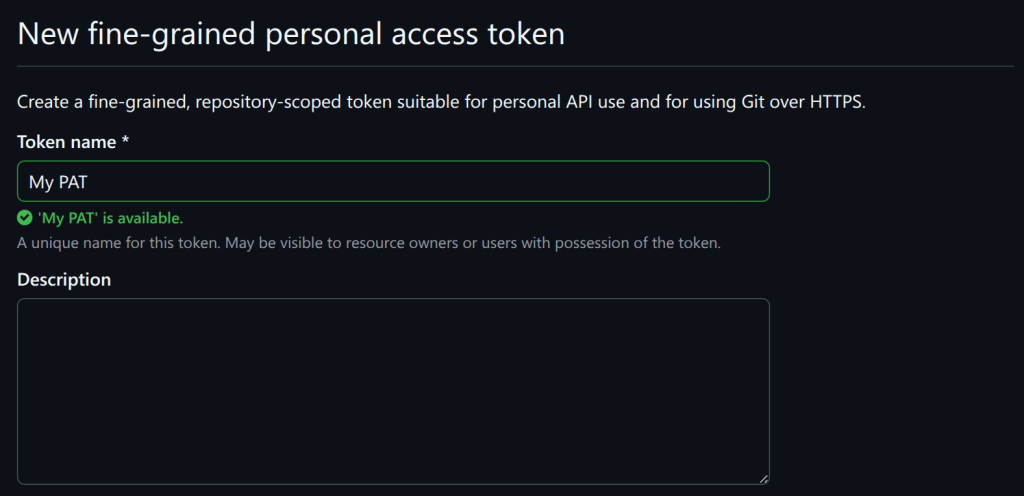
To begin, go to your developer settings page and create a fine-grained personal access token (PAT). You will need to scroll down and grant the “models” permission:
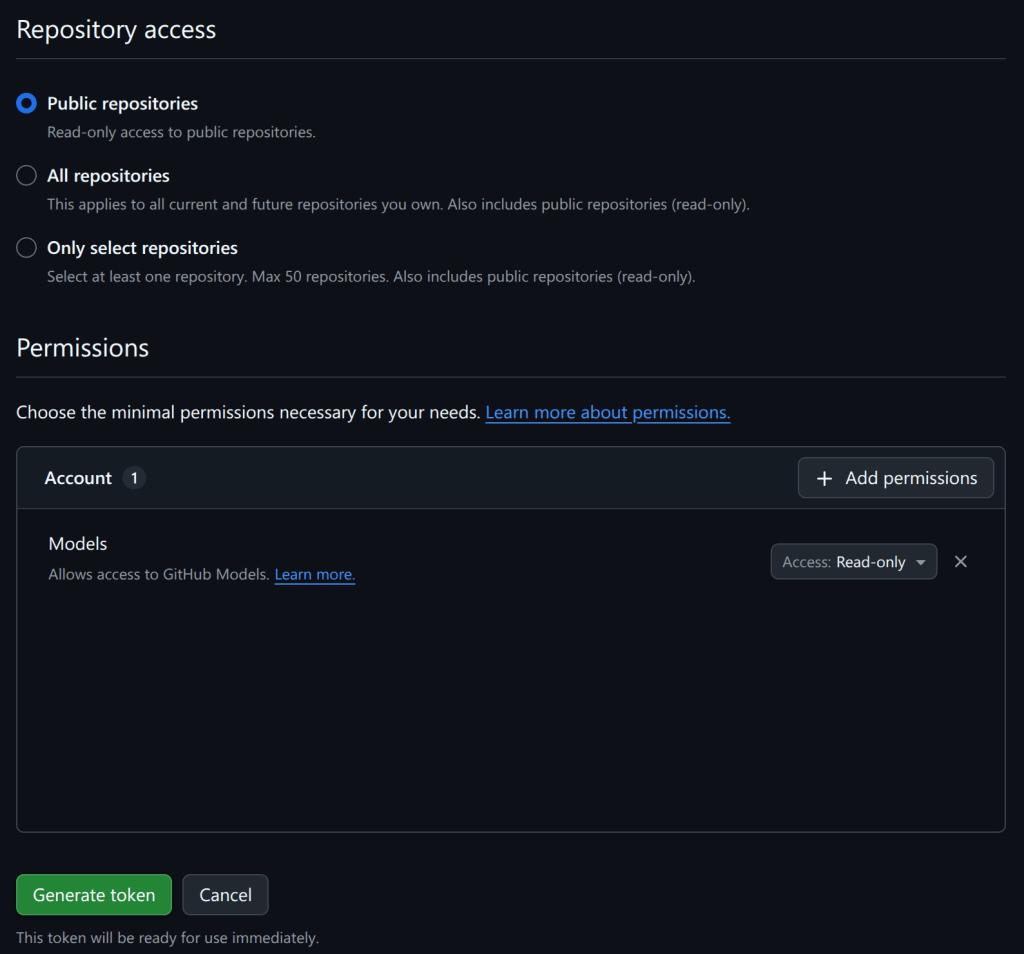
For security reasons, the PAT should not be saved in a file on disk. Instead, store it as a codespace secret, which becomes available as an environment variable when the codespace starts. Go to your codespaces settings and create a secret named GH_TOKEN:
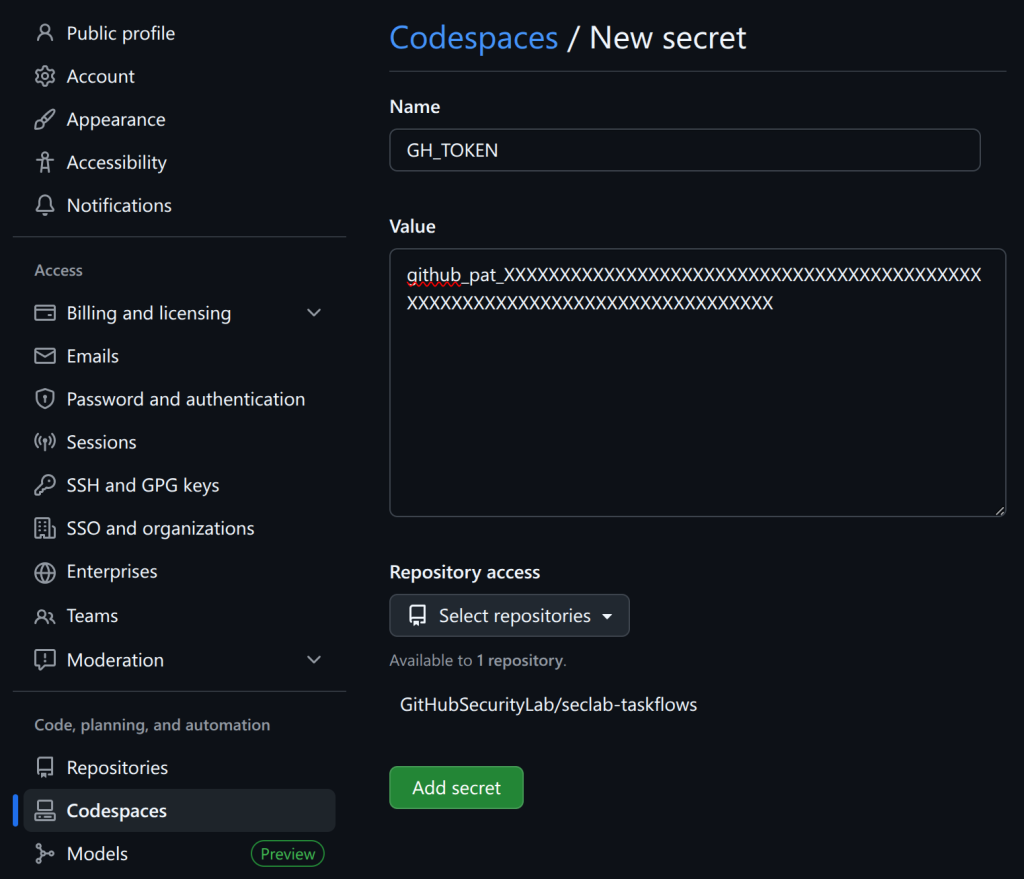
Under “Repository access,” include GitHubSecurityLab/seclab-taskflows, the repository the codespace will be started from. Then create a second codespace secret named AI_API_TOKEN, using the same PAT value.
Two separate secrets are used so that GH_TOKEN handles GitHub API access for reading code, while AI_API_TOKEN is scoped for AI API requests. A single PAT works for this demo because it relies on the GitHub Models API, but the framework also supports plugging in other AI providers.
Next, open the seclab-taskflows repository and start a codespace:
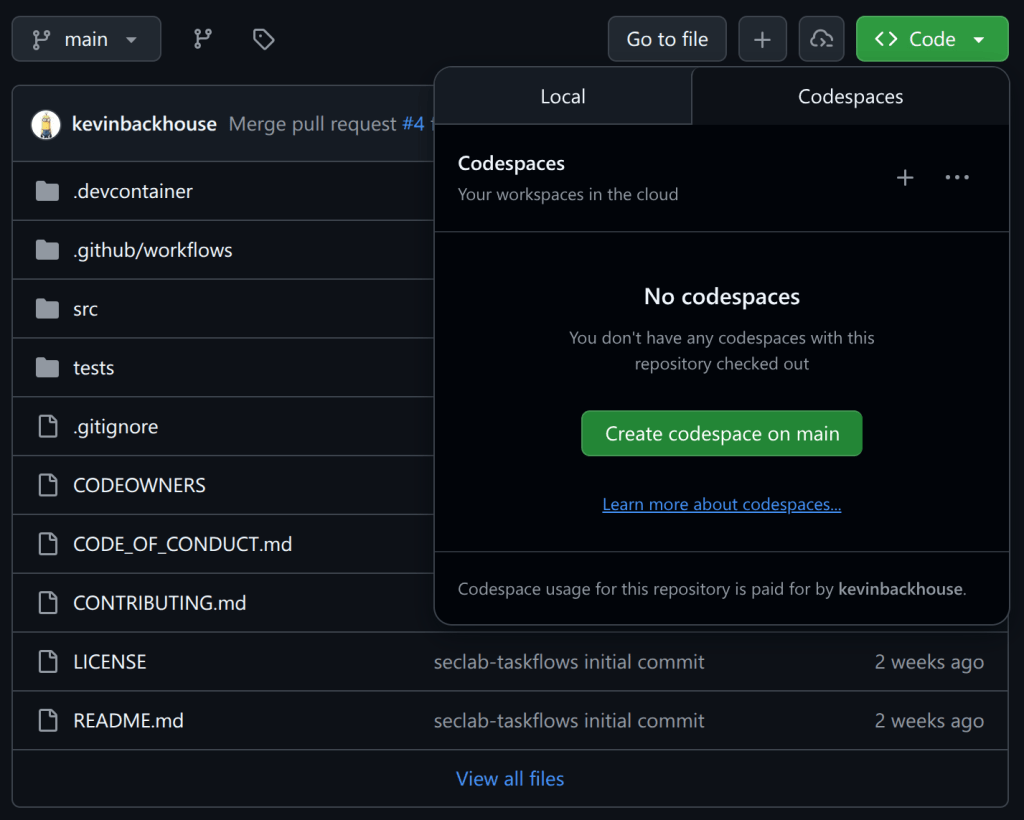
Once the codespace is up, give it a few minutes. It’s important to wait until you see a prompt that includes (.venv), which signals that the Python virtual environment has been created:

For the variant analysis demo, run this one-line command in the codespace terminal:
python -m seclab_taskflow_agent -t seclab_taskflows.taskflows.audit.ghsa_variant_analysis_demo -g repo=github/cmark-gfm -g ghsa=GHSA-c944-cv5f-hpvrThe framework will ask for permission to run memcache_clear_cache — answer “yes,” since this is a first run and the cache is empty. The demo then pulls a security advisory from a repository — in this case GHSA-c944-cv5f-hpvr for cmark-gfm — locates the vulnerable source file, downloads it, and audits it for similar flaws. It’s an intentionally basic demo, and it hasn’t uncovered any new bugs in cmark-gfm, but it’s short and useful for explaining how taskflows work. The repository name at the end of the command can be swapped for another project if you’d like to try it elsewhere.
Alternative deployment options
Codespaces are recommended for a quick, reliable, and sandboxed start, but the framework also runs locally. On a Linux system, install and run the demo with:
export AI_API_TOKEN=github_pat_XXXXXXXXXXXXXXXXXXXXXXXXXXXXXXXX
export GH_TOKEN=$AI_API_TOKEN
python3 -m venv .venv
source .venv/bin/activate
pip install seclab-taskflows
python -m seclab_taskflow_agent -t seclab_taskflows.taskflows.audit.ghsa_variant_analysis_demo -g repo=github/cmark-gfm -g ghsa=GHSA-c944-cv5f-hpvr
These commands install the latest PyPI release of seclab-taskflow-agent. Be aware that some toolboxes bundled with the framework depend on additional software. For instance, the CodeQL toolbox expects CodeQL itself to be installed. The devcontainer configuration used for codespaces contains the relevant installation steps.
There is also a Docker image with CodeQL pre-installed, which can be run with this script. Note that while this image includes only the seclab-taskflow-agent package, a future “batteries included” image is planned that would also bundle the seclab-taskflows repository contents.
Anatomy of a taskflow
A taskflow is a YAML file that lists tasks for the agent framework to execute, structured similarly to a GitHub Actions workflow. Here is the source of the demo taskflow:
seclab-taskflow-agent:
  filetype: taskflow
  version: 1

globals:
  repo:
  ghsa:

taskflow:
  - task:
      must_complete: true
      agents:
        - seclab_taskflow_agent.personalities.assistant
      toolboxes:
        - seclab_taskflow_agent.toolboxes.memcache
      user_prompt: |
        Clear the memory cache.

  - task:
      must_complete: true
      agents:
        - seclab_taskflow_agent.personalities.assistant
      toolboxes:
        - seclab_taskflows.toolboxes.ghsa
        - seclab_taskflows.toolboxes.gh_file_viewer
        - seclab_taskflow_agent.toolboxes.memcache
      user_prompt: |
        Fetch the details of the GHSA {{ GLOBALS_ghsa }} of the repo {{ GLOBALS_repo }}.

        Analyze the description to understand what type of bug caused
        the vulnerability. DO NOT perform a code audit at this stage, just
        look at the GHSA details.

        Check if any source file is mentioned as the cause of the GHSA.
        If so, identify the precise file path and line number.

        If no file path is mentioned, then report back to the user that
        you cannot find any file path and end the task here.

        The GHSA may not specify the full path name of the source
        file, or it may mention the name of a function or method
        instead, so if you have difficulty finding the file, try
        searching for the most likely match.

        Only identify the file path for now, do not look at the code or
        fetch the file contents yet.

        Store a summary of your findings in the memcache with the GHSA
        ID as the key. That should include the file path and the function that
        the file is in.

  - task:
      must_complete: true
      agents:
        - seclab_taskflow_agent.personalities.assistant
      toolboxes:
        - seclab_taskflows.toolboxes.gh_file_viewer
        - seclab_taskflow_agent.toolboxes.memcache
      user_prompt: |
        Fetch the GHSA ID and summary that were stored in the memcache
        by the previous task.

        Look at the file path and function that were identified. Use the
        get_file_lines_from_gh tool to fetch a small portion of the file instead of
        fetching the entire file.

        Fetch the source file that was identified as the cause of the
        GHSA in repo {{ GLOBALS_repo }}.

        Do a security audit of the code in the source file, focusing
        particularly on the type of bug that was identified as the
        cause of the GHSA.
The header defines the file type. Common types include:
taskflow: a sequence of tasks for the framework.personality: reusable instructions for how the agent should behave. For example, theaction_expertpersonality is useful when auditing GitHub Actions workflows.toolbox: instructions for spinning up an MCP server, such as thegh_file_viewertoolbox used for downloading source files from GitHub.
A global section in the demo defines variables repo and ghsa, set by the command-line flags -g repo=github/cmark-gfm and -g ghsa=GHSA-c944-cv5f-hpvr. It’s a simple form of taskflow parameterization.
Each task specifies a personality to adopt. For non-specialized work, the assistant personality is often enough. Every task starts with a completely fresh context, which means results must be exchanged between tasks through a toolbox. The demo uses the memcache toolbox — a simple key-value store — for this purpose. This design aids debugging because each task can be rerun in isolation with consistent inputs.
Task 1 clears the cache, and it demonstrates an important security element of the framework. Toolboxes can require confirmation before performing potentially destructive actions. This is a practical safeguard against prompt injection attacks.
Task 2 uses the ghsa toolbox to fetch the security advisory and the gh_file_viewer toolbox to locate the source file referenced in the advisory. It then writes a summary to the memcache toolbox for the next task.
Task 3 pulls the previous results out of memcache, fetches the source code via gh_file_viewer, and carries out the audit. Prompt wording matters here more than it might seem. Earlier versions of this task attempted to analyze an entire source file at once, consuming far too many tokens. A second instruction in the prompt asking the agent to focus on a “small portion of the file” is critical to keeping the task feasible and successful.
For deeper documentation, the README.md and GRAMMAR.md files are the primary references. More example taskflows live in the examples/taskflows subdirectory of seclab-taskflow-agent and in the seclab_taskflows/taskflows directory of the companion repository.
Built for collaboration
The project is designed so that security teams can publish their own suites of taskflows. Both of the core repositories—the framework implementation (seclab-taskflow-agent) and our own taskflow collection (seclab-taskflows)—are available as packages on PyPI. Keeping the engine separate from the taskflow suites makes it straightforward for others to fork and extend the latter as a starting point.
For publishing your own package, the project recommends using the hatch new command to scaffold the initial structure, which generates the necessary pyproject.toml file for PyPI uploads. A directory layout mirroring seclab-taskflows (with sub-directories for taskflows and toolboxes) is suggested. The included publish-to-pypi.yaml workflow automates uploads whenever a tag like v1.0.0 is pushed.
Sharing MCP servers is equally simple. Each MCP server bundled with seclab-taskflows has a corresponding toolbox YAML file that contains the execution instructions, so distribution follows the same package-based pattern.
Cross-package imports
Reusing personalities and toolboxes across packages is handled through Python’s importlib system. When a taskflow refers to a file from another package—for instance, using a toolbox from seclab-taskflow-agent—the name is split into a directory path and a filename. The implementation then uses importlib.resources.files to locate and load the specified YAML file from that package's resources.
toolboxes:
  - seclab_taskflow_agent.toolboxes.memcache
The only restriction is that names must contain at least two parts, meaning files must be stored at least one directory deep within the package. Otherwise, the system behaves like standard Python imports, which keeps the learning curve shallow and the available documentation plentiful.
Two guiding principles
The first goal is straightforward: encourage community-powered security. Many agentic security tools released today are closed-source, which runs counter to the team’s philosophy. Making the taskflows open means anyone can inspect the logic, modify it, and publish their own versions. Sharing knowledge of how to find vulnerabilities should help the community eliminate software flaws faster than isolated efforts could.
The second goal is more pragmatic: build a tool we actually want to use. As a research team, the priority is rapid experimentation—being able to write a new security rule and test it quickly without fighting complex machinery. The project deliberately favors ease of modification over maximum polish or raw performance. For a deeper example of how this plays out in practice, a separate post by Peter Stöckli and Man Yue Mo covers using the framework for triaging CodeQL alerts.


