

Permissions first
Every workflow step that calls a model needs explicit access to GitHub Models; otherwise the step fails. Grant it in the workflow's permissions block:
permissions:
  contents: read
  issues: write
  models: read
This reads repository contents and reads, creates or updates issues and comments, while enabling GitHub Models access.
Triaging bug reports with the AI inference action
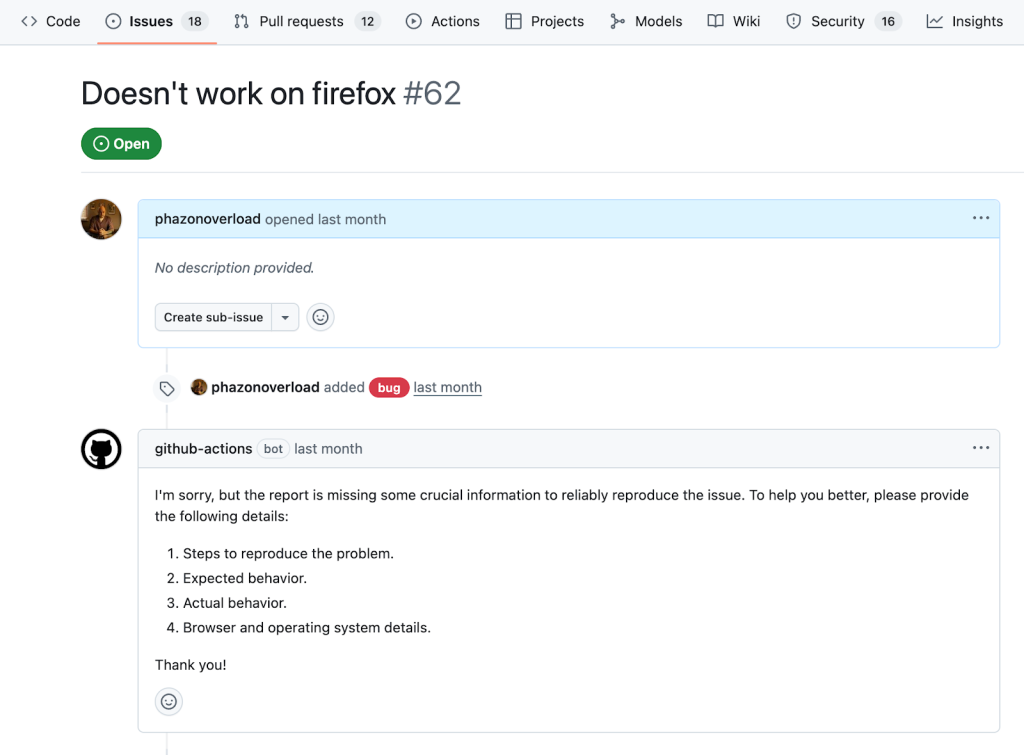
The AI inference action lets a workflow call a model to analyze or generate text. A workflow that screens incoming bug reports can check whether a new issue contains enough detail to be actionable and reply when it does not.
Create bug-reproduction-instructions.yml under .github/workflows — creating the directory if needed. It runs when an issue is opened and captures the issue title and body for later steps.
name: Bug Report Reproduction Check

on:
  issues:
    types: [opened]

permissions:
  contents: read
  issues: write
  models: read

jobs:
  reproduction-steps-check:
    runs-on: ubuntu-latest
    steps:
      - name: Fetch Issue
        id: issue
        uses: actions/github-script@v7
        with:
          script: |
            const issue = await github.rest.issues.get({
              owner: context.repo.owner,
              repo: context.repo.repo,
              issue_number: context.issue.number
            })
            core.setOutput('title', issue.data.title)
            core.setOutput('body', issue.data.body)
Add a step that runs only for issues carrying the bug label. It invokes the AI inference action with a system prompt describing what good reproduction instructions look like, plus the issue content:
- name: Analyze Issue For Reproduction
  if: contains(join(github.event.issue.labels.*.name, ','), 'bug')
  id: analyze-issue
  uses: actions/ai-inference@v1
  with:
  model: mistral-ai/ministral-3b
  system-prompt: |
    Given a bug report title and text for an application, return 'pass' if there is enough information to reliably reproduce the issue, meaning the report clearly describes the steps to reproduce the problem, specifies the expected and actual behavior, and includes environment details such as browser and operating system; if any of these elements are missing or unclear, return a brief description of what is missing in a friendly response to the author instead of 'pass'. Consider the following title and body:
  prompt: |
    Title: ${{ steps.issue.outputs.title }}
    Body: ${{ steps.issue.outputs.body }}
The step returns either pass when the report is sufficient, or a description of what is missing. The model can be swapped by changing the model value to the identifier listed on any model page in the GitHub Models catalog, which offers more than 40 models.
A final step posts a comment only when the returned value is not pass:
- name: Comment On Issue
  if: contains(join(github.event.issue.labels.*.name, ','), 'bug') && steps.analyze-issue.outputs.response != 'pass'
  uses: actions/github-script@v7
  env:
    AI_RESPONSE: steps.analyze-issue.outputs.response
    with:
      script: |
        await github.rest.issues.createComment({
          owner: context.repo.owner,
          repo: context.repo.repo,
          issue_number: context.issue.number,
          body: process.env.AI_RESPONSE
        })
This pattern yields AI-driven branching logic: prompt the model to emit a fixed string when criteria are met, then condition workflow behavior on that value.
Release notes from merged pull requests
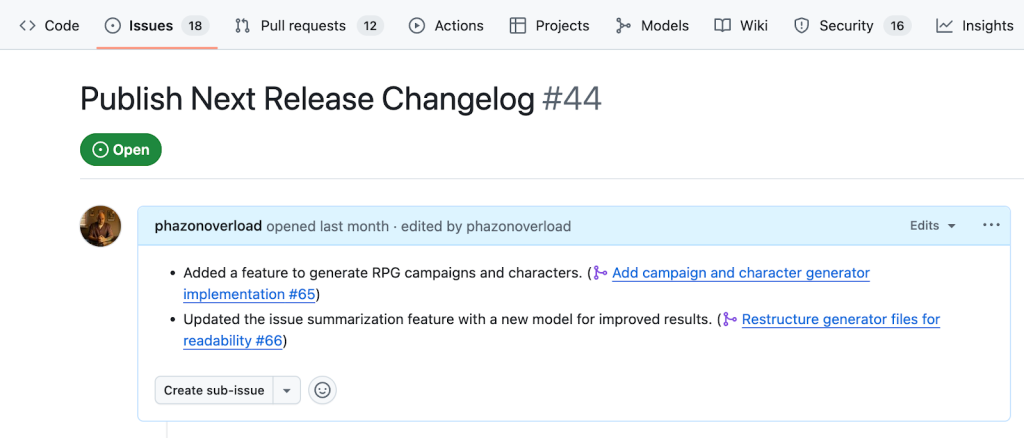
The GitHub CLI with the gh-models extension covers cases where you gather data and act on it inside a workflow — summarizing each merged pull request straight into a changelog issue.
Prepare a release label and a single issue with that label titled Publish next release changelog, then create release-notes.yml in .github/workflows. It fires when a pull request is closed, and its job runs only if the pull request was merged.
name: Add to Changelog

on:
  pull_request:
    types:
      - closed

permissions:
  pull-requests: read
  issues: write
  contents: read
  models: read

jobs:
  add_to_changelog:
    if: github.event.pull_request.merged == true
    runs-on: ubuntu-latest
    steps:
      - name: Checkout repository
        uses: actions/checkout@v4
Install the extension in a step, passing the workflow token that now carries GitHub Models permissions:
- name: Install gh-models extension
  run: gh extension install https://github.com/github/gh-models
  env:
    GH_TOKEN: ${{ secrets.GITHUB_TOKEN }}
The remaining work sits in one step:
- name: Summarize pull request and append to release issue
  env:
    GH_TOKEN: ${{ secrets.GITHUB_TOKEN }}
  run: |-
    PR_NUMBER="${{ github.event.pull_request.number }}"

    # Fetch PR and save to a file
    gh pr view "$PR_NUMBER" --json title,body,comments,reviews > pr.json

    # Generate a summary using the model by reading from file
    cat pr.json | gh models run xai/grok-3-mini \
      "Given the following pull request information, generate a single, clear, and concise one-line changelog entry that summarizes the main change (feature, fix, or bug) introduced by this PR. Use neutral, user-facing language and avoid technical jargon or internal references. Only write the line, with no additional introduction or explanation text." > summary.md

    # Fetch release issue number
    RELEASE_ISSUE=$(gh issue list --label release --limit 1 --json number --jq '.[0].number')

    # Fetch current release issue body
    RELEASE_ISSUE_BODY=$(gh issue view "$RELEASE_ISSUE" --json body --jq '.body')

    # Append summary to release issue body
    FORMATTED_LINE="- $(cat summary.md) (#$PR_NUMBER)"
    NEW_BODY="${RELEASE_ISSUE_BODY}"$'\n'"$FORMATTED_LINE"

    # Update the release issue with the new body
    gh issue edit "$RELEASE_ISSUE" --body "$NEW_BODY"
The pull request title, body, comments and reviews are passed to a model via gh models run; the release issue is fetched and appended with the summarized line.
Scheduled issue summaries with a prompt file
A scheduled workflow can open a weekly issue that summarizes, groups and prioritizes newly opened issues. Create weekly-issue-summary.yml in .github/workflows, triggering every Monday at 9 a.m.:
name: Weekly Issue Summary

on:
  workflow_dispatch:
  schedule:
    - cron: '0 9 * * 1'

permissions:
  issues: write
  contents: read
  models: read

jobs:
  create_weekly_summary:
    runs-on: ubuntu-latest
    steps:
      - name: Checkout repository
        uses: actions/checkout@v4

      - name: Install gh-models extension
        run: gh extension install https://github.com/github/gh-models
        env:
          GH_TOKEN: ${{ github.token }}
Collect the past week's open issues into a file:
 - name: Get issues from the past week and summarize
  id: get_issues
    run: |-
      LAST_WEEK=$(date -d "7 days ago" +"%Y-%m-%d")
      gh search issues "created:>$LAST_WEEK" --state=open --json title,body,url --repo ${{ github.repository }} > issues.json

      # further code will go here
    env:
      GH_TOKEN: ${{ github.token }}
Feed that file to a gh models run call:
cat issues.json | gh models run --file prompts/issue-summary.prompt.yml > summary.mdHere the command takes its instructions from a prompt file instead of an inline prompt. Create a prompts directory containing issue-summary.prompt.yml:
name: Issue summarizer
description: Summarizes weekly issues
model: openai/gpt-4.1
messages:
  - role: system
    content: You are a helpful issue summarizer. When given issue content, respond in markdown format.
  - role: user
    content: "Please summarize the following issues into a few short bullet points. Include links if provided. If possible, pull out general themes and help the team prioritize based on impact. Issues begin here:\n {{input}}"
The file holds the model, the system and user prompts, and optionally parameters that tune the response. Using a .prompt.yml file also connects to GitHub Models' repository integration for iterating on the prompt in a rich UI.
Still in the workflow, directly beneath the gh models run command, create the issue carrying the summary:
ISSUE_TITLE="Issue Summary - $(date -d '7 days ago' '+%B %d') to $(date '+%B %d')"
gh issue create --title "$ISSUE_TITLE" --label summary --body-file summary.md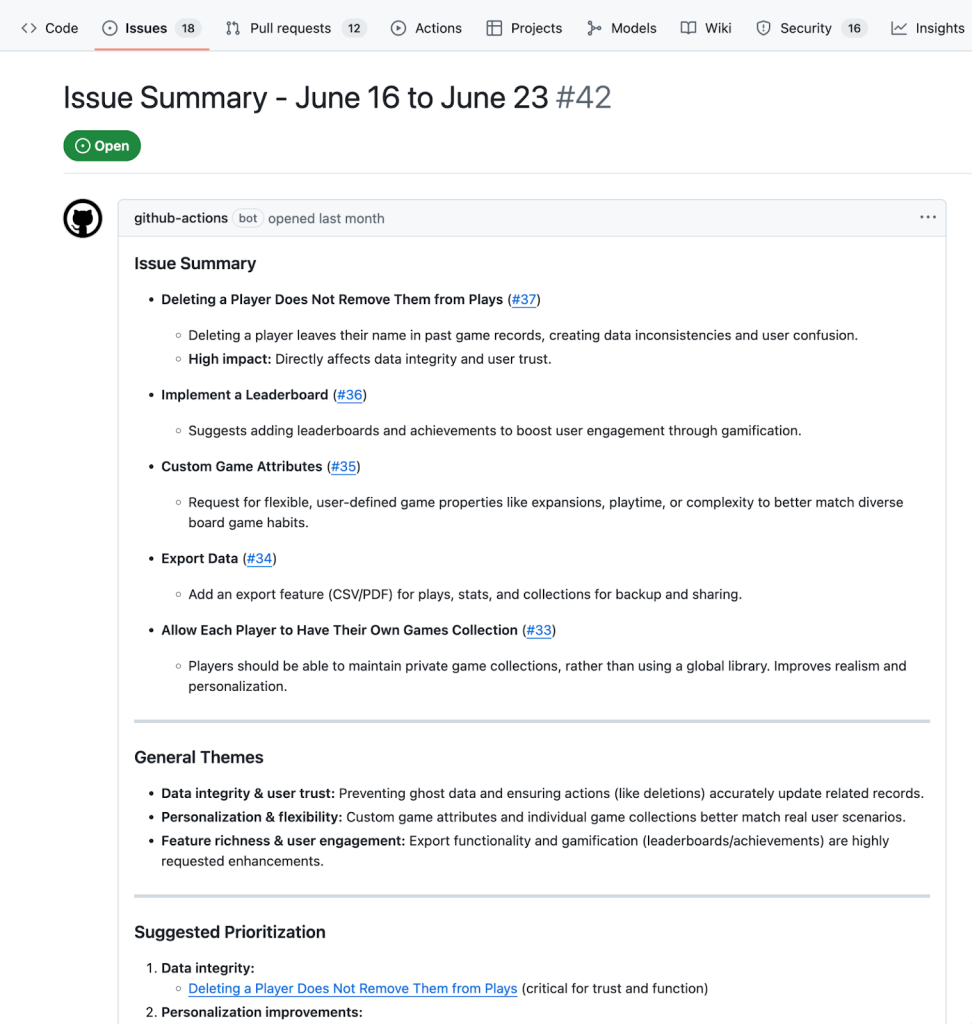
The three approaches scale with your needs: the AI inference action for simple analysis and branching, gh-models with inline prompts for gathering and acting on repository data, and prompt-file-driven workflows for scheduled, more elaborate jobs.


