
What GitHub Copilot’s agent mode does
GitHub Copilot’s agent mode is an autonomous, real-time collaborator that executes multi-step coding tasks from natural-language prompts. Instead of merely responding to requests, it analyzes your codebase for context, plans and implements solutions, runs commands and tests, and iterates on its own output until the task reaches a final state. You define the outcome, and Copilot determines the approach—seeking feedback when needed, testing its own work, and refining it automatically.
Agent mode can handle tasks such as codebase analysis, file edits, test execution, and error detection and correction. As it works, you can observe its reasoning, decision-making, and the tools it invokes. For developers, this translates into faster prototyping, refactoring, and feature implementation, whether you’re starting a small project from scratch or modernizing existing code.
| Tool | What it is |
| Agent mode | A mode where Copilot is capable of iterating on its own code, recognizing errors, and fixing them automatically |
| GitHub Copilot coding agent | An autonomous SWE agent that asynchronously works on your behalf to do everything from resolving issues to solving for human feedback |
| Code completion | A Copilot feature that offers autocomplete-style suggestions in supported IDEs |
Under the hood: how agent mode operates
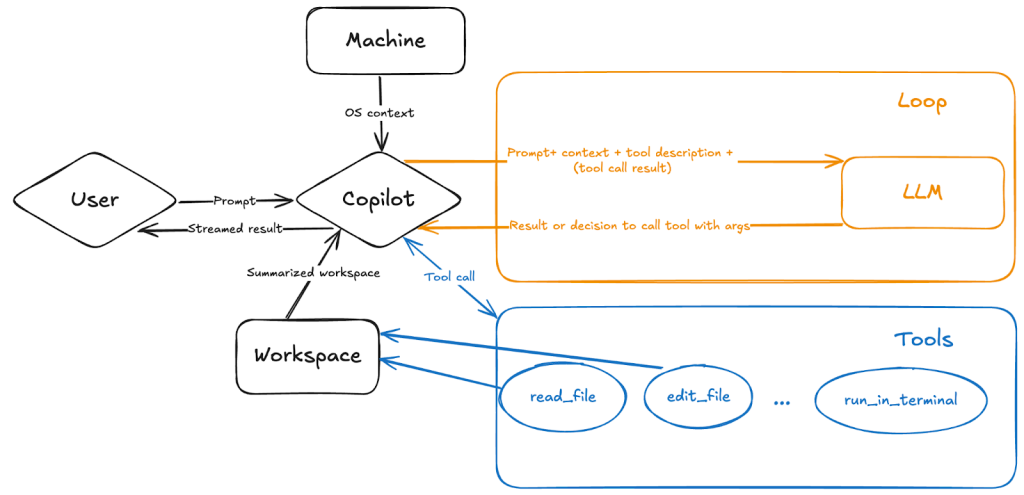
Agent mode functions as an orchestrator that combines your prompt, workspace context, machine information, and tool descriptions via a backend system prompt. When you submit a request, Copilot parses it, consults an AI language model to determine how to resolve the task, and begins working. It then monitors the first iteration for errors—checking syntax, terminal output, test results, and build errors—and decides how to course-correct with additional edits, commands, or tool calls.
The language model has access to an expanding set of tools, including read_file, edit_file, and run_in_terminal. Each tool provides detailed instructions on how and when to use it, enabling Copilot to search your workspace, read files, execute terminal commands, and apply proposed changes. You control which tools agent mode may use, and you can extend its capabilities further by installing specialized tools from Model Context Protocol (MCP) servers or extensions. The GitHub MCP server, for example, allows automation of GitHub workflows, extraction of repository data, and building AI-powered tools that interact with GitHub’s ecosystem.
Because Copilot is powered by nondeterministic LLMs, its suggestions may vary even with identical prompts and context.
Practical use cases and complementary features
Agent mode supports a wide range of workflows, including:
- Refactoring code
- Migrating projects between languages or tech stacks
- Writing tests
- Modernizing legacy code
- Autofixing code generation errors
- Adding new features to applications
- Prototyping apps from functional specs or UI sketches
- Implementing non-functional requirements or boilerplate
- Scoping and planning feature work
- Generating documentation
The quality of results improves with context and specificity. Custom instructions allow you to tailor Copilot’s responses to your coding practices, testing frameworks, and guardrails. This is particularly useful in agent mode, as it lets you direct Copilot’s coding behavior much like you would guide a peer developer. You can also combine agent mode with other Copilot Chat modes, such as edit mode and ask mode, depending on the task at hand.
| Mode | What you can do with it | A use case |
| Edit mode | Easily make edits across multiple files in your codebase. | Apply code edits directly in your project for implementing a new feature, fixing a bug, or refactoring code. |
| Ask mode | Ask Copilot questions for a better understanding of your codebase or technology concepts. | Learn how a piece of code works, brainstorm ideas for software, or discover new technologies. |
| Agent mode | Start an agentic, autonomous coding workflow that delivers your desired result with minimal guidance. | Implement high-level requirements for a new feature or project through agent mode, which identifies and applies necessary changes automatically. |
Working with agent mode effectively
Like any developer, Copilot performs best when given clear requirements and the right tools. Feeding it custom instructions to match your preferences or extending its capabilities via MCP integrations helps align its output with your specific software-building style. Given the nondeterministic nature of LLMs, review agent mode’s suggestions and verify that outcomes work as expected. Whether you let the agent run with an idea or guide it step-by-step, the mode is designed to adapt to how you want to work—prototyping new apps, operating on existing codebases, or automating lower-level workflow tasks.


