
Customizing gotty’s Terminal Colors
gotty’s default white-on-black terminal can be recolored, but the process isn’t documented anywhere obvious. After some experimentation, here’s how to swap in a different theme.
Finding a Compatible Theme
gotty is built on HTerm, so themes written for HTerm should work. The Blink Shell project — an open-source iPad SSH client that also uses HTerm — maintains a collection of themes on GitHub, including the popular Solarized scheme. Its theme file is straightforward JavaScript that defines terminal color values:
t.prefs_.set('color-palette-overrides',["#002831", "#d11c24", "#738a05", "#a57706", "#2176c7", "#c61c6f", "#259286", "#eae3cb", "#001e27", "#bd3613", "#475b62", "#536870", "#708284", "#5956ba", "#819090", "#fcf4dc"]);
t.prefs_.set('foreground-color', "#536870");
t.prefs_.set('background-color', "#fcf4dc");
t.prefs_.set('cursor-color', 'rgba(83,104,112,0.5)');
Applying the Theme to gotty
Simply dropping that JavaScript into your HTML won’t work — it references an undefined variable t. The fix is to integrate the theme code into gotty.js itself. Add three lines to load the theme:
if (setPrefs) { // julia: added this to set terminal colors
    setPrefs(term)
}
Then wrap the theme’s color definitions in a setPrefs function so gotty applies them at the right time:
function setPrefs(t) {
t.prefs_.set('color-palette-overrides',["#002831", "#d11c24", "#738a05", "#a57706", "#2176c7", "#c61c6f", "#259286", "#eae3cb", "#001e27", "#bd3613", "#475b62", "#536870", "#708284", "#5956ba", "#819090", "#fcf4dc"]);
t.prefs_.set('foreground-color', "#536870");
t.prefs_.set('background-color', "#fcf4dc");
t.prefs_.set('cursor-color', 'rgba(83,104,112,0.5)');
}
The modified files used here are available as gists: the gotty.js additions and the full adjusted file.
Results and Remaining Gaps
The background color now matches Solarized, but the overall look still falls short of a native Solarized terminal. A comparison shows the difference:
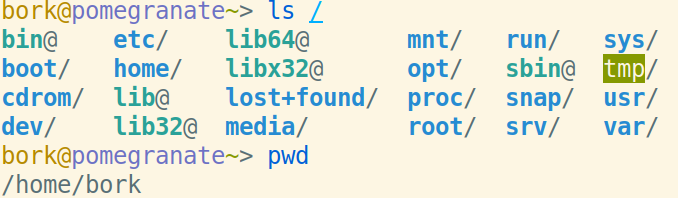
versus gotty’s output:
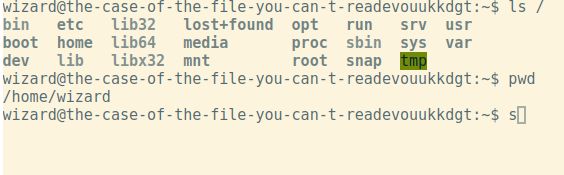
Some of the discrepancy likely comes from running fish locally versus bash on the VM, but the gray directory listings are clearly off. Understanding shell color conventions is the next step to fixing this properly.
Improving Deployment with a Container Registry
In the same session, deployment got a performance upgrade by switching to pre-built Docker images. Previously the server built images on the fly during deployment:
docker-compose build; docker-compose up
That put the server’s CPU at 100% for about five minutes each time. Now images are built locally and pushed to a registry, and the deploy step only pulls them:
docker-compose pull; docker-compose up
This is faster and more reliable. Building images in CI was attempted, but Docker image caching with GitHub Actions never cooperated, so local builds won out. The setup took longer than expected, but the result is a deployment pipeline that no longer stalls the server.



