
The 33 Control Characters, Explained
Terminals are full of hidden machinery. Press Ctrl-C and a program dies; press Ctrl-W and a word disappears. But what's actually happening under the hood? The answer involves 33 ASCII control characters, a mix of operating system tricks, and a lot of historical baggage.
A Mixed Bag of Responsibilities
The first surprise is that those 33 codes aren't a single coherent system. They split into a few rough categories:
- OS-handled codes: When the terminal driver sees
3(which isCtrl-C), it sends aSIGINTsignal to the foreground process. - Pass-through codes: Everything else goes straight to the application, which decides what to do. That includes literal keypresses like
Enter(byte13) andTab, plus codes thatreadlineinterprets for line editing. - Application-specific codes: Some, like
Ctrl-X, have no terminal-wide meaning at all—emacs just happens to use it heavily.
There's no rhyme or reason to which code falls where. The system evolved organically from telegraph machines, where these characters originally controlled mechanical devices, not UNIX processes. The ASCII names (like ETX for byte 3) often have little to do with what the codes do today.
Only 33 Codes Total
Here's a full map of what each control character does on a typical setup:
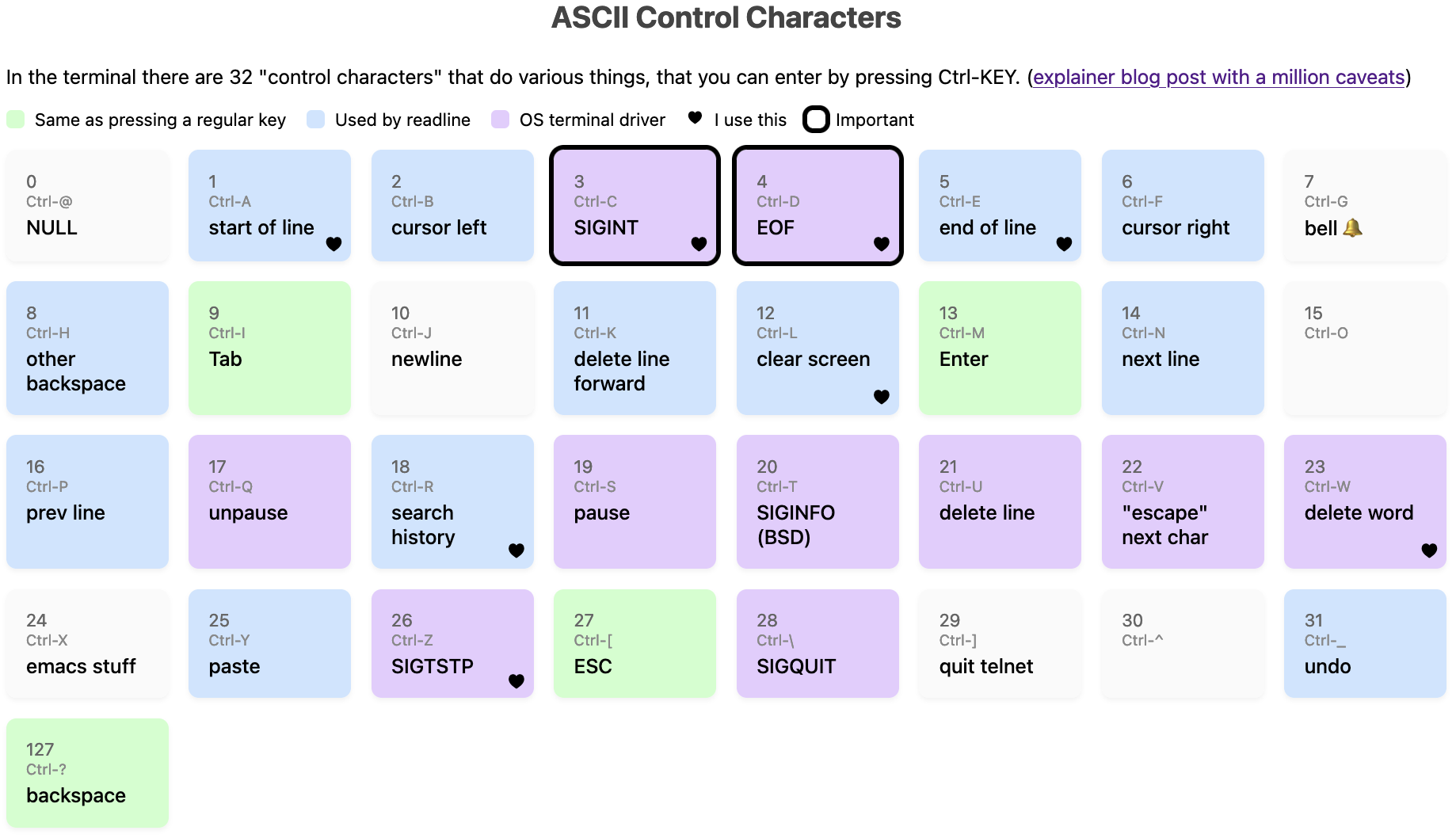
The entire set covers Ctrl-A through Ctrl-Z, plus seven extras: @, [, \, ], ^, _, and ?. That's it. This is fundamentally different from GUI shortcuts, where you can bind Ctrl-1 or Ctrl-Shift-C to anything. In a terminal, Ctrl-1 is just the same as pressing 1; Ctrl+Shift+C is typically intercepted by the terminal emulator for copy-paste and never reaches the TTY. Even Ctrl+Left Arrow isn't a control code—it sends an ANSI escape sequence instead.
A few of these codes are effectively unreusable as shortcuts because they're identical to normal keys. Ctrl-M is the same as Enter, and Ctrl-I is the same as Tab. Some terminal emulators can be configured to distinguish them, but by default they're indistinguishable. If you're writing a terminal application, best to avoid both as bindings.
Canonical vs. Noncanonical Mode
Not all "OS-handled" codes are always handled by the OS. Ctrl-W and Ctrl-U are special cases. In canonical mode, the terminal driver buffers input until you press Enter and handles deletion itself when you hit Backspace or Ctrl-W. In noncanonical mode, keystrokes go straight to the program, which may implement its own word-erasing.
Programs using canonical mode include noninteractive tools like grep and cat, plus git. Noncanonical users are REPLs like python3 and irb, your shell, and any full-screen TUI such as less or vim.
Everything Is Configurable with stty
Those OS-handled codes aren't hardwired. The stty utility can remap all of them, plus Backspace. On a typical Mac, the current mappings look like this:
$ stty -a
cchars: discard = ^O; dsusp = ^Y; eof = ^D; eol = <undef>;
	eol2 = <undef>; erase = ^?; intr = ^C; kill = ^U; lnext = ^V;
	min = 1; quit = ^\; reprint = ^R; start = ^Q; status = ^T;
	stop = ^S; susp = ^Z; time = 0; werase = ^W;
Common reasons people touch stty include fixing a broken terminal with stty sane, setting stty erase ^H when backspace sends the wrong byte, enabling stty ixoff, or even binding SIGINT to an entirely different key.
There are also caveats around signals. If a program turns off the ISIG terminal mode, the OS won't send signals at all—vim does this. On BSDs, Ctrl-T sends an extra SIGINFO signal. You can watch a program toggle these modes with strace, filtering on the ioctl system call:
$ strace -tt -o out  vim
$ grep ioctl out | grep SET
When vim starts, it turns off ISIG and ICANON:
17:43:36.670636 ioctl(0, TCSETS, {c_iflag=IXANY|IMAXBEL|IUTF8,
c_oflag=NL0|CR0|TAB0|BS0|VT0|FF0|OPOST, c_cflag=B38400|CS8|CREAD,
c_lflag=ECHOK|ECHOCTL|ECHOKE|PENDIN, ...}) = 0
And it restores them when it exits:
17:43:38.027284 ioctl(0, TCSETS, {c_iflag=ICRNL|IXANY|IMAXBEL|IUTF8,
c_oflag=NL0|CR0|TAB0|BS0|VT0|FF0|OPOST|ONLCR, c_cflag=B38400|CS8|CREAD,
c_lflag=ISIG|ICANON|ECHO|ECHOE|ECHOK|IEXTEN|ECHOCTL|ECHOKE|PENDIN, ...}) = 0
Conflicts Everywhere
With only 33 codes, collisions are inevitable. Ctrl-S freezes your screen by default, but if you disable that, readline uses the same code for forward search. Ctrl-T can send SIGINFO, transpose two characters, or do something else entirely, depending on whether the program has ISIG set and whether it emulates readline.
The Great Backspace Debate
Code 127 is labeled "backspace" and code 8 is "other backspace"—a distinction with a surprisingly tangled history. On a modern Mac:
- Press
Backspace; the TTY receives byte127(ASCIIDEL). - The OS terminal driver and
readlineboth map127to backspace. - In canonical mode, it deletes the previous character.
- Pressing
Ctrl-H(byte8) has the same effect inreadline, but a program likecatjust prints^H.
Not everyone gets byte 127 from their Backspace key. Some keyboards send byte 8, requiring users to configure stty erase ^H. This confusion was bad enough in the 90s that the Debian Policy Manual has an entire section on keyboard configuration describing how Backspace and Delete ought to behave. The rules hold up pretty well today.
Not Everything Is Useful
There are more codes left unmapped than one might expect. According to stty -a, Ctrl-O is "discard," Ctrl-R is "reprint," and Ctrl-Y is "dsusp"—but in practice, they mostly just pass through to the application. Many of these historical functions seem to have lost their purpose in 2024.
None of this is strictly necessary for day-to-day terminal use. You can get by knowing just the practical shortcuts: Ctrl-C, Ctrl-D, Ctrl-Z, Ctrl-R, Ctrl-L. But the underlying system is a fascinating legacy—a relic of telegraphy that still shapes how we interact with computers, complete with all its quirks and contradictions.



