Scheduling Jupyter Notebooks at Scale
Meta’s internal Jupyter platform, Bento, is widely used not just for ad-hoc analysis but for recurring ETL and reporting workflows. Running those notebooks manually at fixed intervals doesn’t scale, and users often forget. To fix this, Meta built a scheduled notebooks system that plugs directly into its existing batch ETL pipeline framework, Dataswarm (which functions similarly to Apache Airflow). The key design constraint: scheduled notebook execution must remain transparent and privacy-aware, with clear data lineage.
Why Notebooks Are Hard to Schedule
Meta relies on static analysis and transparent Dataswarm operators to maintain coherent narratives around dataflows. Notebooks break that pattern for three reasons:
- Dynamic code: Table names built via f-strings, for example, defeat static analysis of data lineage.
- Opaque execution: Arbitrary code means data lineage can’t be determined, validated, or recorded while the notebook runs.
- Production review: Scheduled notebooks sit on the production side of the development barrier, and reviewing notebook code is non-trivial.
These constraints shaped the scope: only notebooks doing ETL or data transformation with visualizations can be scheduled. Notebooks with any other side effects are ineligible.
System Components
The scheduled notebooks feature has three main parts:
- A UI to set up a schedule and create a diff (Meta’s pull-request equivalent) that must be reviewed before the notebook and its Dataswarm pipeline are checked into source control.
- A debugging interface for runs after scheduling is active.
- A custom scheduler operator, called BentoOperator, that executes the notebook.
How BentoOperator Executes Notebooks
BentoOperator’s core trick is running the notebook in an isolated container with no network access. This addresses the opacity problem: execution happens in a controlled, offline environment, while input and output data annotations surface the dataflow.
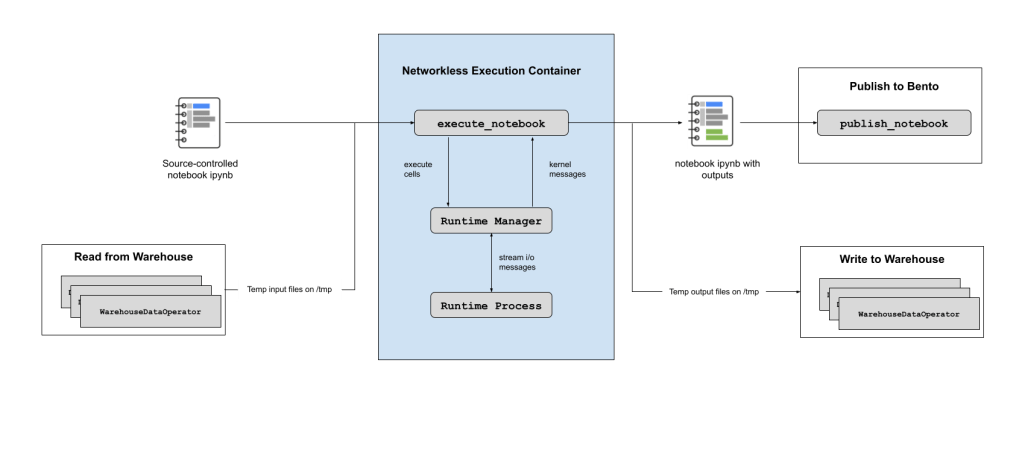
Data movement for ETL is structured around custom cells that are rewritten before execution:
- Data fetches use custom cells (e.g., a SQL cell). When BentoOperator runs, it first parses metadata from those cells, fetches the data via transparent Dataswarm operators, and persists it as local CSV files on the ephemeral host.
- Those custom cells are then replaced with calls to
pandas.read_csv()so the notebook loads data locally, with no network needed. - Writes are similarly done through a custom cell that gets swapped for
pandas.DataFrame.to_csv(); after execution the CSV is uploaded to the warehouse via transparent Dataswarm operators. - The temporary CSVs are garbage-collected, the executed notebook (with outputs) is stored, and the ephemeral host is deallocated.


Privacy and Purpose
BentoOperator integrates with Meta’s data purpose framework. When scheduling a notebook, the user supplies a “purpose policy zone,” which enforces that data is used only for the intended purpose as it flows through Meta’s stack.
The User Workflow
Scheduling starts with a button in the notebook header.

The user first configures the parameters used to auto-generate the pipeline. They then preview the generated pipeline before a Phabricator diff is created. Both the pipeline code and the notebook itself are checked into source control for review, and the test plan includes the output of attempting a scheduled run.
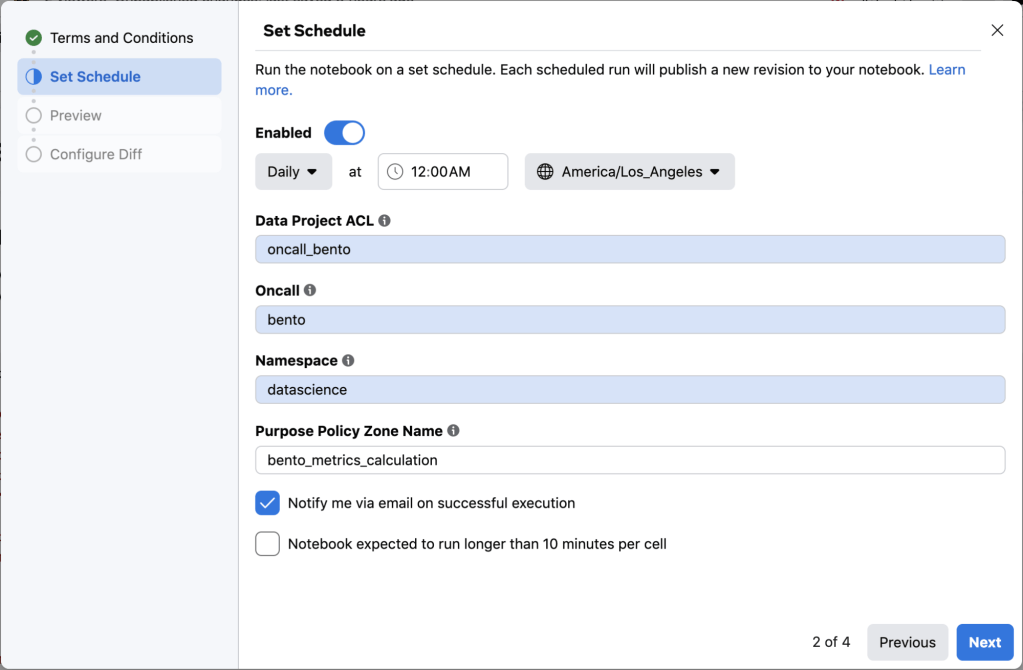
Once the diff lands, the schedule starts running the next day. On failure, the schedule owner is automatically notified. A context-pane extension in Bento supports debugging the runs.
Roadmap
Current scheduling support covers ETL and analysis notebooks without side effects, which is a narrow slice of the full universe of notebooks. Work is underway to broaden the supported data sources beyond the SQL cell, with additional transparent data source types on the way.
Meta is also building out parameterized notebook support—checking in a single notebook and injecting differentiating variables at runtime rather than maintaining many near-identical copies in source control. And finally, event-based scheduling is planned so notebooks can wait for predefined events (e.g., all data sources landing) before execution begins, extending the current time-based approach.


