
Context Is the First Line of Defense
Figma’s security engineering team defends a moving target. Cloud infrastructure shifts, developers adopt new tools, and endpoint software changes quarter to quarter. The SIEM, Panther, runs checks across cloud infrastructure, endpoints, SaaS apps, and identity systems, posting alerts to Slack and creating Asana tickets when something looks wrong. Historically, the hardest part of on-call wasn’t the alert itself—it was reconstructing context: Had this fired before? Was there an open PR addressing it? Had someone already investigated it in Slack?
The team first built a retrieval-augmented classification layer on AWS Bedrock Knowledge Bases and Amazon Kendra. The initial goal was modest: surface historical context when an alert fired, and suppress duplicates. When Panther detects an event, a Lambda handler converts it into a standardized document and indexes it into Kendra. Structured fields are pulled from the raw payload—IPs from p_any_ip_addresses, actors from p_any_usernames and provider-specific user fields, AWS account IDs from ARNs—and become searchable Kendra attributes alongside title, severity, tags, and timestamps.
const attrs: DocumentAttribute[] = [
  { Key: 'alert_id', Value: { StringValue: doc.alert_id } },
  { Key: 'alert_type', Value: { StringValue: doc.alert_type } },
  { Key: 'severity', Value: { StringValue: doc.severity } },
  { Key: 'status', Value: { StringValue: doc.status } },
  { Key: 'created_at', Value: { DateValue: doc.created_at } },
  { Key: 'has_investigation_context', Value: { LongValue: doc.has_investigation_context } },
]
When a similar alert fires later, the system queries Bedrock for semantic matches using the alert title (typically the detection name followed by the actor username) as the primary vector. Recency bias improves the recommendations: a similar alert from two days ago is far more useful than an exact duplicate from six months ago, because triage practices evolve too.
function buildQueryFromAlert(alert: Alert): string {
  return `${alert.data.title}\n\nhas_investigation_context=1`
}
The retrieval system also favors alerts that carry investigation_context—comments left by on-call engineers in Slack about what they found. A closed alert with no comments says little, so context is captured without changing existing workflows. When an engineer leaves a note in a Slack alert thread, the team indexes that comment back into Kendra as investigation context on the original alert.
export async function addInvestigationContext(
  alertId: string, contextText: string
): Promise<void> {
  const existingDoc = await findAlertDocument(alertId)
  if (!existingDoc) return

  let updatedContext: string[]
  updatedContext = [...existingDoc.investigation_context, contextText]

  const updatedDoc: AlertDocument = {
    ...existingDoc,
    investigation_context: updatedContext,
    has_investigation_context: 1,
  }
  await reindexDocument(updatedDoc)
}
Every useful comment on an alert thread makes every future similar alert cheaper to triage. The existing workflow is the training pipeline.
Where Retrieval Stops and Agents Begin
The retrieval system posts a summary into Slack and Asana for each alert, and the effect on on-call burden was immediate. When similar alerts were flagged with high confidence of being benign or duplicative, severity was automatically downgraded. That single change cut on-call pages by 20%.
if (autoResolutionConfidence >= 7) {
  if (updatedSeverity === 'high' || updatedSeverity === 'critical') {
    await alertsDb.updateAlertSeverity(alert.alertId, 'medium')
  }
}
With the RAG foundation in place, the obvious next step was an agentic layer to assist investigation and resolve issues automatically. The team built it on Tines, taking advantage of its support for LLM agent loops with explicit tool interfaces: read a Slack thread, look up an Okta user, query Panther data, open a PR in a specific repository. Each tool is auditable, and engineers can reason about what the agent can and cannot access—critical when an automated system gets access to production security data.
Intent Routing and Scoped Agents
When Panther detects an event, a Lambda stream handler posts the alert to Slack with the first-pass LLM summary and similar-alert references from the RAG layer, then auto-tags @Tines Security Slackbot in the thread. On-call engineers can also tag the bot manually to invoke follow-up questions or request specific insights on demand.
Tagging the bot fires a webhook into Tines, and intent routing runs first. A lighter model (like Claude Sonnet) reads the full Slack thread and classifies the request: alert triage, platform security question, app approval inquiry, or something else. Each classification routes to a specialized agent with its own scoped tool inventory, authorization layer, and system prompt. The alert triage agent handles the bulk of the work, but separate agents with focused tools avoid the risk of a sprawling agent with access to everything.
The Triage Agent’s Toolkit
The alert triage agent (using a model like Claude Opus) does most of the investigating. It receives the full Slack thread history, its own steering memory, and a set of tools scoped to what a security on-call engineer typically needs:
- Okta: get a user’s profile, list groups, check login history, search users by filter. When an alert fires about suspicious activity from a specific actor, the agent typically pulls their Okta profile first to understand who they are and what they should have access to.
- North Pole Security Workshop (managing the Santa endpoint security tool): search rules and events, check host sync status, push rules to hosts. For blocked binaries or endpoint policy violations, the agent can look up the signing ID, check event history, and see if other users are hitting the same block.
- Wiz: pull audit logs, cloud resource inventory, vulnerability findings, open issues, and exposed resources. For cloud infrastructure alerts, it can check whether a flagged resource has known vulnerabilities or misconfigurations.
- Slack: read thread replies, look up user profiles, send progress updates. The agent reads prior threads linked from similar alerts to pull in past reasoning and discussion.
- Panther: get alert details, get raw events, list related alerts. This gives access to the structured alert payload beyond what was posted to Slack.
- Code modification: open PRs in the Panther detections repo or the monorepo.
- The Panther investigation sub-agent: a separate LLM-powered agent that writes and executes Snowflake SQL against the full security data lake.
Querying the Security Data Lake
The triage agent’s direct tools cover a lot of ground: user identity in Okta, applicable Santa rules, cloud resource status in Wiz. But many investigations go deeper. What was this user doing in AWS in the two hours before the alert? What processes were running on their endpoint, and were any of them unusual? Did they access other apps or make configuration changes during the window?
For those questions, the triage agent delegates to a separate investigation sub-agent. This sub-agent (also a model like Claude Opus) translates a natural-language query from the parent agent into Snowflake SQL. It runs against the Panther data warehouse, which ingests audit logs from across the company: AWS CloudTrail, Okta system logs, GitHub audit events, GCP audit logs, osquery endpoint telemetry, Workshop/Santa events, Wiz findings, and roughly a hundred other tables.
The parent agent calls it the way you’d ask a colleague to run a query: “Find the most recent Okta logins for user X in the past 48 hours” or “Check what processes user Y has been running on their endpoint over the last 2 days” or “What was user Z doing in AWS EKS between 10:21 and 20:21 UTC on March 10?” The sub-agent determines which tables to hit, what columns to use, and how to filter by time.
This works, but table schemas can be messy. Column names are inconsistent across log sources, join keys aren’t well documented, and time-partitioning functions vary by table. Without help, the sub-agent would spend four or five queries just discovering the schema before answering the actual question—or worse, query in a way that returns incorrect or incomplete results. Solving that problem required giving the agent a memory of what it learns along the way.
Separating memory by purpose
The team quickly learned that memory design determined how useful the agent became. Figma splits its agent memory into several distinct layers rather than dumping everything into one store.
Case memory is the RAG corpus described earlier: historical alerts plus investigation context pulled from Slack and Asana. When the agent needs precedent for a current situation or wants to see what an on-call engineer concluded about a past incident, it queries this layer.
Steering memory holds behavioral guidance. It's a markdown document loaded into the agent's context at the start of every run, similar to an AGENTS.md file. It contains rules such as "when you see stale Okta sync alerts, check both the resource-sync and group-sync jobs before concluding it's systemic" or "user X is doing maintenance on system Y this week, treat those alerts as expected."
The agent can update its own steering memory when a security engineer corrects it. If a human says "you handled that wrong, here's what to do instead," the correction persists for future runs. But Figma learned to be selective about what goes into steering memory versus the RAG layer. A one-off lesson about a specific alert type belongs in investigation context so it surfaces as precedent for similar future alerts. A behavioral rule that changes how the agent approaches all alerts belongs in steering memory. An early mistake was saving everything as steering memory, which overrode agent behavior in unwanted ways. Precedent and policy are different things and belong in different places.
Stateful objects get database-backed records in Tines: open PRs the agent has created, Panther investigation state, and anything needing stable keys and status tracking rather than natural-language retrieval.
The most interesting layer is procedural memory, which directly solves the schema discovery problem. The investigation sub-agent has its own memory store organized by tags (aws, okta, osquery, workshop, etc.). Before starting a query, the agent loads relevant memories for the data sources it's about to hit. After completing an investigation requiring schema discovery, it saves what it learned:
Title: Job Description Fields in Workiva Logs (2026-03-12T16:25:21 UTC)
Memory: Job descriptions for each user within the system can be found within the field 'jd' in the table 'WORKIVA_USERS'.
A second, lighter-weight LLM handles memory formatting: it takes the raw finding, generates a title with a UTC timestamp, tags it, and writes the memory. The first time the investigation agent was asked about Zoom activity, it needed multiple discovery queries. After saving a memory, the same question cost a single query. That pattern repeated across data sources as the agent built its own operations manual through trial and error.
Three investigations in practice
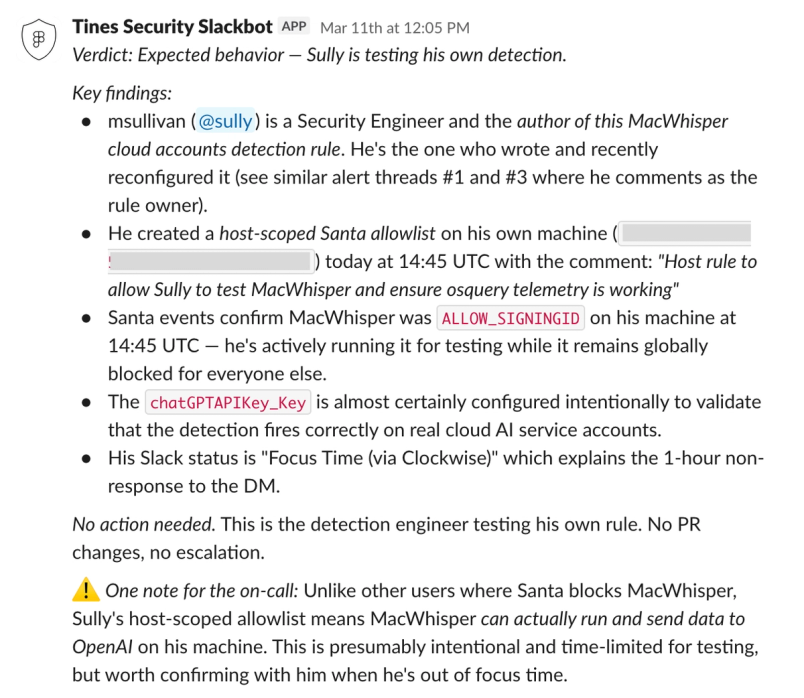
Recent examples show how the agent handles real alerts. In one case, an alert fired because someone installed an unreviewed macOS audio transcription app. The triage agent read the alert thread, pulled similar historical alerts from the RAG layer, and used its Okta and Workshop tools to piece things together: the actor was the same engineer who had authored the detection rule. Workshop showed a same-day, individually-scoped rule created for testing. Conclusion: the rule author was testing his own detection. No action needed. The agent even noted that, based on the author's Slack status, he was heads-down and confirmation might be delayed.
In a second case, repeated Snowflake alert pages fired for the same service account. The agent described the current state, delegated to the investigation sub-agent to query relevant audit logs, identified why the alerts kept recurring, found that a draft PR already existed to suppress them, and explained the long-term fix under discussion in another thread. The on-call engineer got a complete picture without opening a tab.
A third common pattern: alerts for activity that could be malware-related but is usually legitimate, such as an unknown launch service installed on Figma MacBooks. Previously this alert type would have overwhelmed the team. The agent can verify the binary is signed by a trusted entity, use Panther query capability to determine how it was installed (brew, App Store, etc.), and automatically write up code changes to suppress the alert under known-safe conditions—all without human intervention.
From finding to fix
The biggest surprise was how much time the agent saves by going from "figured out what's going on" to "here's a PR that fixes it."
There are two code paths. For changes to detection rules, allowlists, and alert suppressions, the agent opens PRs against the Panther detections repo. This is the common case: an alert fires for a known-benign pattern, an on-call engineer confirms a false positive in Slack, and the agent generates an allowlist entry or tunes the detection rule. For infrastructure changes, service configs, Terraform, or RBAC and IdP configuration, the agent works against the monorepo.
Bot-authored PRs create a git blame pointing at a service account, which obscures context months later. Figma now includes the requesting security engineer's name in the PR description and links back to the originating Slack thread—something that should have been there from the start.
When reviewers leave comments, the agent picks them up via a GitHub webhook and can make additional changes or respond. It can also rebase stale branches onto the latest master when PRs sit open.
Deterministic guardrails
All tool calls include safeguards enforced outside the LLM. Every PR the agent creates is set to draft automatically as a deterministic post-step in the Tines workflow, not a prompt instruction—early experiments showed prompt reliance wasn't reliable enough.
This tool-calling contract enforces controls such as preventing the agent from receiving sensitive employee information when retrieving Okta data, and guaranteeing the agent can't close or modify PRs it didn't author. Tools available to the agent are scoped, authorized, and monitored, and the agent operates on behalf of an authorized team member.
Context is also contained. The agent doesn't get ambient access to whole Slack channels. Outside of DMs, it can read a thread only when explicitly re-tagged on the latest message.
Figma is more comfortable with autonomy when an action is bounded, reversible, and supported by clear evidence than when it's broad, destructive, or hard to audit. Read-heavy investigation, duplicate detection, precedent retrieval, and draft remediation fit agentic execution better than generic high-powered write paths. A larger share of alerts may be handled automatically over time, but only behind tighter guardrails: narrower action scopes, better evaluation, and clearer provenance around conclusions.
What hindsight reveals
- Procedural memory should have been there from the start. The investigation agent's self-built schema memory was a late addition, and the improvement was dramatic enough that everything before it feels like wasted work.
- Configuration-as-code keeps the agent layer from fragmenting. Team members iterating quickly tend to create slightly different copies of the same core agent with slightly different tool configurations for different purposes. That makes it hard to ensure consistent behavior. Today Figma configures and manages the core tool set outside individual agents in configuration-as-code, so all agents share a standardized set of actions.
- The trust model for Slack public channels needs upfront thought. Agents have authorization controls so only security team members can command them, but if an agent looks through detailed user activity logs, sensitive data could surface in a room with a hundred people. Channel-aware prompt design and deterministic controls handle this, but it should be designed up front rather than bolted on later.
Current state and trajectory
The system now handles all initial security response work for the team. The on-call engineer's role shifted from investigating from scratch to reviewing what the agent found, confirming or correcting, and handling cases needing human judgment.
Measured results so far: roughly 70% reduction in time-to-resolution on complex alerts, 20% reduction in on-call pages through AI-driven severity downgrading, 25% fewer endpoint software approval requests (the agent detects when a user asks about a tool and points them to approved alternatives), and higher on-call confidence in resolution quality because the agent's evidence chain is explicit and reviewable.
The longer-term vision is that the system internalizes thousands of triage decisions, schema mappings, and behavioral corrections no single person could hold in their head. The compounding benefit matters most: every run makes the next one cheaper and more accurate.
The next phase focuses on a better control plane: sharper distinctions between memory layers for precedent, policy, and state; better decisions on when an alert is safe to auto-close versus escalated, even when the model sounds confident; and graduating trusted workflows out of prompt behavior and into deterministic, inspectable automation.
On the question of whether AI is worth using for investigations given its imperfections: humans aren't perfect either. There's a middle ground between full automation and full manual work that reduces risk and improves efficiency, and that playbook is still being written.


