
Why centralized CI/CD governance matters
Automation across the DevOps lifecycle pays off in measurable ways—faster feedback through CI, shorter time-to-production via CD, and the ability to run live-environment tests like API fuzzing or load testing. But the path to mature DevOps practices is rarely uniform across an organization. Multiple application teams typically build similar pipelines in parallel, each at its own maturity level: some run rigorous test suites and live-environment validation, while others stop at a successful build. Teams may also standardize on different tooling—Jira, TeamCity, Bash/PowerShell CLIs, or platform-specific helpers like GitHub Actions—which blurs the overall picture.
That disparity creates real business problems:
- Multiple platforms inflate operational overhead and make toolkit consolidation difficult.
- Teams reinvent the wheel; common languages, frameworks, and deployment targets produce recurring pipeline patterns.
- Quality is poorly governed. You can’t easily tell whether a production push was preceded by performance testing or merely a green build.
- In regulated industries, demonstrating compliance against required checks becomes a manual, labor-intensive exercise when CI/CD is fully decentralized.
GitHub Actions offers several primitives that directly address these challenges, from repository-level guardrails to organization-wide policy enforcement.
Establishing quality gates at the repository level
Because workflows live as source files in the repository, they inherit the same governance mechanisms as application code. Branch protection rules define mergeability requirements, and when paired with required status checks, they can enforce conditions such as passing test suites, successful builds, and vulnerability scans before any merge to production branches.
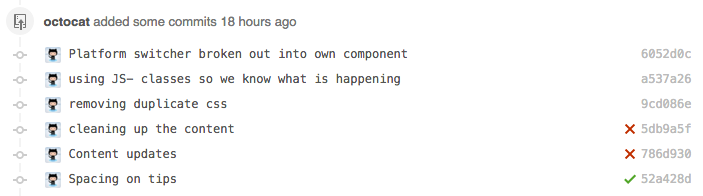
The effect is a consistent, enforceable set of quality gates across every pull request—without asking teams to self-police.
Reusable workflows: the template layer
Reusable workflows act like functions or infrastructure-as-code templates: define a general-purpose workflow once, then invoke it from many repositories. A typical reusable workflow accepts input parameters and named secrets, then executes a series of steps on a specified runner.
on:
  workflow_call:
    inputs:
      config-path:
        required: true
        type: string
    secrets:
      envPAT:
        required: true
jobs:
  reusable_workflow_job:
    runs-on: ubuntu-latest
    environment: production
    steps:
    - uses: actions/labeler@v4
      with:
        repo-token: ${{ secrets.envPAT }}
        configuration-path: ${{ inputs.config-path }}
The example above—a reusable workflow that runs the actions/labeler action with a config path and an environment secret—demonstrates the pattern. Application teams consume it in their own workflows with a minimal call.
jobs:
  call-workflow-passing-data:
    uses: octo-org/example-repo/.github/workflows/reusable-workflow.yml@main
    with:
      config-path: .github/labeler.yml
    secrets:
      envPAT: ${{ secrets.envPAT }}
The key design decision is sharing scope. Division-wide workflows might reflect a business unit’s cloud provider choice or its specific governance policies; for those, a centrally maintained repository (private if necessary) works well. Company-wide workflows make sense when the goal is a paved road with built-in guardrails—for example, templated unit testing and linting for adopted languages, or standardized performance testing against a target platform. In both cases, a dedicated sharing repository enables innersource-style reuse.
Required workflows: enforcing policy from the top
Reusable workflows empower teams to follow good patterns. Required workflows, currently in public beta, go further by mandating execution. Configured at the organization level, a required workflow always runs on pull requests and surfaces as a status check—even if an application team would prefer to skip it.
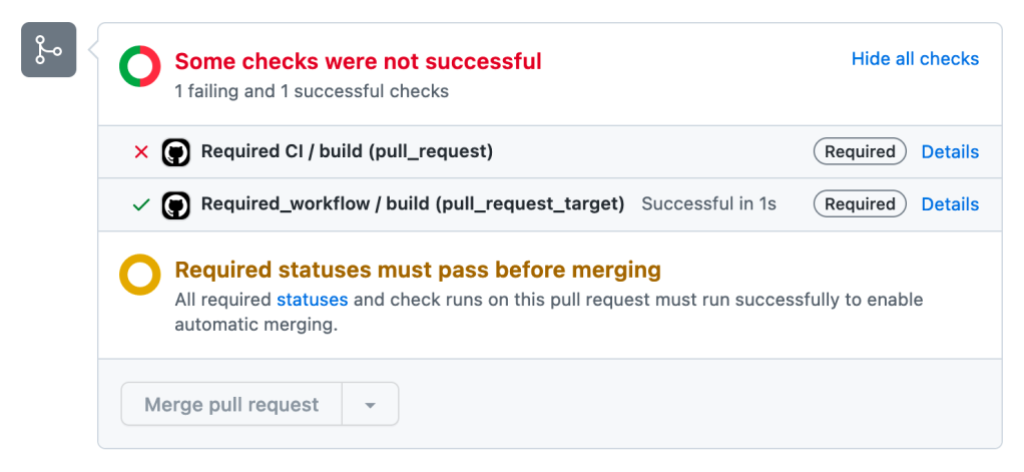
A common use case is rolling out a security scanner across all repositories. Instead of hoping every team adds the scan to its own workflow, you can require it organization-wide. The tradeoff is cultural: mandated workflows are more prescriptive, while reusable workflows let teams pick what fits their context. The right balance depends on your risk appetite and how much standardization your engineering culture will accept.
Migrating from incumbent tools
Adopting GitHub Actions often means migrating existing pipelines. The GitHub Actions Importer supports Azure DevOps, CircleCI, GitLab, Jenkins, and Travis CI. During its preview, the tooling successfully converted over 90% of tasks and constructs on average; it reached general availability in March. After migration, teams can refactor those converted workflows into reusable assets, spreading recommended patterns across the organization—contributing back to the wider engineering community in the spirit of innersource.
Balancing freedom with control
Sharing CI/CD and automation practices across an engineering organization can feel risky to leaders who are used to more tightly controlled pipelines. But with the right guardrails in place, teams can keep moving quickly while still following company-approved patterns.
Eliminating secrets with OpenID Connect
Deploying to Azure, AWS, GCP, or on-premises environments normally means your CI/CD platform needs credentials. Those passwords and certificates introduce operational overhead: rotation schedules, secure storage, and the ever-present risk of leakage.
GitHub Actions offers a path that removes secrets from the equation entirely by using OpenID Connect (OIDC) for cloud deployments. Your workflows can authenticate directly to the target environment through OIDC, so no long-lived credentials need to be stored or managed. This pairs well with the reusable workflow model: application teams depend on shared workflows, and those workflows can use OIDC-based actions internally. The result is that password management and rotation simply disappear from the operational picture.
Tip: with OIDC, you’re still logging on with a service principal on the target platform. This means, you need to consider the permissions which have been granted to that service principal.
Make sure to consider the principle of least privilege. Does it make sense for all teams to reuse the same service principal? (Probably not!) Or does it make more sense to monitor activity and access from service principals per application, per environment?
This approach may now seem more appealing when used with OIDC, as you don’t have to worry about password rotations and the associated operational overhead.
Scoping what a workflow can do
Every workflow run gets a GITHUB_TOKEN that lets it interact with GitHub services, such as publishing packages. The default permission level for this token is now read-only, but you can still grant more specific permissions directly in the workflow's YAML.
Tip: once again, make sure to use the principle of least privilege. Only grant the permissions that are truly required for your job, or overall workflow.
Being explicit about these permissions matters. A workflow that only needs to create a release shouldn't have write access across the whole repository. Setting the least-privilege permissions at the job level is a straightforward way to reduce the blast radius of a compromised or misbehaving workflow.
Controlling which actions and workflows can run
Organizations typically maintain rigorous governance around open source dependencies in the code they ship. Actions and reusable workflows deserve the same level of scrutiny, and GitHub's enterprise policies let you enforce it.
At the enterprise level, administrators can restrict GitHub Actions usage to one of a few modes: allow everything, allow only actions and reusable workflows defined inside the enterprise, or allow a curated list. That last option is where the nuance lives.
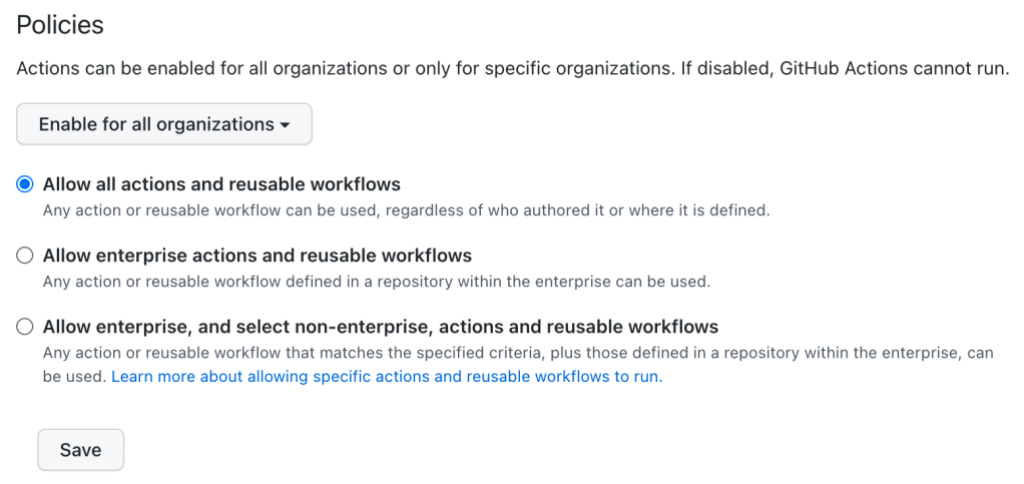
With the "Allow enterprise, and select non-enterprise, actions and reusable workflows" option, policy gets more granular. You can choose to allow only actions authored by GitHub, actions published by verified marketplace creators, or a specific allowlist of actions and reusable workflows you define. The same kinds of controls can be applied at both the organization level and the repository level, so you can delegate governance decisions to whichever tier of the company is best positioned to make them.
Keeping actions current
Actions are just another form of dependency. When you reference an action in a workflow, you pin it to a version number, a Git commit SHA, or a branch name. Outdated versions can carry known security vulnerabilities or missing bug fixes, just like any other library.
Dependabot handles this by opening pull requests to bump the action version in your workflows. This keeps the process of updating CI/CD components as routine and visible as updating any other dependency.
Wrapping up
Automation is what lets engineering organizations ship faster without sacrificing quality. The risk is that each team builds its own bespoke pipeline, and good practices never spread beyond a single repository.
Reusable workflows and shared actions give you a mechanism for codifying internal best practices in one place. Organization-wide policies let you govern how those components are used, and OIDC removes the secret-management burden that often makes centralized pipelines so operationally heavy. The combination gives you a paved road that teams can adopt without losing their ability to innovate.


