

Less Obvious GitHub Actions Use Cases
GitHub Actions is usually thought of as a CI/CD tool, but it can do far more than build and deploy. Here are four practical ways to extend its utility in your DevOps workflow.
Image Compression Built Into Your Repo
Optimizing images for the web is a task many developers skip. Instead of manually compressing files every time you upload, the GitHub Marketplace offers a variety of tools to automate it. A search for "image compression" surfaces Image Actions as a top option. Once added to a workflow, it automatically processes images in your repository, reducing file size without degrading quality.
Automated Semantic Release Notes
Keeping changelogs and version numbers in sync is tedious, but you can hand it off to GitHub Actions. The open-source semantic-release project can be invoked directly in a workflow using the npx command. This is possible because Actions lets you run arbitrary shell commands in a specified runner environment.
One advantage of GitHub Actions is that many users share their workflow files publicly. For example, a release workflow from GitHub user benmvp demonstrates how to wire semantic-release into your pipeline. Beyond triggering releases, tools like this can also generate changelog entries and bump the version number in your package.json automatically.
name: Release

on:
  push:
    branches:
      - master

jobs:
  main:
    name: NPM Release
    runs-on: ubuntu-latest

    steps:
      - name: Checkout
        uses: actions/checkout@v1

      - name: Use Node v12
        uses: actions/setup-node@v1
        with:
          node-version: 12

      - name: Install dependencies
        run: npm ci

      - name: Double check unit tests
        run: npm test
        env:
          CI: true

      - name: Double check integration tests
        run: npm run integrate
        env:
          CI: true

      - name: Build package
        run: npm run build

      - name: Release new version to NPM
        env:
          GITHUB_TOKEN: ${{ secrets.GITHUB_TOKEN }}
          NPM_TOKEN: ${{ secrets.NPM_TOKEN }}
        run: npx semantic-release
Run Workflow Locally for Faster Debugging
Pushing commits just to see if a workflow triggers correctly is inefficient. The community tool nektos/act lets you run workflows locally before they hit the repository. It reads your workflow files from .github/workflows/ and uses the Docker API to pull or build the required images. It then computes the execution order based on declared dependencies and runs each action in a container, mirroring GitHub's environment variables and file system so behavior matches production.
Environment-Level Secret Protection
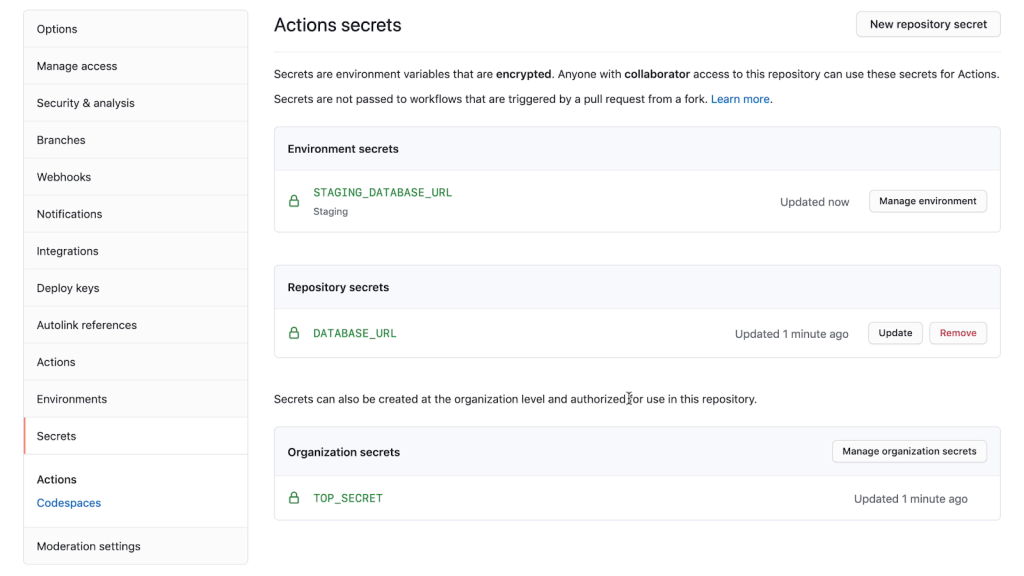
Not all secrets should be accessible to every job. GitHub Actions supports environment-scoped secrets, which can be gated behind required reviewers. If you store a secret at the environment level and enable this setting, a workflow job will not be able to read that secret until an approved approver has given the go-ahead. This adds a human approval checkpoint for sensitive deployments.
For more ideas on using GitHub Actions, the official GitHub documentation covers the full platform. Additional tips—24 more, in fact—are available in a collection on the GitHub DEV space.


