

What SAST Does Under the Hood
With security moving earlier into the software development lifecycle, developers are expected to operate security tooling alongside their usual duties. The burden of triaging false positives on top of writing and shipping code can be heavy. Yet shifting left is here to stay. The practical response isn’t to push back against the trend but to understand what these tools actually do—starting with static application security testing (SAST).
Developers and security engineers reach for SAST for three core reasons:
- Automation: They scan source code automatically to prevent vulnerabilities and catch them early in the pipeline.
- Variant analysis: They expand detection by finding new instances of a known vulnerability elsewhere in the codebase, not just the one originally spotted.
- Manual review support: Tools like CodeQL treat code as data. You run queries against a database representation of the code to pull out patterns, such as potentially vulnerable constructs, using standard queries from GitHub researchers or your own custom analysis.
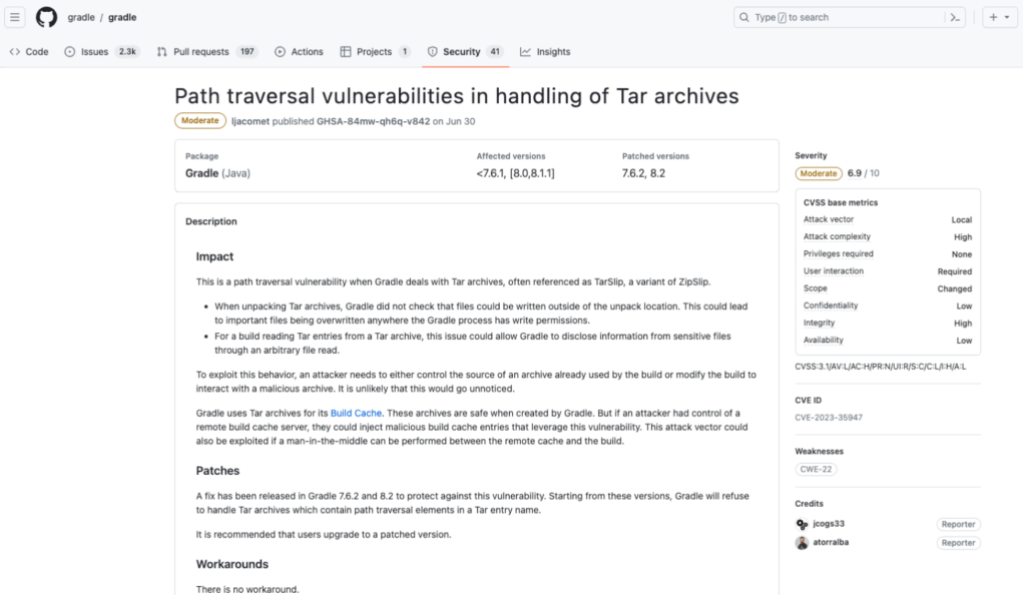
SAST rarely works alone. For full coverage, it is typically paired with:
- Software composition analysis (SCA) identifies vulnerable third-party dependencies, their origins, and license requirements—tools like Dependabot can be used at any point in the SDLC.
- Dynamic application security testing (DAST) finds vulnerabilities in a running application.
- Interactive application security testing (IAST) blends SAST and DAST to close gaps either approach might miss alone.
Strengths and Limits of SAST
The upside of modern SAST is considerable:
- Early detection: Used at the start of the SDLC, it means builds and production are less likely to be disrupted by vulnerable code.
- Whole-codebase analysis: With teams often having one security expert per 100 developers, manual-only reviews are bound to miss issues. SAST scans everything, catching hard-to-find flaws and keeping secure code shipping on pace.
- Data-flow tracing: Tools can follow sensitive data through the code to spot potential leaks, verify input validation and sanitization, and check that proper security protocols are followed during storage or transfer.
- Full application visibility: Most tools trace partial flows only. CodeQL’s database approach gives it an end-to-end view of how data moves across the entire application.
- Pipeline integration: Advanced tools hook into CI/CD and have direct access to the codebase, so every push or build triggers an automatic scan without extra developer effort.
- Actionable alerts: Alerts point to the exact triggering line, explain the flaw's nature and severity, and often suggest a fix. GitHub Advanced Security’s code scanning autofix takes this further, using generative AI to propose a remediation developers can apply directly from a pull request.
| Problems and consequences | Solutions |
| Your SAST tool might match vulnerable patterns in a database to patterns found in comments throughout the source code and in harmless function names. | Adding a lexical analysis function–which transforms code into tokens and ignores characters that aren’t related to the semantics of code—filters out pattern matches unrelated to the source code (like patterns found in your code comments). |
| A legacy SAST tool might not be able to differentiate between input data that comes from a user (and therefore exploitable) and input data that comes from a local source (and therefore benign).
Your SAST tool might not detect when input data has been sanitized or validated as it moves throughout your source code (making the data safe). |
Abstracting your code into a hierarchical structure provides a better understanding of where input data enters and is used throughout your code. As a result, the SAST tool will better determine when input data is actually exploitable and raises fewer false positives. |
| With so many false positives, developers and security experts may lose confidence in the tool’s data and get alert fatigue, which can cause them to skim past critical alerts. | A SAST tool with an alert system that can be set with custom and automated triage rules ensures that the most urgent security alerts are addressed first. Engineering teams should also be able to filter and search alerts to sift through all the results and focus on a particular type of alert. |
The main downside is the persistent problem of false positives. Regardless of how intelligent the analysis is, developers still spend time triaging alerts that turn out not to be real vulnerabilities. That friction between useful signal and noise remains the biggest hurdle to developer adoption of any SAST tool.
Inside a SAST scan: from tokens to alerts
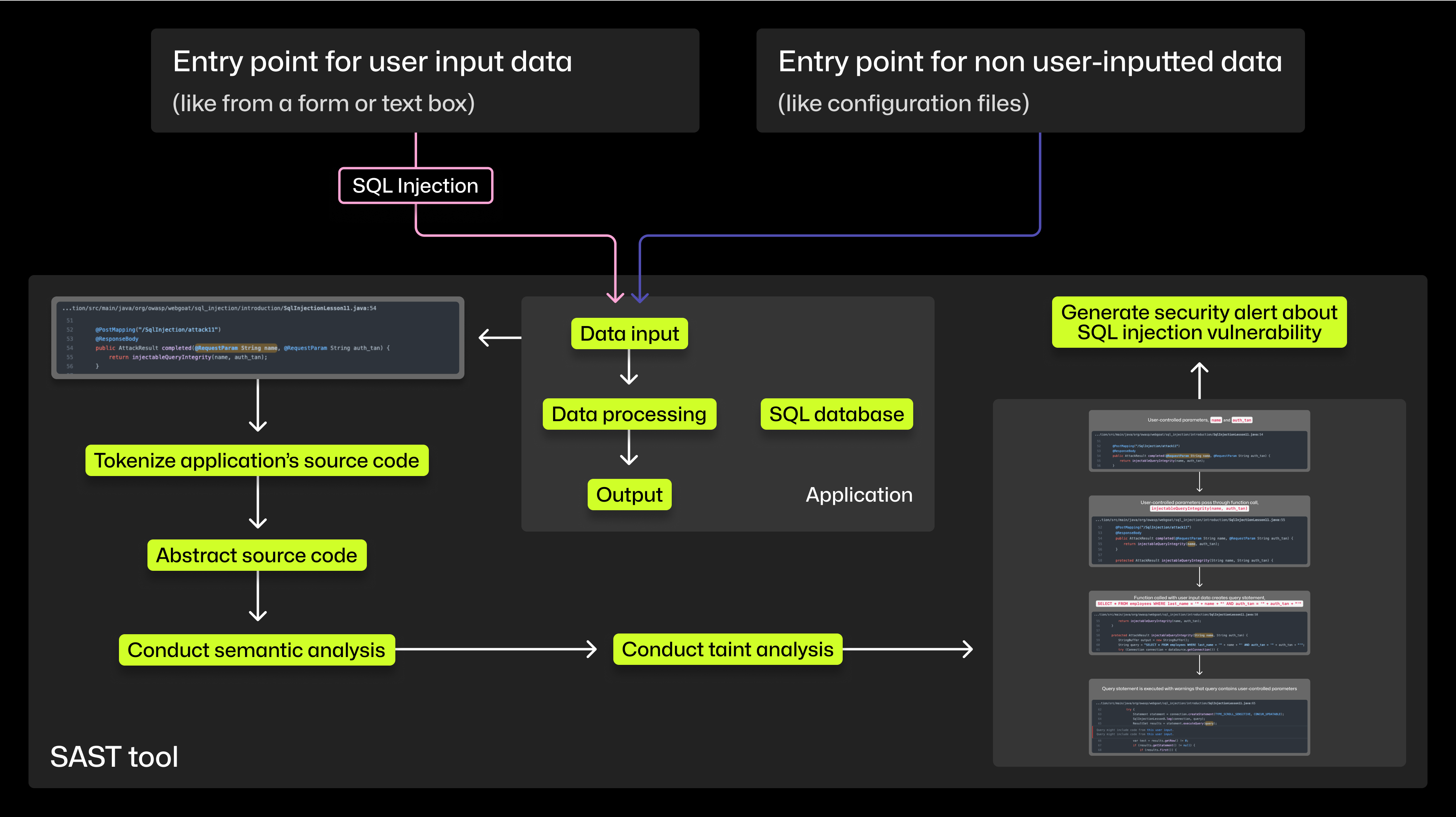
Modern SAST tools rely on a pipeline of analyses to move from raw source code to a targeted security alert. While signature-based pattern matching still exists, advanced tools such as CodeQL lean on semantic and taint analysis for greater precision and broader vulnerability coverage. The process can be broken down into four distinct steps.
Step 1: Tokenize
Lexical analysis breaks source code into tokens, which are categorized according to the grammar rules of the programming language. This standardized list strips away characters irrelevant to the code’s semantics, allowing the tool to later conduct analysis that ignores comments and other non-functional text.
Step 2: Build an abstraction
To understand the structure and meaning of the code, SAST tools typically visualize it as a tree. An abstract syntax tree (AST) renders lines of code as a hierarchical structure, showing relationships between code elements, which pieces belong to which functions, and more.
Step 3: Semantic analysis
With the AST in place, the tool can interpret the code’s actual meaning. This semantic analysis lets the SAST tool scan the logic of the source code itself, ignoring tokens that don’t contribute to how the program behaves.
Step 4: Taint analysis
SAST tools look for vulnerabilities in how your code handles data, not in the data itself. Taint analysis is the mechanism for that. It performs three checks:
- Identifies sources, sanitizers, and sinks — source functions where input enters the code, sanitizer functions that neutralize input, and sink functions that could be exploited if called with unsanitized data.
- Traces the flow from source to sink — using the code abstraction, the tool follows input data from its point of entry to see whether it reaches a sensitive function.
- Checks for sanitization along the path — the tool determines whether the data passes through a validation or sanitization function during its journey.
Advanced tools can judge how effectively those sanitizers actually neutralize data. If unsanitized input can flow unobstructed from a source to a sink, the tool flags the path as a potential vulnerability.
Consider SQL injection, a class of vulnerability that SAST handles particularly well because it involves tracing data flows into database queries. The image above shows a CodeQL trace in action. The tool recognized that user-supplied values, name and auth_tan, were embedded directly into the SQL query SELECT * FROM employees WHERE last_name = '" + name + "' AND auth_tan = '" + auth_tan + "'. The alert notes that the query “might include code from this user input,” which is direct evidence of the taint analysis data flow.
Two important distinctions shape how these results should be read:
- Finding a sink is not finding a vulnerability. A sink alone is just a function that could be dangerous under the wrong conditions; many sinks are used safely in everyday code.
- A vulnerability exists only when unsanitized data can actually flow from a source to a sink. The tool must trace that complete path, confirming no sanitizer intercepts the data, before it raises an alert.
Custom queries and automation
Beyond the standard analysis, tools like CodeQL let developers write their own queries to hunt for specific vulnerability patterns relevant to their codebase. This offers flexibility to extend the tool’s built-in coverage.
SAST scans can also be automated. By integrating the tool into a CI/CD pipeline, code is scanned with every push or build. This continuous access to the codebase helps the tool understand semantic context better and run more thorough taint analysis.
Why teams rely on SAST
Applications that handle sensitive data carry legal and ethical obligations. Wordplay, an educational programming language and web IDE designed for students, illustrates the point. The project is subject to the Children’s Online Privacy Protection Act (COPPA), which requires reporting breaches involving children under 13 to parents. Given that most contributors are aspiring developers still learning secure coding practices, the team needed a safeguard.
“When students submit pull requests that touch any private data, they need to know that they aren’t shipping common vulnerability patterns that might leak it,” says Amy Ko, founder.
With limited bandwidth to manually review every line of submitted code, the Wordplay team integrated CodeQL into its CI/CD pipeline. “CodeQL is like having a community of experienced security developers regularly code reviewing our work,” Ko adds. “The key reason we use it is to expand our team’s expertise and capacity.” The team also sees potential in using CodeQL beyond security, such as finding patterns that might cause accessibility problems, like missing feedback for keyboard inputs.
For developers shouldering more security responsibility in the shift-left era, SAST tools provide a systematic way to trace data flows and identify exploitable code paths. This is increasingly relevant as AI coding assistants speed up code generation, making automated vulnerability scanning of the full source base more valuable. Understanding how the tool reaches its conclusions helps developers interpret alerts, prioritize fixes, and engage more effectively in security decisions across the organization.



