Scaling binary authorization to every laptop
Binary authorization tools are often met with resistance because of their potential to disrupt daily work. Figma’s security team had that same concern when scaling Santa, Google’s open-source macOS binary authorization tool, across its entire fleet. The rollout relied on three pillars: building a data-driven allowlist from monitoring mode, giving users a self-service path when a binary gets blocked, and staging the deployment to avoid chaos.
Binary authorization restricts a device to running only approved applications. It doesn't cover non-binary code such as scripts, extensions, or plugins that an allowed binary can execute, so it's one layer of a broader security strategy—but an important one, since it shrinks the attack surface to a vetting-approved set of applications.
FAA first: an early win before lockdown
Figma deployed Santa initially for file access authorization (FAA), which limits which applications or processes can interact with specific files. The team used FAA to lock down browser cookies so only the browser application itself could access them, reducing the risk of credential theft even from scripted attacks.
Since FAA has essentially zero impact on workflows, it provided an early, low-risk introduction of Santa across the fleet. After that foundation was in place, the team enabled Santa in monitoring mode, which passively records every binary execution without blocking anything. This passive phase generated the data needed to build a precise allowlist before lockdown mode was ever switched on.
Rule types and tradeoffs
Santa’s allowlist supports several rule types, each with different levels of granularity:
- Binary: Uses a binary’s SHA-256 hash for precise control; any tampering with the binary on disk invalidates the rule.
- TeamID: Permits all binaries signed by an Apple developer team (e.g., Google’s
EQHXZ8M8AV). - SigningID: Allows binaries signed by a specific developer signing identity (e.g.,
EQHXZ8M8AV:com.google.Chrome). - Compiler/Transitive: Automatically allows binaries created by specified compilers, useful for development environments.
- PathRegex: Allows or blocks based on file paths—use sparingly due to bypass risks.
Initial allowlist efforts started with SigningID and TeamID rules for approved apps like Zoom, Slack, Chrome, Notion, and GitHub. This covered the majority of binary executions on Figma devices.
Choosing between TeamID and SigningID rules required finding a balance. TeamID rules are simpler for apps with multiple Signing IDs—common in software with separate executables for main binaries, helpers, and updaters—since new components are automatically covered. The downside: TeamID maps to an entire company, so allowing LogMeIn’s Team ID (GFNFVT632V) for GoTo Meeting also permits LogMeIn Rescue, a remote access tool. SigningID rules are more precise, but maintaining rules for every component is more work.
Figma’s default leans on SigningID rules, using TeamID only for trusted developers with broad app portfolios or complex apps where managing many Signing IDs gets impractical. New TeamID requests go through a more rigorous review that analyzes the developer’s full application catalog to ensure nothing unintended is being allowed.
Handling the long tail of binaries
While reviewing the UNKNOWN events in monitoring mode—the binaries that would be blocked under lockdown—the team found three categories:
- Developer-signed binaries missing a TeamID or SigningID rule
- Unsigned or
adhoc-signed binaries built locally - Unsigned binaries from package managers like Homebrew, Terraform plugins, npm, or GitHub releases
The strategy for each category was different. Developer-signed apps installed on more than three devices were reviewed and categorized into global allow or global block rules—anything in between could be approved per-user by the user directly. Compiler rules covered locally built binaries. And unsigned package binaries were the hardest problem.
Solving the package update problem
Packages distributed through Homebrew or similar tools have binaries whose SHA-256 hashes change on every update, which would cause lockdown to block them. Figma’s solution was a custom Package Rule system that dynamically generates Binary rules from official package sources.
Each package is defined with a package_type (e.g., homebrew) and identifier (e.g., vim), stored in the same GitHub repo that manages the rest of Santa’s rules as code. A custom workflow fetches the latest SHA-256 from the official source—or downloads the package to compute the hash—running every 30 minutes on macOS runners. Crucially, those runners must match the architectures supported in the fleet (ARM, x86, or both) to produce correct hashes. New binary rules then distribute to the fleet before the next package update hits.
Staging, self-service, and swift sync
The monitoring phase was meant to make block events rare. But blocking still happens, and users need a fast way out. Figma avoided modifying Santa’s client-side GUI, building instead on Enterprise Slack as the primary interface for blocked binary events.
When Santa blocks an app, the sync server receives the event and checks the binary against malware databases and risk indicators. If the binary passes those checks, the user gets a Slack message from the custom Santa app with three options: approve the application (creating a machine-specific rule), do nothing, or flag it as malware. If the binary fails checks, the user is told it was blocked and can follow up with the security team. This same integration allows different policies to be applied to different users, such as stricter rules for roles more likely to attract attacker attention.
One of the rollout’s technical snags was sync latency: Santa’s default 60-second sync interval caused repeated blocks before a self-approval took effect. Google had solved this internally with Firebase Cloud Messaging, but that wasn’t publicly available. Figma built a package that calls santactl sync on a device through the MDM server, shrinking the time from user approval to enforcement to about three seconds.
Controlling what self-approval grants
Self-approval doesn't mean full trust. Figma keeps other controls on user-approved applications, particularly around macOS TCC (Transparency, Consent, and Control) permissions. If a self-approved app asks for sensitive permissions like Accessibility or Full Disk Access, the endpoint system (built on osquery) automatically detects and unsets that permission until the security team reviews it.
After review, the security team either updates Santa’s allow rules or—rarely—globally blocks the application. In that exceptional case, the user gets directed to the security team for follow-up, and self-service is no longer an option for that app.

A three-month, staged rollout
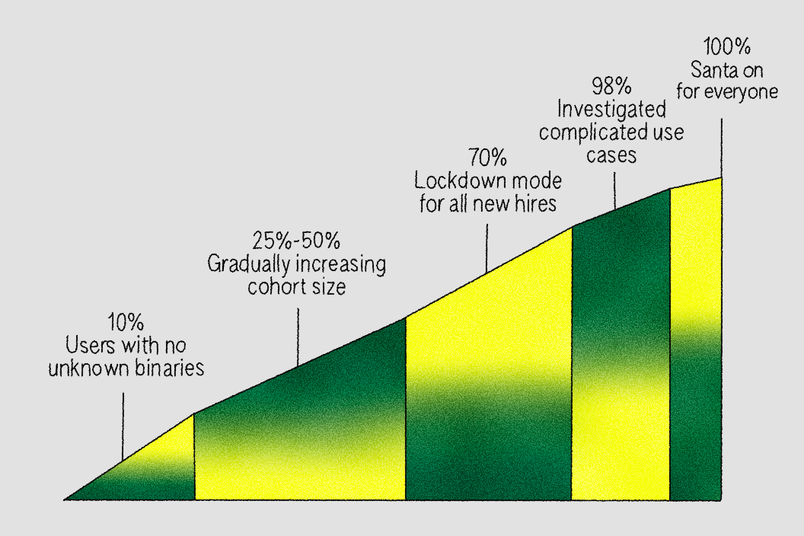
Figma introduced Santa in phases over roughly three months. Leadership first explained the rationale at an all-hands, showing real breach examples and outlining how support would handle blocked binaries. To keep productivity intact, users could run the Slack command /santa disable to flip their machine back to monitoring mode temporarily while the team investigated any issues.
The rollout sequence moved from safest cohorts to most complex:
- 10%: Users with zero unknown binaries in the prior month.
- 25–70%: Groups with fewer than 10 unique unknown binaries, with new hires added to lockdown once the 70% threshold was reached.
- Final 30%: Engineers and data scientists, whose toolchains required more nuanced rules. For example, Anaconda ad-hoc signs Python binaries locally with
codesign, generating unique hashes per machine. Rather than applying broad Compiler or PathRegex rules fleet-wide, Figma extended its sync server to support group-based rule sets, scoping permissive rules only to the teams needing them. - 98%: A month-long pause to investigate machines with more than 10 unknown binaries and those that used the
/santa disableescape hatch, adding global, group, or machine-specific rules as needed. - 100%: The escape hatch was retired, and lockdown mode became a requirement of Figma’s Endpoint Security Baseline (ESB), the set of controls governing corporate device access to internal systems.
Steady-state operations
After more than a year in lockdown mode, the numbers are stable: full fleet coverage, roughly 150 global allowlist rules based on Signing ID and Team ID, about 50 blocklist rules for tools like unapproved remote access software, and around 80,000 Binary rules generated from roughly 200 Package rules. Compiler rules number about 10, and PathRegex rules about 50, tightly scoped but intended to shrink over time. Users maintain a median of three personal rules each, and the P95 rate of blocks per week sits at 3–4, with over 90% resolved through self-service.
Scaling brought its own frictions. As the Package rule set grew to tens of thousands of Binary rules, initial sync for new machines stretched to several minutes, occasionally dropping connections mid-sync. Devices could end up with incomplete rule sets and block legitimate applications. Figma added static allowlist rules in the configuration for critical apps such as the MDM, Chrome, Slack, and Zoom so they work regardless of sync state. There are plans to expire rules for older package versions and improve sync performance.
One lingering edge case involves go run during local development. Compiler rules work when go build produces a binary that then executes, but go run compiles and runs in one step, creating a race where Santa cannot register a Binary rule before execution, resulting in a block. The team has worked around this by adjusting scripts to avoid go run or by adding PathRegex rules, as documented in this GitHub issue.
Lessons for a user-friendly rollout
Figma’s experience points to several practices worth adopting:
- Keep an escape hatch available. Allowing users to return to monitoring mode during the rollout derisks unexpected blocks and gives the security team room to investigate.
- Automate package rule generation. A Package Rule workflow reduces the burden of frequent application updates, so Binaries are covered without manual intervention.
- Prefer non-path-based rules. Use Compiler or Package rules where possible; if path rules are unavoidable, scope them tightly and only to the specific machines that need them.
- Monitor blocks and alerts. Track block events (for example, more than three per day) so you can help users before frustration builds. Watch rule counts to confirm devices sync complete sets, and alert on sync failures so devices missing the sync server don't lose self-service approval capability.
- Pilot changes. Test Santa version updates and major configuration changes with a small group first; this has repeatedly surfaced issues before company-wide impact.
Combining data-driven rule creation, automated workflows, and a self-service user model let Figma lock down its fleet without stalling productivity. The approach may serve as a template for other teams weighing binary authorization.



