
GitHub starts enforcing 2FA enrollment March 13
GitHub will begin rolling out its mandatory two-factor authentication (2FA) requirement for all developers who contribute code on GitHub.com, starting with smaller enrollment groups on March 13. The company announced the initiative last year as part of a broader effort to secure the software supply chain, noting that developer accounts are frequent targets for social engineering and account takeover.
The gradual rollout is designed to let GitHub verify that developers can successfully onboard before expanding to larger groups as the year progresses. If your account is selected, you'll be notified by email and see a banner on GitHub.com asking you to enroll. You'll have 45 days to configure 2FA — during that window nothing about using GitHub changes except for the reminders. After the deadline, you'll be required to enable 2FA the first time you access GitHub.com.
You can snooze the notification for up to one week, but after that, access to your account will be limited. This snooze period only starts once you've signed in after the deadline, so if you're out of office, you'll still get the full week to set up 2FA when you return. If you're not in an early enrollment group but want to get started, you can follow the setup steps now.
New features reduce lockout risk
GitHub has been working on improvements to make the 2FA enrollment experience smoother and reduce the chance of account lockout. Highlights include:
- Second-factor validation after 2FA setup. Users who set up 2FA will see a prompt after 28 days asking them to perform 2FA and confirm their second-factor settings. This helps avoid lockouts caused by misconfigured authenticator apps (TOTP apps). If you can't perform 2FA, you'll get a shortcut to reset your 2FA setup without being locked out.
- Enroll multiple second factors. You can now have both an authenticator app (TOTP) and an SMS number registered at the same time. While GitHub recommends security keys and TOTP apps over SMS, allowing both reduces lockout risk by providing another accessible 2FA option.
- Choose a preferred 2FA method. A new preferred-option setting lets you choose between TOTP, SMS, security keys, or GitHub Mobile for login and the sudo prompt, so you're always asked for your favorite method first. GitHub strongly recommends security keys and TOTP, since SMS-based 2FA does not provide the same level of protection and is no longer recommended under NIST 800-63B. The strongest widely available methods support the WebAuthn standard, including physical security keys and personal devices with Windows Hello, Face ID, or Touch ID.
- Unlink your email in case of 2FA lockout. Since GitHub accounts require a unique email address, locked-out users had difficulty starting a new account with their preferred email — the one their commits point to. You can now unlink your email address from a 2FA-enabled account if you can't sign in or recover it, making it easier to start fresh while keeping your contribution history.
GitHub is also testing passkeys internally, which the company believes will combine ease of use with strong, phishing-resistant authentication.
What to expect during enrollment
GitHub has designed the rollout to minimize unexpected interruptions and prevent account lockouts. Groups of users will be asked to enable 2FA based on their actions or the code they've contributed to.
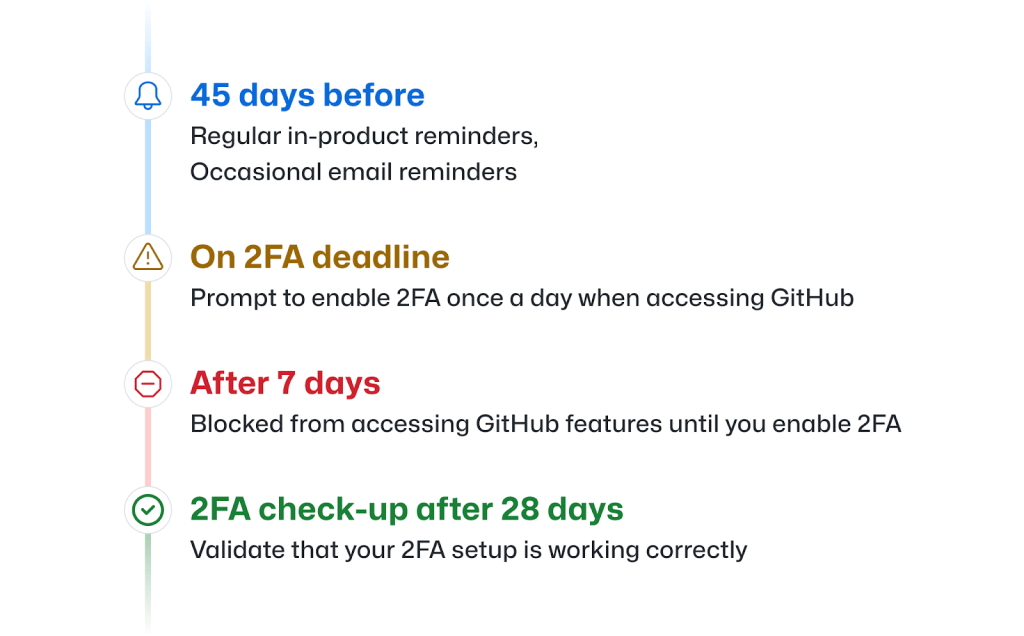
- If you're part of a pending enrollment group, you'll receive an email about 45 days before your deadline with setup instructions and best practices. When your group's timeline begins, you'll start seeing weekly reminder banners on GitHub.com guiding you to the 2FA onboarding process, along with occasional reminder emails.
- Once the deadline passes, you'll be asked to enable 2FA the first time you access GitHub.com each day. You can snooze this prompt once a day for up to one week, but after that, you won't be able to access GitHub.com until you've enabled 2FA. This one-week snooze period only starts when you access GitHub after the deadline, so if you're on vacation, you won't be locked out.
- Twenty-eight days after you enable 2FA, you'll be asked to perform a 2FA check-up while using GitHub.com. This validates that your setup works correctly, and previously signed-in users can reconfigure 2FA if they misconfigured or misplaced second factors during onboarding.
If your project gains traction or you become the maintainer of a critical repository, you might suddenly qualify for a group that's already begun its enrollment timeline. In that case, your 45-day period starts the next day, following the same timeline described above.
Why this matters for the software supply chain
Open source software is ubiquitous — 90 percent of companies report using open source in their proprietary software. As a critical part of that ecosystem, GitHub says it has a duty to expand strong authentication best practices to protect the software supply chain. The effort ultimately depends on developers enrolling in 2FA to make open source software more secure for everyone.



