
Why SELinux matters
At GitHub Security Lab, our focus is on securing open source software. While application-level vulnerabilities are a common concern, system administrators and developers can significantly improve their security posture by layering privileges. Linux offers several mechanisms for this, including SELinux, a Mandatory Access Control (MAC) system that provides fine-grained control over how processes and resources interact. Despite being enabled by default on distributions like Fedora, Red Hat, and Android, SELinux is often misunderstood. This article introduces its core concepts, architecture, and practical tools.
DAC versus MAC
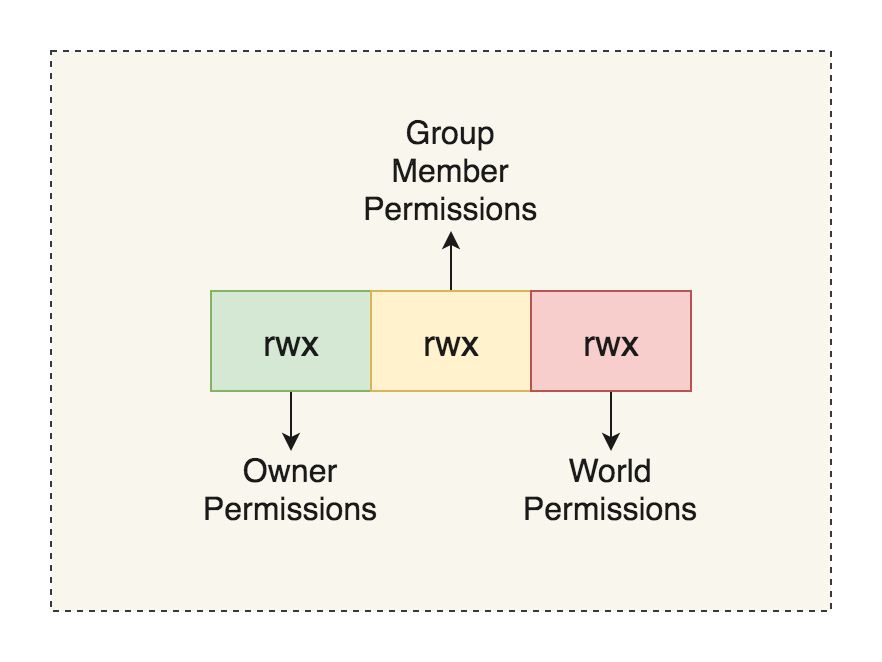
Access control governs how users interact with resources. The traditional model, Discretionary Access Control (DAC), is owner-centric. In a POSIX system, the file owner decides permissions for the owner, group, and others—often displayed as rwx triads. Windows NTFS permissions are similar but allow more complex overlapping allow or deny rules. DAC is intuitive but leaves security decisions to individual users.
Mandatory Access Control (MAC), by contrast, is resource-centric. The system defines how sensitive a resource is and what clearance a subject needs to access it. MAC systems like seccomp (widely used in containerization) and Windows' Mandatory Integrity Control have grown in popularity for their granularity. SELinux, one of the first MAC frameworks added to the Linux kernel, was initially developed by the NSA and integrated via the Linux Security Modules (LSM) framework. Other LSMs such as AppArmor, TOMOYO, and Smack also hook into the kernel, with implementations found under the /security directory in the kernel source tree.
Core architecture
SELinux's decision-making process involves four components:
- Subject: A process requesting access to a resource. Access is mediated by Access Vector Rules.
- Object Manager (OM): Controls subject access and queries the Security Server for decisions.
- Security Server: Evaluates the request against the loaded Security Policy and returns a verdict.
- Access Vector Cache (AVC): Caches Security Server decisions to avoid repeated policy lookups.

A single Security Server resides in kernel space. OMs and AVCs can exist both in-kernel and in userspace. The LSM framework acts as the kernel-side OM, restricting which services SELinux can govern. AVCs are typically implemented as hashtables and reside in kernel or userland implementations. In userspace, a single application can act as both OM and AVC, using the SELinux API to request decisions.
Understanding security contexts
Unix DAC permissions (e.g., rwx for owner, group, others) are set by the file owner. The ls -l command reveals these along with ownership, size, and timestamps.
policy> ls -l example

-rw-r--r-- 1 kevin staff 0 Apr 30 22:29 example
In SELinux, every subject (process) and object (file, socket, etc.) carries a security context formatted as user:role:type:[:range]. The ls -Z command displays these labels.
policy> ls -Z /etc/passwd

system_u:object_r:passwd_file_t:s0 /etc/passwd
The components are:
- User: A SELinux user, distinct from the Linux user, but mapped to one or more Linux accounts. Names often end in
_u. - Role: Defines what a user can do, often matching job functions like admin or auditor. Names conventionally end in
_r. - Type: The foundation of SELinux policy. Types on processes define domains; types on objects define permissible interactions. Type enforcement rules govern transitions between domains. Users in
unconfineddomains can author policy files (*.te) to specify rules. - Range: Defines sensitivity levels (
s#) and optionally categories. A process can read from lower sensitivities but write only to equal or higher ones—multi-level security (MLS). Multi-category security (MCS) adds category compartments with no hierarchy; a process can only access objects in its own categories. A range likes1-s15:c0.c700indicates effective sensitivitys1, clearance up tos15, and access to categories 0 through 700.
Practical tools and configuration
Most examples below use Fedora, where SELinux is enabled by default. Note: some distributions (like Ubuntu) run AppArmor horizontally. Running two exclusive LSMs simultaneously can prevent booting; check include/linux/lsm_hooks.h for the LSM_FLAG_EXCLUSIVE flag.
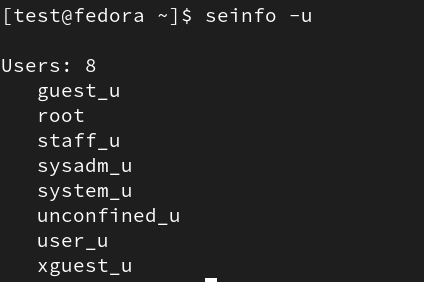
To list SELinux users, use the -u flag with seinfo:
The semanage login -l command shows the mapping between Linux and SELinux users:
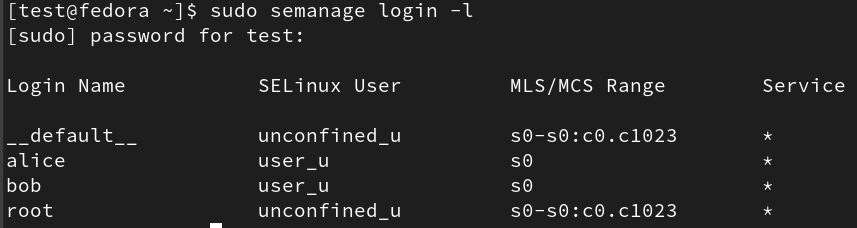
In the example above, __default__ maps all new Linux users to the unconfined_u SELinux user. Alice and Bob have been manually assigned to user_u. Mappings can also be inspected directly in /etc/selinux/{SELINUXTYPE}/seusers, though manual edits are overwritten by policy and require tool-based updates.
Sensitivity ranges and categories are defined in /etc/selinux/{SELINUXTYPE}/setrans.conf. Our Fedora configuration shows a single sensitivity level (s0) with multiple category slots available from 0 to 1023.

Anatomy of a SELinux policy
SELinux policies are not typically authored from scratch. Instead, distributions and administrators start with the reference policy, a baseline developed by the NSA and now maintained under the SELinuxProject on GitHub. Vendors then customize this baseline to support their own services and security requirements. To understand how policies are structured, it helps to examine the components found in the reference policy repository.
When you open a policy source tree, you'll encounter several file types. The most important are .te (type enforcement) files, which contain the core logic: allow rules, type declarations, and calls to macros. Interface files (.if) define reusable macros that expose a module's types to other domains. File context files (.fc) map filesystem paths to security contexts. For instance, the context of /etc/passwd that we saw earlier with ls -Z is defined in an .fc file:
/etc/passwd[-\+]? – gen_context(system_u:object_r:passwd_file_t, s0)
Inside the policy repository, three top-level directories matter: flask, modules, and support. The flask directory contains initial_sids, which lists the security identifiers (SIDs) assigned at boot to core services. A SID is an integer the kernel uses internally to refer to a security context. The mapping between SIDs and contexts is defined in the kernel module, such as:
sid kernel gen_context(system_u:system_r:kernel_t,mls_systemhigh)
Objects created by the kernel (threads, sockets) inherit this initial SID. You can see these initial SIDs in the kernel's security server, in the policydb.h context structure. The sidtab implementation shows how the kernel translates between a SID and its context: entries are stored in a tree structure, with the SID indexing into pointer arrays to locate the appropriate sidtab_entry.
The access_vectors file defines the classes and permissions that SELinux understands. Classes correspond to kernel objects — files, directories, sockets — while common permissions (read, write, create) are defined once and shared across classes:
common name {permission}
class class_name
inherits common_name{
extra permission 1
…
}
Rules are expressed as access vector rules. The most common is the allow rule, which grants a subject type permission to operate on a target type. For example:
allow init_t user_home_t:file read;
This declares that processes with type init_t may read files labeled user_home_t. Other rule types control auditing behavior: dontaudit suppresses logging, auditallow forces logging, and neverallow overrides any conflicting allow rules.
The modules directory organizes policies by category — admin, apps, kernel, and so on. Each module groups its .te, .if, and .fc files together, with the type enforcement file starting with the policy_module macro. Modules are compiled into .pp files that can be loaded into a live system.
Diagnosing and fixing denials
SELinux denials are a routine part of administering a system, especially when installing new software. The audit log records each Access Vector Cache (AVC) denial with the subject and target contexts, the class, and the requested permission:
type=AVC msg=audit(1680661610.629:836): avc: denied { append } for pid=774
comm=72733A6D61696E20513A526567 name="messages" dev="sda3" ino=255765 scontext=system_u:system_r:syslogd_t:s0 tcontext=unconfined_u:object_r:named_conf_t:s0 tclass=file permissive=0
Logs live in /var/log/audit or can be queried with tools like ausearch. Running ausearch -m AVC lists all denial entries. The helper audit2allow can generate suggested rules from a denial log, which is often the fastest path to resolving an issue.
When fixing a denial, you can create a new policy module rather than modifying the existing policy. Create a .te file that begins with policy_module(name, version), then compile it using the development Makefile:
make module_name.pp
The resulting .pp file is loaded with semodule -i module_name.pp. You can inspect the loaded policy and your new types with seinfo:


Inside the LSM framework
SELinux enforces its policy at the kernel level through the Linux Security Module (LSM) framework. The file security/security.c defines a set of hooks that intercept sensitive operations across the kernel. For example, the network subsystem calls security_socket_create before creating a new socket:
int security_socket_create(int family, int type, int protocol, int kern)
{

    return call_int_hook(socket_create, 0, family, type, protocol, kern);

}
int __sock_create(struct net *net, int family, int type, int protocol,
struct socket **res, int kern)
{
    int err;
    struct socket *sock;
    const struct net_proto_family *pf;

    /*
    * Check protocol is in range
    */
    if (family < 0 || family >= NPROTO)
        return -EAFNOSUPPORT;
    if (type < 0 || type >= SOCK_MAX)
        return -EINVAL;

    /* Compatibility.

    This uglymoron is moved from INET layer to here to avoid
    deadlock in module load.
    */
    if (family == PF_INET && type == SOCK_PACKET) {
        pr_info_once("%s uses obsolete (PF_INET,SOCK_PACKET)\n", current->comm);
    family = PF_PACKET;
    }

    err = security_socket_create(family, type, protocol, kern);
    if (err)
         return err;
…
Each security_xxx function wraps one or more LSM hooks that modules can register. The LSM_HOOK_INIT macro registers a hook by placing its security_hook_list structure into the appropriate list:
static struct security_hook_list selinux_hooks[] __lsm_ro_after_init = {
LSM_HOOK_INIT(binder_set_context_mgr, selinux_binder_set_context_mgr),
LSM_HOOK_INIT(binder_transaction, selinux_binder_transaction),
LSM_HOOK_INIT(binder_transfer_binder, selinux_binder_transfer_binder),
LSM_HOOK_INIT(binder_transfer_file, selinux_binder_transfer_file),
…
/*
* Initializing a security_hook_list structure takes
* up a lot of space in a source file. This macro takes
* care of the common case and reduces the amount of
* text involved.
*/
#define LSM_HOOK_INIT(HEAD, HOOK) \
{ .head = &security_hook_heads.HEAD, .hook = { .HEAD = HOOK } }

/* `security_hook_heads`, an external variable used by the previous security_xxxx functions. */

struct security_hook_heads {
    #define LSM_HOOK(RET, DEFAULT, NAME, ...) struct hlist_head NAME;
    #include "lsm_hook_defs.h"
    #undef LSM_HOOK
} __randomize_layout;
SELinux's implementation of the socket creation hook, selinux_socket_create, is revealing:
static int selinux_socket_create(int family, int type,
int protocol, int kern)
{
    const struct task_security_struct *tsec = selinux_cred(current_cred());
    u32 newsid;
    u16 secclass;
    int rc;

    if (kern)
         return 0;

    secclass = socket_type_to_security_class(family, type, protocol);
    rc = socket_sockcreate_sid(tsec, secclass, &newsid);
    if (rc)
        return rc;

    return avc_has_perm(&selinux_state,
    tsec->sid, newsid, secclass, SOCKET__CREATE, NULL);
}
It retrieves the SID for the new socket type and the SID of the current task, then calls avc_has_perm to ask the AVC whether this subject is permitted to create the object. Most kernel structures that can have varying security labels carry a void *security field reserved for such modules. Files are a prime example — their type can change depending on user actions. The selinux_inode function retrieves this data from the inode structure:
static inline struct inode_security_struct *selinux_inode(
const struct inode *inode)
{
    if (unlikely(!inode->i_security))
         return NULL;
    return inode->i_security + selinux_blob_sizes.lbs_inode;
}
The helper function may_create shows how a typical operation is checked. It calls inode_security on the parent directory's inode, extracts that directory's SID, and compares it with the current task's SID via the AVC to determine if file creation should be allowed:
/* Check whether a task can create a file. */
static int may_create(struct inode *dir, struct dentry *dentry, u16 tclass)
{
    const struct task_security_struct *tsec = selinux_cred(current_cred());
    struct inode_security_struct *dsec;
    struct superblock_security_struct *sbsec;
    u32 sid, newsid;
    struct common_audit_data ad;
    int rc;

    dsec = inode_security(dir);
    sbsec = selinux_superblock(dir->i_sb);

    sid = tsec->sid;

    ad.type = LSM_AUDIT_DATA_DENTRY;
    ad.u.dentry = dentry;

    rc = avc_has_perm(&selinux_state,
    sid, dsec->sid, SECCLASS_DIR,
    DIR__ADD_NAME | DIR__SEARCH,
    &ad);
    if (rc)
        return rc;

    rc = selinux_determine_inode_label(tsec, dir, &dentry->d_name, tclass,
    &newsid);
    if (rc)
         return rc;

    rc = avc_has_perm(&selinux_state,
    sid, newsid, tclass, FILE__CREATE, &ad);
    if (rc)
        return rc;

    return avc_has_perm(&selinux_state, newsid, sbsec->sid, SECCLASS_FILESYSTEM, FILESYSTEM__ASSOCIATE, &ad);
}
SELinux in practice
Most of SELinux's work happens in the kernel, but userland applications also play a role. The key userspace component is libselinux, a library that provides a standard API for interacting with SELinux. It lets programs query policy, maintain an access vector cache (AVC), register callbacks for policy changes, and otherwise inspect the SELinux state of the system.
Most applications, however, do not use these facilities directly. They operate under SELinux's default behavior: the kernel checks permission requests against the policy, and applications only need to be labeled with the appropriate type. A typical example of a labeled application is the standard password-changing utility, passwd. A normal user can only change their own password; root can change any account's password, and SELinux is part of what enforces that boundary on root.
int check_selinux_permit (const char *perm_name)
{
    char *user_context_raw;
    int r;

    if (0 == is_selinux_enabled ()) {
         return 0;
    }

selinux_set_callback (SELINUX_CB_LOG, (union selinux_callback) { .func_log = selinux_log_cb });

if (getprevcon_raw (&user_context_raw) != 0) {
    fprintf (shadow_logfd,
    _("%s: can not get previous SELinux process context: %s\n"),
    shadow_progname, strerror (errno));
    SYSLOG ((LOG_WARN,
    "can not get previous SELinux process context: %s",
    strerror (errno)));
    return (security_getenforce () != 0);
}

    r = selinux_check_access (user_context_raw, user_context_raw, "passwd", perm_name, NULL);
    freecon (user_context_raw);
    return r;
}
In this case, SELinux checks whether the current process context has the passwd permission in the passwd class. This permission effectively allows a process to change another user's password. A quick ls -Z on /usr/bin/passwd shows its type is passwd_t. When a user executes this binary, policy logic may permit a domain transition, causing the new process to run under passwd_t rather than the user's own domain. In the example above, only root's context is being checked. Consequently, preventing the transition for root — say, by denying it in policy — would cause /usr/bin/passwd to run in a different, unrestricted type that lacks the passwd permission in the passwd class, and root would no longer be able to set arbitrary passwords.
Although passwd is SELinux-aware, it is a relatively simple utility. Building a full AVC cache and object manager in userland is uncommon. The two most visible implementations are Dbus, which uses SELinux to restrict which processes can send messages to its services, and sepgsql, a PostgreSQL extension that provides a much more granular SELinux integration.
Recommended exercise
To see how a userland AVC and object manager work together in a real project, the sepgsql directory in the PostgreSQL source tree is a good starting point. It demonstrates how a project can exercise fine-grained control over resources outside the kernel. For a higher-level overview of the database objects, users, and other resources that SELinux can control in PostgreSQL, the following two documents complement the source code well:



